Thumbnail of product Eclipse DX from brand Baby Lock
Logo of brand Baby Lock

Uncategorized Baby Lock Eclipse DX

The Baby Lock Eclipse DX is a household appliance from the brand Baby Lock, known for its quality and innovation. This model, the Eclipse DX, is designed to offer optimal performance and an enhanced user experience in the field of sewing.

With its robust construction and advanced features, the Baby Lock Eclipse DX is ideal for sewing enthusiasts seeking precision and reliability. This model is equipped with cutting-edge technology that simplifies sewing tasks, making each project more enjoyable and efficient.

Additionally, the Baby Lock Eclipse DX includes a user manual and a technical sheet, allowing users to quickly familiarize themselves with its features. In summary, this appliance is a wise choice for those looking to explore their creativity in the world of sewing.

Manuals of product Eclipse DX
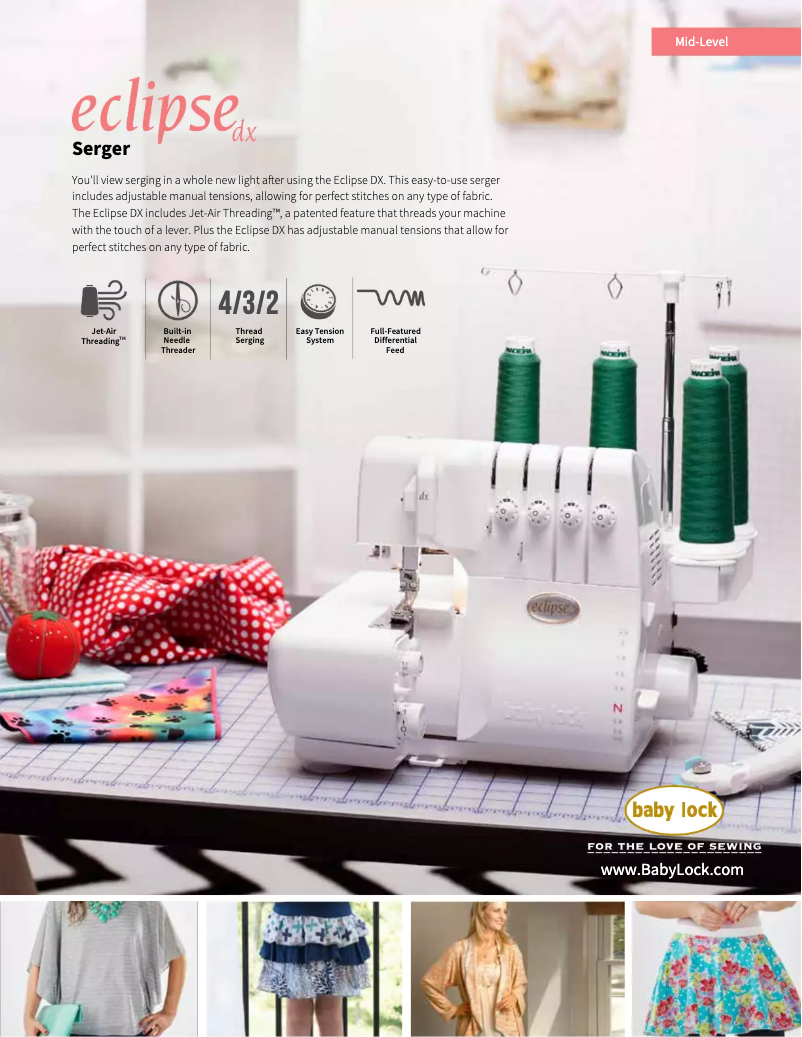
7 10

Editorial note

The Baby Lock Eclipse DX is a device that stands out for its optimal performance and versatility. The reputation of the Baby Lock brand, known for its quality and innovation, ensures users a reliable and enjoyable experience. The Eclipse DX model is designed to meet various needs, making it suitable for a wide range of users. Additionally, the availability of a user manual and a technical sheet greatly facilitates the handling of the device. However, some drawbacks must be taken into consideration. The cost of the Baby Lock Eclipse DX can be high compared to other similar machines, which may deter some buyers. Furthermore, the learning curve to master all the features can be a challenge for novices. The weight of the device may also pose practicality issues when moving it, while the high noise level during use could disturb users sensitive to sound. In summary, the Baby Lock Eclipse DX is a wise choice for those seeking a high-performing and versatile device, but it is important to weigh these advantages against its disadvantages before making a purchase.

Score details

User experience

The Baby Lock Eclipse DX offers optimal performance, ensuring a smooth and enjoyable user experience. However, the learning curve can be quite steep, which may frustrate beginners.

Performance

The performance of the Eclipse DX is reliable, with the ability to meet the varied needs of users, making it a versatile choice.

Value for money

The price of the Baby Lock Eclipse DX may be considered high compared to other similar machines, which could deter some potential users.

repairability

Some replacement parts may be difficult to find, which could complicate repairs if needed.

Design

The device is designed with particular attention to quality and innovation, but its weight may make it impractical to move.

Usability

The availability of a user manual and a technical sheet makes it easier to get started, although the noise level during use may disturb users sensitive to sound.


Advantages

Recognized quality and innovation

Optimal and smooth performance

User manual included

Versatile for various needs

Established and reliable reputation

Disadvantages

High price compared to the competition

Steep learning curve for beginners

Spare parts sometimes hard to find

Unwieldy weight for transportation

Potentially disturbing noise level

Technical Specifications Eclipse DX

General Information

Frequently Asked Questions

How to thread the needles on the Baby Lock Eclipse DX?
To thread the needles on the Baby Lock Eclipse DX, follow these steps: 1. Raise the presser foot and place the needles in the highest position. 2. Remove any broken thread from the needle thread guides. 3. Select the 'R' or 'L' option according to the needle to be threaded. 4. Use the needle threader to facilitate the operation. Refer to pages 12 and 13 of the manual for more information on its use. 5. Place a cone or spool of thread on the right front spool holder. 6. Pass the thread through the telescopic antenna thread guide '1' above the spool, then insert it into thread guide '2' located at the top of the machine. The thread should pass through the slot at the front of the machine. 7. Pull about 45 cm of thread through guide '3'. 8. Insert the end of the thread into the 'L' threading port about 2.5 cm. A pair of tweezers may be helpful if needed. 9. Lower the looper threading lever. If the thread does not pass through the eye of the lower looper on the first try, lower the lever again until it does. 10. Cut the thread about 10 cm from the eye of the lower looper and let it hang. 11. Finally, move the unlock lever of the lock button to the right. By following these steps, you will be able to thread the needles on the Baby Lock Eclipse DX.
What optional accessories are compatible with the Baby Lock Eclipse DX?
The Baby Lock Eclipse DX is compatible with various optional accessories. Here is a list of compatible accessories: 1. Beading foot R0-B5002-01A-C-E (BLE-BF) 2. Invisible hem foot R0-B5002S02A-E (BLE-BLHFS) 3. Clear foot R0-B5002K01A-E (BLE-CLF) 4. Piping foot (3 mm) R0-B5002-02A-C-E (BLE-CF3) 5. Piping foot (5 mm) R0-B5002-03A-C-E (BLE-CF5) 6. Elastic applicator foot R0-B5002S01A-E (BLE-EF) 7. Flat sole foot R0-B5001K02B-C-E (BLE-FSF) 8. Lace applicator foot R0-B5002S05A-E (BLE-LF) 9. Gathering foot R0-B5002S03A-E (BLE-RF) 10. Bulb removal tool R0-B7525-01A (262011) 11. Size 90 (T-90B) topstitch needle. You can obtain these accessories from your Baby Lock dealer.
What are the reasons why the Baby Lock Eclipse DX is not sewing correctly?
If the Baby Lock Eclipse DX is not sewing correctly, several factors may be the cause. Here are some steps to diagnose the problem: 1. Check the needle: Ensure it is properly inserted and not bent or damaged. Replace it if necessary. 2. Check the thread: Ensure the thread is correctly threaded in the machine, including in the tension discs and guides. Make sure it is not tangled or stuck. 3. Check the tension: Adjust the tension settings according to the fabric and thread used. Refer to the manual for recommended settings. 4. Clean the machine: Remove lint or debris around the bobbin, feed dogs, and needle plate. Lint buildup can affect sewing quality. 5. Use the appropriate stitch settings: Ensure you have selected the correct type and length of stitch. Try different settings to see if they improve sewing. If the problem persists, it is advisable to contact your Baby Lock dealer or customer service for assistance.
How to adjust the tension on the Baby Lock Eclipse DX?
To adjust the tension on the Baby Lock Eclipse DX, follow these steps: 1. Refer to the 'Tension Adjustment Chart' in the manual (page 46) for recommended settings based on the fabric and thread. 2. Raise the presser foot and the needles to the highest position. 3. Locate the tension adjustment dial, usually located at the front or side of the machine. 4. Turn the dial to modify the tension. A higher number means tighter tension, while a lower number indicates looser tension. 5. Start with the recommended tension setting and test the stitch on a piece of fabric. Evaluate the stitch quality and adjust the tension if necessary. 6. Make slight adjustments to the dial and test again until you achieve the desired result. 7. Remember to adjust the tension for both upper and lower threads if necessary. By following these steps, you will be able to adjust the tension on the Baby Lock Eclipse DX for optimal sewing results.
What are the features and functions of the Baby Lock Eclipse DX?
The Baby Lock Eclipse DX offers many features and functions that enhance your sewing experience. Here are some of its main features: 1. Overview of the Eclipse: The manual provides an overview of the Eclipse DX, highlighting its capabilities and components (see page 6 of the manual for more details). 2. Operation of the serger: The manual explains how the serger operates and provides information on its functionality (see page 5 for more information). For a comprehensive understanding of all features, it is advisable to consult the manual provided with the product.
How to thread the needles on the Baby Lock Eclipse DX?
To thread the needles on the Baby Lock Eclipse DX, proceed as follows: 1. Raise the presser foot and place the needles in the highest position. 2. Remove broken threads from the needle guides. 3. Choose the 'R' or 'L' option according to the needle to be threaded. 4. Use the needle threader for simpler and more precise threading. Refer to pages 12 and 13 of the manual for additional instructions on its use. 5. Place the cone or spool of thread on the right front spool holder. 6. Pass the thread through the telescopic antenna guide '1' above the spool, then into guide '2' at the top of the machine. The thread should pass through the front slot. 7. Pull about 45 cm of thread through guide '3'. 8. Insert the end of the thread into the 'L' threading port about 2.5 cm. A pair of tweezers may facilitate this step. 9. Lower the looper threading lever. If the thread does not pass on the first try, lower the lever again until it does. 10. Cut the thread about 10 cm from the eye of the lower looper and let it hang. 11. Finally, move the unlock lever of the lock button to the right. By following these steps, you will be able to thread the needles on the Baby Lock Eclipse DX.
What optional accessories are compatible with the Baby Lock Eclipse DX?
The Baby Lock Eclipse DX is compatible with various optional accessories. Here is the list of compatible accessories: 1. Beading foot R0-B5002-01A-C-E (BLE-BF) 2. Invisible hem foot R0-B5002S02A-E (BLE-BLHFS) 3. Clear foot R0-B5002K01A-E (BLE-CLF) 4. Piping foot (3 mm) R0-B5002-02A-C-E (BLE-CF3) 5. Piping foot (5 mm) R0-B5002-03A-C-E (BLE-CF5) 6. Elastic applicator foot R0-B5002S01A-E (BLE-EF) 7. Flat sole foot R0-B5001K02B-C-E (BLE-FSF) 8. Lace applicator foot R0-B5002S05A-E (BLE-LF) 9. Gathering foot R0-B5002S03A-E (BLE-RF) 10. Bulb removal tool R0-B7525-01A (262011) 11. Size 90 (T-90B) topstitch needle. These accessories are available from your Baby Lock dealer.
Why is the Baby Lock Eclipse DX not sewing correctly?
If the Baby Lock Eclipse DX is not sewing correctly, it may be due to several reasons. Here are some steps to identify the problem: 1. Check the needle: Ensure it is properly inserted and not bent or damaged. Replace it if necessary. 2. Check the thread: Ensure the thread is properly threaded in the machine, including in the tension discs and guides. Check that it is not tangled or stuck. 3. Check the tension: Adjust the tension settings according to the fabric and thread used. Test different settings to see if it improves sewing. 4. Clean the machine: Remove lint or debris from the bobbin area, feed dogs, and needle plate. Lint buildup can harm sewing quality. 5. Use the correct stitch settings: Ensure you have selected the appropriate type and length of stitch for your project. Refer to the manual for advice on choosing stitch settings. If the problem persists after these checks, it is advisable to contact your Baby Lock dealer or customer service for assistance.
How to adjust the tension on the Baby Lock Eclipse DX?
To adjust the tension on the Baby Lock Eclipse DX, follow these steps: 1. Refer to the 'Tension Adjustment Chart' in the manual (page 46) for recommended settings based on different types of stitches and fabrics. 2. Locate the tension dial on the machine, usually at the front or side. 3. Turn the dial to adjust the tension. A high number indicates tighter tension, while a low number means looser tension. 4. Start with the default recommended setting in the manual for the stitch you are using. 5. Test the tension by sewing a fabric sample. Observe the stitch quality and adjust the tension if needed. If the stitches are too tight or too loose, make slight adjustments to the dial and test again until you achieve the desired quality. 6. Remember to adjust the tension for both upper and lower threads if necessary, as some machines have separate tension controls. By following these steps, you will be able to adjust the tension on the Baby Lock Eclipse DX for optimal stitch quality.
What are the features and functions of the Baby Lock Eclipse DX?
The Baby Lock Eclipse DX has several functions and features that enhance your sewing experience. Here are some of its main features: 1. Overview of the Eclipse: The manual provides an overview of the main components and functions of the Eclipse DX (see page 6 for more details). 2. Operation of the serger: The manual explains how the machine operates, including the threading process, stitch selection, and tension adjustment (see page 5 for additional information). For a complete understanding of all features, it is recommended to consult the manual provided with the product.
Is the manual for the Baby Lock Eclipse DX available in French?
Yes, the manual for the Baby Lock Eclipse DX is available in French.

Similar products


Discover the technical sheet of Beach from Sunny and its manuals...
Available manuals:
Discover the technical sheet of Euphoria from Baby Lock and its manuals...
Available manuals:
Discover the technical sheet of A030.139.01 from Sunny and its manuals...
Available manuals:
Discover the technical sheet of Victory from Baby Lock and its manuals...
Available manuals:
Discover the technical sheet of NV Goggles from Yukon and its manuals...
Available manuals:
Discover the technical sheet of Enlighten from Baby Lock and its manuals...
Available manuals:
Discover the technical sheet of Sandy from Sunny and its manuals...
Available manuals:
Discover the technical sheet of Acclaim from Baby Lock and its manuals...
Available manuals:
Discover the technical sheet of SZ-JB02 from Zojirushi and its manuals...
Available manuals:
Discover the technical sheet of A030.139.00 from Sunny and its manuals...
Available manuals:
Discover the technical sheet of Decorators Choice 2 from Baby Lock and its manuals...
Available manuals:

More product categories from brand Baby Lock

Presentation of product Eclipse DX specifications from brand Baby Lock

General Information

The Baby Lock Eclipse DX is an iconic model from the Baby Lock brand, known for its commitment to quality and innovation in the home appliance sector. This model is specifically designed to deliver optimal performance, thus ensuring an enriched and efficient user experience.

Designed to meet a variety of needs, the Baby Lock Eclipse DX stands out for its versatility, making it a wise choice for users looking to undertake diverse projects. The brand's well-established reputation reassures users about the reliability and durability of this product.

To facilitate handling, the Baby Lock Eclipse DX comes with a user manual and a detailed technical sheet, allowing users to easily navigate its features.

Advantages

  • Quality and innovation: The Baby Lock brand is synonymous with reliability and durability, ensuring the longevity of the Eclipse DX model.
  • Optimal performance: This model offers a smooth user experience, making usage enjoyable and efficient.
  • Comprehensive documentation: The availability of a manual and a technical sheet facilitates understanding and use of the device.
  • Versatility: The Baby Lock Eclipse DX is designed to adapt to the diverse needs of its users, making it a versatile choice.
  • Established reputation: The brand's notoriety reassures users about the quality and effectiveness of the device.

Disadvantages

  • Cost: The price of the Baby Lock Eclipse DX may be high compared to other similar machines, which could deter some buyers.
  • Learning curve: Mastering all the features may require an adjustment period, which can be frustrating for novice users.
  • Availability of parts: Some replacement parts may be difficult to obtain, complicating potential repairs.
  • Weight: The device can be heavy, making it impractical to transport, especially for those with limited workspace.
  • Noise level: Using the device may generate high noise, which could disturb users sensitive to sound.