

Manual of product i-Sensys MF8450
Editorial note
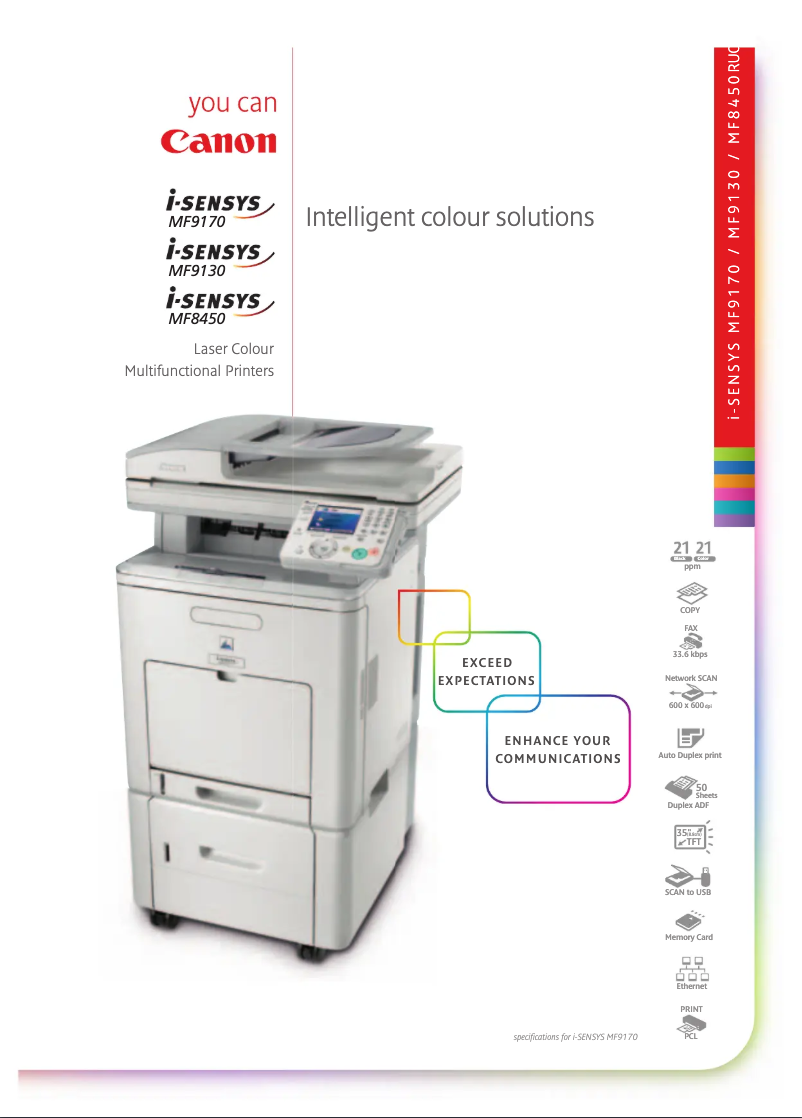
The Canon i-Sensys MF8450 stands out for its all-in-one features, offering solid performance for printing, scanning, copying, and faxing. With a printing speed of 17 pages per minute and a maximum resolution of 2400 x 600 DPI, this device effectively meets the daily needs of professional users. Its 500-sheet paper capacity also allows for handling a large volume of documents without interruption, which is an undeniable asset for offices. However, some limitations should be considered. The printer is not compatible with Mac operating systems, which may pose an obstacle for some users. Additionally, its weight of 44 kg complicates its movement and installation in tight spaces. The lack of Wi-Fi connectivity also limits usage flexibility, making a wired connection necessary. In terms of value for money, the Canon i-Sensys MF8450 proves to be interesting due to its features suited to professional requirements. Features such as high-quality laser printing and Ethernet connectivity are strong points, although the lack of Wi-Fi may restrict certain uses. While documentation is available, it could benefit from improvements to better assist users, especially those with specific needs. In conclusion, the Canon i-Sensys MF8450 is a wise choice for professionals looking for a reliable and versatile printer, provided that its few limitations are taken into account.Score details
User experience
The user experience is generally satisfactory thanks to all-in-one features and a professional-friendly interface, but limited compatibility with Mac systems can be problematic.
Performance
Performance is good for daily use, with a print speed of 17 ppm, but may be insufficient for high-volume printing offices.
Design
The design is professional, but the weight of 44 kg makes moving and installation difficult, which can be a disadvantage in tight spaces.
Value for money
The product offers good value for money with its all-in-one features and 500-sheet paper capacity, suitable for professional user needs.
Features
Features such as high-quality laser printing and Ethernet connectivity are excellent, but the lack of Wi-Fi limits usage flexibility.
Support
Support is available, but the documentation could be improved to better assist users, particularly regarding compatibility limitations.
Documentation
The user manual is present but may lack details for users with specific needs or questions about setup.
Advantages
Fast printing: 17 pages per minute
Multifunction: printing, scanning, copying, faxing
Laser quality: 2400 x 600 DPI
Capacity: 500 sheets for high volumes
Ethernet connectivity for built-in office
Disadvantages
Not compatible with Mac.
Heavy weight of 44 kg.
No Wi-Fi connectivity.
Print speed of 17 ppm.
Output capacity limited to 250 sheets.
Technical Specifications i-Sensys MF8450
General Information
-
ModelI-SENSYS MF8450
-
Brand
-
Category
-
Type
-
SKU234257
-
MPN234257
Print speed
-
Maximum resolution2400 x 600 DPI
-
Print speed (color, normal quality, A4/US Letter)17 ppm
-
Print speed (color, normal quality, A4/US Letter)17 ppm
-
Printing technologyLaser
-
PrintingColor printing
Digitization
-
Input color display depth24 bit
-
DigitizationColor scanning
Copier
-
Max. resolution of copies600 x 600 DPI
-
Copy speed (normal quality, color, A4)17 cpm
-
Copy speed (normal quality, color, A4)17 cpm
-
CopySingle copy
Fax
-
Modem speed33.6 Kbit/s
-
Fax memory1000 pages
-
FaxSimple fax
Input and output capacity
-
Total output capacity250 sheets
-
Total power capacity500 sheets
Paper management
-
ISO, Format Series A (A0...A9)A4, A5
-
ISO, Formats Series-B (B0...B9)B5
-
Type of paper tray supportEnvelopes, Labels, Plain paper, Recycled paper, Transparencies
-
Non-ISO print support sizesExecutive (184 x 267mm), Statement (140 x 216mm)
-
Maximum ISO A series paper sizeA4
Representation / realization
-
Mac CompatibilityYes
Other features
-
Compatible operating systemsWindows 2000
-
All-in-one functionsServer 2003
-
All-in-one color functionsServer 2008
-
XP
-
Vista
-
Mac X10.2.8+
-
Linux
-
Copy
-
Fax
-
Scan
-
print
-
scan
Network
-
Ethernet/LANYes
-
WifiNo
Connectivity
-
Standard interfacesUSB 2.0
-
USB portYes
Weight and dimensions
-
Weight44000 g
Power
-
Energy consumption (eco mode)1.2 W
-
Electricity consumption (average operation)410 W
-
Energy consumption (standby mode)33 W
Features
-
Digital senderNo
-
Service cycle (Maximum)50000 pages per month
Design
-
Market positionProfessional
Frequently Asked Questions
What is the weight of the Canon i-Sensys MF8450 printer?
What is the recommended method for removing paper jammed in the printer?
Why does my printer not recognize original cartridges?
What could be the reasons for poor print quality?
What is the difference between a laser printer and an inkjet printer?
Why does my inkjet printer leave black streaks on prints?
What does the acronym DPI mean?
Is the manual for the Canon i-Sensys MF8450 available in French?
Similar products


More product categories from brand Canon
Computers and accessories Canon
Camera and photography Canon
Other Canon
Audio Canon
Software Canon
Interior Canon
More product types from brand Canon





Presentation of product i-Sensys MF8450 specifications from brand Canon
General Information
The Canon i-Sensys MF8450 is a high-performance multifunction printer, designed by the renowned brand Canon, known for its expertise and innovation in the field of printing devices. This i-Sensys MF8450 model stands out for its high performance and an improved user interface, suitable for both professional environments and personal needs.
Print Speed
With a maximum resolution of 2400 x 600 DPI, the Canon i-Sensys MF8450 offers prints of remarkable clarity, ideal for various types of documents. It achieves a print speed of 17 pages per minute, both in black and color, allowing for fast and efficient production. Thanks to its laser printing technology, this printer ensures high-quality results, with vibrant and accurate colors for your documents and images.
Scanning
The 24-bit color input depth ensures faithful color reproduction, providing an optimal scanning experience. The color scanning function allows for capturing images and documents with vibrant accuracy, meeting the demands of professional users.
Copier
The Canon i-Sensys MF8450 provides quality copies with a maximum resolution of 600 x 600 DPI. Its copy speed is 17 copies per minute in both black and color, ensuring superior efficiency for daily tasks. The color copy functions allow for reproductions that are true to the originals, ideal for presentations and important documents.
Fax
Equipped with a modem operating at 33.6 Kbit/s, the Canon i-Sensys MF8450 ensures fast connections for sending and receiving faxes. Its fax memory can store up to 1000 pages, facilitating the management of your fax communications.
Input and Output Capacity
The printer's output capacity is 250 sheets, while its input capacity can handle up to 500 sheets. These features allow for processing a large volume of documents without interruption, ideal for heavy use.
Paper Management
Compatible with several paper sizes, including A4, A5, and B5, the Canon i-Sensys MF8450 supports various types of media, including envelopes, labels, plain paper, recycled paper, and transparencies. This flexibility of use meets a variety of printing applications.
Representation / Performance
It is important to note that the Canon i-Sensys MF8450 is not compatible with Mac operating systems, which may limit its use for some users.
Other Features
The operating system compatibility includes Windows XP, Vista, and 7, ensuring smooth integration with these environments. Its all-in-one functionality offers copy, fax, and scanning services, making this printer particularly versatile to meet various professional needs.
Network
The Canon i-Sensys MF8450 is equipped with network connectivity via Ethernet, facilitating its integration into a office environment. However, it does not have Wi-Fi connectivity, which may restrict usage flexibility.
Connectivity
This printer offers standard interfaces, ensuring optimal connectivity with various devices. A USB port is also included, allowing for fast and efficient connections.
Weight and Dimensions
The weight of the Canon i-Sensys MF8450 is 44 kg, which may make its installation and movement more difficult in tight spaces.
Power
In economy mode, the power consumption is 1.2 W, while in normal operation, it reaches 410 W. In standby, it consumes 33 W, contributing to energy savings during periods of inactivity.
Specifications
This model does not include a digital sending function, but its maximum service cycle is 50,000 pages per month, thus meeting the demands of intensive use.
Design
The Canon i-Sensys MF8450 positions itself in the market as a professional product, suited to the specific needs of demanding users in a work setting.


