

Manual of product Maxify iB4000
Editorial note
The Canon Maxify iB4000 stands out for its superior print quality, delivering sharp and precise results, perfect for professional documents and marketing materials. Its user-friendly interface and available user manual make setup and usage easy, which is a major advantage for users of all levels. Additionally, this printer is designed to be energy-efficient, helping to reduce operating costs. However, some drawbacks must be considered. The cost of ink cartridges can be high, which may deter budget-conscious users in the long run. While the print quality is excellent, the print speed is sometimes slower than that of some competing models. Furthermore, the lack of scanning and copying features limits its use for those who need these options. Finally, wireless connectivity, while convenient, can sometimes be unstable, and the printer's design may not suit smaller workspaces. Overall, the Canon Maxify iB4000 is a robust and efficient printer, ideal for small offices or dynamic work environments, but it has limitations that are important to consider before making a purchase.Score details
User experience
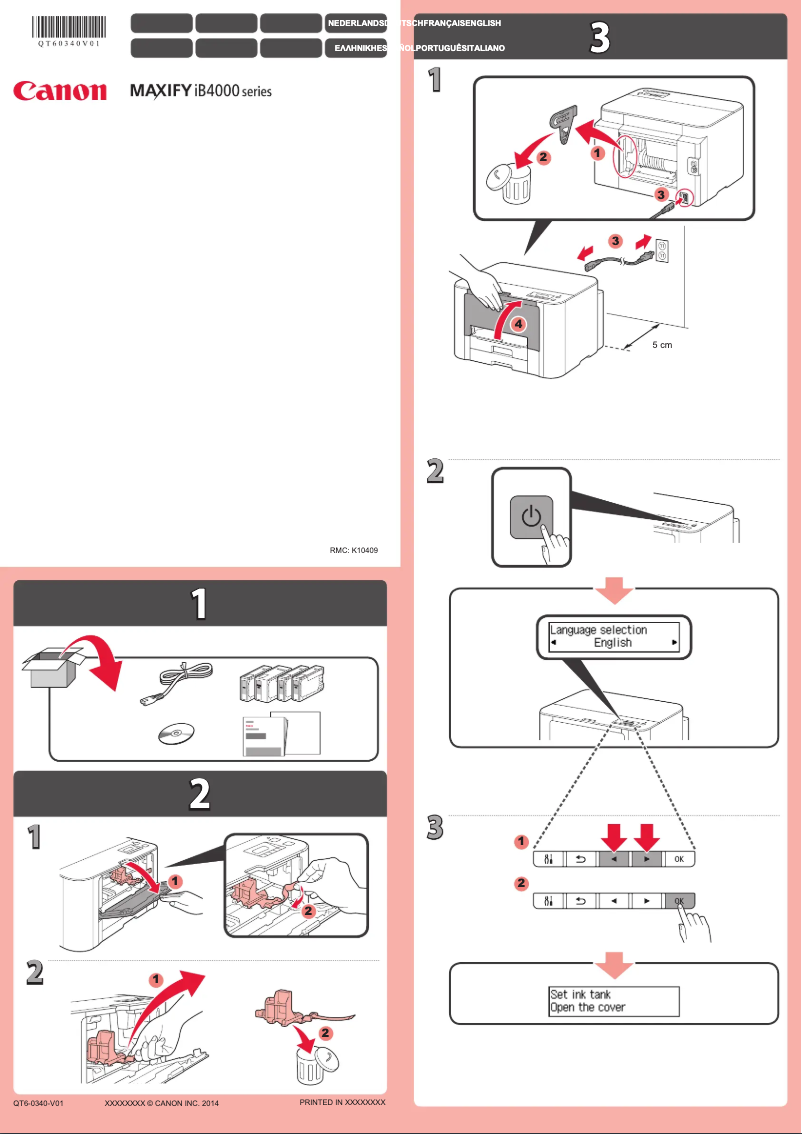
The ease of use of the Canon Maxify iB4000 is appreciated thanks to its user-friendly interface and the availability of a user manual, which simplifies setup.
Performance
The printing performance is good, with superior quality, but the printing speed may be lower than that of some competitors, which is something to consider.
Value for money
Although the print quality is excellent, the high cost of ink cartridges can increase the long-term cost of use, which may deter some users.
Design
The design of the printer is functional but may not be suitable for small workspaces, which can pose a problem for some users.
Features
The flexible connectivity is a plus, allowing for wireless printing from various devices. However, the lack of scanning and copying features limits its use.
Robustness
The Canon Maxify iB4000 is designed to handle high printing volumes, making it robust and suitable for dynamic work environments.
Advantages
Clear and precise prints
Reduced energy consumption
User-friendly and simple interface
Convenient wireless connectivity
Efficient management of high volumes
Disadvantages
High cost of ink cartridges.
Printing speed lower than some competitors.
Lack of scanning and photocopying.
Wireless connectivity sometimes unstable.
Design not suitable for small spaces.
Technical Specifications Maxify iB4000
General Information
-
ModelMAXIFY IB4000
-
Brand
-
Category
-
Type
-
SKU859381
-
MPN859381
Frequently Asked Questions
What is the recommended method for removing paper jammed in the printer?
Why is my printer refusing to accept original cartridges?
What are the possible reasons for poor print quality?
How does a laser printer differ from an inkjet printer?
Why is my inkjet printer producing black streaks?
What does the acronym DPI mean?
Is the manual for the Canon Maxify iB4000 available in French?
Similar products


More product categories from brand Canon
Computers and accessories Canon
Camera and photography Canon
Other Canon
Audio Canon
Software Canon
Interior Canon
More product types from brand Canon





Presentation of product Maxify iB4000 specifications from brand Canon
General Information
The Canon Maxify iB4000 comes from a world-renowned brand, Canon, known for its innovation and quality in the electronics sector. This model is designed to deliver optimal performance, ensuring a smooth and efficient user experience.
Advantages
The Canon Maxify iB4000 stands out for several appreciated features:
- Superior print quality: It produces sharp and precise prints, ideal for creating professional documents and marketing materials.
- Energy efficiency: This printer is designed to consume less energy while maintaining high performance, thus helping to reduce operating costs.
- Ease of use: Its user-friendly interface and accessible user manual make setup and use easy, making the printer accessible to everyone.
- Flexible connectivity: The Maxify iB4000 allows for wireless connection, enabling printing from various devices such as computers, tablets, and smartphones.
- Fast processing capacity: It is capable of handling high print volumes, making it particularly suitable for small offices and dynamic work environments.
Disadvantages
However, some aspects may be considered disadvantages:
- Cost of ink cartridges: The cartridges can be expensive, thus increasing the long-term usage cost.
- Print speed: Although acceptable, the print speed may be lower than that of some competing models in the same range.
- Lack of additional features: The printer does not offer scanning or copying functions, which may limit its use for some users.
- Wireless connectivity: While convenient, wireless connectivity can sometimes be unstable, leading to difficulties when printing from mobile devices.
- Design and dimensions: The printer's size may not be suitable for small workspaces, which can pose a problem in certain environments.


