

Manual of product Maxify MB5155
Editorial note
The Canon Maxify MB5155 stands out for its superior print quality, delivering sharp and professional documents, perfect for business needs. This all-in-one printer meets a multitude of needs, as it allows printing, copying, scanning, and faxing, while offering advanced connectivity through Wi-Fi, NFC, and mobile printing. Its user-friendly interface and touchscreen make it particularly intuitive to use. However, there are a few drawbacks to consider. The cost of ink cartridges can be high, which increases the total cost of ownership and affects the value for money. Additionally, its relatively large size may pose space issues for users with limited desk space. While the print speed is adequate, it may not satisfy those with intensive printing needs. Some users also report compatibility issues with certain operating systems, requiring additional updates or configurations. Overall, the Canon Maxify MB5155 is a solid choice for professionals looking for a versatile printer, but it is essential to consider operating costs and available space before making an investment.Score details
User experience
The user experience is very positive thanks to a user-friendly interface and an intuitive touchscreen, making it easy to navigate between different functions.
Performance
The printing performance is good for business documents, but the printing speed may not satisfy users with intensive needs.
Design
The design is functional, but the relatively large size may pose space issues for users with limited desk space.
Value for money
The cost of ink cartridges is high, which increases the total cost of ownership of the printer, thus impacting the value for money.
Features
This all-in-one printer offers great versatility with printing, scanning, copying, and faxing functions, as well as advanced connectivity.
Support
Some users encounter compatibility issues with operating systems or software, requiring additional updates or configurations.
Documentation
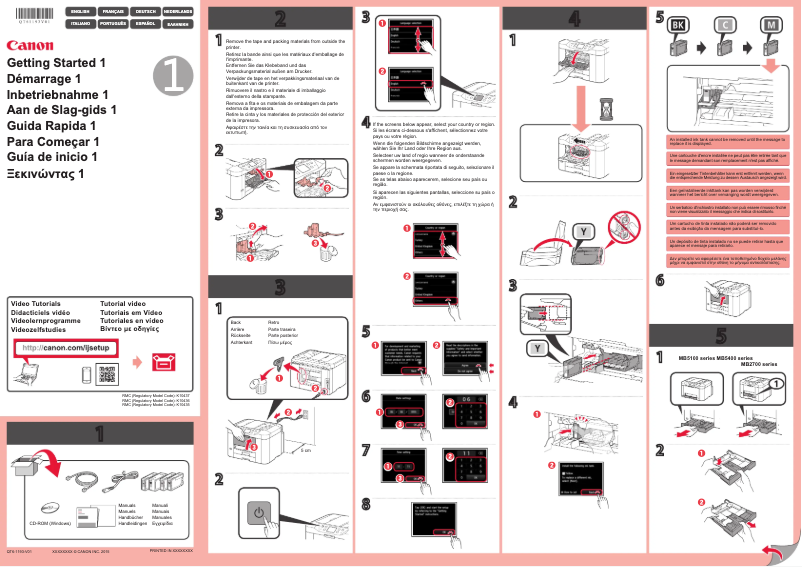
The user manual is available, but it is brief and could provide more detailed information on installation and setup.
Advantages
Clear and professional prints
Printing, copying, scanning, faxing functions
Wireless connectivity and mobile printing
Reduced energy consumption
User-friendly interface and touchscreen
Disadvantages
High cost of ink cartridges.
Bulky size for small offices.
Insufficient printing speed for heavy users.
Limited connectivity with certain devices.
Compatibility issues with certain systems.
Technical Specifications Maxify MB5155
General Information
-
ModelMAXIFY MB5155
-
Brand
-
Category
-
Type
-
SKU859367
-
MPN859367
Frequently Asked Questions
What is the recommended method for removing jammed paper from the printer?
Why is my printer not recognizing the original cartridges?
What are the possible reasons for poor print quality?
How does a laser printer differ from an inkjet printer?
Why is my inkjet printer leaving black streaks on prints?
What does the acronym DPI mean?
Is the manual for the Canon Maxify MB5155 available in French?
Similar products


More product categories from brand Canon
Computers and accessories Canon
Camera and photography Canon
Other Canon
Audio Canon
Software Canon
Interior Canon
More product types from brand Canon





Presentation of product Maxify MB5155 specifications from brand Canon
General Information
The Canon Maxify MB5155 is a multifunction printer that embodies Canon's commitment to quality and innovation. This model is designed to deliver high performance, making it an ideal choice for professionals and businesses with specific printing requirements.
Advantages
The Canon Maxify MB5155 stands out for its superior print quality, producing clear and professional documents, perfect for presentations and business reports. As an all-in-one printer, it not only allows for printing, but also copying, scanning, and faxing, thus meeting a wide range of office needs.
Thanks to its advanced connectivity, including Wi-Fi, NFC, and mobile printing options, users can easily print from various devices such as smartphones, tablets, or computers. Additionally, this printer is designed to be energy efficient, helping to reduce operating costs and environmental impact.
Its intuitive interface, combined with a touchscreen, makes it easy to navigate through its various features, making its use enjoyable and accessible.
Disadvantages
However, the Canon Maxify MB5155 has some drawbacks. The cost of ink cartridges can be relatively high, thus increasing the total cost of ownership of the printer. Its size, while robust, may pose space challenges for users with limited desk space. Moreover, its print speed, although acceptable, may not meet the expectations of users with intensive printing needs.
Finally, some users have reported compatibility issues with certain operating systems or software, requiring updates or additional adjustments to ensure optimal use.


