

Manual of product Maxify MB5440
Editorial note
The Canon Maxify MB5440 stands out for its remarkable printing performance, delivering sharp and clear results, ideal for professional documents and presentations. Its versatility is also a major asset, as it combines printing, scanning, and copying in a single device, thus meeting various office needs. Additionally, its energy efficiency helps reduce operating costs while minimizing environmental impact. Wireless connectivity makes it easy to print from different devices, adding appreciated flexibility. However, some drawbacks are worth mentioning. The initial purchase cost may seem high for some users, and replacing ink cartridges can incur additional expenses in the long run. The size of the printer may pose a problem in restricted workspaces, and Wi-Fi connectivity issues have been reported, leading to frustrations for some users. Finally, the noise generated during printing, especially for large documents, can be disruptive in a quiet environment. Overall, the Canon Maxify MB5440 offers a generally satisfying user experience thanks to its user-friendly interface and varied features, despite some aspects to consider for those seeking a more compact or economical option.Score details
User experience
The user experience is very satisfactory thanks to a user-friendly interface and a clear user manual, making setup and daily use easier.
Performance
The printing performance is excellent, providing sharp and clear prints suitable for professional documents and presentations.
Value for money
The initial purchase cost is high, which may deter some users, although the print quality partly justifies this investment.
Features
The versatility of the printer, with printing, scanning, and copying features, meets various office needs.
connectivity
The wireless connectivity is convenient, although some users have encountered issues with Wi-Fi, which can lead to frustrations.
Design
Although the design is modern, the size of the printer may pose a problem for those with limited workspace.
noise_level
The noise generated during printing can be disturbing in a quiet environment, especially for large print jobs.
Advantages
Clear and sharp prints."
Versatile all-in-one printer."
Reduced energy consumption."
Easy wireless connectivity."
User-friendly interface.
Disadvantages
High purchase cost for some users.
Expensive ink cartridges to replace.
Bulky size for small spaces.
Frequent Wi-Fi connectivity issues.
Disturbing noise during printing.
Technical Specifications Maxify MB5440
General Information
-
ModelMAXIFY MB5440
-
Brand
-
Category
-
Type
-
SKU859365
-
MPN859365
Frequently Asked Questions
What is the recommended method for removing paper jammed in the printer?
Why does my printer not recognize the original cartridges?
What could be the reasons for poor print quality?
How does a laser printer differ from an inkjet printer?
Why does my inkjet printer produce black marks on prints?
What does the acronym DPI mean?
Is the manual for the Canon Maxify MB5440 available in French?
Similar products


More product categories from brand Canon
Computers and accessories Canon
Camera and photography Canon
Other Canon
Audio Canon
Software Canon
Interior Canon
More product types from brand Canon





Presentation of product Maxify MB5440 specifications from brand Canon
General Information
The Canon Maxify MB5440 is a multifunction printer from the Canon brand, known for its expertise and innovation in printing technology. This model is designed to optimize performance and provide a smooth and efficient user experience.
Advantages
This printer stands out for its high-quality printing capability, thanks to advanced technology that ensures precise and sharp prints, perfect for professional documents and presentations. Additionally, the Canon Maxify MB5440 is an all-in-one device, capable not only of printing but also of scanning and copying, making it versatile for various office needs.
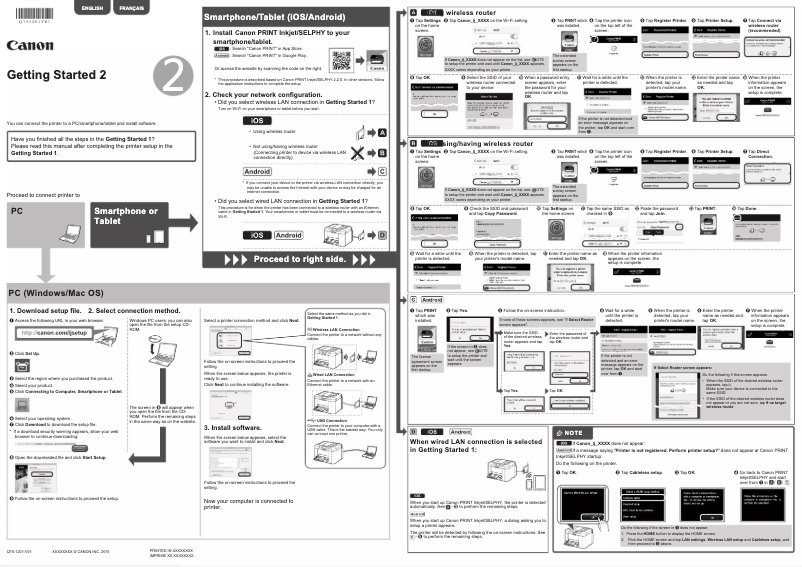
In terms of efficiency, this device is designed to consume less energy, thereby reducing operating costs and environmental impact. Its wireless connectivity allows for easy printing from computers, tablets, or smartphones, offering appreciated flexibility of use. Finally, the user-friendly interface and included user manual make setup and daily use easy, even for novice users.
Disadvantages
However, there are some disadvantages to consider. The initial purchase cost of the Canon Maxify MB5440 may be higher than that of other models, which may deter some users looking for more economical options. Additionally, replacing ink cartridges, although designed for superior print quality, can incur extra costs for users who print frequently.
The size of the printer may also pose a problem for those with limited workspace, as it requires a dedicated location. User feedback mentions connectivity issues when using Wi-Fi, which can cause frustration when printing from mobile devices. Finally, the noise generated during printing may be perceived as disruptive, especially in quiet work environments, particularly when printing large documents.


