

Manual of product Maxify MB5450
Editorial note
The Canon Maxify MB5450 stands out for its exceptional print quality, producing sharp text and vibrant colors, ideal for professional documents. With all-in-one features, it offers printing, scanning, copying, and faxing, making it a versatile tool for home offices and small businesses. Its connectivity is also a strong point, providing various options such as Wi-Fi, Ethernet network, and USB, thus facilitating printing from different devices. However, some drawbacks deserve to be highlighted. The price of the printer may seem high compared to other similar models, which may deter some buyers. Additionally, the cost of ink cartridges can increase long-term expenses for regular users. The user interface, while functional, may appear complex for less experienced users, requiring an adjustment period. Finally, the printer's large size may pose space issues for those with a small office. Overall, the Canon Maxify MB5450 receives good ratings in terms of performance and features, but its value for money could be improved. Users will appreciate its print quality and versatility, but will need to consider the associated costs and available space before making their choice.Score details
User experience
The user experience is generally positive, with an intuitive touchscreen, but the interface may seem complex for beginners.
Performance
The printing performance is excellent, offering sharp text and vibrant colors, although the printing speed may be insufficient for high-demand environments.
Value for money
The price of the printer is relatively high compared to other similar models, and the cost of ink cartridges can increase long-term expenses.
Features
The all-in-one features are a major asset, integrating printing, scanning, copying, and faxing, making the product versatile for offices.
Design
The design is functional, but the printer's large size may pose space issues for some users.
Advantages
High-quality prints and vibrant colors.
Wi-Fi, Ethernet, and USB connectivity.
Printing, scanning, copying, faxing functions.
Energy-saving features to reduce costs.
Intuitive touchscreen for easy use.
Disadvantages
High price compared to the competition.
Complex interface for beginner users.
Large size, requires a lot of space.
Insufficient printing speed for businesses.
High cost of ink cartridges.
Technical Specifications Maxify MB5450
General Information
-
ModelMAXIFY MB5450
-
Brand
-
Category
-
Type
-
SKU859364
-
MPN859364
Frequently Asked Questions
How can I remove paper jammed in the printer?
Why is my printer rejecting original cartridges?
What could be the reasons for poor print quality?
How does a laser printer differ from an inkjet printer?
Why is my inkjet printer producing black streaks?
What does the acronym DPI mean?
What are the reasons my printer won't turn on?
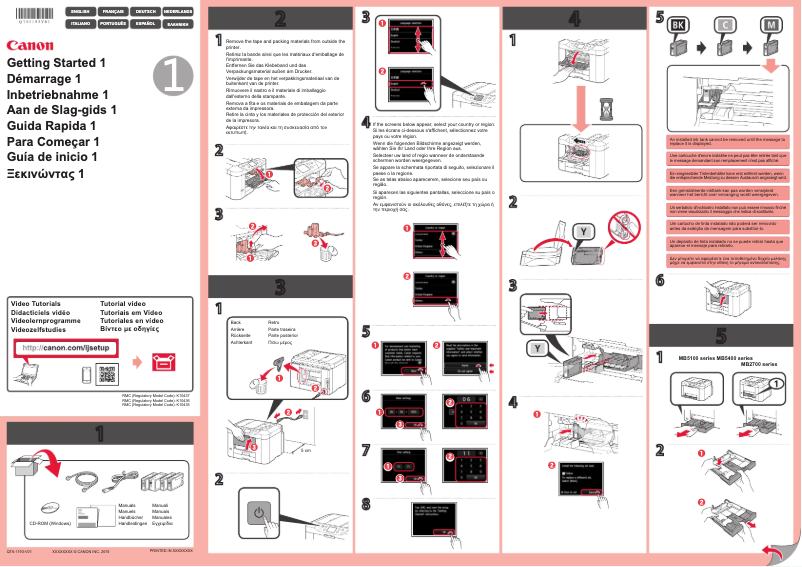
How do I add paper to the Canon Maxify MB5450 printer?
What should I do if the printer does not recognize the ink cartridges?
How to fix paper jams on the Canon Maxify MB5450 printer?
How do I establish a wireless connection with my printer?
Is the manual for the Canon Maxify MB5450 available in French?
Similar products


More product categories from brand Canon
Computers and accessories Canon
Camera and photography Canon
Other Canon
Audio Canon
Software Canon
Interior Canon
More product types from brand Canon





Presentation of product Maxify MB5450 specifications from brand Canon
General Information
The Canon Maxify MB5450 printer is a flagship model from the Canon brand, known for its excellence and innovation in the field of office equipment. This versatile model is designed to meet the varied needs of professionals and small businesses, offering impressive performance and an enhanced user experience.
Advantages
Exceptional print quality: The Canon Maxify MB5450 stands out for its ability to produce high-quality prints, with sharp text and vibrant colors, making it ideal for professional documents and presentations.
Versatile connectivity: This printer offers a multitude of connection options, including Wi-Fi, Ethernet network, and USB, allowing for easy printing from various devices such as computers, tablets, and smartphones.
All-in-one features: The Canon Maxify MB5450 is a true multifunction tool, integrating printing, scanning, copying, and faxing capabilities, making it practical for home offices or small businesses.
Energy efficiency: Designed to be energy-efficient, this model helps reduce operating costs while having a minimal environmental impact.
Ease of use: With its intuitive touchscreen, users can easily navigate between different functions and settings, simplifying daily use.
Disadvantages
Initial cost: The price of the Canon Maxify MB5450 may seem high compared to other similar models, which could deter some potential buyers.
Complexity of the interface: Although functional, the user interface may appear complex for those unfamiliar with technology, thus requiring an adjustment period.
Bulky size: The size of the printer may pose space challenges for users with limited desk space.
Print speed: While acceptable, the print speed may not meet the demands of some high-demand work environments.
Cost of cartridges: Ink cartridges can be relatively expensive, thus increasing long-term expenses for regular users.


