

Manual of product Maxify MB5455
Editorial note
The Canon Maxify MB5455 is a printer that stands out for its high print quality, making your professional documents and presentations particularly attractive thanks to its advanced technology. Its versatility is also a major asset, with the ability to print, scan, copy, and send faxes, thus meeting various office needs. The user-friendly interface and touchscreen make navigation easy, significantly enhancing the user experience. However, several drawbacks must be taken into account. The initial purchase cost is relatively high, which can be a significant investment for small businesses or occasional users. Additionally, the price of ink cartridges can quickly increase operating costs in the long run. The printer's bulkiness may pose issues in limited workspaces, and while the print speed is acceptable, it may not satisfy users with very high printing needs. Finally, some users report difficulties during the initial setup and connection to the network. In summary, the Canon Maxify MB5455 offers excellent performance and a multitude of features, but it requires a substantial investment and may pose challenges in terms of space and setup.Score details
User experience
The user experience is very positive thanks to a user-friendly interface and a touchscreen that facilitates the management of printing tasks.
Performance
The printing performance is good, but the speed may not be sufficient for users with very high printing needs.
Design
The design is functional, but the printer can be bulky and may require considerable desk space.
Value for money
The initial purchase cost is relatively high, and the ink cartridges can increase operating costs in the long run.
Features
The versatility of the printer is a major asset, with printing, scanning, copying, and faxing features.
Support
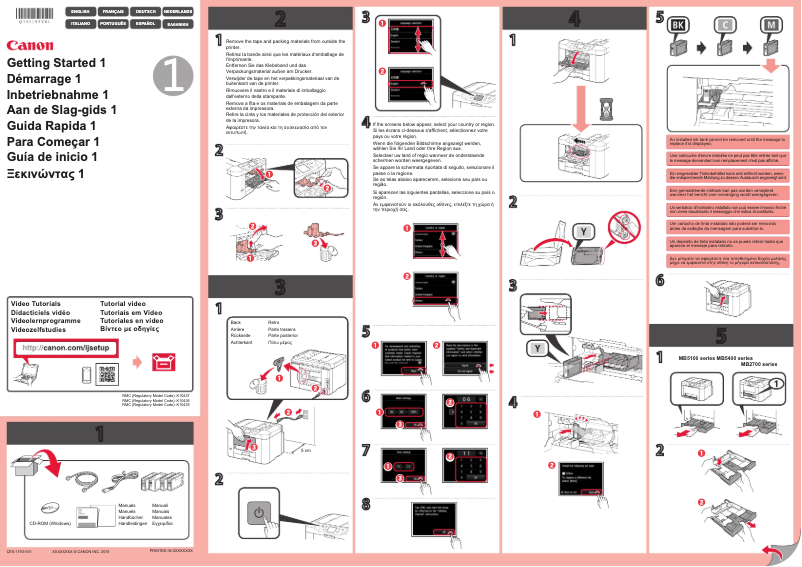
The user manual is available, but some users found the initial setup complicated.
Advantages
High-quality printing for professional documents.
Energy-saving for optimal performance.
Versatile features: printing, scanning, copying, faxing.
User-friendly interface with intuitive touchscreen.
Wireless connectivity and cloud printing.
Disadvantages
High purchase cost for small businesses.
Expensive ink cartridges to replace.
Bulky, requires a lot of space.
Printing speed sometimes insufficient.
Complicated initial setup for some.
Technical Specifications Maxify MB5455
General Information
-
ModelMAXIFY MB5455
-
Brand
-
Category
-
Type
-
SKU859363
-
MPN859363
Frequently Asked Questions
What is the recommended method for removing a jammed paper from the printer?
Why does my printer not recognize the original cartridges?
Why is the quality of my prints poor?
What are the differences between a laser printer and an inkjet printer?
Why does my inkjet printer leave black streaks on my prints?
What does the abbreviation DPI mean?
Is the manual for the Canon Maxify MB5455 available in French?
Similar products


More product categories from brand Canon
Computers and accessories Canon
Camera and photography Canon
Other Canon
Audio Canon
Software Canon
Interior Canon
More product types from brand Canon





Presentation of product Maxify MB5455 specifications from brand Canon
General Information
The Canon Maxify MB5455, manufactured by the renowned brand Canon, stands out for its reputation for excellence and innovation in the office equipment sector. Designed to meet the demands of professionals, this multifunction device combines printing, scanning, copying, and faxing, thus providing a comprehensive solution for modern offices.
Advantages
The Canon Maxify MB5455 is characterized by its remarkable print quality, ideal for producing professional documents and presentations thanks to its advanced printing technology. Additionally, this device is energy-efficient, allowing for a significant reduction in electricity consumption while maintaining high performance.
Its versatility makes it a wise choice for various office needs, while its user-friendly interface and touchscreen make managing printing tasks intuitive. The enhanced connectivity, including the ability to print wirelessly and use cloud applications, allows for convenient printing from various devices, such as smartphones and tablets.
Disadvantages
However, the Canon Maxify MB5455 also has some drawbacks. Its initial purchase cost may be a barrier for small businesses or occasional users, and the ink cartridges, although high quality, can be relatively expensive to replace frequently, thus increasing long-term operating costs.
Moreover, this printer can be bulky, requiring considerable office space, which can be problematic in restricted work environments. While its print speed is acceptable, it may not satisfy users with very high printing needs. Finally, some users report that the initial setup and network connection can be complex, especially for those who are not well-versed in technology.


