

Manual of product Pixma E484
Editorial note
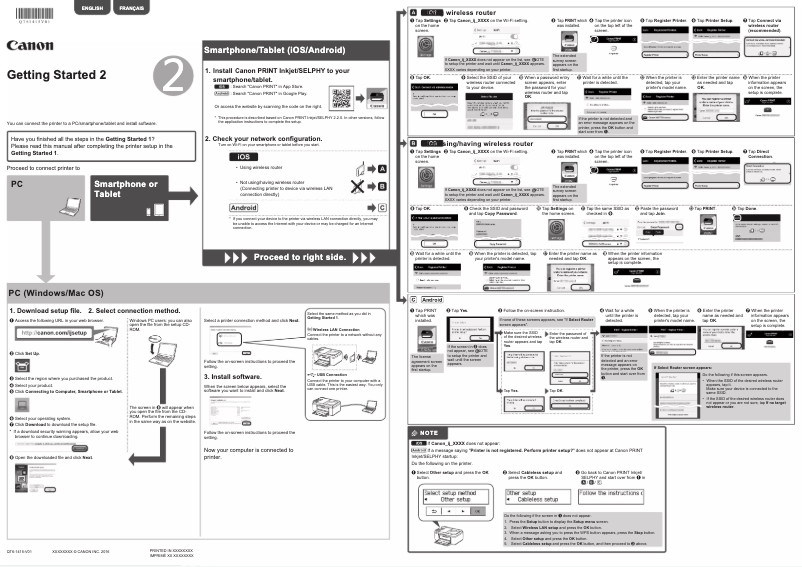
The Canon Pixma E484 stands out for its many qualities, offering an excellent user experience thanks to its user-friendly interface and a clear user manual. This all-in-one model allows for printing, copying, and scanning, thus meeting the varied needs of home or small office users. The print quality is remarkable, both for text documents and images, making it a solid choice for those seeking high-quality results. However, some drawbacks should be considered. The cost of ink cartridges can be high, which increases the long-term operating cost. Additionally, the printing speed is relatively slow compared to other models on the market, which can be a hindrance for users with frequent printing needs. Wireless connectivity can also be unstable, sometimes making printing from mobile devices difficult. In terms of robustness, the printer is generally reliable, but its bulk can be an issue in tight workspaces. Finally, while energy efficiency is a plus, it would be beneficial to have more information online to improve user support. Overall, the Canon Pixma E484 is a versatile printer that meets many criteria, but users should be aware of the operating costs and printing speed.Score details
User experience
The user experience is generally positive thanks to the user-friendly interface and the included user manual, making setup and use easier.
Performance
Print performance is high for documents and images, but the printing speed is relatively slow, which can be a drawback.
Features
The features of this all-in-one printer, including copying, scanning, and wireless connectivity, offer valuable versatility for users.
Value for money
Although the print quality is excellent, the high cost of ink cartridges and the slow printing speed can increase long-term usage costs.
Robustness
The printer is generally sturdy, but its bulkiness can pose problems for those with limited workspace.
Battery life
The energy efficiency of the Canon Pixma E484 helps reduce electricity costs and is an asset for sustainable use.
Support
The support is adequate thanks to the user manual, but additional online information could improve assistance for users.
Advantages
Excellent print quality for documents and images.
All-in-one printer: copy, scan, print.
Wireless connectivity for various devices.
User-friendly and easy to use interface.
Energy-efficient and environmentally friendly.
Disadvantages
High cost of ink cartridges
Slow printing speed
Unstable wireless connectivity
Insufficient black and white print quality
Bulky printer for small spaces
Technical Specifications Pixma E484
General Information
-
ModelPIXMA E484
-
Brand
-
Category
-
Type
-
SKU859354
-
MPN859354
Frequently Asked Questions
What is the recommended method for removing jammed paper from the printer?
Why is my printer not recognizing the original cartridges?
What could be the reasons for poor print quality?
What are the differences between a laser printer and an inkjet printer?
Why is my inkjet printer producing black lines?
What does the acronym DPI mean?
Is the user manual for the Canon Pixma E484 available in French?
Similar products


More product categories from brand Canon
Computers and accessories Canon
Camera and photography Canon
Other Canon
Audio Canon
Software Canon
Interior Canon
More product types from brand Canon





Presentation of product Pixma E484 specifications from brand Canon
General Information
The Canon Pixma E484 is an all-in-one printer from the renowned brand Canon, known for its reliability and innovation in the field of printing devices. This model is designed to provide a quality user experience, combining performance and functionality.
Advantages
The Canon Pixma E484 stands out for its high print quality, capable of producing sharp text documents and vibrant images, thus meeting the varied needs of users. As an all-in-one printer, it allows for copying, scanning, and printing, providing a practical solution for homes and small offices.
Its wireless connectivity makes it easy to print from various devices, including smartphones and tablets, making modern use accessible. Additionally, its user-friendly interface and included user manual simplify setup and use, even for those who are not familiar with technology.
Designed with energy efficiency in mind, the Canon Pixma E484 helps reduce electricity costs while supporting a more sustainable lifestyle.
Disadvantages
Despite its many strengths, the Canon Pixma E484 has some drawbacks. The cost of ink cartridges can be high, increasing the long-term operating costs. Furthermore, its print speed is relatively slow compared to other models, which could be an issue for users with large print volumes.
The wireless connectivity can sometimes suffer from instability, making printing from mobile devices or Wi-Fi networks difficult. Additionally, the print quality of black and white documents may not always meet expectations, with sometimes unsatisfactory shades of gray. Finally, its design may be considered bulky, which can be a disadvantage for those with limited workspace.


