

Manual of product Pixma G3202
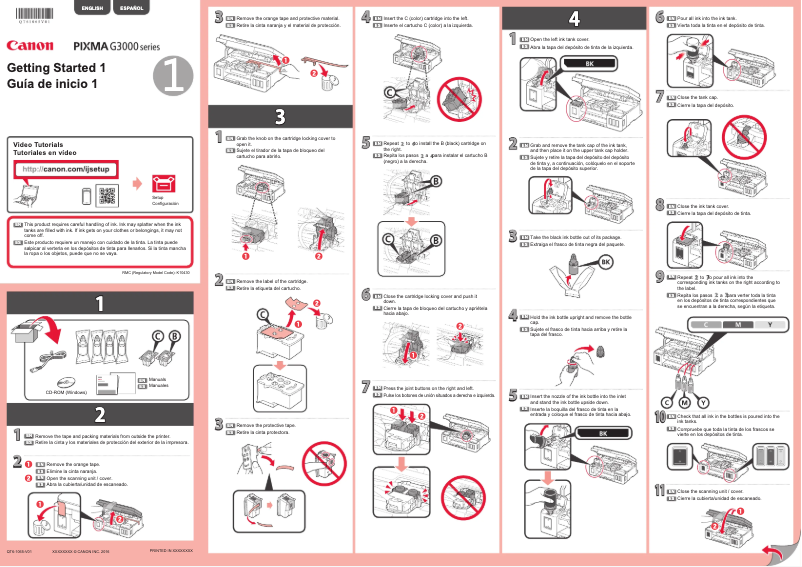
Editorial note
The Canon Pixma G3202 printer stands out for its versatility and efficiency, offering printing, scanning, and copying features in a single device. Its high-capacity ink tank helps reduce the cost per page, making it an economical solution for home or office use. Additionally, its simplified wireless connectivity makes printing from various devices easy, making remote printing access very convenient. The print quality is also satisfactory, with vibrant colors and precise details, suitable for many types of documents. However, there are some drawbacks to consider. The initial setup can be complex for novice users, requiring an adjustment period. Although ink cartridge costs are less frequent due to the tank system, they can still accumulate with heavy use. Furthermore, the print speed is adequate for home use but may not meet the demands of a high-volume office environment. Finally, the print quality of photos may not satisfy professionals who prefer printers specifically designed for photography. Overall, the Canon Pixma G3202 offers good value for money, particularly due to its compact and modern design, ideal for tight spaces. While there are aspects to improve, such as user documentation, its versatile features and efficiency make it an interesting choice for those seeking a reliable printer.Score details
User experience
The user experience is generally positive, although the initial setup can be complex for novice users.
Performance
The performance is satisfactory for home use, but the printing speed may be insufficient for high-volume office environments.
Design
The design is compact and modern, which is ideal for tight spaces while offering full functionality.
Value for money
The printer offers good value for money thanks to its high-capacity ink tank, although cartridge costs can add up.
Features
It has versatile printing, scanning, and copying features, as well as simplified wireless connectivity.
Support
The user manual is available, but it could be more detailed to help users navigate the features.
Advantages
Economic printing thanks to the high-capacity tank.
Printing, scanning, and copying features.
Wi-Fi connectivity for remote printing.
Print quality with vibrant colors.
Compact design for small spaces.
Disadvantages
Complex initial setup for beginners.
High long-term cost of ink cartridges.
Insufficient printing speed for offices.
Disappointing photo quality for professionals.
Lack of available Ethernet connectivity.
Technical Specifications Pixma G3202
General Information
-
ModelPIXMA G3202
-
Brand
-
Category
-
Type
-
SKU1663172
-
MPN1663172
Frequently Asked Questions
What is the recommended method for removing jammed paper from the printer?
Why is my printer not recognizing the original cartridges?
What could be the causes of poor print quality?
How does a laser printer differ from an inkjet printer?
Why does my inkjet printer leave black streaks on prints?
What does the acronym DPI mean?
Is the manual for the Canon Pixma G3202 available in French?
Similar products


More product categories from brand Canon
Computers and accessories Canon
Camera and photography Canon
Other Canon
Audio Canon
Software Canon
Interior Canon
More product types from brand Canon





Presentation of product Pixma G3202 specifications from brand Canon
General Information
The Canon Pixma G3202 stands out due to the reputation of the Canon brand, known for its innovation and quality in the field of household appliances. This model is designed to deliver exceptional performance while ensuring a pleasant and intuitive user experience.
Advantages
This printer is characterized by a high-capacity ink tank, allowing for economical printing and a significant reduction in cost per page. Users can print a larger number of documents without having to frequently replace the cartridges.
The Canon Pixma G3202 offers versatile usage, integrating printing, scanning, and copying features into a single device, making it ideal for both home and office use.
Its simplified wireless connectivity allows for easy printing from smartphones, tablets, or computers via Wi-Fi, thus facilitating remote printing access. Moreover, the print quality is remarkable, with vibrant colors and precise details, suitable for a variety of documents and photos.
With its compact and modern design, the printer fits perfectly into small spaces while offering full functionality.
Disadvantages
However, some aspects may pose challenges. The initial setup may seem complex for novice users, requiring an adjustment period to master all the features. Additionally, although the costs of ink cartridges are reduced thanks to the tank system, they can become high for intensive use.
The printing speed, while adequate for home use, may not be sufficient in an office environment where large volumes of printing are required. Furthermore, the print quality of photos may not satisfy professional photographers, who might prefer more specialized models. Finally, the lack of Ethernet connectivity may be a drawback for those looking to integrate the printer into a local network without resorting to Wi-Fi.


