

Manual of product PIXMA iP8700
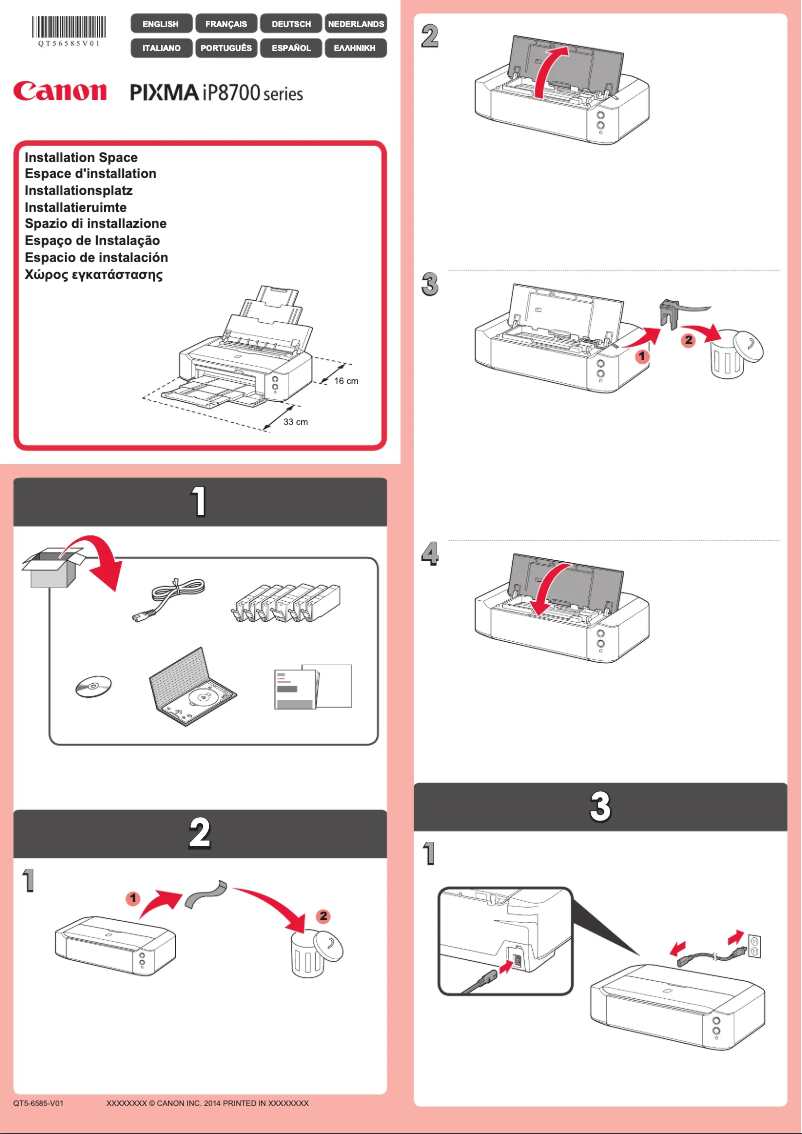
Editorial note
The Canon PIXMA iP8700 stands out for its exceptional print quality, offering vibrant colors and precise details, making it an ideal choice for photos and professional documents. Its use is facilitated by an accessible manual, allowing for quick handling even for novice users. Additionally, the printer's versatility, which supports various paper formats and types of printing, adds to its flexibility for different creative projects. However, it is important to consider some drawbacks. The cost of ink cartridges is relatively high, which can increase long-term usage expenses. The printer can also be slow when printing high-resolution documents, which could frustrate hurried users. Furthermore, its fairly large dimensions may pose a problem in restricted workspaces. Finally, the lack of advanced connectivity features, such as Wi-Fi Direct, limits its use in a wireless environment. Additionally, some users have encountered compatibility issues with certain operating systems, which can complicate installation. Despite these drawbacks, the Canon PIXMA iP8700 remains a solid choice for those seeking a reliable and high-quality printer.Score details
User experience
The setup is quick thanks to an accessible manual, making the user experience positive even for beginners.
Performance
Although the print quality is exceptional, the printer can be relatively slow when printing high-resolution documents.
Value for money
The cost of ink cartridges is high, which increases the long-term usage cost.
Design
The dimensions of the printer are quite large, which can be problematic in tight workspaces.
Features
The lack of advanced connectivity features, such as Wi-Fi Direct, can limit wireless usage.
Support
Some users have reported compatibility issues with certain operating systems, complicating installation.
Advantages
High-quality prints and vibrant colors.
Fast and efficient printing technology.
Easy to use for all levels.
Supports various formats and types of paper.
Reputable brand for its reliability.
Disadvantages
High cost of ink cartridges.
Slow printing in high resolution.
Bulky dimensions for small spaces.
Lack of advanced wireless connectivity.
Compatibility issues with certain systems.
Technical Specifications PIXMA iP8700
General Information
-
ModelPIXMA IP8700
-
Brand
-
Category
-
Type
-
SKU859459
-
MPN859459
Frequently Asked Questions
What is the recommended method for removing a paper jam in the printer?
Why is my printer refusing to accept original cartridges?
What are the possible reasons for poor print quality?
What is the distinction between a laser printer and an inkjet printer?
Why does my inkjet printer leave black streaks on prints?
What does the acronym DPI mean?
Is it possible to obtain the manual for the Canon PIXMA iP8700 in French?
Similar products


More product categories from brand Canon
Computers and accessories Canon
Camera and photography Canon
Other Canon
Audio Canon
Software Canon
Interior Canon
More product types from brand Canon





Presentation of product PIXMA iP8700 specifications from brand Canon
General Information
The Canon PIXMA iP8700 is a printer from the Canon brand, known for its print quality and technological innovation. This model stands out for its ability to deliver remarkable performance, thus ensuring an optimal user experience.
Advantages
This printer excels with its exceptional print quality, producing documents and photos with vibrant colors and precise details, perfect for professionals and photography enthusiasts. Thanks to its advanced printing technology, the PIXMA iP8700 offers speed and efficiency that simplify everyday tasks.
Designed to be user-friendly, it allows for quick handling thanks to an accessible user manual, even for those who are not familiar with technology. Its versatility is also an asset, as it supports various paper formats and types of printing, making it ideal for a multitude of creative projects.
Finally, as a trusted brand, Canon ensures the durability and high quality of its products, thus reinforcing the reliability of the PIXMA iP8700.
Disadvantages
However, some aspects may be considered disadvantages. The cost of ink cartridges can be relatively high, which increases the long-term usage cost. Additionally, the printer may be relatively slow when printing high-resolution documents.
The dimensions of the printer are also quite large, which can pose a challenge for limited workspace. The lack of advanced connectivity features, such as Wi-Fi Direct, may limit its use in wireless environments. Finally, some users have reported compatibility issues with certain operating systems, making installation sometimes complicated.


