

Manual of product Pixma MG2220
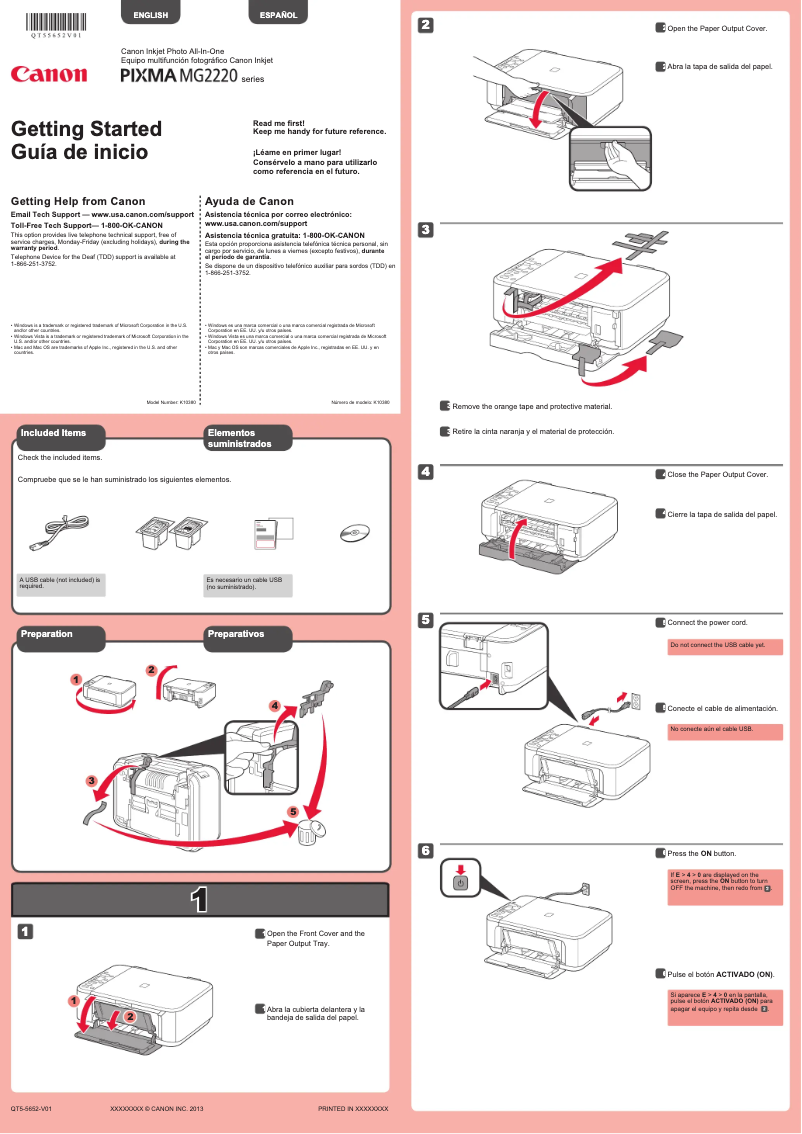
Editorial note
The Canon Pixma MG2220 is a printer that stands out for its exceptional print quality, capable of producing sharp text documents and photos. Its user-friendly interface and the availability of a user manual make installation and use easy, even for those less familiar with technology. Its compact and sleek design allows for easy integration into various workspaces while adding a modern touch. However, there are some drawbacks to consider. The print quality of photos may be limited, with colors less vibrant than those of other newer models. Additionally, the print speed is relatively slow, which could be an issue for users with high printing needs. Connectivity features are also limited, with the lack of wireless capability restricting its integration into a multi-device environment. Finally, ink consumption can be high, leading to additional costs in the long run. In summary, while the Canon Pixma MG2220 offers good value for money and a satisfactory user experience, its limitations in terms of speed, connectivity, and ink consumption make it a choice to evaluate based on the specific needs of each user.Score details
User experience
The user experience is very positive due to its user-friendly interface and the availability of a user manual, making installation and use easier.
Performance
The performance is good for document printing, but the printing speed is relatively slow for users with high demands.
Design
The design is compact and sleek, allowing for easy integration into different workspaces while adding a modern touch.
Features
The features are limited, notably the lack of wireless connectivity and automatic duplex printing, which can restrict usage in a multi-device environment.
Value for money
The value for money is acceptable, but ink consumption can lead to additional costs, affecting long-term profitability.
Advantages
High-quality printing - Versatile for different media - Easy to install and use - Compact and modern design - Reliability of the Canon brand
Disadvantages
Photo quality inferior to recent models.
Slow printing speed for large volumes.
No wireless connectivity available.
High and costly ink consumption.
Lack of automatic duplex printing.
Technical Specifications Pixma MG2220
General Information
-
ModelPIXMA MG2220
-
Brand
-
Category
-
Type
-
SKU1663248
-
MPN1663248
Frequently Asked Questions
What is the recommended method for removing paper jammed in the printer?
Why does my printer not recognize the original cartridges?
What could be the causes of poor print quality?
What is the difference between a laser printer and an inkjet printer?
Why does my inkjet printer leave black streaks on prints?
What does the acronym DPI mean?
Is the manual for the Canon Pixma MG2220 available in French?
Similar products


More product categories from brand Canon
Computers and accessories Canon
Camera and photography Canon
Other Canon
Audio Canon
Software Canon
Interior Canon
More product types from brand Canon





Presentation of product Pixma MG2220 specifications from brand Canon
General Information
The Canon Pixma MG2220 is a printer from the renowned brand Canon, known for its excellence and innovation in the home appliance sector. This model, the Pixma MG2220, is designed to deliver quality performance and enhance the user experience, whether for personal or professional use.
Advantages
This printer stands out for its exceptional print quality, capable of producing text documents and images with remarkable clarity. Its versatility allows it to handle different types of media, including photo paper, thus facilitating a wide range of printing projects.
The ease of use is another major asset, thanks to its intuitive interface and a clear user manual, making its setup and operation accessible even to technology novices.
With its compact and elegant design, the Canon Pixma MG2220 fits seamlessly into any workspace or home office, while adding a modern touch to your environment. The reputation of the Canon brand also ensures reliability and durability of the product.
Disadvantages
However, this model has some disadvantages. The print quality for photos may be limited, with a tendency to reproduce less vibrant colors compared to other newer models. Additionally, its print speed is relatively slow, which could be an issue for users with high printing volumes.
Connectivity features are also limited, with the lack of wireless options restricting its use in multi-device environments. Furthermore, the ink consumption can be high, leading to additional costs, and the printer lacks advanced features such as automatic duplex printing, which may be a drawback for some users.


