

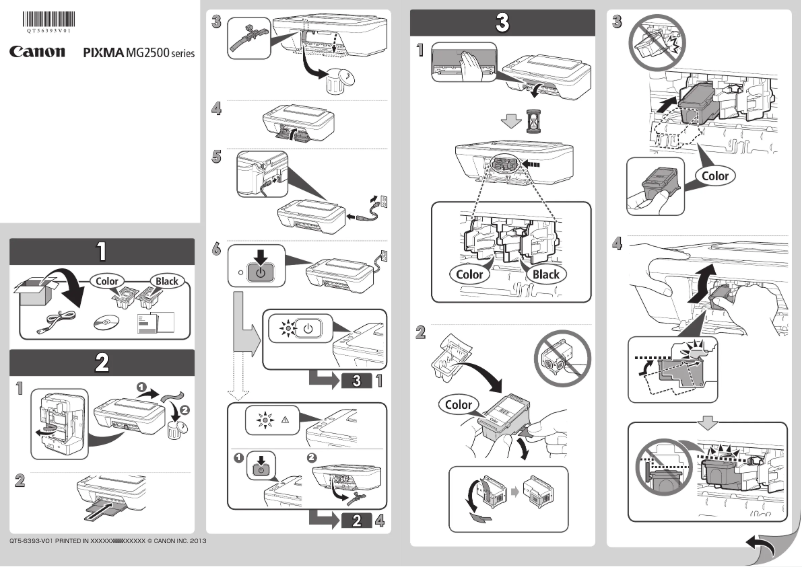
Manual of product Pixma MG2540
Editorial note
The Canon Pixma MG2540 printer stands out for its ease of use, making it an ideal choice for novice users. Its simple installation allows anyone to operate it without difficulty, making the printing process accessible to all. In terms of performance, although the print quality is remarkable, the relatively slow speed can be a drawback for those with high printing needs. Additionally, the cost of ink cartridges can quickly add up, affecting the total cost of use for frequent users. The compact and lightweight design of the printer is a major asset, allowing for easy integration into small workspaces, which is particularly appreciated by home users. However, the lack of wireless connectivity features and the limited paper tray capacity may restrict flexibility and require more frequent refills during high-volume printing. In summary, the Canon Pixma MG2540 offers good value for money for an entry-level model, combining quality printing performance with practical features, despite some limitations in terms of speed and connectivity.Score details
User experience
The ease of use of the Canon Pixma MG2540 is one of its strengths, allowing all users to operate it without difficulty.
Performance
Although the print quality is excellent, the relatively slow printing speed can be a problem for users with high demands.
Value for money
The Canon Pixma MG2540 offers good value for money, especially for an entry-level model, although the cost of ink cartridges can increase the total cost of use.
Design
Its compact and lightweight design allows for easy integration into small workspaces, which is an advantage for home users.
Features
Unfortunately, the lack of wireless connectivity features and the limited paper tray capacity can restrict usability flexibility.
Advantages
High-quality printing and exceptional clarity
Compact design, ideal for small spaces
All-in-one function: print, copy, scan
Ease of use for all users
Excellent value for money for beginners
Disadvantages
Slow print speed for large volumes.
High cost of ink cartridges.
No wireless connection available.
Limited paper tray capacity.
Insufficient photo quality for professionals.
Technical Specifications Pixma MG2540
General Information
-
ModelPIXMA MG2540
-
Brand
-
Category
-
Type
-
SKU859434
-
MPN859434
Frequently Asked Questions
What is the recommended method for removing jammed paper from the printer?
Why is my printer not recognizing the original cartridges?
What could be the reasons for poor print quality?
What is the difference between a laser printer and an inkjet printer?
Why is my inkjet printer producing black lines?
What does the acronym DPI mean?
Why won't my printer turn on?
How can I troubleshoot paper jam issues in my Canon Pixma MG2540 printer?
What is the procedure for aligning the print head on the Canon Pixma MG2540 printer?
Can my printer be used wirelessly?
What is the procedure for replacing the ink cartridges in my Canon Pixma MG2540 printer?
Is the manual for the Canon Pixma MG2540 available in French?
Similar products


More product categories from brand Canon
Computers and accessories Canon
Camera and photography Canon
Other Canon
Audio Canon
Software Canon
Interior Canon
More product types from brand Canon





Presentation of product Pixma MG2540 specifications from brand Canon
General Information
The Canon Pixma MG2540 is a multifunction printer from the renowned brand Canon, known for its commitment to quality and innovation in the electronics sector. This model is designed to provide optimal performance and a pleasant user experience, making it a relevant choice for both personal and professional use.
Advantages
This printer stands out for several strengths:
- High-quality printing: Canon's printing technology allows for documents and images of remarkable clarity, thus meeting the varied demands of users.
- Compact and lightweight design: Thanks to its small size, the Canon Pixma MG2540 easily fits into tight workspaces, making it ideal for homes or small offices.
- Versatility: In addition to printing, this printer offers copying and scanning features, making it a practical all-in-one device for various needs.
- Ease of use: Its installation and handling are straightforward, allowing all users, including those less familiar with technology, to use it without difficulty.
- Affordable cost: As an entry-level model, the Canon Pixma MG2540 offers good value for money, providing access to interesting features without excessive investment.
Disadvantages
However, a few points may be considered limitations:
- Printing speed: The printing speed is relatively lower, which may pose a problem for users with high or urgent volume needs.
- Cost of ink cartridges: The cartridges can be expensive to replace, especially for regular use, which can increase the overall operating cost.
- Absence of wireless connectivity: This model does not support wireless connections, thus limiting flexibility for printing from different devices.
- Paper tray capacity: The limited capacity of the paper tray requires frequent reloading when printing large volumes.
- Photo printing quality: Professional users or photography enthusiasts may find that the photo printing quality does not meet their expectations.


