

Manual of product PIXMA MG2910
Editorial note
The Canon PIXMA MG2910 stands out for its exceptional print quality, delivering impressive results for both text documents and images. Its versatility, combining printing, copying, and scanning, makes it an ideal choice for home or office use. Additionally, its Wi-Fi connectivity makes printing from mobile devices easy, making remote access to documents simple and convenient. Its compact design also allows for easy installation in small spaces, which is a major advantage for those with limited surface area. However, there are some drawbacks to note. The print speed is relatively slow, which can be a hindrance for users needing to print large volumes quickly. Furthermore, being an inkjet printer, maintenance costs can be high due to the frequent replacement of cartridges. The lack of advanced features, such as faxing, also limits its use for more complex tasks. Finally, wireless connectivity can sometimes be unstable, making printing from mobile devices more challenging, and print quality can vary depending on the type of paper used, requiring frequent adjustments. Overall, the Canon PIXMA MG2910 offers good value for money, particularly thanks to its high-yield ink cartridges. However, users should be aware of potential maintenance costs and limitations in speed and features.Score details
User experience
The user experience is generally positive due to the exceptional print quality and versatility of the device, although the wireless connectivity can sometimes be unstable.
Performance
The printing performance is good, but the print speed is relatively slow, which can be a disadvantage for those who need to print large volumes quickly.
Value for money
The printer offers good value for money, especially with its high-yield ink cartridges, but maintenance costs can be high due to the frequent replacement of cartridges.
Design
The compact design of the Canon PIXMA MG2910 is an asset, allowing it to be easily installed in small spaces.
Features
Although the printer is versatile, the lack of advanced features like faxing may limit its use for more complex tasks.
Support
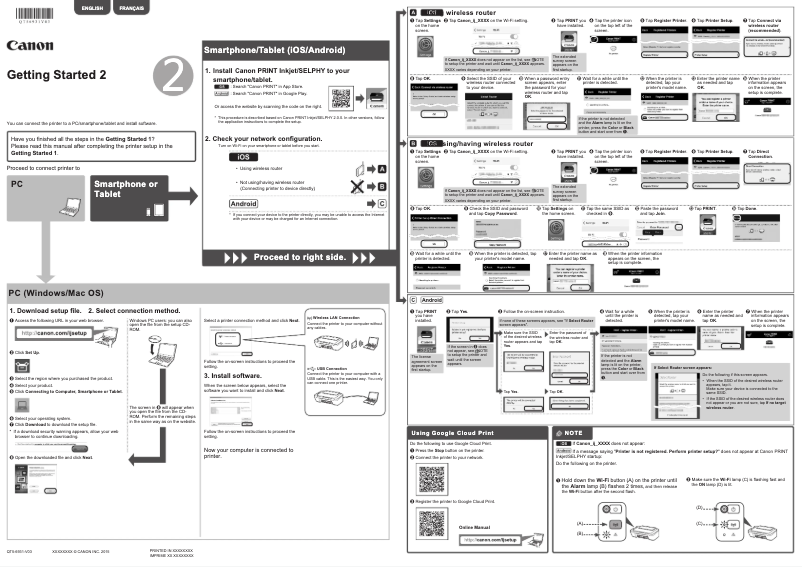
The user manual is available, but it could be more detailed to help users troubleshoot wireless connectivity issues.
Advantages
High-quality prints
Multifunction printer: prints, copies, scans
Wi-Fi connectivity for mobile printing
Compact design for small spaces
High-yield ink cartridges
Disadvantages
High maintenance costs for ink cartridges.
Slow printing speed for large volumes.
No scanning or faxing.
Wireless connectivity often unstable.
Print quality varies depending on the paper.
Technical Specifications PIXMA MG2910
General Information
-
ModelPIXMA MG2910
-
Brand
-
Category
-
Type
-
SKU1610996
-
MPN1610996
Frequently Asked Questions
How can I remove the paper jammed in the printer?
Why does my printer not recognize the original cartridges?
What are the causes if my prints are of poor quality?
How does a laser printer differ from an inkjet printer?
Why does my inkjet printer leave black streaks on prints?
What does the acronym DPI mean?
Is the manual for the Canon PIXMA MG2910 available in French?
Similar products


More product categories from brand Canon
Computers and accessories Canon
Camera and photography Canon
Other Canon
Audio Canon
Software Canon
Interior Canon
More product types from brand Canon





Presentation of product PIXMA MG2910 specifications from brand Canon
General Information
The Canon PIXMA MG2910 is a multifunction printer from the renowned brand Canon, known for its excellence and innovation in the electronics sector. This model, the PIXMA MG2910, is designed to provide reliable performance and an enhanced user experience, suitable for both home and professional use.
Features and Benefits
This printer stands out for its exceptional print quality, capable of producing sharp text documents as well as vibrant images thanks to its advanced printing technology. As a versatile device, the MG2910 not only allows for printing but also copying and scanning, thus meeting the varied needs of an office or home.
Moreover, the wireless connectivity makes it easy to print from mobile devices, allowing convenient access to documents from anywhere in the house or office. Its compact design is an additional advantage, making its integration into small spaces simple and efficient. Finally, thanks to its high-yield ink cartridges, this printer contributes to significant ink savings while maintaining high print quality.
Disadvantages
However, the Canon PIXMA MG2910 has some drawbacks. As an inkjet printer, it can incur high maintenance costs due to the frequent replacement of cartridges. The print speed is relatively slow, which could be an issue for those who need to print large volumes quickly. Additionally, the lack of advanced features such as faxing and complex scanning may limit its use for more demanding office tasks.
Finally, the wireless connectivity can sometimes be unstable, making printing from mobile devices more challenging, and print quality may vary depending on the type of paper used, requiring adjustments to achieve optimal results.


