

Manual of product Pixma MG2940
Editorial note
The Canon Pixma MG2940 is a printer that stands out for its ability to deliver high-quality prints, whether for professional documents or photos. Its compact design allows for easy integration into various workspaces, even the most limited ones, which is an asset for those who lack space. However, this device has some notable drawbacks. Its printing speed is relatively slow, which can be problematic for users with high printing volumes. Additionally, the cost of ink cartridges can be high, and their limited lifespan can lead to frequent expenses. The lack of advanced connectivity features, such as direct Wi-Fi or NFC, also limits its use in modern environments. In terms of user experience, handling is facilitated by the provided manual, although the absence of an LCD screen may make usage less intuitive for some. The versatility of this printer is appreciated, as it allows for scanning and copying documents, but this does not fully compensate for its limitations in connectivity. In summary, the Canon Pixma MG2940 is a high-performing printer for those seeking print quality and a compact design, but users should be aware of its limitations in speed and operating costs.Score details
User experience
The handling is facilitated by the provided manual, but the absence of an LCD screen may complicate usage for some users.
Performance
Although the printer offers high-quality printing, its printing speed is relatively slow, which can be a disadvantage for high-volume users.
Design
Its compact format and modern design allow the printer to easily fit into various workspaces.
Value for money
Although the printer is affordable, the high cost of ink cartridges and their limited lifespan can lead to frequent expenses.
Features
The versatility of the printer is an asset, but the lack of advanced connectivity limits its use in modern environments.
Advantages
Clear and precise prints.
Compact and easy to integrate.
Scanning and copying included.
Quick and intuitive installation.
Optimization of ink consumption.
Disadvantages
Slow printing speed for large volumes.
High cost and limited lifespan of cartridges.
Lack of advanced connectivity (Wi-Fi, NFC).
Photo quality below user expectations.
No LCD screen for easy navigation.
Technical Specifications Pixma MG2940
General Information
-
ModelPIXMA MG2940
-
Brand
-
Category
-
Type
-
SKU859432
-
MPN859432
Frequently Asked Questions
What is the recommended method for removing jammed paper from the printer?
Why is my printer not recognizing original cartridges?
What are the possible reasons for poor print quality?
What is the difference between a laser printer and an inkjet printer?
Why is my inkjet printer leaving black streaks on prints?
What does the acronym DPI mean?
Is the manual for the Canon Pixma MG2940 available in French?
Similar products


More product categories from brand Canon
Computers and accessories Canon
Camera and photography Canon
Other Canon
Audio Canon
Software Canon
Interior Canon
More product types from brand Canon





Presentation of product Pixma MG2940 specifications from brand Canon
General Information
The Canon Pixma MG2940 printer is a versatile model offered by the Canon brand, which is widely recognized for its commitment to quality and innovation in the field of printing devices. This model, the Pixma MG2940, is designed to provide reliable performance and an optimized user experience, thus meeting the varied needs of users, whether they are professionals or individuals.
Advantages
The Canon Pixma MG2940 stands out with several notable strengths:
- High-quality printing: It ensures precise and clear prints, suitable for both professional documents and photos.
- Compactness: Its compact design allows it to be easily integrated into small workspaces without compromising its functionality.
- Versatility: In addition to its printing capabilities, it also offers scanning and copying functions, making it ideal for various office needs.
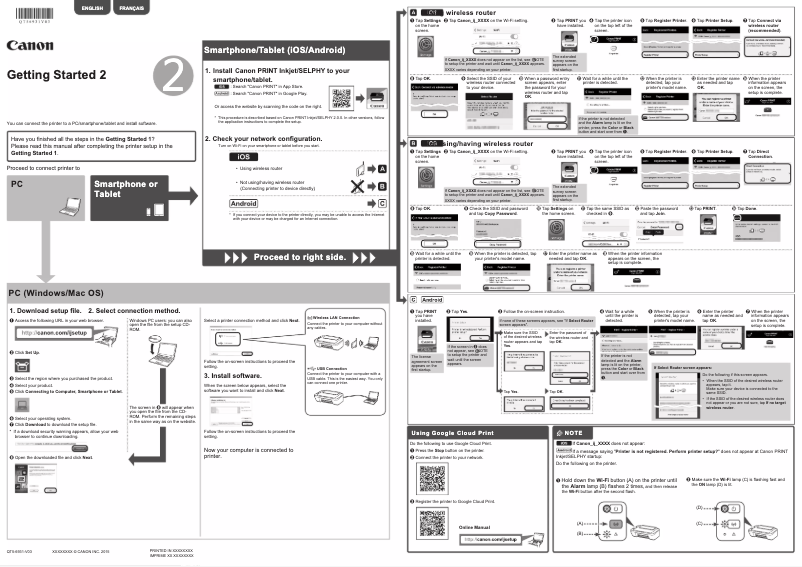
- Ease of use: The printer comes with a handy user manual, allowing for intuitive installation and use.
- Ink savings: Thanks to its optimized cartridges, it helps reduce ink consumption, thereby contributing to lower long-term printing costs.
Disadvantages
However, the Canon Pixma MG2940 also has some limitations:
- Printing speed: Its printing speed is often considered slow, which can be an issue for users with high printing volumes.
- Cartridge cost: The ink cartridges can represent a significant cost, and their limited lifespan may lead to frequent replacements.
- Limited connectivity: The lack of advanced features such as direct Wi-Fi or NFC may restrict its use in modern technological environments.
- Photo print quality: Photography enthusiasts may find that the photo print quality does not always meet their expectations, particularly regarding color fidelity.
- Absence of LCD screen: The lack of an LCD screen for navigating settings can make using the printer less intuitive, especially for users less familiar with technology.


