

Manual of product Pixma MG3200
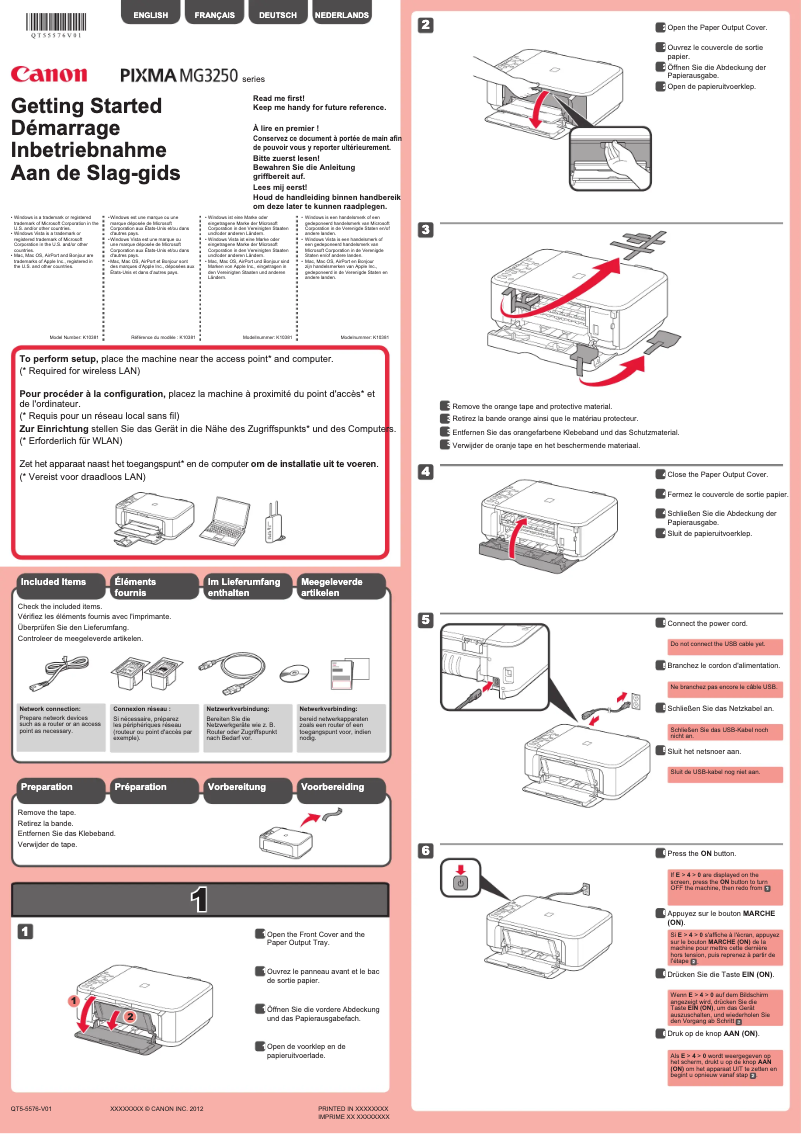
Editorial note
The Canon Pixma MG3200 is a printer that stands out for its high print quality, both for text documents and photos. Thanks to its advanced printing technology, it ensures a satisfying user experience. The user-friendly interface makes it easy to use, even for those who are not familiar with technology. Additionally, its versatile features, including printing, scanning, and copying, make it a practical choice for home or office use. However, it is important to note some drawbacks. The printing speed, especially for color prints, can be relatively slow, which may frustrate users with urgent needs. The ink cartridges, although optimized to reduce consumption, can run out quickly and prove costly for frequent users. Connectivity issues, particularly with Wi-Fi, can also occur, making wireless printing sometimes complicated. Finally, the paper storage space is limited, requiring frequent reloads during large print jobs. In summary, the Canon Pixma MG3200 is a printer offering excellent print quality and varied features, but it also has limitations in terms of speed and ink cost, as well as potential connectivity issues.Score details
User experience
The user experience is generally positive thanks to a user-friendly interface, making it easy to use even for those who are not familiar with technology.
Performance
Although the print quality is high, the printing speed can be relatively slow, especially for color prints, which may frustrate some users.
Features
The printer offers versatile features, including printing, scanning, and copying, making it a convenient all-in-one device.
Value for money
The Canon Pixma MG3200 optimizes ink consumption, but the cartridges can be expensive and run out quickly, which could lead to additional expenses.
Robustness
Connectivity issues can occur, particularly with Wi-Fi, which can create difficulties when printing wirelessly.
Advantages
Excellent text and photo print quality.
Wireless connection for multiple devices.
Printing, scanning, and copying functions.
Ink consumption optimization.
Simple and intuitive interface.
Disadvantages
Slow print speed, especially in color.
Expensive ink cartridges that wear out quickly.
Frequent Wi-Fi connectivity issues.
No automatic duplex printing.
Limited paper capacity, frequent reloads.
Technical Specifications Pixma MG3200
General Information
-
ModelPIXMA MG3200
-
Brand
-
Category
-
Type
-
SKU859452
-
MPN859452
Frequently Asked Questions
What is the recommended method for removing paper jammed in the printer?
Why does my printer not recognize original cartridges?
Why is the quality of my prints poor?
What are the differences between a laser printer and an inkjet printer?
Why does my inkjet printer leave black streaks on the paper?
What does the acronym DPI mean?
My printer won't turn on. What could be the causes?
How can I fix paper jams in my printer?
What should I do to improve print quality if it is unsatisfactory?
I am having trouble connecting my printer to my Wi-Fi network. What should I do?
What should I do if the printer displays an error code?
Is the manual for the Canon Pixma MG3200 available in French?
Similar products


More product categories from brand Canon
Computers and accessories Canon
Camera and photography Canon
Other Canon
Audio Canon
Software Canon
Interior Canon
More product types from brand Canon





Presentation of product Pixma MG3200 specifications from brand Canon
General Information
The Canon Pixma MG3200 is a multifunction printer from the Canon brand, known for its commitment to quality and innovation in the electronics sector. This model, the Pixma MG3200, stands out for its reliable performance and pleasant user experience, suitable for both home and professional use.
Advantages
Among the main strengths of the Canon Pixma MG3200, we note:
- Exceptional print quality: This printer produces high-quality prints, whether for text documents or photos, thanks to advanced printing technology.
- Wireless connectivity: The MG3200 allows for wireless connection, making it easy to print from various devices, including smartphones and tablets.
- Versatile features: In addition to printing, this device offers scanning and copying options, making it ideal for varied use.
- Ink savings: Designed to optimize ink consumption, this printer helps reduce printing costs in the long run.
- User-friendly interface: Its intuitive interface makes it easy to use, even for those who are not very familiar with technology.
Disadvantages
However, some limitations can be noted:
- Print speed: The print speed, especially for color, can be relatively slow, which may not suit users with urgent needs.
- Cost of cartridges: Ink cartridges can be expensive and deplete quickly, leading to additional costs for frequent users.
- Connectivity issues: Connection difficulties, particularly when using Wi-Fi, may occur, which can be frustrating for users wanting to print wirelessly.
- Limited features: The lack of automatic duplex printing can be a drawback for those seeking more versatility.
- Storage capacity: The paper storage space is limited, requiring frequent reloading, especially during high-volume printing.


