

Manual of product Pixma MG3522
Editorial note
The Canon Pixma MG3522 is a printer that stands out for its ease of use and compact design, making it an ideal choice for small workspaces. With a usability score of 90, it is accessible even for novice users, supported by a clear user manual that simplifies its setup and operation. In terms of performance, this printer offers good print quality for both documents and photos. However, it can be slow when printing color documents, which can be frustrating for those seeking quick prints. Additionally, the cost of printing could be a drawback, as the ink cartridges are relatively expensive, which may deter users who print frequently. Wireless connectivity is a valuable asset, although it should be noted that its instability can sometimes cause connection issues. In summary, the Canon Pixma MG3522 is a practical and efficient printer for light home or office use, but it may not be suitable for users with more intensive or professional printing needs.Score details
User experience
The user experience is positive due to the ease of use and a clear manual that simplifies installation.
Performance
The printing performance is good, but it can be slow when printing color documents, which may frustrate some users.
Design
The compact design of the Canon Pixma MG3522 allows for easy integration into various workspaces, adding a modern touch.
Value for money
The cost of printing can be relatively high due to the price of ink cartridges, which may deter frequent users.
Features
The printer offers convenient wireless features, although connectivity instability can be an issue.
Usability
Using the printer is simple and accessible, even for novice users, which is a significant advantage.
Advantages
Wireless printing from various devices
High print quality for documents and photos
Compact design, ideal for small spaces
Easy setup and use for everyone
Ink savings for budget and environment
Disadvantages
High printing costs due to cartridges.
Slow and frustrating color prints.
No automatic duplex, manual return required.
Wireless connectivity sometimes unstable.
Insufficient photo quality for professionals.
Technical Specifications Pixma MG3522
General Information
-
ModelPIXMA MG3522
-
Brand
-
Category
-
Type
-
SKU1663244
-
MPN1663244
Frequently Asked Questions
What is the best method to remove paper stuck in the printer?
Why does my printer refuse to accept original cartridges?
Why is the quality of my prints poor?
What is the difference between a laser printer and an inkjet printer?
Why does my inkjet printer leave black streaks on prints?
What does the acronym DPI mean?
Is the manual for the Canon Pixma MG3522 available in French?
Similar products


More product categories from brand Canon
Computers and accessories Canon
Camera and photography Canon
Other Canon
Audio Canon
Software Canon
Interior Canon
More product types from brand Canon





Presentation of product Pixma MG3522 specifications from brand Canon
General Information
The Canon Pixma MG3522 is a multifunction printer from the brand Canon, known for its commitment to quality and innovation in the printing device sector. This model combines performance and user-friendliness, providing an enriching user experience tailored to the diverse needs of the modern user.
Advantages
Among the strengths of the Canon Pixma MG3522, we find:
- Wireless printing: Thanks to its wireless connectivity, this printer allows easy printing from various devices such as computers, tablets, and smartphones, without the need for cumbersome cables.
- High print quality: This model is recognized for its ability to produce high-quality prints, whether for text documents or photos, delivering sharp and vibrant results.
- Compactness and design: Its compact format allows it to fit easily into various work environments, whether at home or in the office.
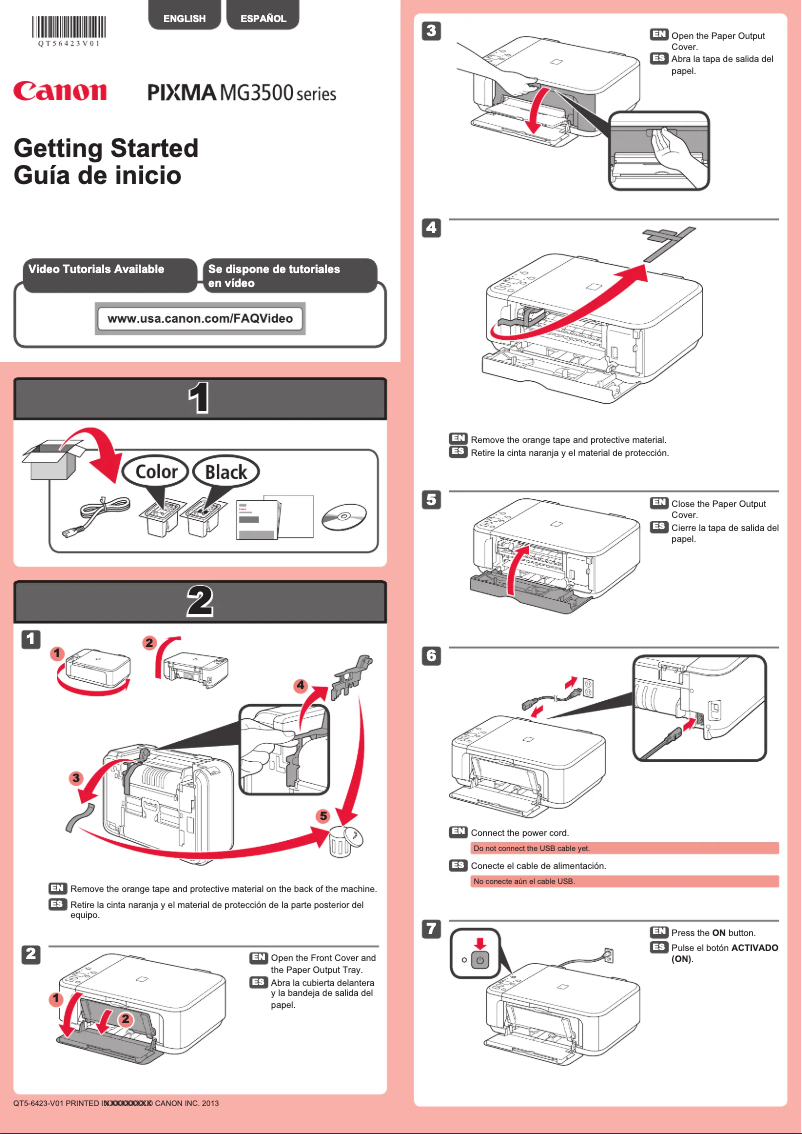
- Ease of use: The printer comes with a clear user manual, simplifying its setup and use, even for beginners.
- Ink savings: The printing technology used by the Canon Pixma MG3522 helps reduce ink consumption, which is both economical and environmentally friendly.
Disadvantages
Despite its advantages, the Canon Pixma MG3522 also has some drawbacks:
- The printing costs can be relatively high due to the price of ink cartridges, which may deter users who frequently print.
- When printing color documents, the device can be slow, which may frustrate those seeking speed and efficiency.
- This model does not have automatic duplexing features, requiring users to manually flip pages for double-sided printing.
- The wireless connectivity can sometimes experience stability issues, leading to difficulties in connecting and printing from mobile devices.
- Finally, the print quality of photos may not meet the expectations of professional users or photography enthusiasts.


