

Manual of product Pixma MG5622
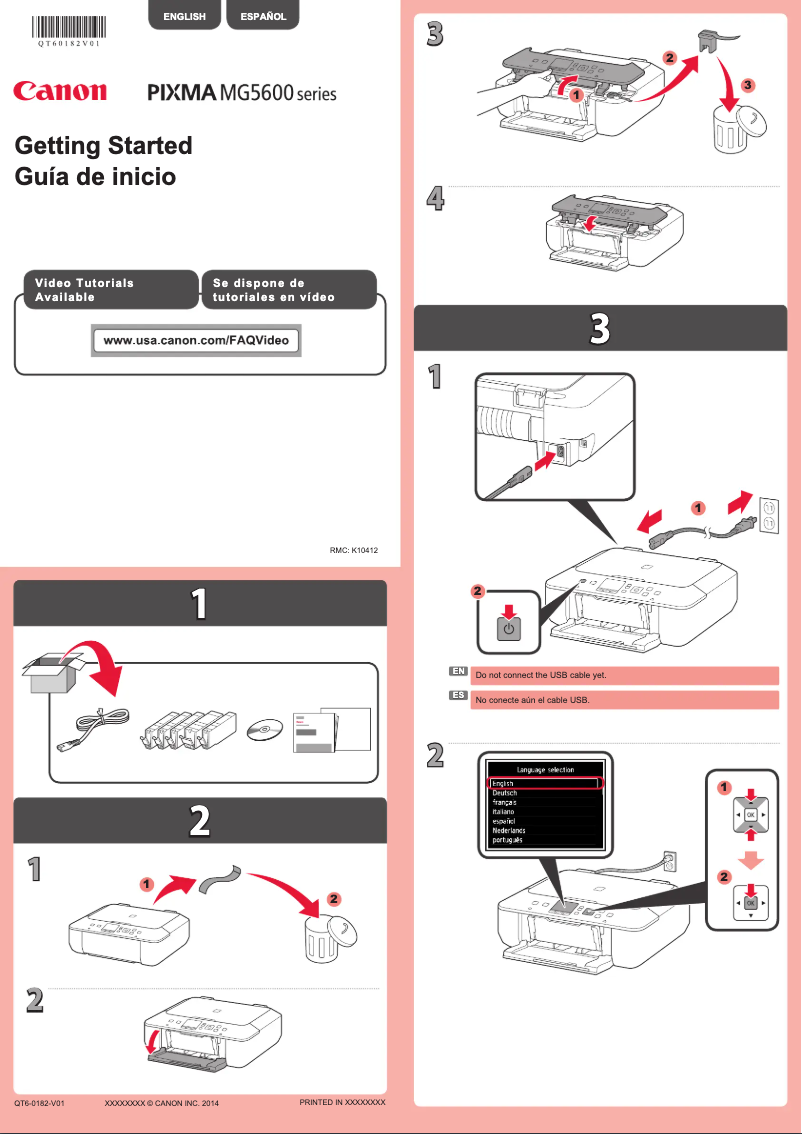
Editorial note
The Canon Pixma MG5622 is a versatile printer that stands out for its exceptional print quality, both for text documents and photos. Its inkjet printing technology delivers high-quality results, making it a wise choice for home or professional use. Additionally, its wireless connectivity makes it easy to print from various devices such as computers, tablets, and smartphones, thus providing an enhanced user experience. However, some drawbacks are worth mentioning. The printer can be relatively slow when printing color documents, which may frustrate hurried users. Furthermore, the ink cartridges tend to run out quickly, leading to additional costs for those who print frequently. The user interface may also seem complex for novices, while the Wi-Fi connectivity, although advantageous, can sometimes lack stability. Finally, the size of the printer can be cumbersome for small workspaces, limiting its installation. In terms of user experience, the Canon Pixma MG5622 offers a relatively easy handling thanks to a clear user manual. The printing performance is generally satisfactory, although the color printing speed could be improved. The functional design of the printer is another quality, even if its size may pose a problem in reduced environments. In conclusion, the value for money is good, as the print quality and the variety of features justify the cost, even if users need to be aware of the expenses related to ink. Overall, the Canon Pixma MG5622 represents a solid option for those looking for a reliable and high-performing printer.Score details
User experience
The user experience is generally positive, with ease of use thanks to a clear manual, but the interface may seem complicated for some users.
Performance
Print performance is good for text documents and photos, but can be slow for color prints, which may frustrate some users.
Design
The design is functional, but the size of the printer can be cumbersome for small workspaces, limiting its installation.
Value for money
The print quality and versatility of features justify the price, although ink costs can add up for frequent users.
Support
The user manual is accessible and helps with setup, providing good support for less experienced users.
connectivity
Wireless connectivity is convenient, but it can be unstable, which may cause issues when printing wirelessly.
Advantages
High-quality prints
Easy and fast Wi-Fi connection
Prints, copies, and scans
Energy efficient
Simple and intuitive to use
Disadvantages
Slow color prints.
Ink cartridges run out quickly.
Complicated user interface.
Unstable Wi-Fi connectivity.
Bulky size for small spaces.
Technical Specifications Pixma MG5622
General Information
-
ModelPIXMA MG5622
-
Brand
-
Category
-
Type
-
SKU1663218
-
MPN1663218
Frequently Asked Questions
What is the recommended method for removing paper jammed in the printer?
Why is my printer not accepting original cartridges?
What are the possible reasons for poor print quality?
What is the difference between a laser printer and an inkjet printer?
Why does my inkjet printer leave black streaks on prints?
What does the acronym DPI mean?
Is the manual for the Canon Pixma MG5622 available in French?
Similar products


More product categories from brand Canon
Computers and accessories Canon
Camera and photography Canon
Other Canon
Audio Canon
Software Canon
Interior Canon
More product types from brand Canon





Presentation of product Pixma MG5622 specifications from brand Canon
General Information
The Canon Pixma MG5622 is a well-known printer, the result of the expertise of the Canon brand, famous for its innovation and quality in the printing device sector. This versatile model is designed to deliver exceptional performance, whether for text documents or photographs, thus ensuring an enhanced user experience.
Advantages
- Superior print quality: Thanks to its advanced inkjet technology, the Canon Pixma MG5622 produces high-quality prints for both text and images.
- Wireless connectivity: With an easy and fast Wi-Fi connection, this printer allows printing from various devices, including computers, tablets, and smartphones.
- Versatility: In addition to printing, it offers copying and scanning features, thus meeting the varied needs of users, whether at home or in a professional environment.
- Energy efficiency: Designed to be energy-efficient, the Canon Pixma MG5622 helps reduce electricity bills while being environmentally friendly.
- Ease of use: Its clear user manual makes setup and use simple, allowing for quick handling, even for printing novices.
Disadvantages
- Print speed: The printer can sometimes be slow when printing in color, which may not suit users in a hurry.
- Ink consumption: Ink cartridges can run out quickly, leading to additional costs for those who print frequently.
- User interface: For some users, especially those less familiar with technology, the interface may seem complex.
- Connectivity stability: Wi-Fi connectivity can sometimes experience instabilities, complicating wireless printing.
- Printer size: Its bulk can be an issue in limited workspaces, restricting installation options.


