

Manual of product PIXMA MG5720
Editorial note
The Canon PIXMA MG5720 stands out for its remarkable print quality, offering a maximum resolution of 4800 x 1200 DPI, ideal for professional documents and vibrant images. Its all-in-one functionality, which combines printing, scanning, and copying, helps optimize workspace while enhancing the efficiency of office tasks. Additionally, wireless connectivity makes it easy to print from various mobile devices, adding flexibility to its daily use. The 2.5-inch touchscreen interface also contributes to an intuitive and pleasant user experience. However, some drawbacks must be considered. The color print speed of 9 ipm may seem slow for users with high printing needs, which could impact productivity. The duplex printing mode being manual may prove inconvenient for those seeking automatic printing. Furthermore, the lack of fax function limits its capabilities for professional users, and the 100-sheet paper capacity may require frequent refills in a high-volume printing environment. Overall, with a score of 85 for user experience and a good value-for-money rating of 75, the Canon PIXMA MG5720 represents a solid option for users who prioritize print quality and versatility in a compact format. However, it is advisable to consider its limitations in terms of speed and features to ensure it meets the specific needs of each user.Score details
User experience
The user experience is positive thanks to the intuitive touchscreen interface that facilitates navigation between the different functions of the printer.
Performance
Although the print quality is excellent, the color print speed of 9 ipm can be considered slow, which may hinder productivity for users with high demands.
Design
The modern design and the 2.5" touchscreen enhance the aesthetic appeal of the printer while providing user-friendly operation.
Value for money
With its all-in-one features, the Canon PIXMA MG5720 represents good value for money, although some limitations, such as manual duplex printing, may affect the perception of its value.
Features
Features such as manual duplex printing and Wi-Fi connectivity add flexibility, but the lack of a fax function and limited paper capacity can be drawbacks.
Usability
Overall ease of use is good, but the manual duplex printing mode may prove inconvenient for some users.
Documentation
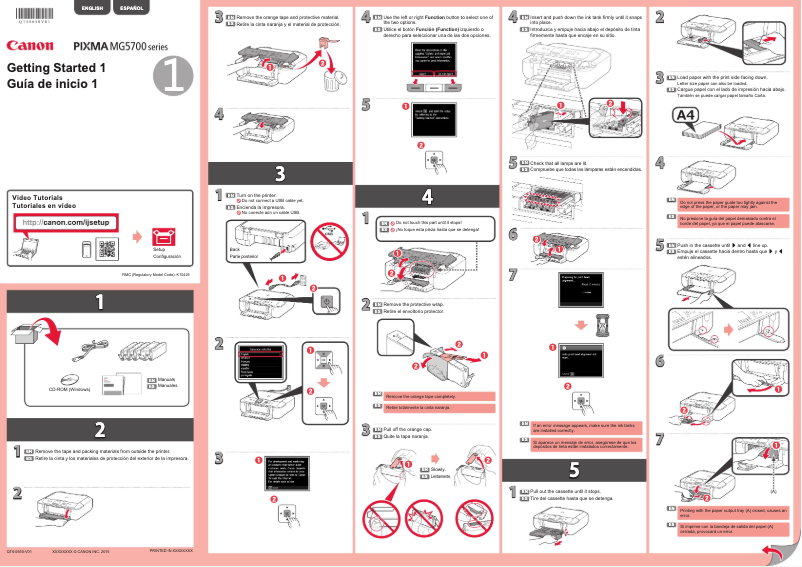
The user manual is available, providing clear instructions on how to use and set up the printer.
Advantages
High-quality printing up to 4800 x 1200 DPI.
All-in-one device: printing, scanning, copying.
Wi-Fi connectivity for wireless printing.
Manual duplex printing to save paper.
Intuitive and easy-to-use touchscreen.
Disadvantages
Slow color print speed.
Manual duplex printing.
Absence of fax function.
Paper capacity limited to 100 sheets.
Slow flatbed scanner for multiple pages.
Technical Specifications PIXMA MG5720
General Information
-
ModelPIXMA MG5720
-
Brand
-
Category
-
Type
-
SKU761282
-
MPN761282
Print speed
-
Printing technologyInkjet
-
PrintingColor printing
-
Duplex printing modeAuto
-
Print speed (black, normal quality, A4/US Letter)- ppm
-
Print speed (ISO / IEC 24734) monochrome12.6 ipm
-
Maximum resolution4800 x 1200 DPI
-
Black print resolution600 x 600 DPI
-
Print speed (ISO/IEC 24734) color9 ipm
-
Double-sided printingYes
-
Double-sided printingYes
Copier
-
CopyColor copy
-
Release time of the first print (color, concept)20 s
-
Max. resolution of copies19200 x 19200 DPI
-
All-in-one function (N=)2, 4
Digitization
-
DigitizationColor scanning
-
Optical scanning resolution1200 x 2400 DPI
-
Maximum scanning resolution19200 x 19200 DPI
-
Type of scannerFlatbed scanning
-
Input color display depth48 bit
-
Output color display depth24 bit
-
Scanning technologyCIS
-
Maximum scan area215.9 x 297 mm
Fax
-
FaxNo
Features
-
Digital sender-
-
Service cycle (Maximum)- pages per month
-
Number of print cartridges5
Paper management
-
Maximum ISO A series paper size-
-
ISO, Format Series A (A0...A9)-
-
Photo paper formats10x15, 13x18, 20x25 cm
-
Borderless print size4x6, 5x7, 8x10, 10x15, Legal, Letter
-
Type of paper tray supportEnvelopes, Glossy paper, Matte paper, Plain paper, Semi-glossy paper
-
Non-ISO print support sizesLegal
-
Envelope sizes10
-
Photo paper sizes4x6, 5x7, 8x10
Design
-
ScreenLCD
-
Screen size2.5 "
-
Built-in screenYes
-
Product colorBlack
-
Built-in screenYes
-
Market positionDomestic and professional
-
Order typeTouchscreen
Network
-
Ethernet/LANNo
-
WifiYes
-
Wifi standards802.11b, 802.11g, Wi-Fi 4 (802.11n)
-
Mobile printing technologiesApple AirPrint, Google Cloud Print, PIXMA Cloud Link
Connectivity
-
Direct printing-
-
Standard interfacesUSB, Wireless LAN
-
Quantity of USB 2.0 Ports1
-
USB portYes
Other features
-
PictBridgeYes
Representation / realization
-
Internal memory- Mo
-
Built-in memory card readerNo
Power
-
Electricity consumption (average operation)W
Minimum system requirements
-
Support for the Windows operating systemWindows 7 Enterprise
-
Support for the Mac operating systemWindows 7 Enterprise x64
-
Supported mobile systemWindows 7 Home Basic
-
Windows 7 Home Basic x64
-
Windows 7 Home Premium
-
Windows 7 Home Premium x64
-
Windows 7 Professional
-
Windows 7 Professional x64
-
Windows 7 Starter
-
Windows 7 Starter x64
-
Windows 7 Ultimate
-
Windows 7 Ultimate x64
-
Windows 8
-
Windows 8 Enterprise
-
Windows 8 Enterprise x64
-
Windows 8 Pro
-
Windows 8 Pro x64
-
Windows 8 x64
-
Windows 8.1
-
Windows 8.1 Enterprise
-
Windows 8.1 Enterprise x64
-
Windows 8.1 Pro
-
Windows 8.1 Pro x64
-
Windows 8.1 x64
-
Windows Vista Business
-
Windows Vista Business x64
-
Windows Vista Enterprise
-
Windows Vista Enterprise x64
-
Windows Vista Home Basic
-
Windows Vista Home Basic x64
-
Windows Vista Home Premium
-
Windows Vista Home Premium x64
-
Windows Vista Ultimate
-
Windows Vista Ultimate x64
-
Windows XP Home
-
Windows XP Home x64
-
Windows XP Professional
-
Windows XP Professional x64
-
Mac OS X 10.10 Yosemite
-
Mac OS X 10.11 El Capitan
-
Mac OS X 10.6 Snow Leopard
-
Mac OS X 10.7 Lion
-
Mac OS X 10.8 Mountain Lion
-
Mac OS X 10.9 Mavericks
-
Android
-
Windows RT
-
iOS
Weight and dimensions
-
Width457.2 mm
-
Depth370.84 mm
-
Height149.86 mm
-
Weight6260 g
Input and output capacity
-
Total output capacity100 sheets
-
Total output capacity100 sheets
Frequently Asked Questions
What is the weight of the Canon PIXMA MG5720 printer?
What is the recommended method for removing jammed paper from the printer?
Why is my printer not recognizing the original cartridges?
What could be the reasons for poor print quality?
What is the difference between a laser printer and an inkjet printer?
Why does my inkjet printer leave black streaks on prints?
What does the acronym DPI mean?
How many cartridges can be installed in the Canon PIXMA MG5720?
What is the size of the screen on the Canon PIXMA MG5720 printer?
What is the height of the Canon PIXMA MG5720 printer?
What is the width of the Canon PIXMA MG5720?
What is the depth of the Canon PIXMA MG5720?
Is the user manual for the Canon PIXMA MG5720 available in French?
Similar products


More product categories from brand Canon
Computers and accessories Canon
Camera and photography Canon
Other Canon
Audio Canon
Software Canon
Interior Canon
More product types from brand Canon





Presentation of product PIXMA MG5720 specifications from brand Canon
General Information
The Canon PIXMA MG5720 is a multifunction printer from the renowned brand Canon, known for its technological excellence and reliability. This model, identified by the code PIXMA MG5720 | 0557C003, is designed to deliver remarkable performance and a user-friendly experience. The EAN code, 0013803256529, uniquely identifies the product in distribution systems.
Print Speed
Equipped with inkjet printing technology, the Canon PIXMA MG5720 ensures exceptional print quality, whether for monochrome or color documents. Its maximum resolution reaches 4800 x 1200 DPI, guaranteeing prints of remarkable clarity. Although the color print speed is 9 ipm, this model also allows for manual duplex printing, contributing to both paper savings and a more eco-friendly use. The monochrome print speed is 12.6 ipm, providing a quick response to daily printing needs.
Copier
The integrated copier of the Canon PIXMA MG5720 allows for high-quality color copies with a maximum resolution of 19200 x 19200 DPI. The wait time for the first copy is only 20 seconds, which enhances productivity in the office. As an all-in-one device, it combines printing, scanning, and copying functions, optimizing workspace.
Scanning
The color scanning function of this device ensures faithful and vibrant reproductions of your documents. With an optical resolution of 1200 x 2400 DPI and a maximum resolution of 19200 x 19200 DPI, image quality is guaranteed. The flatbed scanner allows for easy handling of various types of documents, while CIS technology ensures fast and efficient scanning.
Fax
The Canon PIXMA MG5720 does not have fax functionality, which may be a drawback for professional users requiring this feature.
Features
Designed for heavy use, the maximum duty cycle of this printer is suitable for regular users. The model uses five ink cartridges, allowing for efficient ink management and quality prints.
Paper Management
This printer supports various paper sizes, including borderless sizes like 4x6, 5x7, and 8x10, perfect for professional prints. The paper tray can hold up to 100 sheets, which is sufficient for home use, although it may require frequent refills in a high-volume office.
Design
Featuring a 2.5-inch LCD screen, the Canon PIXMA MG5720 offers an intuitive user interface, making it easy to navigate between different functions. Its sleek black design easily fits into any environment, whether home or office. The touch controls add to the device's user-friendliness.
Network
Wi-Fi connectivity is built-in, allowing for convenient wireless printing from various mobile devices. However, the lack of an Ethernet/LAN port may limit some connectivity options, but support for Wi-Fi standards 802.11b/g/n ensures a stable connection.
Connectivity
The Canon PIXMA MG5720 is equipped with a USB 2.0 port, facilitating a quick connection with computers. Although it does not have a direct printing function, its compatibility with mobile printing technologies allows for increased usage flexibility.
Other Features
The PictBridge functionality allows for direct printing of photos from a compatible camera, simplifying the printing process.
Power
The printer's power consumption during use is optimized to ensure efficient performance while being environmentally friendly.
Minimum System Requirements
Compatible with a wide range of operating systems, including Windows and Mac, the Canon PIXMA MG5720 ensures smooth integration into various computing environments. It also supports mobile systems such as Android and iOS.
Weight and Dimensions
With dimensions of 457.2 mm in width, 370.84 mm in depth, and 149.86 mm in height, the Canon PIXMA MG5720 is designed to fit easily into your workspace. Its weight of 6260 g makes it relatively easy to handle.
Input and Output Capacity
The 100-sheet input capacity allows for moderate printing volume management without interruption, while the output capacity is also 100 sheets, ensuring consistent performance for your prints.


