

Manual of product Pixma MG5740
Editorial note
The Canon Pixma MG5740 stands out for its exceptional print quality, delivering impressive results for both text documents and photos. Its versatility as a printer, copier, and scanner makes it an ideal choice for home or office use. Additionally, its Wi-Fi connectivity simplifies printing from various devices without the clutter of cables, while the automatic duplex printing options contribute to ink and paper savings. However, some drawbacks are worth mentioning. The printer can be slow when printing documents, which may disappoint users looking for a quick solution. Moreover, wireless connectivity issues can occur, making printing occasionally frustrating. The ink cartridges, while necessary for print quality, can run out quickly, leading to additional costs in the long run. Finally, the noise level during printing can disrupt a quiet environment. In terms of user experience, the majority of users report high satisfaction, despite some connectivity issues. The compact and sleek design of the printer makes it easy to integrate into various workspaces, although its size may pose challenges in restricted environments. While the initial cost is justified by the quality, it is important to consider ink expenses for a complete assessment of value for money. In summary, the Canon Pixma MG5740 is a solid option for those seeking a quality printer with versatile features, but one should be aware of its limitations in speed and connectivity.Score details
User experience
The user experience is generally positive due to the exceptional print quality and versatile features, but the wireless connectivity can be unstable.
Performance
The performance is good for most tasks, but the printer can be slow when printing documents, which may frustrate some users.
Design
The design is compact and sleek, allowing for easy integration into various workspaces.
Value for money
Although the print quality is high, the cost of ink cartridges can increase long-term expenses.
Usability
The printer is easy to use thanks to its Wi-Fi connectivity and scanning and copying features, but connectivity issues may arise.
Robustness
The printer is generally sturdy, but its size can make it cumbersome in tight spaces.
Support
The user manual is available, but there could be more documentation to troubleshoot connectivity issues.
Advantages
High-quality and precise prints.
Multifunction: prints, copies, scans.
Wi-Fi connection for wireless printing.
Double-sided printing to save paper.
Compact and stylish design.
Disadvantages
Slow printing for urgent needs.
Wireless connectivity sometimes unstable.
Ink cartridges run out quickly.
Bulky for small spaces.
High noise level during printing.
Technical Specifications Pixma MG5740
General Information
-
ModelPIXMA MG5740
-
Brand
-
Category
-
Type
-
SKU859412
-
MPN859412
Frequently Asked Questions
What is the best method to remove paper jammed in the printer?
Why is my printer not recognizing the original cartridges?
What are the possible reasons for poor print quality?
What is the difference between a laser printer and an inkjet printer?
Why is my inkjet printer producing black lines on prints?
What does the acronym DPI mean?
Is the manual for the Canon Pixma MG5740 available in French?
Similar products


More product categories from brand Canon
Computers and accessories Canon
Camera and photography Canon
Other Canon
Audio Canon
Software Canon
Interior Canon
More product types from brand Canon





Presentation of product Pixma MG5740 specifications from brand Canon
General Information
The Canon Pixma MG5740 is a multifunction printer from the renowned brand Canon, known for its commitment to innovation and quality. This model is designed to provide reliable performance, thus offering an enriching user experience.
Advantages
Remarkable print quality: The Canon Pixma MG5740 excels in producing high-quality prints, both for text documents and photos, with vibrant colors and precise details.
Versatile features: In addition to its printing capabilities, this printer also functions as a copier and scanner, making it ideal for home or office use.
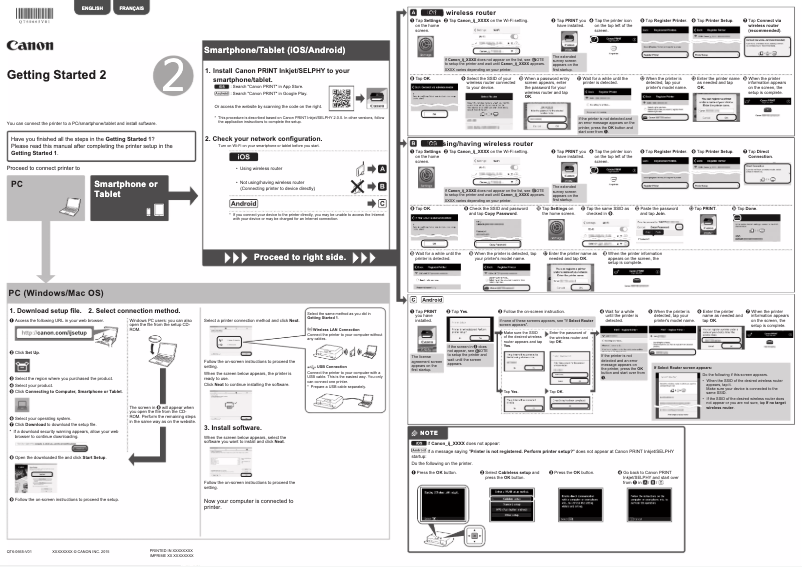
Wireless connectivity: With its built-in Wi-Fi connection, the MG5740 allows for easy printing from various devices such as computers, tablets, and smartphones, without the constraints of cables.
Ink-saving: This model offers automatic double-sided printing, helping to reduce paper and ink consumption, which is beneficial for the environment.
Compact design: Its sleek and space-saving design makes it easy to integrate into any workspace while maintaining optimal functionality.
Disadvantages
Slow printing: The Canon Pixma MG5740 may exhibit relatively slow printing speeds for documents, which can be frustrating for users with quick needs.
Connectivity instability: Although the wireless connection is convenient, it can sometimes be unstable, leading to difficulties when printing from different devices.
Ink consumption: Ink cartridges can deplete quickly, which may increase long-term usage costs.
Bulkiness: This model can be cumbersome in small spaces, complicating its integration into a home office.
Noise level: During printing, the noise level can be relatively high, which may be disruptive in a quiet environment.


