

Manual of product PIXMA MX391
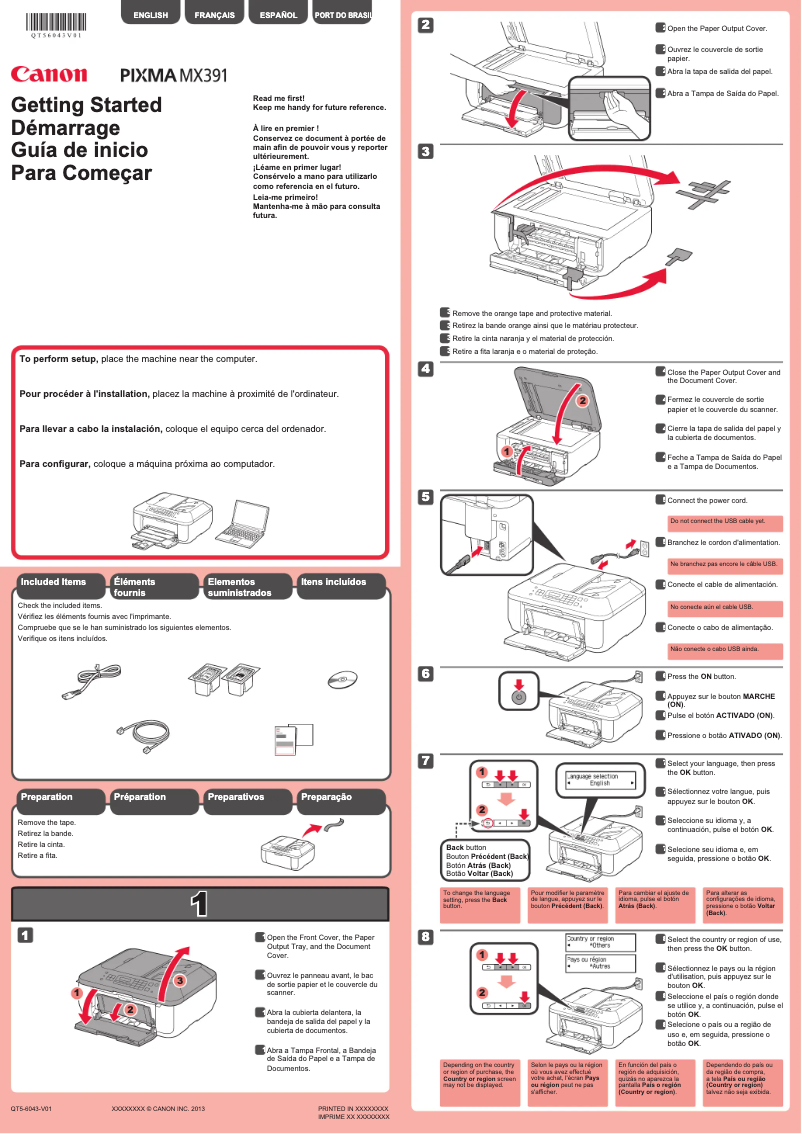
Editorial note
The Canon PIXMA MX391 is a multifunction printer that stands out for its exceptional print quality, delivering clear documents and vibrant images thanks to Canon's advanced technology. Its versatility allows not only printing but also scanning, copying, and faxing, making it an excellent choice for home offices and small businesses. Additionally, the printer proves easy to use, even for those who are not familiar with technology, thanks to a clear user manual. However, some drawbacks should be considered. The color printing speed can be relatively slow, which may frustrate users who need speed. Furthermore, ink consumption is high, which can lead to higher operating costs in the long run. Wireless connectivity, while useful, can sometimes be unstable, and the paper tray has a limited capacity, requiring frequent refills. Finally, the absence of certain advanced features, such as automatic duplex printing, may disappoint those looking for a complete multifunction printer. In terms of scoring, the user experience is very positive with a score of 85, while overall performance receives a score of 70. The functional design is rated at 75, although it may seem bulky to some. The value for money is average with a score of 65 due to ink costs. The versatility of features is appreciated, but some limitations are noted with a score of 70. Canon's support is rated good, with a score of 80, while the brand's robustness, with a score of 75, inspires confidence in the device's durability. In summary, the Canon PIXMA MX391 is a solid choice for those seeking a quality multifunction printer, but users should be aware of its limitations in terms of speed and operating costs.Score details
User experience
The user experience is overall positive due to the ease of use and a clear manual, making setup easy even for beginners.
Performance
The performance is satisfactory for document printing, but the color printing speed can be a drawback for those seeking quickness.
Design
The design is functional and suitable for a home office, although the printer may seem bulky to some users.
Value for money
Although the initial cost is reasonable, the high ink consumption can increase long-term operating costs.
Features
The versatility of the printer is an asset with its printing, scanning, copying, and faxing functions, but the lack of certain advanced features may disappoint.
Support
Canon provides good support, with accessible documentation, although wireless connectivity can sometimes pose issues.
Robustness
The Canon brand is known for its durability, which inspires confidence in the printer's longevity.
Advantages
High-quality prints.
Multifunction: print, scan, copy, fax.
Simple and intuitive setup.
Built-in energy saving.
Connectivity for mobile devices.
Reliable and durable brand.
Disadvantages
Slow and not very fast color printing.
High ink consumption, increased costs.
Sometimes unstable wireless connectivity.
Limited capacity paper tray.
Absence of automatic duplex printing.
Technical Specifications PIXMA MX391
General Information
-
ModelPIXMA MX391
-
Brand
-
Category
-
Type
-
SKU1610998
-
MPN1610998
Frequently Asked Questions
What is the recommended method for removing paper jammed in the printer?
Why is my printer not recognizing the original cartridges?
What are the possible reasons for poor print quality?
How does a laser printer differ from an inkjet printer?
Why does my inkjet printer leave black streaks on prints?
What does the acronym DPI mean?
Is the manual for the Canon PIXMA MX391 available in French?
Similar products


More product categories from brand Canon
Computers and accessories Canon
Camera and photography Canon
Other Canon
Audio Canon
Software Canon
Interior Canon
More product types from brand Canon





Presentation of product PIXMA MX391 specifications from brand Canon
General Information
The Canon PIXMA MX391 model is a multifunction printer from the Canon brand, known for its commitment to quality and innovation in the printing device sector. This model is designed to deliver exceptional performance, combining efficiency and ease of use.
Advantages
Among the strengths of the Canon PIXMA MX391, there is a remarkable print quality, thanks to its advanced technology that produces sharp texts and vibrant images. As a multifunction printer, it allows you to print, scan, copy, and fax, making it a versatile tool ideal for home offices and small businesses.
The device is easy to handle due to a clear user manual, making it accessible even to those who are not very familiar with printing technologies. Additionally, the Canon PIXMA MX391 is designed to be energy-efficient, thus helping to reduce operating costs while minimizing its environmental impact.
In terms of connectivity, this printer offers various options that allow for easy printing from different devices, which is particularly advantageous for users on the go. Finally, Canon's reputation for durability and reliability assures users of their confidence in the longevity and quality of their prints.
Disadvantages
However, the Canon PIXMA MX391 also has some drawbacks. It can be relatively slow when printing color documents, which may not suit users with fast printing needs. Additionally, this printer tends to consume a lot of ink, leading to higher operating costs in the long run.
Wireless connectivity can sometimes be unstable, making remote use frustrating for some users. Furthermore, the paper tray has a limited capacity, requiring frequent refills during high-volume printing. Finally, the lack of certain advanced features, such as automatic duplex printing, may disappoint those looking for a complete multifunction printer.


