

Manual of product Pixma MX722
Editorial note
The Canon Pixma MX722 printer stands out for its superior print quality, whether for text documents or photos, thanks to its advanced technology. Its versatility as an all-in-one printer, offering printing, scanning, copying, and faxing features, makes it an ideal choice for both home and professional use. Additionally, wireless connectivity allows for easy printing from mobile devices and computers, making the user experience smoother. However, some points deserve mention. The print speed is relatively slow compared to other laser models, which can be a drawback for users with frequent printing needs. Ink costs can also be high, especially for those who often print in color. The setup interface may pose difficulties for some users, making the initial setup more complex. Furthermore, its size can be cumbersome in small spaces, and connectivity issues have been reported, particularly when using Wi-Fi. In summary, while the Canon Pixma MX722 offers excellent performance and a wide range of features, it is important to consider ink costs and potential connectivity issues, as well as its bulkiness, before making a choice.Score details
User experience
The user experience is generally satisfactory, but the complex configuration interface can be a barrier for some users.
Performance
The printing performance is excellent for quality documents, but the printing speed is lower than that of laser models.
Design
The design is functional but can be bulky for small spaces, which limits its appeal in confined environments.
Value for money
Although the print quality is high, ink costs can increase the total cost of ownership, which is a point to consider.
Robustness
The printer is well-built and durable, making it a good choice for regular use.
Features
The multiple features, such as printing, scanning, copying, and faxing, add great value to this device.
Support
Technical support could be improved, as some users have reported connectivity issues, particularly with Wi-Fi.
Documentation
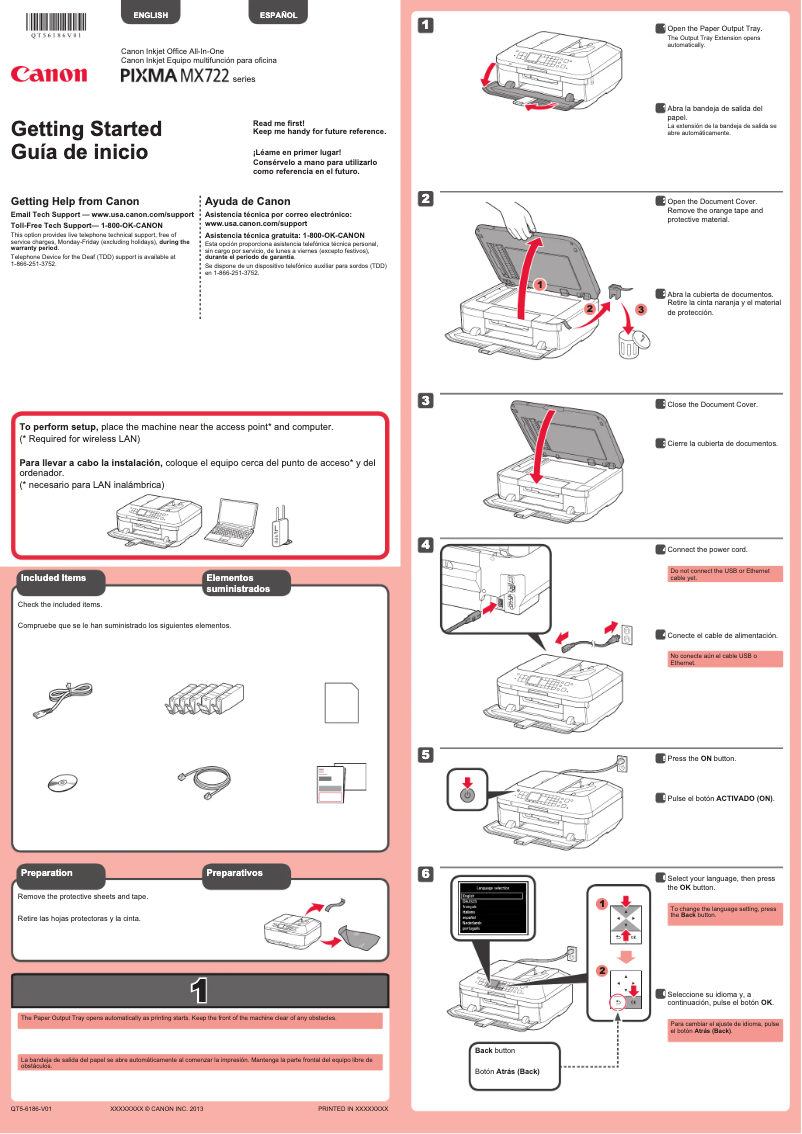
The user manual is available, but it could be more detailed to facilitate the setup and use of advanced features.
Advantages
High-quality printing, documents and photos.
All-in-one features: printing, scanning, copying, faxing.
Wi-Fi connectivity for wireless printing.
Ink savings with separate cartridges.
Automatic double-sided scanning and copying.
Disadvantages
Slow printing speed compared to laser
High ink costs, especially for color
Complex setup for some users
Bulky size for small spaces
Frequent Wi-Fi connectivity issues
Technical Specifications Pixma MX722
General Information
-
ModelPIXMA MX722
-
Brand
-
Category
-
Type
-
SKU1663148
-
MPN1663148
Frequently Asked Questions
What is the recommended method for removing paper jammed in the printer?
Why is my printer refusing to accept original cartridges?
What are the possible reasons for poor print quality?
What is the difference between a laser printer and an inkjet printer?
Why is my inkjet printer producing black lines on my prints?
What does the acronym DPI mean?
Is the manual for the Canon Pixma MX722 available in French?
Similar products


More product categories from brand Canon
Computers and accessories Canon
Camera and photography Canon
Other Canon
Audio Canon
Software Canon
Interior Canon
More product types from brand Canon





Presentation of product Pixma MX722 specifications from brand Canon
General Information
The Canon Pixma MX722 is a multifunction printer from the Canon brand, known for its commitment to excellence and innovation in the home appliance sector. This model, the Pixma MX722, is designed to deliver high-level performance, thus meeting the varied needs of users in both domestic and professional settings.
Advantages
This printer stands out for its superior print quality, capable of producing text documents and photos with remarkable clarity, thanks to advanced printing technology. Additionally, its versatility is a major asset, as it combines several functions such as printing, scanning, copying, and faxing, making it particularly suitable for various work environments.
The wireless connectivity of the Canon Pixma MX722 facilitates remote printing, allowing users to easily connect to their mobile devices and computers via Wi-Fi, without the need for cumbersome cables. In terms of ink savings, this printer uses separate cartridges, allowing users to replace only the exhausted color, which helps reduce printing costs. Finally, the document management features, such as automatic duplex scanning and copying, enhance efficiency when processing documents.
Disadvantages
However, the Canon Pixma MX722 has some drawbacks. Its print speed may be lower than that of some laser printer models, which can be a disadvantage for users with frequent or urgent printing needs. Additionally, ink costs can be high, especially for those who regularly print in color, thus increasing the total cost of ownership.
Some users may also find that the setup interface and connectivity options are complex, making the initial setup somewhat difficult, especially for those who are not very tech-savvy. Furthermore, the size of the printer can be bulky, which poses a problem for small spaces. Finally, connectivity issues have been reported, particularly when using the Wi-Fi function, which can lead to frustrations during remote printing.


