

Manual of product Pixma Pro-100S
Editorial note
The Canon Pixma Pro-100S stands out for its exceptional print quality, achieving a maximum resolution of 4800 x 2400 DPI, making it an ideal choice for professionals and artists. Its borderless printing capability allows for exact-sized documents with a polished aesthetic finish. Additionally, compatibility with various paper formats, including A3+, offers valuable flexibility for different printing projects. The user experience is enhanced by an integrated screen that makes navigation intuitive. Connectivity is also improved with Wi-Fi and Ethernet, although the lack of Bluetooth may limit some wireless connection options. However, it is important to note a few drawbacks. The Canon Pixma Pro-100S can be relatively bulky, making it less suitable for tight workspaces. Furthermore, ink consumption can be high, especially for photo-quality prints, leading to additional costs for users. Its weight of approximately 19.7 kg complicates moving and installation, and the provided software may require a learning curve, which could pose challenges for less experienced users. In summary, the Canon Pixma Pro-100S is a solid choice for those seeking superior print quality and flexibility in paper formats, but it is essential to consider its bulkiness and ink consumption before making a purchase.Score details
User experience
The user experience is positive thanks to a built-in screen that facilitates navigation and an intuitive use of the printer.
Performance
The print quality is exceptional, with a maximum resolution of 4800 x 2400 DPI, ideal for professional and artistic prints.
Features
The Canon Pixma Pro-100S offers interesting features, including borderless printing capability and compatibility with various paper sizes, including A3+.
Design
Although the design is modern, the printer can be relatively bulky, making it less suitable for tight workspaces.
Value for money
Ink consumption can be high, especially for photo-quality prints, leading to additional costs for users.
connectivity
Connectivity is improved with Wi-Fi and Ethernet, but the lack of Bluetooth limits wireless connection options for some users.
Robustness
The weight of the printer, which is about 19.7 kg, can make moving and setting it up more difficult.
Usability
The provided software may require a learning curve, which could pose challenges for less experienced users.
Advantages
High-quality printing up to 4800 x 2400 DPI.
Borderless printing for a polished finish.
Compatible with various formats, including A3+.
Wi-Fi and Ethernet connectivity for wireless printing.
Built-in screen for intuitive navigation.
Disadvantages
Bulky for small workspaces.
High ink consumption for photos.
No Bluetooth connectivity available.
Heavy weight, difficult to move.
Complex software for novice users.
Technical Specifications Pixma Pro-100S
General Information
-
ModelPIXMA PRO-100S
-
Brand
-
Category
-
Type
-
SKU794436
-
MPN794436
Print speed
-
Maximum resolution4800 x 2400 DPI
-
Printing technologyInkjet
-
Borderless printingYes
Paper management
-
Maximum print formatA3+ (330 x 483 mm)
-
Borderless print size10x15, 25x30, A3, A3+, A4, Letter
-
ISO, Format Series A (A0...A9)A3, A3+, A4, A5
-
ISO, Formats Series-B (B0...B9)B4, B5
-
Print format10 x 15, 13 x 18, 20 x 25, 25 x 30 cm
Input and output capacity
-
Total power capacity151 sheets
-
Paper feed typePaper bin
Features
-
Built-in screenNo
-
Printing colorsBlack
-
Product colorCyan
-
Number of print cartridgesGrey
-
Market positionLight grey
-
Magenta
-
Photo cyan
-
Photo magenta
-
Yellow
-
Gray
-
8
-
Professional
Connectivity
-
Direct printing-
-
USB portYes
-
USB connectorUSB Type-B
-
USB portYes
-
Quantity of USB 2.0 Ports1
Network
-
WifiYes
-
WifiYes
-
BluetoothNo
Representation / realization
-
Built-in memory card reader-
-
Sound pressure level (impression)38.5 dB
Packaging information
-
Provided softwarePrintStudioPro
-
Colour Management Tool Pro
-
My Image Garden w/ Full HD Movie Print
-
Easy-WebPrint EX
-
Quick Menu
Weight and dimensions
-
Width689 mm
-
Depth385 mm
-
Height215 mm
-
Weight19700 g
Minimum system requirements
-
Minimal disk space1500 MB
-
Support for the Windows operating system
-
Support for the Mac operating systemWindows 7 Enterprise
-
Support for other operating systemsWindows 7 Enterprise x64
-
Windows 7 Home Basic
-
Windows 7 Home Basic x64
-
Windows 7 Home Premium
-
Windows 7 Home Premium x64
-
Windows 7 Professional
-
Windows 7 Professional x64
-
Windows 7 Starter
-
Windows 7 Starter x64
-
Windows 7 Ultimate
-
Windows 7 Ultimate x64
-
Windows 8
-
Windows 8 Enterprise
-
Windows 8 Enterprise x64
-
Windows 8 Pro
-
Windows 8 Pro x64
-
Windows 8 x64
-
Windows 8.1
-
Windows 8.1 Enterprise
-
Windows 8.1 Enterprise x64
-
Windows 8.1 Pro
-
Windows 8.1 Pro x64
-
Windows 8.1 x64
-
Windows Vista Business
-
Windows Vista Business x64
-
Windows Vista Enterprise
-
Windows Vista Enterprise x64
-
Windows Vista Home Basic
-
Windows Vista Home Basic x64
-
Windows Vista Home Premium
-
Windows Vista Home Premium x64
-
Windows Vista Ultimate
-
Windows Vista Ultimate x64
-
Windows XP Home
-
Windows XP Home x64
-
Windows XP Professional
-
Windows XP Professional x64
-
-
Mac OS X 10.7 Lion
-
Mac OS X 10.8 Mountain Lion
-
Mac OS X 10.9 Mavericks
-
-
Android
-
iOS
Power
-
Power supplySector
-
Average power consumption in Print mode19 W
-
AC input voltage100 - 240 V
-
AC input frequency50 - 60 Hz
-
Energy consumption (standby mode)2.6 W
-
Energy consumption (in standby mode)0.4 W
Environmental conditions
-
Operating temperature5 - 35 °C
-
Operating relative humidity (H-H)10 - 90 %
Other features
-
CD/DVD PrintingYes
-
Wireless technologyWLAN 802.11b/g/n
-
CD/DVD PrintingYes
Frequently Asked Questions
What is the weight of the Canon Pixma Pro-100S printer?
What is the best method to remove paper jammed in the printer?
Why is my printer not accepting original cartridges?
Why is the quality of my prints poor?
What is the difference between a laser printer and an inkjet printer?
Why does my inkjet printer leave black streaks on prints?
What does the acronym DPI mean?
How many cartridges can be installed in the Canon Pixma Pro-100S?
What is the height of the Canon Pixma Pro-100S printer?
What is the width of the Canon Pixma Pro-100S printer?
What is the depth of the Canon Pixma Pro-100S printer?
Is the manual for the Canon Pixma Pro-100S available in French?
Similar products


More product categories from brand Canon
Computers and accessories Canon
Camera and photography Canon
Other Canon
Audio Canon
Software Canon
Interior Canon
More product types from brand Canon





Presentation of product Pixma Pro-100S specifications from brand Canon
General Information
The Canon Pixma Pro-100S is a printer from the Canon brand, known for its excellence and innovation in the field of printing devices. This model, identified by the number 9984B009, is designed to deliver high-level performance and an enhanced user experience. The EAN code, which ensures unique product identification, is 4549292021950, 4058154044414, 4549292021981.
Print Speed
With a maximum resolution of 4800 x 2400 DPI, the Canon Pixma Pro-100S ensures prints of remarkable clarity, suitable for both professional needs and personal projects. Thanks to its inkjet printing technology, it guarantees precise and high-quality results. Additionally, this printer allows borderless printing, providing documents in the exact format without white borders for a neat finish.
Paper Management
The maximum print size supported by the Canon Pixma Pro-100S is A3+ (330 x 483 mm), ideal for large documents. It can print borderless in various formats, including 10x15, 25x30, A3, A4, and Letter. This capability allows for great flexibility and compatibility with standard paper sizes such as A4 and A5, as well as B4 and B5 formats.
Input and Output Capacity
The Canon Pixma Pro-100S has a paper feed capacity of 151 sheets, allowing it to handle large print volumes without interruption. It uses a paper tray feed system, optimizing paper management to effectively meet your needs.
Features
Equipped with a built-in screen, the Canon Pixma Pro-100S offers an intuitive user interface. Its color printing palette includes black, cyan, gray, magenta, yellow, and other shades, ensuring vibrant and accurate color prints. With 8 cartridges, it is designed to deliver optimal quality, meeting the demands of image professionals.
Connectivity
The Canon Pixma Pro-100S allows for direct printing, making it easy to print from various devices. It is compatible with PictBridge technology, enabling direct printing from a camera. The USB Type-B connector ensures a fast connection for data transfer, and it features a USB port for simplified access.
Network
This printer is equipped with Ethernet/LAN connectivity and Wi-Fi, ensuring fast and reliable wireless printing. However, it does not have Bluetooth connectivity, which may limit some connection options for users who prefer this method.
Environmental Conditions
The Canon Pixma Pro-100S operates efficiently within a temperature range of 5 to 35 °C and supports a relative humidity of 10 to 90 %, allowing it to adapt to various work environments.
Weight and Dimensions
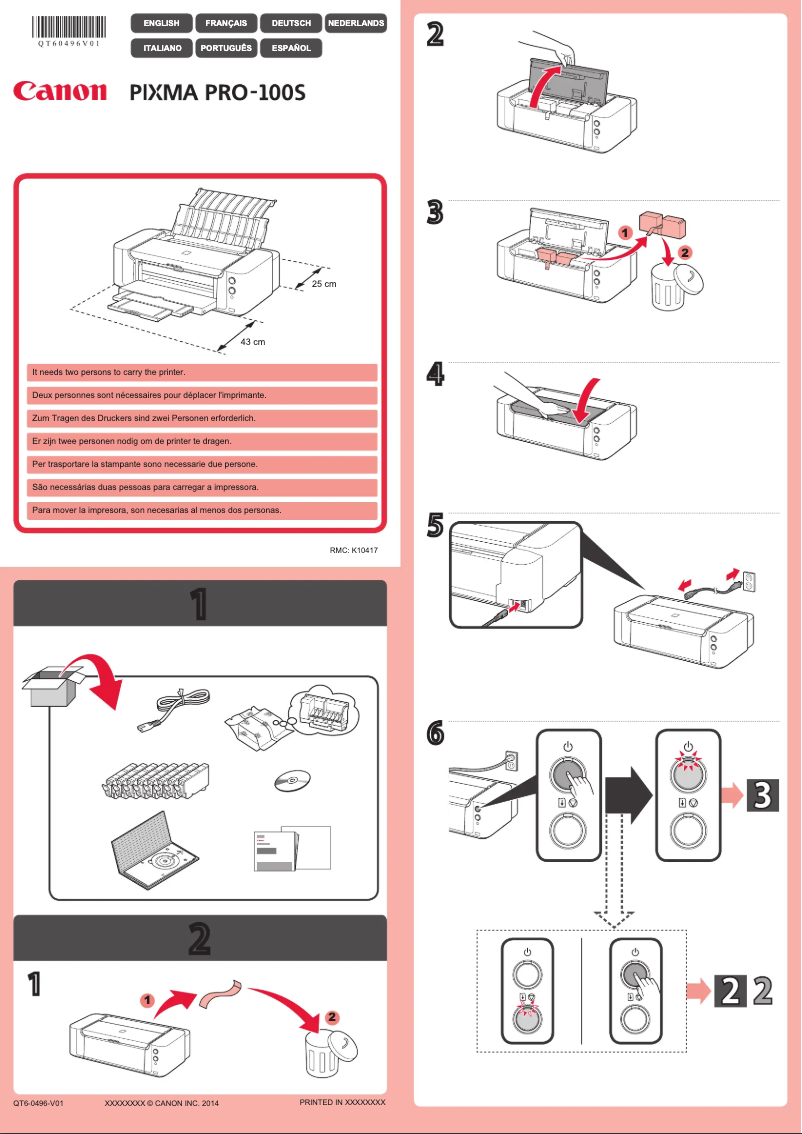
With dimensions of 689 mm in width, 385 mm in depth, and 215 mm in height, the Canon Pixma Pro-100S is designed to fit easily into workspaces. Its weight of 19.7 kg may make it a bit more difficult to move.
Minimum System Requirements
The Canon Pixma Pro-100S requires a minimum disk space of 1500 Mo for optimal operation. It is compatible with various operating systems, including Windows and Mac, as well as mobile platforms like Android and iOS, ensuring broad compatibility.
Power
This printer operates on mains power with an approximate power consumption of 19 W in print mode. It supports an input voltage of 100 - 240 V and a frequency of 50 - 60 Hz, while offering reduced energy consumption in standby mode, contributing to energy savings.
Other Features
The Canon Pixma Pro-100S is equipped with indicator lights to visualize its operating status. Its WLAN 802.11b/g/n wireless technology allows for simplified connectivity, and it also offers the ability to print directly onto CD/DVD discs, adding a personalized dimension to your projects.


