

Manuals of product WG7240
Editorial note
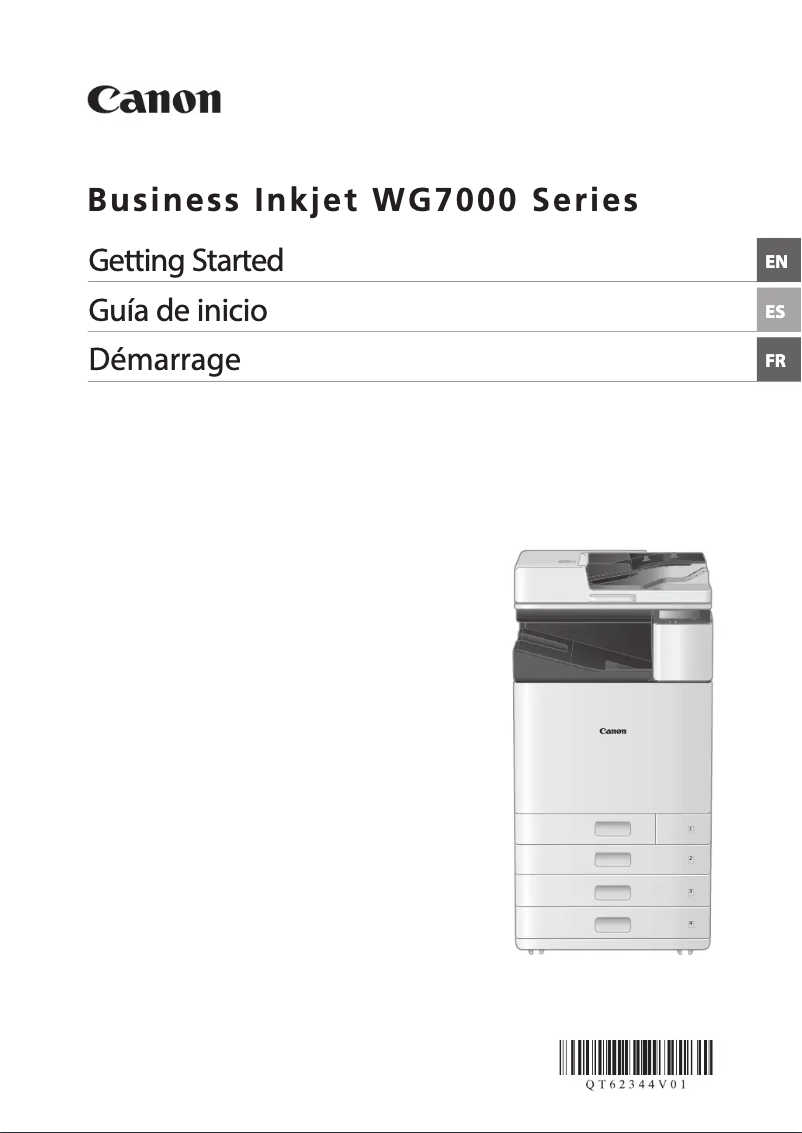
The Canon WG7240 printer stands out for its impressive performance, offering a printing speed of up to 70 pages per minute in color and a maximum resolution of 1200 x 1200 DPI. These features make it an ideal choice for intensive professional use, ensuring high-quality and efficient prints. Among its advantages, the built-in duplex printing functionality is also noted, which helps reduce paper consumption while optimizing resources. The model offers flexibility of use thanks to its multifunction tray, capable of handling various types of media, from plain paper to labels. Additionally, the quality of the documentation provided is excellent, facilitating the handling and use of the device. However, the WG7240 has some drawbacks. The lack of faxing and duplex scanning capabilities may limit its effectiveness for some users. Furthermore, the copier does not support automatic duplex copying, which can slow down the printing process and require manual intervention. The output capacity of 250 sheets may also be insufficient for users with high printing needs, leading to frequent interventions to empty the output tray. Finally, the absence of Wi-Fi connectivity can be a disadvantage in modern office environments. In summary, the Canon WG7240 is a high-performing and reliable printer, well-suited for professionals seeking quality and speed. However, some limitations may not be suitable for all users, particularly those requiring greater versatility.Score details
User experience
The user experience is generally positive thanks to an intuitive interface and well-thought-out features, although the lack of faxing and duplex scanning may be a drawback for some users.
Performance
The printing performance is excellent with speeds of up to 70 ppm in color and a resolution of 1200 x 1200 DPI, suitable for intensive professional use.
Design
The design is modern and functional, but the weight and dimensions may pose integration issues in some office spaces.
Value for money
Although the product offers good performance, the output capacity of 250 sheets may be insufficient for high-volume printing users, which could require frequent interventions.
Features
The product has useful features like duplex printing, but the lack of duplex scanning and faxing limits its versatility.
Usability
Ease of use is enhanced by the presence of a multifunction tray, but limitations in certain features may require additional effort from users.
Support
The product comes with comprehensive documentation, but the lack of Wi-Fi connectivity could be a drawback in modern environments.
Documentation
The provided documentation is thorough and helps to understand the features and use of the printer.
Advantages
Fast printing up to 70 ppm color.
Print quality 1200 x 1200 DPI.
Built-in duplex printing.
Accurate color scanning and copying.
Multi-purpose tray for various media.
Disadvantages
No fax function available
No duplex scanning
No automatic duplex copying
Output capacity limited to 250 sheets
No Wi-Fi connectivity
Technical Specifications WG7240
General Information
-
ModelWG7240
-
Brand
-
Category
-
Type
-
SKU1663128
-
MPN1663128
Print speed
-
Printing technologyInkjet
-
PrintingColor printing
-
Double-sided printingYes
-
Maximum resolution1200 x 1200 DPI
-
Print speed (black, normal quality, A4/US Letter)40 ppm
-
Print speed (color, normal quality, A4/US Letter)70 ppm
-
Duplex printing speed (Black, normal quality, A4/US Letter)20 ppm
Copier
-
Duplex copy-
-
CopySimple copy
-
Max. resolution of copies600 x 600 DPI
-
Copy speed (normal quality, black, A4)40 cpm
-
Release time of the first print (black, normal)5.8 s
-
Maximum number of copies999 copies
-
Resizing copy25 - 400 %
-
Copy Function N in 1Yes
-
Copy Function N in 1Yes
-
All-in-one function (N=)4
Digitization
-
DigitizationColor scanning
-
Double-sided scanningYes
-
Type of scannerFlatbed and ADF scanner
-
Scanning technologyDual CIS
-
Optical scanning resolution600 x 600 DPI
-
Maximum scanning resolution9600 x 9600 DPI
-
Scan toImage
-
Scanning speed (color)40 ppm
-
Duplex scanning speed (color)65 ppm
-
Supported image formatsJPEG, TIFF
-
Support for text formatsPDF
-
Maximum scan area297 x 431 mm
Fax
-
FaxNo
Features
-
Service cycle (Maximum)100,000 pages per month
-
Number of print cartridges1
-
Printing colorsBlack, Cyan, Magenta, Yellow
-
Languages of the page descriptionJPEG, PCL 6, PDF, PS3, TIFF, UFRII, XPS
-
Printer fontsPCL, PostScript, Windows
-
Replacement cartridgesPGI-7200 Series XXL Black/Cyan/Magenta/Yellow
Input and output capacity
-
Maximum output capacity250 sheets
-
Total power capacity- sheets
-
Total number of power supply units1
-
Automatic Document Feeder (ADF)Yes
-
Automatic Document Feeder (ADF)Yes
-
Maximum output capacity250 sheets
Paper management
-
ISO, Format Series A (A0...A9)A3
-
ISO, Format Series A (A0...A9)A3
-
Type of paper tray supportBond paper
-
Envelope sizesEnvelopes
-
Non-ISO print support sizesLabels
-
Photo paper formatsMatte paper
-
Photo paper sizesPlain paper
-
Recycled paper
-
Thick paper
-
Thin paper
-
10
-
Ledger (media size)
-
Letter (media size)
-
Tabloid (media size)
-
10x15
-
12.5x17.5
-
20x25
-
25x30 cm
-
4x6
-
5x7
-
8x10
-
8.5x11
-
10x12
-
13x19
Connectivity
-
USB portYes
-
USB portYes
-
Quantity of USB 2.0 Ports2
Network
-
WifiNo
-
Ethernet/LANYes
-
Wiring technology10/100/1000Base-T(X)
-
LAN Ethernet: data transfer rate1000 Mbit/s
-
Security-supported algorithm64-bit WEP, 128-bit WEP, AES, AES-CCMP, TKIP, WPA-PSK, WPA2-PSK
-
Mobile printing technologiesNot supported
Representation / realization
-
Built-in memory card reader-
-
Internal memory2048 MB
-
Processor familyARM Cortex-A9
-
Integrated into the processorYes
-
Number of processor cores2
-
Processor frequency800 MHz
Design
-
Product colorWhite
-
Market positionProfessional
-
Built-in screenYes
-
ScreenLCD
-
Screen size5 "
-
Order typeTouchscreen
Power
-
Electricity consumption (average operation)- W
-
Consumption (max)300 W
-
Energy consumption (in standby mode)1.9 W
-
Energy consumption (in standby mode)1.9 W
-
Electricity consumption (stop)0.1 W
-
Energy Star, typical electrical consumption (TEC)1.25 kWh/week
-
AC input voltage100 - 240 V
-
AC input frequency50 - 60 Hz
Environmental conditions
-
Operating relative humidity (H-H)20 - 85 %
-
Operating temperature15 - 30 °C
Sustainability
-
Sustainability certificatesEPEAT Gold
-
ENERGY STAR
Minimum system requirements
-
Support for the Windows operating systemWindows 10
-
Support for the Mac operating systemWindows 7
-
Support for the Linux operating systemWindows 8.1
-
Support for the server operating system
-
Mac OS X 10.10 Yosemite
-
Mac OS X 10.11 El Capitan
-
Mac OS X 10.12 Sierra
-
Mac OS X 10.13 High Sierra
-
Mac OS X 10.8 Mountain Lion
-
Mac OS X 10.9 Mavericks
-
-
Fedora 26
-
Fedora 27
-
Ubuntu 17.10
-
-
Windows Server 2008
-
Windows Server 2012
-
Windows Server 2012 R2
-
Windows Server 2016
Weight and dimensions
-
Width561.34 mm
-
Depth591.82 mm
-
Height881.38 mm
-
Weight81238 g
Packaging contents
-
Included cartridge capacity (black)20000 pages
-
Included cartridge capacity (CMY)16500 pages
-
Cartridge(s) includedYes
-
Provided softwareWindows: Canon Driver Installer, V3 Printer Drivers (Canon Business IJ UFR II Printer Driver, Canon Business IJ PCL6 Printer Driver, Canon Business IJ PS3 Driver), V4 Printer Drivers (Canon WG7000 Series LIPSLX/UFR II V4 Printer Driver), Composite Driver - Canon WG Driver, Canon PostScript Printer Description File, Canon Business IJ Fax Driver, Canon ScanGear WG Scanner Driver for Windows, WG Scan Utility; Mac: Canon MF Printer Driver & Utilities for Mac, Canon PostScript Printer Description File, Canon Fax Driver for Macintosh, Canon ScanGear MF Scanner Driver for Macintosh, MF Scan Utility; Linux: PDF Printer Driver for Linux
-
Cables includedAC, Phone
Frequently Asked Questions
What is the weight of the Canon WG7240?
What is the recommended method for removing paper jammed in the printer?
Why does my printer not recognize original cartridges?
What can cause poor print quality?
What is the difference between a laser printer and an inkjet printer?
Why does my inkjet printer leave black streaks on prints?
What does the acronym DPI mean?
How many cartridges can be installed in the Canon WG7240?
What is the size of the screen on the Canon WG7240?
What is the height of the Canon WG7240?
What is the width of the Canon WG7240?
What is the depth of the Canon WG7240?
Is the manual for the Canon WG7240 available in French?
Similar products


More product categories from brand Canon
Computers and accessories Canon
Camera and photography Canon
Other Canon
Audio Canon
Software Canon
Interior Canon
More product types from brand Canon





Presentation of product WG7240 specifications from brand Canon
General Information
The Canon WG7240 is a printer from the Canon brand, known for its high-quality products and technological innovation in the office equipment sector. This model, identified by the code WG7240 | 2721C002, is designed to deliver optimal performance and an enhanced user experience. Its EAN code, 0013803314328, allows for unique identification in the distribution system.
Print Speed
Equipped with inkjet printing technology, the Canon WG7240 ensures remarkable print quality with precise results. It offers color printing, allowing for the production of documents and images with vibrant and true-to-life colors. With the built-in duplex printing function, it optimizes paper usage, thereby reducing waste. With a maximum resolution of 1200 x 1200 DPI, it guarantees prints of exceptional clarity. The print speed reaches 40 pages per minute in black and 70 pages per minute in color, making it suitable for intensive professional use. In duplex mode, the speed is 20 pages per minute in black.
Copier
The Canon WG7240 offers a color copying function, allowing for faithful reproduction of documents. However, it does not support automatic duplex copying, which may slow down the copying process. The maximum resolution for copies is 600 x 600 DPI, ensuring satisfactory print quality. With a speed of 40 copies per minute in black, it effectively meets daily needs. It can produce up to 999 copies and allows resizing from 25 to 400% according to requirements. Additionally, it includes practical functions such as ID card copying and the ability to make multiple copies in a single operation.
Scanning
Color scanning is also a feature integrated into the Canon WG7240, allowing for accurate reproductions of documents. However, it does not include duplex scanning, which could extend the scanning time for multi-page documents. Its flatbed scanner and ADF (Automatic Document Feeder) facilitate the scanning of multiple documents at once. With Dual CIS scanning technology, it guarantees optimal image quality at a resolution of 600 x 600 DPI, as well as a maximum resolution of 9600 x 9600 DPI. It supports various formats, including JPEG, TIFF, and PDF, offering flexibility and adaptability to scanning needs.
Fax
The Canon WG7240 does not have a fax function, which may be a disadvantage for users needing to send or receive documents by fax.
Features
The maximum service cycle of the Canon WG7240 is 100,000 pages per month, suitable for high-demand environments. It uses a single print cartridge, providing quality printing with vibrant colors (black, cyan, magenta, yellow). The available fonts include PCL, PostScript, and Windows, ensuring diverse print quality. The replacement cartridges belong to the PGI-7200 series, ensuring optimal performance and print quality.
Input and Output Capacity
The output capacity of the Canon WG7240 is 250 sheets, suitable for moderate use. It has a multifunction tray, allowing for the handling of different types of media, and an automatic document feeder (ADF) to simplify scanning and copying tasks.
Paper Management
Compatible with paper sizes up to A3, the Canon WG7240 can handle a variety of media, including plain paper, labels, and envelopes. It supports various envelope sizes and non-standard formats for increased flexibility.
Connectivity
The Canon WG7240 offers direct printing and has two USB 2.0 ports for quick connection to various devices. However, it does not support Wi-Fi, which may limit wireless connectivity options.
Network
For network connectivity, the Canon WG7240 is equipped with an Ethernet/LAN port, ensuring a stable connection. Its cabling technology (10/100/1000Base-T(X)) ensures efficient data transfer with a rate of 1000 Mbit/s. It also supports multiple security algorithms to protect data.
Representation / Performance
With an internal memory of 2048 MB and an ARM Cortex-A9 processor at 800 MHz, the Canon WG7240 ensures smooth task execution. Although it does not have a built-in memory card reader, it is designed to deliver optimal performance.
Design
The Canon WG7240 features a white finish, giving it a modern look. Primarily aimed at professionals, it includes a 5-inch LCD screen to facilitate its use. The touch control simplifies interactions with the device.
Power
Its maximum power consumption is 300 W, while in standby mode, it only rises to 1.9 W, allowing for energy savings. The AC input voltage is 100-240 V, suitable for standard electrical systems.
Environmental Conditions
The Canon WG7240 operates efficiently in a relative humidity of 20 to 85% and at an ambient temperature of 15 to 30 °C, ensuring reliable performance in various environments.
Durability
Certified EPEAT Gold and ENERGY STAR, the Canon WG7240 meets high standards for energy efficiency and environmental respect.
Minimum System Requirements
Compatible with several operating systems, including Windows (10, 7, 8.1), Mac (OS X 10.10 to 10.13), and Linux (Fedora, Ubuntu), the Canon WG7240 offers flexibility of use in different computing environments.
Weight and Dimensions
The Canon WG7240 measures 561.34 mm in width, 591.82 mm in depth, and 881.38 mm in height. Its weight of 81.238 kg allows for easy use and transport.
Package Contents
The included cartridge (black) has a capacity of 20,000 pages, while the color cartridge reaches 16,500 pages, providing an economical solution for printing. With the supplied software, users can enhance their experience and optimize the device's performance right from installation.


