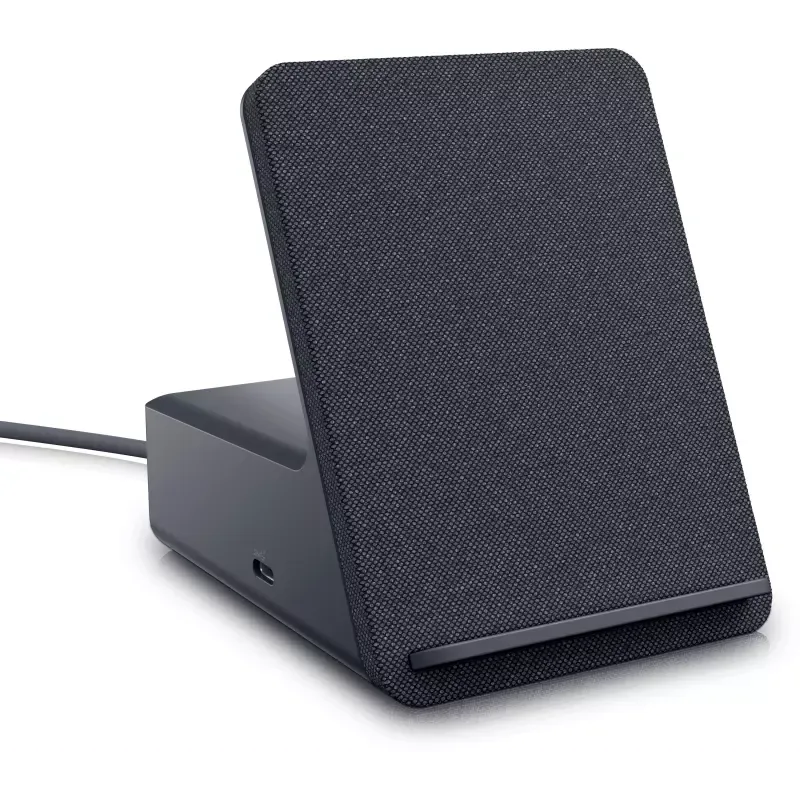

Manual of product Dual Charge Dock

Technical Specifications Dual Charge Dock
General Information
-
ModelDUAL CHARGE DOCK
-
Brand
-
Category
-
SKU1622984
-
MPN1622984
Connectivity
-
Connectivity technologyWith cable
-
Host interfaceUSB 3.2 Gen 1 (3.1 Gen 1) Type-A
-
Headset output0
-
Number of USB 3.2 Gen 1 (3.1 Gen 1) type A ports4
-
Quantity of DisplayPort interfaces1
-
Quantity of DisplayPort interfaces1
-
Quantity of DisplayPort interfaces1
-
HDMI version2.1
-
DisplayPort version1.4
-
DC InputYes
-
Microphone jack inputNo
-
Headset output0
Network
-
Ethernet/LANYes
-
Number of Ethernet LAN ports (RJ-45)1
-
LAN Ethernet: data transfer rate10,100,1000 Mbit/s
Representation / realization
-
IndicatorsYes
-
Product colorBlack
-
Built-in memory card readerNo
-
Number of supported displays2
-
Resolution (maximum numeric)7680 x 4320 pixels
Power
-
Power supply typeSector
-
Power supply130 W
-
AC input voltage100 - 240 V
-
Input current2.5 A
-
AC input frequency50 - 60 Hz
-
Output current6.67 A
-
Output voltage19.5 V
Software
-
Support for the Linux operating systemYes
-
Support for the Linux operating systemYes
Weight and dimensions
-
Weight670 g
-
Width90.5 mm
-
Depth117.4 mm
-
Height113 mm
Environmental conditions
-
Operating temperature0 - 40 °C
-
Temperature out of operation-40 - 70 °C
Logistics data
-
Harmonized System Code84733020
Similar products




More product categories from brand Dell
Computers and accessories Dell
Other Dell
Audio Dell
Phones Dell
Software Dell
Interior Dell
More product types from brand Dell


Presentation of product Dual Charge Dock specifications from brand Dell
Generalities
The product model Dell Dual Charge Dock is Dual Charge Dock | DELL-HD22Q-BB. This model ensures optimal performance and an enhanced user experience. The brand of the product Dell Dual Charge Dock is Dell. This brand is known for its quality and innovation in the field of household appliances. The EAN code of the product Dell Dual Charge Dock is 5397184718858, 5715063010365, 5715063176719, 5715063228685, 0884116434467. This code allows for the unique identification of the product in the distribution system.
Network
Does the product Dell Dual Charge Dock have Ethernet/LAN? Oui. This specification determines the network connectivity of the product. The data transfer rate of the product Dell Dual Charge Dock is 10,100,1000 Mbit/s. This rate ensures a fast and efficient connection for your networking needs. The number of Ethernet LAN (RJ-45) ports of the product Dell Dual Charge Dock is 1. These ports provide a stable and fast network connection for your devices.
Representation / realization
Does the product Dell Dual Charge Dock have indicators? Oui. These indicators allow you to visualize the operating status of the device. The color of the product Dell Dual Charge Dock is Noir. This shade gives it a modern and elegant look. The number of supported displays for the product Dell Dual Charge Dock is 2. This product provides an optimal visual experience by supporting a display. Does the Dell Dual Charge Dock have a built-in memory card reader? Non. This feature allows you to read and write data directly on memory cards, providing a convenient and efficient storage solution. The product Dell Dual Charge Dock has a maximum resolution of 7680 x 4320 pixels. This feature ensures exceptional image quality for an immersive viewing experience.
Connectivity
The product Dell Dual Charge Dock features a Avec fil connectivity technology. This functionality allows for practical and flexible use without the constraints of cables. The product host interface type Dell Dual Charge Dock is wireless. This interface allows for a convenient and flexible connection, without the constraints of cables. The number of USB 2.0 ports on the Dell Dual Charge Dock is 0. These ports allow for a fast and efficient connection for your devices. The product Dell Dual Charge Dock has 0 Type A USB 3.2 Gen 1 (3.1 Gen 1) ports. This specification allows for the connection of various devices with optimal transfer speed. The product Dell Dual Charge Dock has 0 USB Type-C 3.2 Gen 1 (3.1 Gen 1) ports. This means there is no additional connectivity via this type of port. The number of HDMI ports on the Dell Dual Charge Dock is 1. This detail is essential for determining compatibility with your multimedia devices. The number of DisplayPort interfaces of the product Dell Dual Charge Dock is 1. This specification allows for optimal connectivity with various devices. The product Dell Dual Charge Dock has an HDMI Version 2.1. This specification ensures optimal connectivity for your multimedia devices. The product Dell Dual Charge Dock has DisplayPort version 1.4. This specification allows for improved connectivity for high resolutions and refresh rates. Does the product Dell Dual Charge Dock have a DC Input? Oui. This specification ensures compatibility with DC power supplies. The headphone output of the Dell Dual Charge Dock is %. This output allows for easy connection of headphones or a headset for an optimal audio experience. Does the product Dell Dual Charge Dock have a microphone jack input? No. This feature means that the product does not allow connecting a microphone via a jack.
Power
The type of power source for the product Dell Dual Charge Dock is Secteur. This type of power supply ensures optimal performance and efficient use of the device. The AC input voltage of the Dell Dual Charge Dock is 100 - 240 V. This specification ensures optimal compatibility with standard electrical systems. The input current of the product Dell Dual Charge Dock is 2.5 A. This input current ensures optimal performance and increased energy efficiency. The power supply of the product Dell Dual Charge Dock is 130 W. This power supply ensures optimal performance for all your needs. The AC input frequency of the product Dell Dual Charge Dock is 50 - 60 Hz. This specification is essential to ensure optimal operation and compatibility with electrical systems. The output current of the product Dell Dual Charge Dock is 6.67 A. This current ensures optimal performance for your electrical needs. The output voltage of the Dell Dual Charge Dock is 19.5 V. This specification ensures optimal performance for your electrical needs.
Weight and dimensions
The width of the product Dell Dual Charge Dock is 90.5 mm. This dimension is essential to ensure optimal integration into your space. The weight of the product Dell Dual Charge Dock is 670 g. This weight is ideal for ensuring optimal use and easy handling. The height of the product Dell Dual Charge Dock is 113 mm. This dimension is essential to ensure that the product fits perfectly in your space. The depth of the product Dell Dual Charge Dock is 117.4 mm. This dimension allows for optimal integration into your space.
Software
Does the product Dell Dual Charge Dock support the Windows operating system? Oui. This feature ensures optimal compatibility with Windows systems, providing a smooth and uninterrupted user experience. Does the product Dell Dual Charge Dock support the Linux operating system? Oui. This feature allows for optimal compatibility with Linux environments, thus providing increased usability flexibility.
Environmental conditions
The operating temperature of the product Dell Dual Charge Dock is 0 - 40 °C. This specification ensures optimal performance within a temperature range suitable for various environments. The non-operating temperature of the product Dell Dual Charge Dock is -40 - 70 °C. This specification ensures that the product can withstand extreme conditions without suffering damage.
Logistics data
The Harmonized System code for the product Dell Dual Charge Dock is 84733020. This code allows for the unique identification of goods in international trade.


