Thumbnail of product 2800 from brand Doro
Logo of brand Doro

Phone Doro 2800

The Doro 2800 is a phone designed by the Doro brand, known for its quality and innovation in the field of communication devices. This model, the 2800 | 8563, is specifically designed to offer a simple and intuitive user experience.

With optimal performance, the Doro 2800 stands out for its user-friendly interface and features tailored to the needs of those looking for an easy-to-use phone. It is ideal for those who want to stay connected without complexity.

The Doro 2800 comes with a user manual to facilitate handling and ensure optimal use. This phone positions itself as a wise choice for those who prioritize simplicity and reliability in their daily lives.

Manual of product 2800
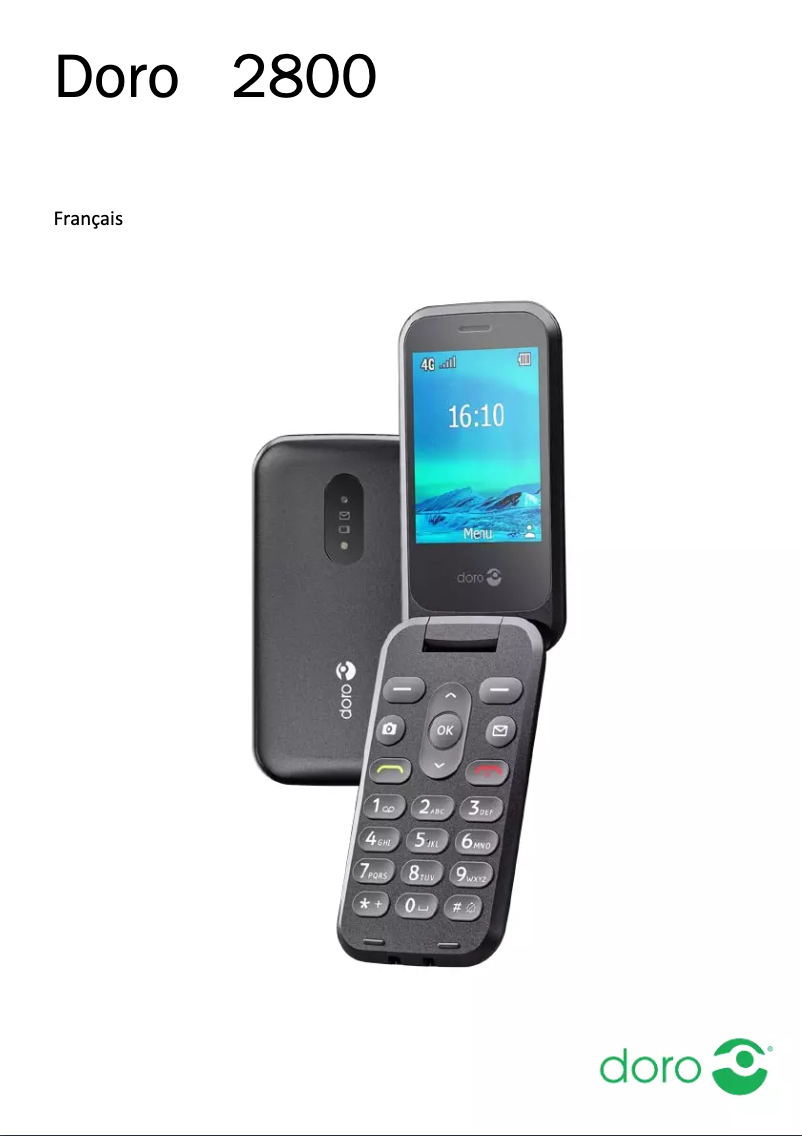
7 10

Editorial note

The Doro 2800 stands out for its ergonomic design and wide keys, offering a comfortable grip, particularly appreciated by elderly people or those less familiar with technology. Its simplified interface makes it easy to access essential features, contributing to an overall satisfying user experience. Moreover, the sound quality of the speaker ensures clear conversations, enhancing the appeal of this device. However, the Doro 2800 has some drawbacks. Its interface may seem basic to users accustomed to modern smartphones, and the lack of advanced features, such as instant messaging applications, may limit its appeal. The battery life is also a consideration, as it may be insufficient for heavy use, requiring frequent recharges. Finally, its design, relatively old-fashioned, may not attract consumers looking for a device with a contemporary look. In terms of robustness, the Doro 2800 is recognized for its durability, designed to withstand daily use. However, customization options remain limited, which could frustrate some users wanting to tailor their device to their personal preferences. Overall, the Doro 2800 is a wise choice for those who prioritize simplicity and reliability, although it may not meet the expectations of all users.

Score details

User experience

The user experience is generally satisfactory thanks to a simplified interface, although some users accustomed to modern smartphones may find it basic.

Performance

The performance is adequate for everyday tasks, but the lack of advanced features may limit its appeal to more demanding users.

Battery life

The battery life may be insufficient for intensive use, requiring frequent recharges.

Design

The design of the Doro 2800 is relatively old-fashioned and may not appeal to consumers looking for a contemporary-looking device.

Robustness

The Doro 2800 is known for its robustness, designed to withstand daily use, thus offering appreciable longevity.

Usability

The ergonomic design and large buttons make it easier to use for elderly people or those less familiar with technology.

Features

The features tailored for users with visual or hearing difficulties are a strong point, although the customization options are limited.


Advantages

Ergonomic design for easy handling.

Intuitive interface for simplified access.

Clear sound for quality conversations.

Large keys and customizable ringtones.

Sturdy and durable for daily use.

Disadvantages

Basic and not very intuitive interface

No messaging or social media applications

Insufficient battery life

Outdated and not very contemporary design

Limited customization options

Technical Specifications 2800

General Information

Frequently Asked Questions

How can I adjust the speaker volume on the Doro 2800?
To adjust the speaker volume on your Doro 2800, follow these steps: 1. Press the Menu button to access the settings. 2. Navigate to the Sound section and choose 'Audio settings'. 3. In the Audio settings menu, you will find various volume options for different sounds. 4. Use the navigation keys or volume buttons to set the sound level. 5. Select the desired level for the speaker. 6. Press the Save button to confirm your changes. Keep in mind that there are several volume settings, such as for ringtones, messages, alarms, and calls. Adjust each setting according to your preferences. By following these steps, you can easily modify the speaker volume on your Doro 2800.
What should I do if the left selection button on my Doro 2800 is not working?
If the left selection button on your Doro 2800 is unresponsive, try these steps: 1. Restart the phone by holding down the power button until the power options menu appears. Select 'Restart' and wait for the device to reboot. 2. Check if the button is stuck or obstructed. Gently clean around the button with a soft cloth or a cotton swab dipped in isopropyl alcohol. 3. If the button remains inactive, try a soft reset by removing the battery, waiting a few seconds, and then reinserting it. Turn on the phone to check if the button works. 4. If the problem persists, it could be a software issue. Perform a factory reset to restore the phone to its original settings, but remember that this will erase all your data, so back up your important files beforehand. 5. If none of the previous solutions work, it is advisable to contact Doro customer support for assistance. By following these steps, you can resolve the issue with the left selection button on your Doro 2800.
How do I use the navigation keys to browse the menu on the Doro 2800?
To navigate the menu using the navigation keys on your Doro 2800, proceed as follows: 1. Use the navigation keys (identified by A) to move in different directions within the menu. 2. Press the center button (indicated by B) to open the menu and confirm your choices. 3. In standby mode, you can press the center button to return to the home screen. 4. To adjust the volume during a call, use the volume buttons on the side of the device. 5. To activate silent mode, hold down the # key until you see the corresponding icon. To reactivate ringtones, hold the # key again until the icon disappears. 6. If a headset is connected, the internal microphone will be disabled. Use the headset's answer button to manage your calls. By following these instructions, you can easily navigate the menu on your Doro 2800.
How can I quickly access the camera on my Doro 2800?
To quickly access the camera on your Doro 2800, follow these steps: 1. Press the shortcut button with the camera icon (usually located on the side or front of the phone). You can also access the camera via the Menu button by selecting the corresponding option. 2. Use the navigation keys to zoom if needed, but be aware that zooming may affect image quality. 3. Press the center button or the capture button (often marked with a camera icon) to take a photo. To record a video, press this button again to start and stop recording. You can pause the recording by pressing the pause button (usually represented by a square icon). 4. After taking a photo or recording a video, you will have the option to save it. Press 'Yes' to save your shot. By following these steps, you can quickly access the camera on your Doro 2800 to capture images and record videos.
What should I do if the call button is not working on my Doro 2800?
If the call button on your Doro 2800 is inactive, try these steps: 1. Ensure that the button is not stuck or obstructed. Gently clean the area with a soft cloth or a cotton swab moistened with isopropyl alcohol. 2. Restart the phone by holding down the power button until the power options menu appears. Choose 'Restart' and wait for the device to reboot. 3. If the problem persists, check if the phone is in call mode or if any active call settings might be affecting the button. Adjust the call settings as needed. 4. If the call button remains non-functional, it could be a software issue. Perform a factory reset to restore the phone to its original settings, keeping in mind that this will erase all data. Be sure to back up your important files beforehand. 5. If none of the solutions work, it is recommended to contact Doro customer support for assistance. By following these steps, you can resolve issues related to the call button on your Doro 2800.
Is the Doro 2800 manual available in French?
Yes, the Doro 2800 manual is available in French.

Similar products


Discover the technical sheet of ME6051 from Motorola and its manuals...
Available manuals:
Discover the technical sheet of PhoneEasy 336w AHS from Doro and its manuals...
Available manuals:
Discover the technical sheet of D114 from Motorola and its manuals...
Available manuals:
Discover the technical sheet of Form 25r from Doro and its manuals...
Available manuals:
Discover the technical sheet of AUB 200h from Doro and its manuals...
Available manuals:
Discover the technical sheet of D112 from Motorola and its manuals...
Available manuals:
Discover the technical sheet of Congress 100 from Doro and its manuals...
Available manuals:
Discover the technical sheet of D103 from Motorola and its manuals...
Available manuals:
Discover the technical sheet of HearPlus 318w from Doro and its manuals...
Available manuals:
Discover the technical sheet of D113 from Motorola and its manuals...
Available manuals:
Discover the technical sheet of aub200 from Doro and its manuals...
Available manuals:
Discover the technical sheet of D210 from Motorola and its manuals...
Available manuals:

Presentation of product 2800 specifications from brand Doro

General Information

The Doro 2800 is a phone from the Doro brand, known for its commitment to quality and innovation in the communication device sector. This model, identified by the reference 2800 | 8563, offers reliable performance and smooth usage, ideal for users looking for a simple and effective device.

Advantages

This phone stands out for its ergonomic design, allowing for a comfortable grip, making it perfect for those who prefer an easy-to-handle device.

Its simplified interface makes accessing basic features easy, making it particularly suitable for elderly people or those less comfortable with modern technology.

Moreover, the quality speaker of the Doro 2800 ensures excellent sound clarity during conversations, providing a pleasant calling experience.

The user-friendly features such as large buttons and customizable ringtones meet the needs of users with visual or hearing difficulties. Its durability is also a plus, as it is designed to withstand daily use, thus ensuring appreciable longevity.

Disadvantages

However, it is important to note that the user interface may appear basic and not very intuitive for those accustomed to modern smartphones. Additionally, the Doro 2800 does not offer advanced features such as instant messaging apps or social networks, which may limit its appeal to some users.

The battery life may also prove insufficient for intensive use, leading to frequent recharges. Furthermore, its design, considered relatively outdated, may not attract consumers looking for a device with a contemporary look. Finally, the customization options are limited, which could frustrate those who wish to adapt their device to their personal preferences.
