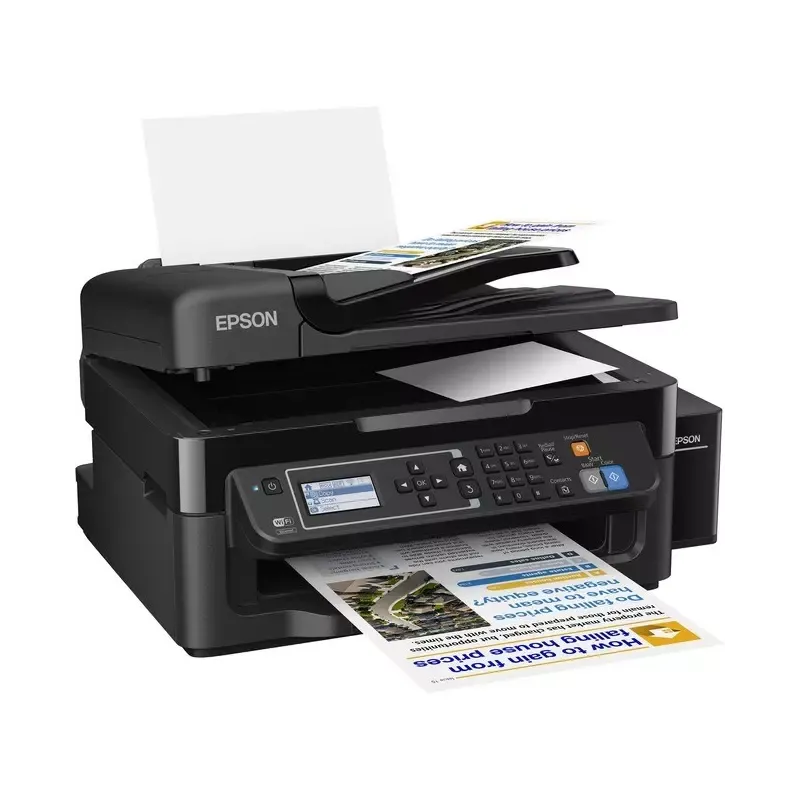

Manual of product EcoTank L565

Editorial note
The Epson EcoTank L565 stands out for its multifunctional features, offering an all-in-one solution ideal for office needs. Its refillable tank system allows for significant ink savings, thereby reducing printing costs in the long run. Additionally, wireless connectivity makes it easy to print from various devices, making it particularly convenient to use. However, this model has some drawbacks. The initial purchase cost is relatively high compared to traditional cartridge printers, which may deter some users. Its large size can also pose space issues, especially for those with compact desks. While ink savings are a plus, refilling the tanks can be messy and requires some caution. Finally, some people have encountered connectivity issues, affecting workflow. Overall, the user experience is positive thanks to its many features, although improvements are possible, particularly in terms of printing speed and connectivity. The Epson EcoTank L565 represents a good long-term investment, especially for those looking for a reliable and economical printing solution.Score details
User experience
The user experience is generally positive thanks to the integrated multifunction features and wireless connectivity, making it easy to print from various devices.
Performance
Performance is good for everyday tasks, but print speed may be lower than that of some competing printers.
Value for money
Although the initial cost is high, long-term ink savings and reduced printing costs make the product appealing in the long run.
Design
The compact and modern design easily fits into any workspace, although its size may be imposing for some users.
Usability
Filling the ink tanks can be messy and requires some caution, which can detract from the user experience.
Support
Some users report connectivity issues, particularly when using the wireless function, which can disrupt workflow.
Advantages
Ink-saving with refillable tanks
All-in-one features: printing, scanning, copying
Wireless printing from smartphones and tablets
Print quality: vibrant colors, sharp texts
Compact design easily fits into the space
Disadvantages
High initial purchase cost
Large size, requires space
Messy ink filling
Below average printing speed
Wireless connectivity issues
Technical Specifications EcoTank L565
General Information
-
ModelECOTANK L565
-
Brand
-
Category
-
Type
-
SKU1367571
-
MPN1367571
Frequently Asked Questions
What is the recommended method for removing a jammed paper from the printer?
Why does my printer not recognize original cartridges?
What are the possible reasons for poor print quality?
What is the difference between a laser printer and an inkjet printer?
Why does my inkjet printer produce black lines on prints?
What does the acronym DPI mean?
Is the manual for the Epson EcoTank L565 available in French?
Similar products


More product categories from brand Epson
More product types from brand Epson




Presentation of product EcoTank L565 specifications from brand Epson
General Information
The Epson EcoTank L565 is a multifunction printer from the brand Epson, known for its commitment to innovation and quality in the field of office equipment. This model stands out for its high performance and design aimed at enhancing the user experience.
Advantages
This printer offers several notable advantages:
- Ink savings: Thanks to its refillable tank system, the EcoTank L565 significantly reduces long-term printing costs.
- All-in-one features: It combines printing, scanning, and copying, thus meeting various office needs in a single device.
- Wireless connectivity: Facilitates printing from different devices, including smartphones and tablets, making usage more convenient.
- Print quality: Produces high-quality prints with vibrant colors and sharp texts, suitable for both professional documents and presentations.
- Compact design: Its modern appearance and optimized size allow it to fit easily into different workspaces.
Disadvantages
Despite its many advantages, the EcoTank L565 has some disadvantages:
- Initial cost: The purchase price may be higher than that of traditional cartridge printers, which could deter some users.
- Bulky size: Its size can pose space issues, especially for those with limited desk space.
- Tank refilling: Although the EcoTank system is economical, the refilling process can be messy and requires careful handling to avoid spills.
- Print speed: The print speed may be lower than that of some competing printers, which can be a disadvantage for users with high demands.
- Connectivity issues: Some users may experience difficulties with the wireless function, which can disrupt workflow.


