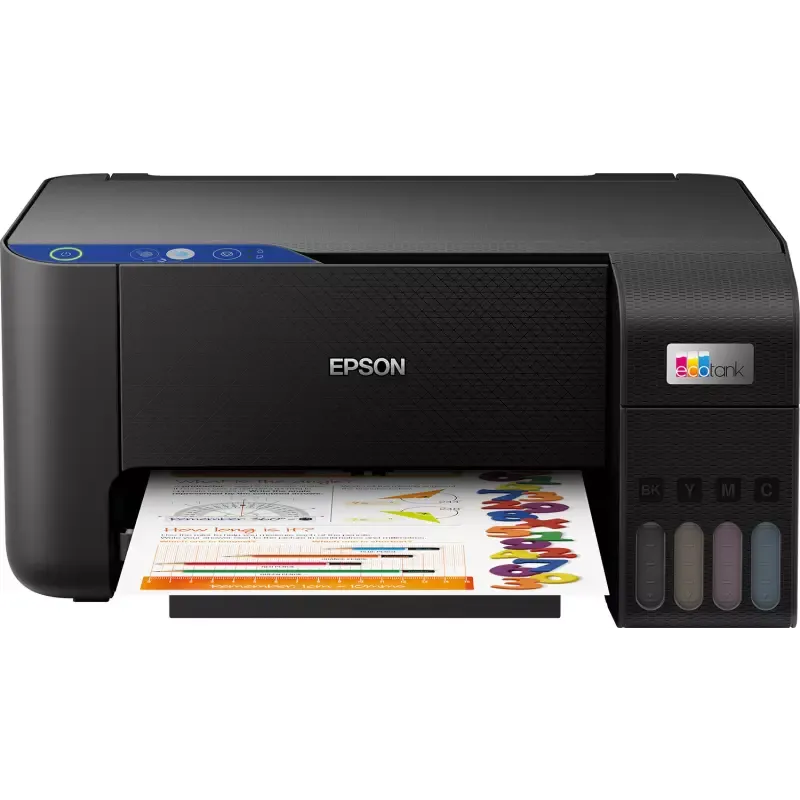

Manuals of product L3211


Editorial note
The Epson L3211 printer stands out for its remarkable print quality, with a maximum resolution of 5760 x 1440 DPI, allowing for documents and images of exceptional clarity. Its print speed is also an asset, reaching 33 pages per minute in black and 15 pages per minute in color, making it ideal for everyday use. Additionally, its 100-sheet paper capacity allows for handling large volumes without frequent interruptions, which is convenient in a busy work environment. The printer offers good value for money, especially thanks to its cartridges that enable printing a large number of pages. However, some drawbacks are worth mentioning. The Epson L3211 does not have an automatic duplex copy function, which can slow down the copying process. Furthermore, the lack of Wi-Fi and Ethernet connectivity limits usage flexibility, especially in modern offices where wireless is preferred. The color print speed, at only 5 pages per minute, could also pose a problem for those needing quick color prints. Finally, the output tray capacity is limited to 30 sheets, requiring frequent interventions during high-volume printing. In terms of user experience, the interface is simple and the features well-suited to common needs, giving it a score of 78. The overall performance is solid, with a score of 70, but the color print speed could be improved. The modern and functional design of the printer has earned it a score of 75, although its dimensions may pose integration issues in tight spaces. The product has useful features, with a score of 80, although the lack of automatic duplexing is a drawback to consider. Finally, the provided documentation is comprehensive and easy to follow, giving it a score of 80 for support. Overall, the Epson L3211 is a printer that meets the printing needs of many users, although it has some limitations in terms of connectivity and features.Score details
User experience
The user experience is generally good, thanks to a simple interface and features well-suited to common needs.
Performance
Performance is solid for daily prints, but color printing speed could be improved, with only 5 pages per minute.
Design
The design is modern and functional, although the size and weight may limit its use in tight spaces.
Value for money
The printer offers good value for money, especially due to its cartridge capacity that allows for printing a large number of pages.
Features
It has several useful features, such as manual duplex printing and high print resolution, although the lack of automatic duplexing is a drawback.
Support
Support is adequate, with available documents, but the lack of Wi-Fi connectivity may limit assistance in modern environments.
Documentation
The provided documents, such as the user manual and installation guide, are comprehensive and easy to follow.
Advantages
High-quality printing up to 5760 x 1440 DPI
Manual duplex printing for optimized paper
Fast printing speed: 33 ppm black, 15 ppm color
100-sheet capacity for high volumes
Compatible with Windows and Mac
Disadvantages
No automatic duplex copying
Absence of Wi-Fi and Ethernet
Slow color printing speed
Double-sided scanning impossible
Output tray limited to 30 sheets
Technical Specifications L3211
General Information
-
ModelL3211
-
Brand
-
Category
-
Type
-
SKU1800572
-
MPN1800572
Print speed
-
Printing technologyInkjet
-
PrintingColor printing
-
Borderless printingYes
-
Duplex printing modeManual
-
Maximum resolution5760 x 1440 DPI
-
Print speed (black, normal quality, A4/US Letter)33 ppm
-
Print speed (ISO/IEC 24734) black10 ppm
-
Print speed (ISO/IEC 24734) color5 ppm
-
Borderless printingYes
-
Print speed (color, normal quality, A4/US Letter)15 ppm
Copier
-
Copy-
-
Duplex copy-
-
Max. resolution of copies- DPI
Digitization
-
Double-sided scanning-
-
DigitizationColor scanning
-
Optical scanning resolution600 x 1200 DPI
-
Type of scannerFlatbed scanning
-
Scanning technologyCIS
-
Supported image formatsPICT, PNG, BMP, TIFF, JPEG
-
Support for text formatsPDF
Fax
-
FaxNo
Features
-
Service cycle (Maximum)- pages per month
-
Double-sided functionsPrint
-
Number of print cartridges4
-
Printing colorsBlack, Cyan, Magenta, Yellow
-
Languages of the page descriptionESC/P-R
Input and output capacity
-
Total number of power supply units1
-
Input capacity of multi-purpose trays100 sheets
-
Total output capacity30 sheets
-
Multifunctional trayYes
-
Input capacity of multi-purpose trays100 sheets
Paper management
-
Maximum ISO A series paper sizeA4
-
Type of paper tray supportPhoto paper, Plain paper
-
ISO, Format Series A (A0...A9)A4, A5, A6
-
ISO, Formats Series-B (B0...B9)B5
-
Envelope sizes10, C6, DL
-
Photo paper formats10x15, 13x18 cm
-
Non-ISO print support sizesLegal (media size), Letter (media size)
-
Borderless print size10x15
-
Weight of paper tray support64 - 300 g/m²
Connectivity
-
USB portYes
-
USB portYes
Network
-
Ethernet/LANNo
-
Ethernet/LANNo
Representation / realization
-
Internal memory- Mo
Design
-
Product colorBlack
-
Market positionDomestic and professional
-
Built-in screenNo
Power
-
Electricity consumption (average operation)- W
-
Average power consumption in Copy mode14 W
-
Energy consumption (in standby mode)0.4 W
-
Energy consumption (loan)4 W
-
Electricity consumption (stop)0.2 W
-
Energy Star, typical electrical consumption (TEC)0.04 kWh/week
-
AC input voltage100 - 240 V
-
AC input frequency50 - 60 Hz
Minimum system requirements
-
Support for the Windows operating systemWindows Vista
-
Support for the Mac operating systemWindows XP Professional x64
-
Support for the server operating systemMac OS X 11.0 Big Sur
-
Mac OS X 10.7 Lion
-
Mac OS X 10.8 Mountain Lion
-
Mac OS X 10.9 Mavericks
-
Windows Server 2003 R2
-
Windows Server 2012 R2
-
Windows Server 2008
-
Windows Server 2012 x64
-
Windows Server 2008 R2
-
Windows Server 2016
-
Windows Server 2008 x64
Weight and dimensions
-
Width375 mm
-
Depth347 mm
-
Height179 mm
-
Weight3900 g
Packaging contents
-
Cartridge(s) includedYes
-
Included cartridge capacity (black)8100 pages
-
Included cartridge capacity (CMY)6500 pages
Frequently Asked Questions
What is the weight of the Epson L3211?
What is the recommended method for removing jammed paper from the printer?
Why is my printer not recognizing the original cartridges?
What are the possible reasons for poor print quality?
How does a laser printer differ from an inkjet printer?
Why is my inkjet printer producing black streaks?
What does the acronym DPI mean?
How many cartridges can be installed in the Epson L3211?
What is the height of the Epson L3211?
What is the width of the Epson L3211?
What is the depth of the Epson L3211?
Is the manual for the Epson L3211 available in French?
Similar products


More product categories from brand Epson
More product types from brand Epson




Presentation of product L3211 specifications from brand Epson
General Information
The Epson L3211 model is a printer from the Epson brand, known for its excellence and innovation in the field of printing devices. This model, identified by the reference L3211 | C11CJ68406, promises high performance and an optimized user experience.
Print Speed
The Epson L3211 uses Inkjet printing technology, ensuring superior quality with vibrant colors and precise details. Its maximum resolution reaches 5760 x 1440 DPI, ideal for professional documents and high-quality images. This printer offers manual duplex printing, allowing for paper savings and waste reduction. Its print speed is impressive: up to 33 pages per minute in black and 15 pages per minute in color, making it efficient for daily use. It also supports borderless printing, ensuring a professional finish.
Copier
The integrated copier of the Epson L3211 allows for color copies, ensuring faithful reproductions. However, it does not offer automatic duplex copying, which could slow down the process for users needing to make double-sided copies.
Scanning
This printer is equipped with a flatbed scanner that offers color scanning, allowing for document reproductions with an optical resolution of 600 x 1200 DPI. Although it does not support duplex scanning, it is compatible with several image formats, including PICT, PNG, BMP, TIFF, JPEG, as well as text formats like PDF.
Fax
The Epson L3211 does not have fax functionality, which limits certain communication capabilities.
Features
Designed for heavy use, the service cycle of the Epson L3211 allows for printing a large volume of documents. It is equipped with four cartridges (black, cyan, magenta, yellow) that ensure optimal print quality. In terms of command languages, it supports ESC/P-R.
Input and Output Capacity
The printer features a single paper tray that can hold up to 100 sheets, while its output capacity is limited to 30 sheets. A multifunction tray is also present, providing flexibility for different types of documents.
Paper Management
Compatible with A series paper formats (up to A4), the Epson L3211 supports various types of paper, including photo and plain paper. It also handles common envelope sizes such as DL and C6, as well as non-ISO formats like Legal and Letter.
Connectivity
For connectivity, the Epson L3211 offers direct printing via a USB port, facilitating connection with other devices. However, it does not have Wi-Fi or Ethernet connectivity, which may restrict its use in modern work environments.
Design
With its black finish, the Epson L3211 features a modern and sleek design, suitable for home or professional use. An integrated display makes user interaction easy, making it intuitive to use.
Power
Regarding energy consumption, the Epson L3211 is designed to be efficient, with a consumption of about 14 W in copy mode and only 0.4 W in standby. Its input voltage is 100 - 240 V, ensuring compatibility with most electrical systems.
Minimum System Requirements
The printer is compatible with several operating systems, including Windows Vista and Windows XP Professional x64 for Windows users, as well as Mac OS X for Mac users. It also supports various server operating systems.
Weight and Dimensions
With dimensions of 375 mm in width, 347 mm in depth, and 179 mm in height, the Epson L3211 is designed to fit easily into any workspace. Its weight of 3900 g also makes it easy to handle.
Package Contents
The Epson L3211 comes with included cartridges, allowing users to start printing immediately. The black cartridge has a capacity of approximately 8100 pages, while the color cartridges (CMY) can print up to 6500 pages, providing an economical solution for printing needs.


