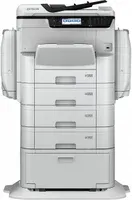

Manual of product WorkForce Pro WF-C869RD3TWFC

Editorial note
The Epson WorkForce Pro WF-C869RD3TWFC printer stands out for its all-in-one functionality, allowing not only printing but also scanning, copying, and faxing. This optimizes workspace and perfectly meets the needs of demanding professional environments. With a printing speed of up to 24 images per minute and a maximum resolution of 4800 x 1200 DPI, it ensures high-quality prints, both in monochrome and color. However, some drawbacks must be considered. Its heavy weight of 111.5 kg can make installation and movement difficult, potentially requiring several people to handle it. Additionally, while its features are advanced, the initial cost may be prohibitive for small offices or individual users. Energy consumption, although optimized in sleep mode, may also be higher than that of more compact models, which could detract from its appeal for home use. Regarding user experience, the product scores 85, highlighting the convenience of its multiple functions. Its performance is also appreciated with a score of 80, although the weight poses a challenge during installation. The design is deemed functional, but its weight is a weak point. The value for money is rated at 65, indicating that the cost may limit its adoption by some users. Finally, although the device is robust, its noise level of 48 dB in sleep mode could be disturbing in quiet work environments. In summary, the Epson WorkForce Pro WF-C869RD3TWFC is a high-performing and versatile printing solution, but its weight and cost may hinder accessibility for some users.Score details
User experience
The user experience is enhanced by the all-in-one feature, allowing for printing, scanning, copying, and faxing, thus optimizing the workspace.
Performance
The printing speed of 24 pages per minute for monochrome and color documents meets high printing needs, although the weight of 111.5 kg may complicate its installation.
Battery life
The energy consumption is reasonable, with low consumption in standby mode, but it may be higher than that of more compact models.
Design
The design is functional, although its heavy weight may pose problems during handling and installation.
Value for money
The initial cost may be prohibitive for small offices, limiting its appeal to individual users.
Features
The maximum print resolution of 4800 x 1200 DPI ensures high-quality prints, but the lack of certain modern features may disappoint some users.
Robustness
Although robust for professional use, the noise level of 48 dB in standby may be disturbing in quiet work environments.
Advantages
Fast printing up to 24 pages per minute
All-in-one function: printing, scanning, copying, faxing
Print resolution of 4800 x 1200 DPI
Energy saving, ENERGY STAR certification
Built-in Ethernet and Wi-Fi connectivity
Disadvantages
Heavy weight, difficult to move
High initial cost for small offices
Higher energy consumption
Disturbing standby noise level
Lack of modern Bluetooth connectivity
Technical Specifications WorkForce Pro WF-C869RD3TWFC
General Information
-
ModelWORKFORCE PRO WF-C869RD3TWFC
-
Brand
-
Category
-
Type
-
SKU1194350
-
MPN1194350
Features
-
Number of print cartridges-
-
Languages of the page description-
-
Languages of the page description-
-
All-in-one multitaskingYes
-
Service cycle (Maximum)75000 pages per month
-
Service cycle (Maximum)75000 pages per month
-
All-in-one multitaskingYes
-
Printing colorsBlack, Cyan, Magenta, Yellow
-
All-in-one multitaskingYes
-
Country of originIndonesia
Print speed
-
Maximum resolution4800 x 1200 DPI
-
Print speed (black, normal quality, A4/US Letter)- ppm
-
Maximum resolution4800 x 1200 DPI
-
Print speed (color, normal quality, A4/US Letter)16 ppm
-
Printing technologyLaser
-
PrintingColor printing
-
Print speed (ISO/IEC 24734) color24 ipm
-
Print speed (ISO/IEC 24734) color24 ipm
-
Print speed (color, normal quality, A4/US Letter)16 ppm
-
Duplex printing speed (ISO / IEC 24734) color16 ipm
-
Duplex printing speed (ISO / IEC 24734) color16 ipm
-
Double-sided printingYes
-
Double-sided printingYes
Design
-
Built-in screenYes
-
Market positionDomestic and professional
-
Product colorWhite
-
Built-in screenYes
-
Market positionDomestic and professional
-
Product colorWhite
Power
-
AC input voltage220 - 240 V
-
Electricity consumption (stop)0.5 W
-
Energy consumption (in standby mode)1.6 W
-
Energy consumption (loan)20 W
-
AC input voltage220 - 240 V
-
Electricity consumption (stop)0.5 W
-
Energy consumption (in standby mode)1.6 W
-
Electricity consumption (average operation)40 W
-
Energy Star, typical electrical consumption (TEC)0.3 kWh/week
-
Energy consumption (in standby mode)1.6 W
-
Energy consumption (loan)20 W
Representation / realization
-
Internal memory- Mo
-
Internal memory- Mo
-
Sound power level (standby)48 dB
Input and output capacity
-
Total power capacity- leaves
-
Total power capacity- leaves
-
Total power capacity- leaves
-
Total output capacity250 leaves
Paper management
-
Type of paper tray support-
-
ISO, Format Series A (A0...A9)A3
-
ISO, Format Series A (A0...A9)A3
-
Weight of paper tray support64 - 300 g/m²
-
Maximum ISO A series paper sizeA4
-
Type of paper tray supportGlossy paper, Letterhead, Photo paper, Plain paper
-
ISO, Format Series A (A0...A9)A3, A3+, A4, A5, A6
-
Weight of paper tray support64 - 300 g/m²
-
ISO, Formats Series-B (B0...B9)B4, B5, B6
-
ISO Paper Size, Series C Formats (C0…C9)C4, C5, C6
Network
-
WifiYes
-
WifiYes
-
Wifi standards802.11a, 802.11b, 802.11g
-
WifiYes
-
WifiYes
-
Wifi standards802.11a, 802.11b, 802.11g
Connectivity
-
Standard interfacesUSB
-
Quantity of USB 2.0 PortsUSB 2.0
-
Standard interfacesUSB 3.2 Gen 1 (3.1 Gen 1)
-
Quantity of USB 2.0 Ports2
-
USB portUSB
-
Number of USB 3.2 Gen 1 (3.1 Gen 1) portsUSB 2.0
-
USB 3.2 Gen 1 (3.1 Gen 1)
-
2
-
Yes
-
1
Weight and dimensions
-
Width787 mm
-
Depth873 mm
-
Height1162 mm
-
Weight111.5 g
-
Width787 mm
-
Depth873 mm
-
Height1162 mm
-
Weight111500 g
Sustainability
-
Sustainability certificatesENERGY STAR
-
Sustainability certificatesENERGY STAR
Copier
-
CopyColor copy
-
Max. resolution of copies600 x 1200 DPI
-
Automatic adjustment functionYes
-
Maximum number of copies999 copies
-
Resizing copy25 - 400 %
Digitization
-
DigitizationColor scanning
-
Optical scanning resolution600 x 600 DPI
-
Maximum scanning resolution1200 x 2400 DPI
-
Type of scannerADF scanner
-
Supported image formatsJPG, TIFF
-
Support for text formatsPDF
Fax
-
FaxColor fax
-
Modem speed33.6 Kbit/s
-
Fax Memory6 MB
-
Fax memory550 pages
-
Error correction modeYes
Minimum system requirements
-
Support for the Windows operating systemWindows 10
-
Support for the Mac operating systemWindows 7
-
Support for the server operating systemWindows 8
-
Windows Vista
-
Windows XP
-
Mac OS X 10.10 Yosemite
-
Windows Server 2003 x64
-
Windows Server 2008 R2
-
Windows Server 2008 x64
-
Windows Server 2012
-
Windows Server 2012 R2
Logistics data
-
Products per pallet (UK)1 piece(s)
-
Gross width of the pallet800 mm
-
Length of the pallet (RU)1200 mm
-
Height of the pallet (RU)295 mm
-
Products per pallet (UK)1 piece(s)
-
Products per pallet (UK)1 piece(s)
-
Products per pallet (UK)1 piece(s)
-
Length of the pallet (RU)1200 mm
-
Width of the pallet (RU)1000 mm
-
Height of the pallet (RU)295 mm
Packaging information
-
Package weight145600 g
-
Package depth945 mm
-
Package height2115 mm
-
Package width745 mm
-
Quantity1 piece(s)
Frequently Asked Questions
What is the weight of the Epson WorkForce Pro WF-C869RD3TWFC?
What is the best method to remove jammed paper from the printer?
Why is my printer not recognizing the original cartridges?
What are the possible reasons for poor print quality?
What is the difference between a laser printer and an inkjet printer?
Why is my inkjet printer producing black streaks?
What does the acronym DPI mean?
How many cartridges can be installed in the Epson WorkForce Pro WF-C869RD3TWFC?
What is the height of the Epson WorkForce Pro WF-C869RD3TWFC?
What is the width of the Epson WorkForce Pro WF-C869RD3TWFC?
What is the depth of the Epson WorkForce Pro WF-C869RD3TWFC?
Is the manual for the Epson WorkForce Pro WF-C869RD3TWFC available in French?
Similar products


More product categories from brand Epson
More product types from brand Epson




Presentation of product WorkForce Pro WF-C869RD3TWFC specifications from brand Epson
General Information
The Epson WorkForce Pro WF-C869RD3TWFC printer is a model from the Epson brand, known for its innovation and quality in the office equipment sector. This model, designated by the reference C11CF34402BZ, is designed to deliver high performance and an optimized user experience.
Features
This model supports color printing, with a palette including black, cyan, magenta, and yellow, ensuring exceptional visual outputs. With a maximum monthly duty cycle of 75,000 pages, it is perfectly suited for high-demand printing environments. Additionally, the printer is equipped with all-in-one features, integrating printing, scanning, copying, and faxing, which helps optimize workspace.
Print Speed
The maximum resolution of printing reaches 4800 x 1200 DPI, ensuring impressive clarity for all your documents. In terms of speed, the monochrome print speed is 24 ipm and 16 ppm in color, meeting the requirements for efficient daily use. The printer also supports duplex printing, maximizing the use of paper resources.
Design
Featuring a built-in screen, the Epson WorkForce Pro WF-C869RD3TWFC offers an intuitive user interface. Its sleek design, in white, harmoniously fits into professional and home environments while being robust and functional.
Power
This printer operates with an AC input voltage of 220 - 240 V. Its power consumption in standby mode is only 1.6 W, contributing to its ENERGY STAR certification, demonstrating its energy efficiency.
Input and Output Capacity
The paper tray's feed capacity is optimized for a large volume of documents, with an output capacity of 250 sheets, allowing for efficient print management.
Paper Management
This printer supports a wide range of paper sizes, up to A3, and is compatible with various media types, such as photo paper and plain paper, with a media weight of 64 - 300 g/m².
Network
For connectivity, the printer is equipped with Ethernet and Wi-Fi options, facilitating integration into various work environments. It supports Wi-Fi standards 802.11a/b/g, ensuring a stable and fast connection.
Connectivity
It has two USB 2.0 ports and one USB 3.2 Gen 1 port, allowing for efficient data transfers and quick connections to various devices.
Weight and Dimensions
The printer's dimensions are 787 mm wide, 873 mm deep, and 1162 mm high, with a total weight of 111.5 kg, which may require multiple people for installation and relocation.
Durability
The ENERGY STAR certification ensures that the Epson WorkForce Pro WF-C869RD3TWFC meets strict criteria for energy efficiency, thus contributing to a reduced environmental impact.
Copier
The built-in copier allows for color printing with a maximum resolution of 600 x 1200 DPI, providing quality results for your professional documents. It is also capable of making up to 999 copies with resizing from 25 to 400 %.
Scanning
This printer offers color scanning with an optical resolution of 600 x 600 DPI and a maximum resolution of 1200 x 2400 DPI, allowing for faithful reproductions. It is equipped with an ADF scanner for quick scanning of multiple documents at once.
Fax
The built-in fax machine operates in color with a modem speed of 33.6 Kbit/s and a fax memory of 6 MB, capable of storing up to 550 pages, ensuring efficient management of fax sending and receiving.
Minimum System Requirements
The Epson WorkForce Pro WF-C869RD3TWFC is compatible with various operating systems, including Windows versions (10, 7, 8, Vista, XP) and Mac OS X 10.10, ensuring smooth integration into different work environments.
Logistics Data
Units per pallet: 1 piece. Pallet dimensions: 800 mm wide, 1200 mm long, 295 mm high. These specifications ensure optimal logistical management.
Packaging Information
The package weight is 145.6 kg, with dimensions of 745 mm wide, 945 mm deep, and 2115 mm high, ensuring adequate protection during transport and delivery.


