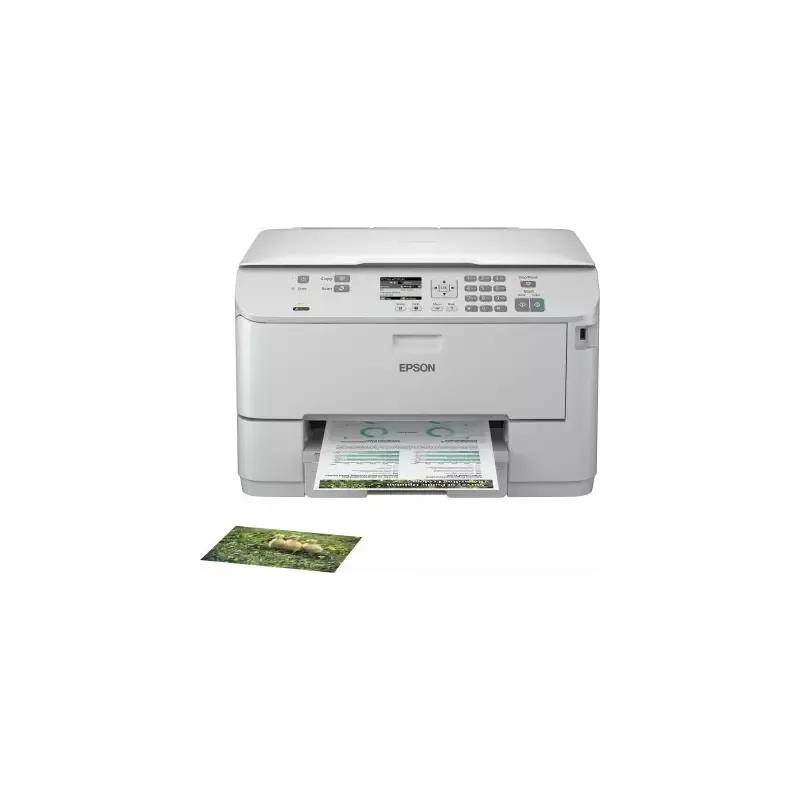

Manuals of product Workforce Pro WP-4515 DN


Editorial note
The Epson Workforce Pro WP-4515 DN stands out for its all-in-one versatility, offering copy, print, and scan features tailored to the varied needs of users. Its print quality is remarkable, with a maximum resolution of 4800 x 1200 DPI, ensuring professional results for documents and images. Additionally, its economical printing helps reduce costs while maintaining high quality, making it a wise choice for those looking to manage their budget. However, some drawbacks are worth mentioning. The lack of duplex scanning functionality may slow down the process for double-sided documents, while the absence of Wi-Fi connectivity limits wireless connection options, which can be restrictive for some users. Furthermore, its weight of 12.6 kg can complicate its movement and installation in tight spaces. In terms of connectivity, although it is advanced with Ethernet options, the limited compatibility with Mac operating systems may prevent some users from fully enjoying all the printer's features. Finally, the noise level of 44 dB during printing can be considered high in noise-sensitive work environments. Overall, the Epson Workforce Pro WP-4515 DN is a robust and high-performing device, ideal for demanding work environments, but it has a few limitations to consider.Score details
User experience
The user experience is generally positive due to the all-in-one versatility of the printer, but the missing duplex scanning feature can slow down some processes.
Performance
The print quality is exceptional with a maximum resolution of 4800 x 1200 DPI, ideal for professional documents and images.
connectivity
Although the printer offers advanced Ethernet connectivity, the lack of Wi-Fi limits wireless connection options, which can be restrictive for some users.
Value for money
The economical printing feature helps reduce printing costs while maintaining high quality, making it a wise choice for budget-conscious users.
Robustness
With a high volume handling capacity of 20,000 pages per month, this device is suitable for demanding work environments, although its weight of 12.6 kg may pose mobility challenges.
Usability
Limited compatibility with Mac operating systems may pose problems for some users, preventing optimal use of all features.
noise_level
The noise level of 44 dB during printing can be considered high in noise-sensitive work environments, which could disturb some users.
Advantages
All-in-one features: printing, copying, scanning
Sharp prints: 4800 x 1200 DPI
Reduced and efficient printing costs
Ethernet connectivity and varied network
Capacity of 20,000 pages per month
Disadvantages
No duplex scanning available
No built-in Wi-Fi connectivity
High weight of 12.6 kg
Limited compatibility with Mac
High noise level of 44 dB
Technical Specifications Workforce Pro WP-4515 DN
General Information
-
ModelWORKFORCE PRO WP-4515 DN
-
Brand
-
Category
-
Type
-
SKU77944
-
MPN77944
Other features
-
All-in-one functionsCopy
-
All-in-one color functionsPrint
-
Ready-to-use networkScan
-
copy
-
print
-
scan
-
Yes
Print speed
-
Printing technologyInkjet
-
Maximum resolution4800 x 1200 DPI
-
Double-sided printingYes
-
Print speed (black, normal quality, A4/US Letter)26 ppm
-
Print speed (color, normal quality, A4/US Letter)24 ppm
-
PrintingColor printing
-
Double-sided printingYes
Features
-
Service cycle (Maximum)20000 pages per month
-
All-in-one multitaskingYes
-
Printing colorsBlack, Cyan, Magenta, Yellow
-
Number of print cartridges4
-
Service cycle (recommended)1600 pages per month
-
Digital senderNo
-
Country of originIndonesia
Copier
-
Max. resolution of copies1200 x 600 DPI
-
Copy speed (normal quality, black, A4)8.6 cpm
-
Copy speed (normal quality, color, A4)13 cpm
-
Resizing copy25 - 400 %
-
CopyColor copy
-
Duplex copyYes
Input and output capacity
-
Total power capacity330 sheets
-
Maximum input capacity580 sheets
-
Total number of power supply units2
-
Total output capacity150 sheets
Paper management
-
Maximum print format216 x 356 mm
-
Type of paper tray supportPhoto paper, Plain paper
-
ISO, Format Series A (A0...A9)A4, A5, A6
-
ISO, Formats Series-B (B0...B9)B5
-
Envelope sizes10, C4, C6, DL
-
Photo paper sizes10x15, 20x24 "
-
Weight of paper tray support64 - 256 g/m²
-
Maximum ISO A series paper sizeA4
Design
-
ScreenLCD
-
Screen size2.5 "
-
Product colorGray
-
Built-in screenYes
-
Market positionProfessional
Connectivity
-
Direct printing-
-
Standard interfacesEthernet, USB 2.0
-
USB portYes
Network
-
Ethernet/LANYes
-
WifiNo
-
Network printing methodsSNMP v1, HTTP, DHCP, BOOTP, AutoIP, DNS, Bonjour (mDNS), SNTP, SSDP, WSD, LLTD, LLMNR, SLP, ENPC
-
Support for network protocols (IPv6)TCP
-
Support for network protocols (IPv6)TCP
-
Mobile printing technologiesApple AirPrint, Epson Connect, Google Cloud Print
Representation / realization
-
Built-in memory card reader-
-
Maximum internal memory128 MB
-
Maximum internal memory128 MB
-
Mac CompatibilityYes
-
Processor frequency333 MHz
-
Sound pressure level (impression)44 dB
Power
-
Electricity consumption (average operation)17 W
-
AC input frequency50 - 60 Hz
-
AC input voltage100 - 240 V
-
Energy consumption (standby mode)2.1 W
Weight and dimensions
-
Weight12600 g
-
Width460 mm
-
Depth420 mm
-
Height299 mm
Minimum system requirements
-
Support for the Windows operating systemWindows 7 Home Premium
-
Support for the Mac operating systemWindows 7 Home Premium x64
-
Support for the server operating systemWindows 7 Professional
-
Windows 7 Professional x64
-
Windows 7 Starter x64
-
Windows 7 Ultimate
-
Windows 7 Ultimate x64
-
Windows 98SE
-
Windows Vista Business
-
Windows Vista Business x64
-
Windows Vista Home Basic
-
Windows Vista Home Basic x64
-
Windows Vista Home Premium
-
Windows Vista Ultimate
-
Windows Vista Ultimate x64
-
Windows XP Home
-
Windows XP Home x64
-
Windows XP Professional
-
Windows XP Professional x64
-
Mac OS X 10.4 Tiger
-
Mac OS X 10.5 Leopard
-
Mac OS X 10.6 Snow Leopard
-
Windows Server 2003
-
Windows Server 2003 x64
-
Windows Server 2008
-
Windows Server 2008 R2
-
Windows Server 2008 x64
Packaging contents
-
Drivers includedYes
Sustainability
-
Sustainability certificatesENERGY STAR
Digitization
-
Optical scanning resolution1200 x 2400 DPI
-
Maximum scan areaA4 / Letter (216 x 297) mm
-
Type of scannerFlatbed scanner and ADF
-
Scan toE-mail, USB
-
Scanning technologyCIS
-
DigitizationColor scanning
-
Double-sided scanningYes
Environmental conditions
-
Operating temperature10 - 35 °C
Fax
-
FaxNo
Logistics data
-
Products per pallet (UK)8 piece(s)
-
Gross width of the pallet800 mm
-
Length of the pallet (RU)1200 mm
-
Height of the pallet (RU)2190 mm
-
Products per pallet layer (UK)2 piece(s)
-
Products per pallet layer (UK)2 piece(s)
-
Products per pallet (UK)8 piece(s)
-
Length of the pallet (RU)1200 mm
-
Width of the pallet (RU)1000 mm
-
Height of the pallet (RU)2190 mm
Packaging information
-
Package weight16914 g
-
Package depth615 mm
-
Package height510 mm
-
Package width518 mm
-
Quantity1 piece(s)
Frequently Asked Questions
What is the weight of the Epson Workforce Pro WP-4515 DN?
What is the recommended method for removing a jammed paper from the printer?
Why is my printer not recognizing the original cartridges?
What could be the reasons for poor print quality?
What is the difference between a laser printer and an inkjet printer?
Why is my inkjet printer leaving black streaks on prints?
What does the acronym DPI mean?
How many cartridges can be installed in the Epson Workforce Pro WP-4515 DN?
What is the size of the screen on the Epson Workforce Pro WP-4515 DN?
What is the height of the Epson Workforce Pro WP-4515 DN?
What is the width of the Epson Workforce Pro WP-4515 DN?
What is the depth of the Epson Workforce Pro WP-4515 DN?
Is the manual for the Epson Workforce Pro WP-4515 DN available in French?
Similar products


More product categories from brand Epson
More product types from brand Epson




Presentation of product Workforce Pro WP-4515 DN specifications from brand Epson
General Information
The Epson Workforce Pro WP-4515 DN printer is a well-known model from the Epson brand, recognized for its commitment to quality and innovation in the electronics sector. This model, identified by the code C11CB34301, is designed to deliver optimal performance while enhancing the user experience. The associated EAN code, 8715946485904, 8715946490144, ensures unique identification in the distribution system.
All-in-One Features
This multifunction printer Epson Workforce Pro WP-4515 DN integrates copying, printing, and scanning capabilities, effectively meeting a variety of office needs. Additionally, it allows color printing, providing extra flexibility for your documents. Ready to use, it facilitates connectivity through its built-in network, ensuring quick internet access upon installation.
Print Speed and Quality
Equipped with Inkjet printing technology, the Epson Workforce Pro WP-4515 DN ensures remarkable print quality with a maximum resolution of 4800 x 1200 DPI. This feature results in sharp and precise prints, ideal for professional documents. Its print speed is 26 ppm in black and 24 ppm in color, allowing for quick processing of daily tasks. Moreover, the duplex printing function contributes to efficient paper resource management.
Capacity and Volume Management
Designed for heavy use, the Epson Workforce Pro WP-4515 DN can handle a maximum service cycle of 20,000 pages per month, adapting to demanding work environments. This printer uses a four-cartridge ink system (black, cyan, magenta, yellow), ensuring optimal print quality.
Copier and Scanning
The built-in copier offers a resolution of 1200 x 600 DPI and speeds of 8.6 cpm for black copies and 13 cpm in color, ensuring increased efficiency for your printing needs. The copy resizing ranges from 25 to 400%, allowing you to adjust document sizes according to your requirements, although the duplex copy function is not available.
Paper Management
This printer has a total feed capacity of 330 sheets and can hold up to 580 sheets in its input tray. With a weight of 64 to 256 g/m², it is compatible with various types of paper, including photo paper and plain paper. Supported formats include series A and B, as well as several envelope sizes, making the Epson Workforce Pro WP-4515 DN suitable for many uses.
Connectivity and Network
It is equipped with standard interfaces for optimal connectivity, including a USB port. However, this printer does not offer Wi-Fi connectivity, which may limit options for users who prefer a wireless connection. Support for various network protocols such as SNMP, HTTP, and DHCP ensures smooth integration into different work environments.
Operating Conditions and Durability
The recommended operating temperature for the Epson Workforce Pro WP-4515 DN is between 10 and 35 °C, ensuring optimal operation under appropriate conditions. Additionally, the printer is ENERGY STAR certified, ensuring compliance with energy efficiency and environmental standards.
Dimensions and Weight
With a weight of 12.6 kg and dimensions of 460 mm x 420 mm x 299 mm, this printer requires adequate space for installation, which may be a factor to consider depending on your work environment.
System Configuration
The Epson Workforce Pro WP-4515 DN is compatible with several operating systems, including various versions of Windows and Mac OS, although its compatibility with Mac systems is limited. This may impact users who exclusively use Apple devices.
Conclusion
In summary, the Epson Workforce Pro WP-4515 DN stands out for its versatility, superior print quality, and ability to handle high workloads, while offering connectivity features suitable for professional environments.


