

Manual of product AmpliDect 595 Photo
Editorial note
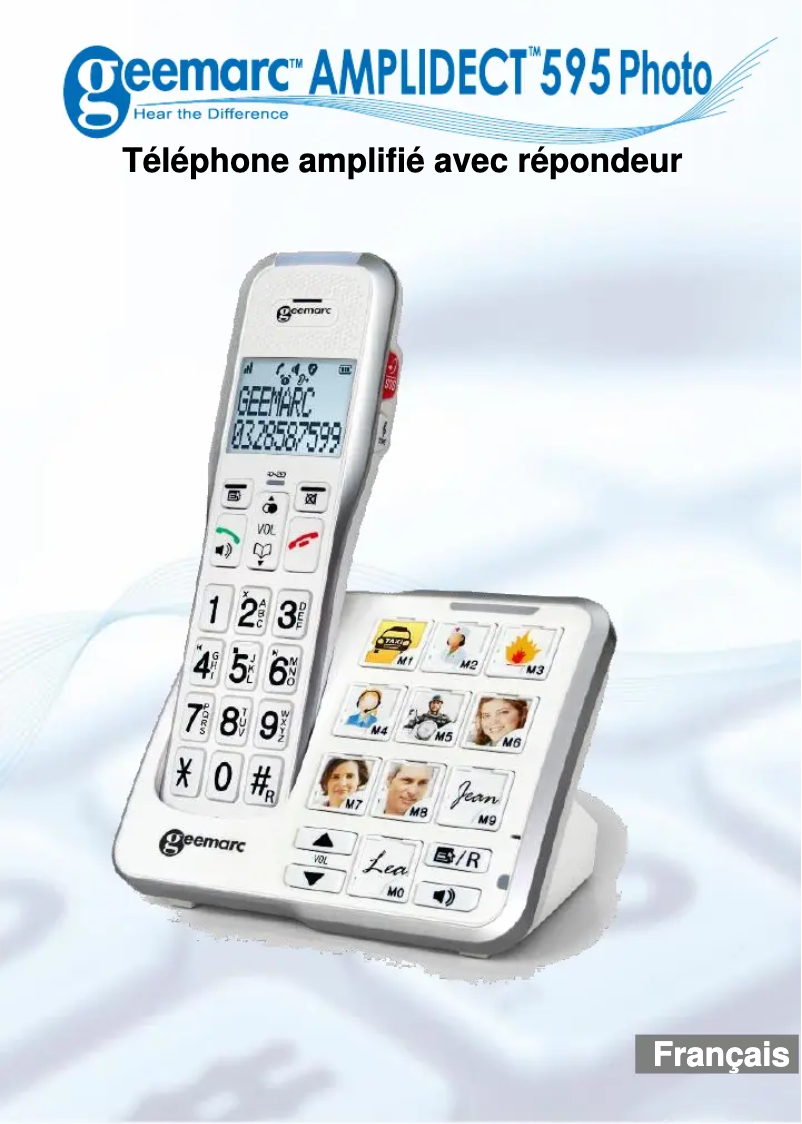
The Geemarc AmpliDect 595 Photo stands out for its ergonomic and intuitive design, making daily use easier, especially for elderly people. Its superior sound quality allows for volume amplification and clarity of communications, although some users may find it insufficient compared to higher-end models. The customizable photo features for contacts and compatibility with hearing aids are real advantages, making this phone accessible and practical. However, the design of the Geemarc AmpliDect 595 Photo may seem bulky and unattractive, which could make it less appealing in a modern environment. Additionally, its price is higher than that of many standard phones, representing a significant investment for some. Although the use is simplified, handling it may still be complicated for those who are not familiar with modern technologies. Finally, the included user manual is a positive point, providing a practical guide for quick and effective handling, which is particularly beneficial for new users. Overall, the Geemarc AmpliDect 595 Photo is an interesting choice for those looking for a phone suited to the specific needs of elderly or hearing-impaired users, despite some drawbacks to consider.Score details
User experience
The ergonomic and intuitive design of the Geemarc AmpliDect 595 Photo facilitates daily use, especially for elderly people, providing an enhanced user experience.
Performance
The superior sound quality allows for volume amplification and clarity of communications, although some users may find the quality insufficient compared to high-end models.
Features
The customizable photo features for contacts and compatibility with hearing aids are major assets, making the phone accessible and practical.
Design
The design may seem bulky and unattractive to some, which can make it less appealing in a modern decor.
Value for money
The price is higher than that of other standard phones, which can represent a significant investment for some users.
Usability
Although the use is simplified, handling can still be complicated for those unfamiliar with modern technologies.
Documentation
The included user manual provides a practical guide for quick and effective handling, which is a positive point for new users.
Advantages
Ergonomic design for easy use
Customizable photos for quick identification
Amplified and clear sound for better listening
Compatible with hearing aids
User manual included for easy handling
Disadvantages
Bulky and unattractive design
Higher price than standard phones
Complicated handling for some users
Superfluous advanced features for some
Sound quality inferior to high-end phones
Frequently Asked Questions
How can I adjust the volume on my Geemarc AmpliDect 595 Photo phone?
How can I activate the photo memory function on my Geemarc AmpliDect 595 Photo phone?
What is the procedure to set up speed dial numbers on my Geemarc AmpliDect 595 Photo phone?
How do I activate the hearing aid compatibility mode on my Geemarc AmpliDect 595 Photo phone?
How can I change the ringtone on my Geemarc AmpliDect 595 Photo phone?
Is the manual for the Geemarc AmpliDect 595 Photo available in French?
Similar products


More product categories from brand Geemarc
More product types from brand Geemarc








Presentation of product AmpliDect 595 Photo specifications from brand Geemarc
General Information
The Geemarc AmpliDect 595 Photo is a phone designed by the brand Geemarc, known for its commitment to quality and innovation in the communication device sector. This model stands out for its efficiency and user-friendliness, thus providing an optimized user experience. The EAN code, 3521350009026, allows for unique identification of this product in commercial systems.
This phone is particularly suitable for elderly people or those with specific communication needs. Thanks to its ergonomic design, it is accessible and easy to use on a daily basis. Additionally, it offers an innovative feature that allows users to associate custom photos with contacts, making it easier to identify callers. The sound quality is also a major asset, with volume amplification that ensures clear and pleasant exchanges.
The Geemarc AmpliDect 595 Photo is compatible with hearing aids, making it an ideal choice for hearing-impaired individuals. A user manual is provided to ensure quick and effective handling.
Advantages
This phone has several notable advantages:
- Intuitive design making it easy to use for everyone, especially seniors.
- Customizable photo feature for immediate identification of contacts.
- Superior sound quality with volume amplification for better clarity.
- Compatibility with hearing aids, making the phone accessible.
- User manual included for a practical and quick guide.
Disadvantages
However, the Geemarc AmpliDect 595 Photo also has some disadvantages to consider:
- A design that may seem bulky and unattractive to some users.
- A price that may be high compared to other standard phones.
- A handling that may prove complicated for novice users.
- Advanced features that may be superfluous for those with basic needs.
- Sound quality that might not satisfy users of high-end phones.


