Thumbnail of product A150A Duo from brand Gigaset
Logo of brand Gigaset

Phone Gigaset A150A Duo

The Gigaset A150A Duo is a cordless phone designed to meet daily communication needs with a touch of modernity. This model is particularly appreciated for its ease of use and practical features.

This phone is equipped with a built-in answering machine, allowing you to manage your incoming calls effectively. It has a maximum range of 50 m indoors and 300 m outdoors, providing great freedom of movement. Additionally, the ECO mode helps reduce energy consumption while maintaining optimal performance.

With a 1.4-inch amber backlit display, the Gigaset A150A Duo ensures clear visibility, even in low light conditions. Its sleek and compact design, with dimensions of 159 x 48 x 32 mm for the handset, allows for easy integration into various spaces.

Call management features such as call forwarding, conference calling, and speed dialing enhance the user experience, while the directory can hold up to 50 entries, making it easy to access your contacts.

In summary, the Gigaset A150A Duo is a practical choice for those looking for an efficient cordless phone that combines functionality and modern design, ideal for everyday use.

Manual of product A150A Duo
8 10

Editorial note

The Gigaset A150A Duo stands out for its solid performance and remarkable battery life. With a talk time of up to 18 hours and a standby time of 200 hours, it allows for prolonged use without requiring frequent recharges. Additionally, its ECO mode helps reduce energy consumption, which is beneficial for the environment and your electricity bill. The user experience is generally satisfactory thanks to the amber backlit screen, which enhances readability in low-light conditions. However, the 1.4-inch screen size may be considered too small for some users, making it less comfortable to read information. In terms of features, the built-in answering machine and the ability to record up to 25 minutes of messages are undeniable assets. However, the lack of caller ID and intercom functionality limits some practical options that could enhance the experience. The design of the Gigaset A150A Duo is modern and sleek, but it lacks customization options to suit various aesthetic tastes. Moreover, it is not specifically designed for senior users, which could pose a problem for some. Finally, the value for money is satisfactory, particularly due to its maximum range of 300 meters outdoors, although some limitations may disappoint users looking for more advanced features. In summary, the Gigaset A150A Duo is a solid choice for those seeking a practical and efficient cordless phone, while being aware of its limitations.

Score details

User experience

The user experience is satisfactory thanks to a backlit amber screen, making it easier to read in low light conditions. However, the 1.4-inch screen size may be considered too small for some users.

Performance

The performance is solid with a communication time of 18 hours and a standby time of 200 hours, allowing for prolonged use without needing frequent recharges.

Battery life

The battery life is excellent, ensuring prolonged use and reducing the frequency of recharges thanks to hybrid nickel-metal battery technology.

Features

The built-in answering machine and the ability to record up to 25 minutes of messages are assets, but the lack of caller ID and intercom functionality limits some practical features.

Design

The design is modern and sleek, but it lacks customization options to cater to various aesthetic tastes and is not particularly suited for senior users.

Value for money

The Gigaset A150A Duo offers good value for money thanks to its features and a maximum range of 300 meters outdoors, although some limitations may disappoint.


Advantages

Range of 300 meters outdoors

ECO mode for energy saving

Convenient wireless use

18 hours of continuous communication

Backlit screen for better readability

Answering machine with 25 minutes of recording

Disadvantages

No caller ID

1.4-inch screen too small

Lack of intercom function

Indoor range limited to 50 m

Little customizable design

Technical Specifications A150A Duo

General Information

Representation / realization

  • Type
    DECT phone
  • GAP Compatibility
    Yes
  • Type of handset
    Cordless handset
  • GAP Compatibility
    Yes
  • Maximum indoor range
    50 m
  • Maximum outdoor range
    300 m
  • GAP Compatibility
    Yes
  • GAP Compatibility
    Yes
  • GAP Compatibility
    Yes
  • Number of rings
    10
  • Recording time
    25 min

Screen

  • Display screen size
    34 x 17 mm
  • Built-in screen
    Yes
  • Backlight Color
    Amber
  • Screen size
    1.4 "
  • Built-in screen
    Yes

Design

  • Mounting type
    Office
  • Product color
    Black
  • Elderly people's phone
    No

Connectivity

  • Wireless connections
    Yes
  • Wireless connections
    Yes
  • Wireless connections
    Yes

Power

  • AC input voltage
    230 V
  • Battery type
    AAA
  • Battery technology
    Nickel-metal hydride (NiMH)
  • Number of supported batteries
    2
  • Communication time
    18 h
  • Standby autonomy
    200 h

Phone features

  • Speaker
    Yes
  • Location of the composer
    Combined
  • Directory capacity
    50 entries
  • Compatible with multiple handsets
    4
  • Numbering
    Tone/Pulse

Call management

  • Caller ID
    No
  • Call timer
    Yes
  • Call timer
    Yes
  • Call log
    25
  • Call timer
    Yes
  • Call timer
    Yes
  • Call timer
    Yes

Weight and dimensions

  • Basic dimensions
    97 x 81 x 55 mm
  • Dimensions of the combined unit (LxWxH)
    159 x 48 x 32 mm
  • Weight of the phone
    109 g
  • Base weight
    69 g
  • Width
    159 mm
  • Depth
    48 mm
  • Height
    32 mm

Management features

  • Clock with calendar
    Yes
  • Volume order
    Digital
  • Clock with calendar
    Yes
  • Clock with calendar
    Yes
  • Clock with calendar
    Yes

Packaging contents

  • Number of included bundles
    2
  • Charger
    Yes
  • Charger
    Yes
  • Charger
    Yes

Other features

  • Signal strength indication
    Yes
  • Signal strength indication
    Yes
  • Signal strength indication
    Yes

Indication

  • Loading indicator
    Yes
  • Loading indicator
    Yes

Frequently Asked Questions

What is the screen size of the Gigaset A150A Duo?
The screen of the Gigaset A150A Duo measures 1.4 inches.
What is the height of the Gigaset A150A Duo?
The Gigaset A150A Duo has a height of 32 mm.
What is the width of the Gigaset A150A Duo?
The width of the Gigaset A150A Duo is 159 mm.
What is the depth of the Gigaset A150A Duo?
The Gigaset A150A Duo has a depth of 48 mm.
Is the Gigaset A150A Duo a DECT device?
Yes, this means that the phone uses DECT technology for wireless communication, providing clear sound quality without interference.
Does the Gigaset A150A Duo come with an answering machine?
Yes, this feature allows users to receive and store voice messages when they are unavailable, ensuring that no important calls are missed.
Is the handset of the Gigaset A150A Duo wireless?
Yes, the wireless handset allows users to move freely during calls, providing flexibility and freedom of movement.
Does the Gigaset A150A Duo have an intercom function?
Yes, this facilitates communication between multiple handsets within the same system, which is convenient both at home and in the office.
What is the maximum indoor range of the Gigaset A150A Duo?
The maximum indoor range of the Gigaset A150A Duo is 50 meters, ensuring sufficient coverage for most homes or small offices, allowing users to make calls from different rooms without signal loss.
How can I ensure that the Gigaset A150A Duo phone is set up securely?
To ensure a secure setup of the Gigaset A150A Duo phone, follow these steps: 1. Check the packaging contents to ensure you have the base, charger, handset, telephone cord, rechargeable batteries, battery cover, and user manual. If you have a version with multiple handsets, check that you have the extra batteries, battery cover, and charger. 2. Install the base and charger in a central and stable location in your home. You can also mount them on the wall if desired. Ensure that the base has a range of 300 meters outdoors and 50 meters indoors. Use them in closed and dry rooms at a temperature between +5 °C and +45 °C. Clean them with a damp or anti-static cloth, avoiding solvents. Avoid placing the phone near heat sources, direct light, or other electrical devices. 3. Handle the handset carefully: do not expose it to moisture, dust, or aggressive liquids. Use only the power adapter and batteries that meet specifications. Do not use damaged batteries. If the screen is cracked, contact customer service. Avoid holding the handset close to your ear during calls or when using the hands-free function to prevent hearing damage. If you experience issues with hearing aids, consult an audiologist. Consider the technical conditions of the environment, especially in medical facilities. If medical equipment is used, contact the manufacturer to ensure its protection against high-frequency external energies. By following these steps, you can ensure the secure setup of the Gigaset A150A Duo.
What should I do if the packaging contents of the Gigaset A150A Duo phone are missing or incomplete?
If you find that items are missing from the packaging of the Gigaset A150A Duo, proceed as follows: 1. Carefully check the contents: ensure you have unpacked all components mentioned in the manual, including the base, charger, handset, telephone cord, rechargeable batteries, battery cover, and user manual. For versions with multiple handsets, check that you also have the extra batteries, battery cover, and charger for each handset. 2. Contact the seller or retailer: if items are missing, contact the seller or retailer where you purchased the Gigaset A150A Duo. Indicate the missing items and request a replacement or new packaging. 3. Contact Gigaset support: if you cannot resolve the issue with the seller, contact Gigaset support directly. They will help you obtain the missing items. Contact details for support can be found in the manual or on the Gigaset website. By following these steps, you can resolve the issue of missing contents in the packaging of the Gigaset A150A Duo.
How to properly set up the base station and charger of the Gigaset A150A Duo phone?
To properly set up the base station and charger of the Gigaset A150A Duo, follow these steps: 1. Check that you have all the necessary components in the packaging. 2. Choose a central and stable location for the base station and charger, or consider mounting them on the wall. 3. Plug the base station into a power source using the provided power adapter. Ensure that the adapter is turned on, as the phone needs electricity to function. 4. Connect the telephone cord to the base station and route the cables through the designated guides. 5. If a charger is included, connect it to the base station with the provided cables. 6. Place the base station and charger on non-slip surfaces and avoid moisture, direct sunlight, or other electrical devices. 7. Clean the base station, charger, and handset with a damp or anti-static cloth. Avoid solvents and dry cloths that may generate static charges. 8. Wait about 30 seconds after connecting the base station for it to be ready for use, especially if an answering machine is included (only for A150A/A250A models). By following these steps, you can properly set up the base station and charger of the Gigaset A150A Duo.
How can I obtain the user manual for the Gigaset A150A Duo phone?
To obtain the user manual for the Gigaset A150A Duo, follow these steps: 1. Visit the official Gigaset website by searching for 'Gigaset' in your search engine. 2. Go to the support section of the site. Look for a link or tab indicating 'Support' or 'Customer Service'. 3. On the support page, search for the Gigaset A150A Duo model by entering its name in the search bar or selecting the appropriate category. 4. Find the 'Downloads' or 'Manuals' section on the product page, where you can access the user manual. 5. Click on the link to download the manual in PDF format. Make sure you have a PDF reader to view it. 6. Save the manual in an accessible location on your device. By following these steps, you can download the user manual for the Gigaset A150A Duo from the official Gigaset website.
What are the main features and functions of the Gigaset A150A Duo handset?
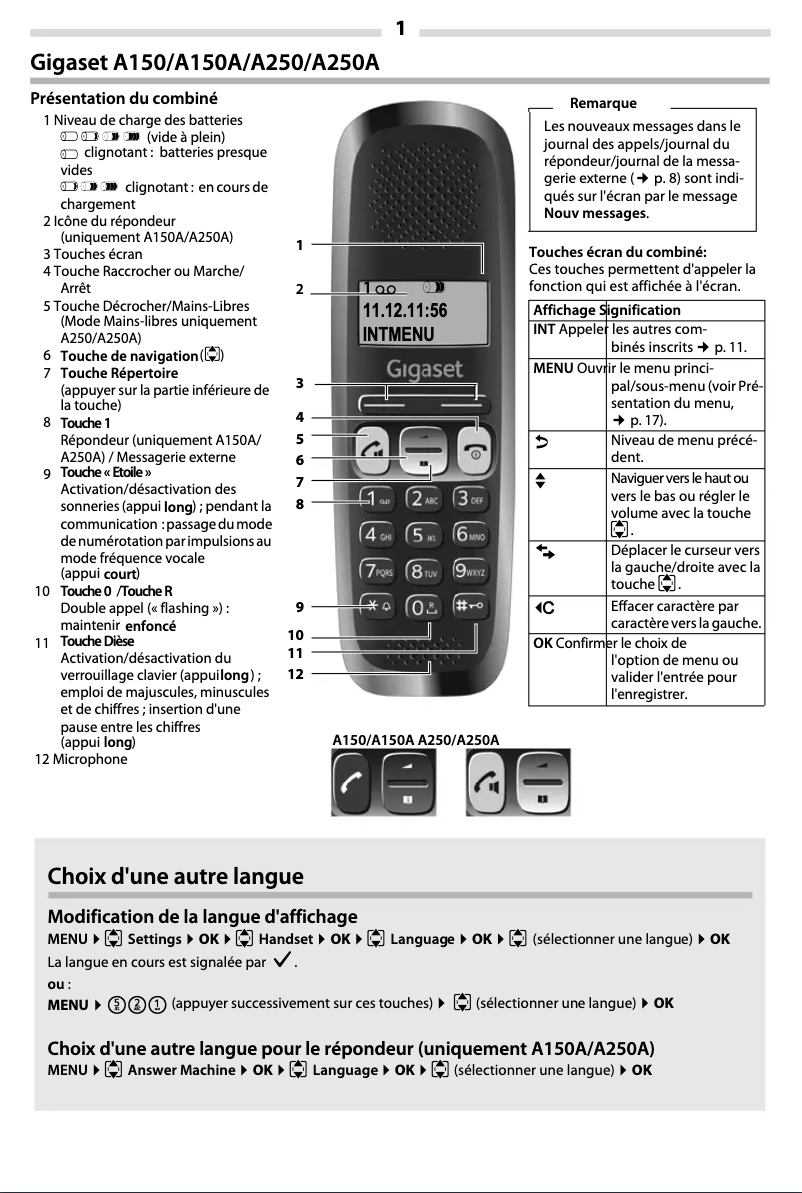
The main features and functions of the Gigaset A150A Duo handset include: 1. Making and receiving calls: Use the handset to make and receive calls from external and internal numbers. 2. Caller ID display: The handset can display the number or name of the caller if the identification service is activated. 3. Hands-free mode: The Gigaset A250/A250A model allows the use of the hands-free function, enabling you to talk without holding the handset to your ear. 4. Adjustable volume: You can change the volume of the handset and the hands-free speaker according to your preferences. 5. Menu navigation: The handset has a menu system to access various functions and settings. 6. Messaging functions: The handset also supports messaging functions such as voicemail and answering machine. These are the main features and functions of the Gigaset A150A Duo handset.
How to ensure the secure setup of the Gigaset A150A Duo phone?
To ensure a secure setup of the Gigaset A150A Duo, follow these steps: 1. Check the packaging contents: Ensure you have all necessary items, including the base, charger, handset, telephone cord, rechargeable batteries, battery cover, and user manual. If you have a version with multiple handsets, ensure you have everything needed for each handset. 2. Install the base and charger: Place them in a central and stable location in your home. You can also mount them on the wall. Ensure that the range is 300 meters outdoors and 50 meters indoors, in a closed and dry room, at a temperature of +5 °C to +45 °C. Clean them with a damp or anti-static cloth. 3. Take care of the handset: Avoid moisture, dust, and aggressive liquids. Use only the power adapter and compliant batteries. If the screen is damaged, contact customer service. Be cautious during calls to avoid hearing damage. By following these steps, you ensure the security of the setup of the Gigaset A150A Duo.
What should I do if the contents of the Gigaset A150A Duo phone package are missing or incomplete?
If the contents of the Gigaset A150A Duo packaging are incomplete, follow these steps: 1. Contact Gigaset Communications: If you find items missing, contact Gigaset Communications for assistance. 2. Provide necessary information: Be ready to indicate the missing items. 3. Follow the instructions: Gigaset will guide you on the steps to take to resolve the issue. By contacting Gigaset and providing the necessary information, you can resolve any issues related to missing contents in the packaging.
How to properly set up the base station and charger of the Gigaset A150A Duo phone?
To properly set up the base station and charger of the Gigaset A150A Duo, follow these steps: 1. Check that you have all required components. 2. Choose a central and stable location for the base station and charger, or consider mounting them on the wall. 3. Plug the station into a power source with the provided adapter and ensure it is turned on. 4. Connect the telephone cord to the station and route the cables. 5. If a charger is included, plug it into the power source. 6. Place the handset on the charger to recharge it. 7. Wait about 30 seconds after connecting the station for it to be ready, especially if an answering machine is included. 8. Clean the station, charger, and handset with a damp cloth. By following these steps, you can properly set up the base station and charger of the Gigaset A150A Duo.
Where can I find the user manual for the Gigaset A150A Duo phone?
To find the user manual for the Gigaset A150A Duo, follow these steps: 1. Access the menu by pressing the MENU button on the handset. 2. Navigate to 'Messages' using the navigation keys. 3. Select 'Save / View / Delete' to access the messages menu. 4. Locate the 'Language' option in the menu. 5. Choose your preferred language, such as 'Nederlands' for Dutch. 6. Confirm your selection by pressing the OK button. By following these steps, you can access the language settings of the Gigaset A150A Duo.
What are the main features and functions of the device for the Gigaset A150A Duo phone?
The main features and functions of the Gigaset A150A Duo telephone include: 1. Making and receiving calls from external and internal numbers. 2. Displaying caller ID if the service is activated. 3. Hands-free mode for conversing without holding the handset. 4. Adjustable volume according to your preferences. 5. Answering machine function (only for the A250A model) to record and play messages. 6. Language selection for display and options. 7. Adjustable alarm function. These are the main features and functions of the Gigaset A150A Duo.
Is the manual for the Gigaset A150A Duo available in French?
Yes, the manual for the Gigaset A150A Duo is available in French.

Similar products


Discover the technical sheet of SL100 colour from Gigaset and its manuals...
Available manuals:
Discover the technical sheet of ME6051 from Motorola and its manuals...
Available manuals:
Discover the technical sheet of D114 from Motorola and its manuals...
Available manuals:
Discover the technical sheet of D112 from Motorola and its manuals...
Available manuals:
Discover the technical sheet of E450 SIM from Gigaset and its manuals...
Available manuals:
Discover the technical sheet of A380 from Gigaset and its manuals...
Available manuals:
Discover the technical sheet of D103 from Motorola and its manuals...
Available manuals:
Discover the technical sheet of AS405 Trio from Gigaset and its manuals...
Available manuals:
Discover the technical sheet of D113 from Motorola and its manuals...
Available manuals:
Discover the technical sheet of A120A Quattro from Gigaset and its manuals...
Available manuals:
Discover the technical sheet of A170 from Gigaset and its manuals...
Available manuals:
Discover the technical sheet of D210 from Motorola and its manuals...
Available manuals:

Presentation of product A150A Duo specifications from brand Gigaset

General Information

The Gigaset A150A Duo is a cordless phone designed by the brand Gigaset, known for its commitment to quality and innovation in the telecommunications sector. This model, referenced under the number A150A Duo | L36852-H2722-M201, offers optimal performance and enhances the user experience. Its EAN code, 4250366849034, ensures unique identification in the distribution system.

Representation / Realization

This model is designed in the form of an island, providing a solution that is both functional and aesthetic to optimize your living space. The Gigaset A150A Duo is equipped with a built-in answering machine, facilitating the management of incoming calls. Its cordless handset allows for great freedom of movement, making daily use very convenient. The maximum indoor range reaches 50 m, while outdoors it can go up to 300 m, ensuring effective use over long distances. Additionally, it features an ECO mode, which reduces energy consumption, and a silent mode for discreet use. This phone is also compatible with GAP standards, ensuring its compatibility with other similar devices. With up to 10 customizable ringtones and a recording time of 25 minutes, it adapts to your specific needs.

Screen

The screen of the Gigaset A150A Duo measures 34 x 17 mm, providing clear visibility for a pleasant user experience. It is backlit in amber, making it easy to read in low light conditions. With a size of 1.4 inches, the screen ensures a sufficiently optimal visual experience for viewing information.

Design

The Gigaset A150A Duo is designed for desk mounting, allowing for simple and quick installation. Its black color gives it a modern and elegant appearance, although it is not specifically designed for elderly people, which may limit its appeal to this audience.

Connectivity

The phone integrates a Plug and Play system, ensuring quick and hassle-free installation. It also has a DC input, ensuring adequate compatibility with DC power supplies, as well as wireless connections for convenient connectivity.

Power

The Gigaset A150A Duo operates with an AC input voltage of 230 V, ensuring compatibility with standard electrical systems. It uses AAA type batteries, of nickel-metal hybrid (NiMH) technology, offering excellent performance. This model supports two batteries, allowing for extended use with a talk time of up to 18 hours and a standby time of 200 hours.

Phone Features

This model is equipped with a quality speaker, ensuring a pleasant sound experience. The directory capacity is 50 entries, facilitating quick access to your contacts. It is compatible with multiple handsets and allows for tone or pulse dialing, offering some flexibility in use.

Call Management

Although the Gigaset A150A Duo does not have a caller ID system, it allows for conference calling, call forwarding, and has a call log of 25 entries. Features such as redial and speed dialing further enhance its efficiency in call management.

Weight and Dimensions

The base dimensions of the Gigaset A150A Duo are 97 x 81 x 55 mm, while those of the handset are 159 x 48 x 32 mm. With a weight of 109 g for the handset and 69 g for the base, this phone is lightweight and easy to handle, ensuring a seamless integration into various spaces.

Management Features

The Gigaset A150A Duo is equipped with a navigation button for intuitive use and a digital volume control for precise adjustment. It also includes an alarm clock with customizable alarm, a clock with calendar, and the ability to add contacts directly from the handset.

Packaging Contents

The Gigaset A150A Duo comes with two handsets, a user manual, a base station, and a charger, thus meeting all your communication needs.

Other Features

It displays the date and time, has a power adapter for immediate use, and includes a signal strength indicator, allowing for better management of battery life.

Indication

The phone is also equipped with a battery capacity indicator, allowing you to monitor the charge level, and a charging indicator, which provides a clear visualization of the battery status.


