Thumbnail of product AS435 from brand Gigaset
Logo of brand Gigaset

Phone Gigaset AS435

The Gigaset AS435 is a landline phone from the Gigaset brand, known for its quality and innovation in the field of household appliances. This model is designed to provide optimal performance and an enhanced user experience.

With an ergonomic and modern design, the Gigaset AS435 makes it easy to take calls thanks to its user-friendly interface. It is ideal for users looking for a reliable and practical phone for everyday use.

For comprehensive support, a user manual is available, allowing users to discover all the features and optimize the use of the device. The Gigaset AS435 stands out for its robustness and sound quality, ensuring clear and crisp communications.

Manual of product AS435
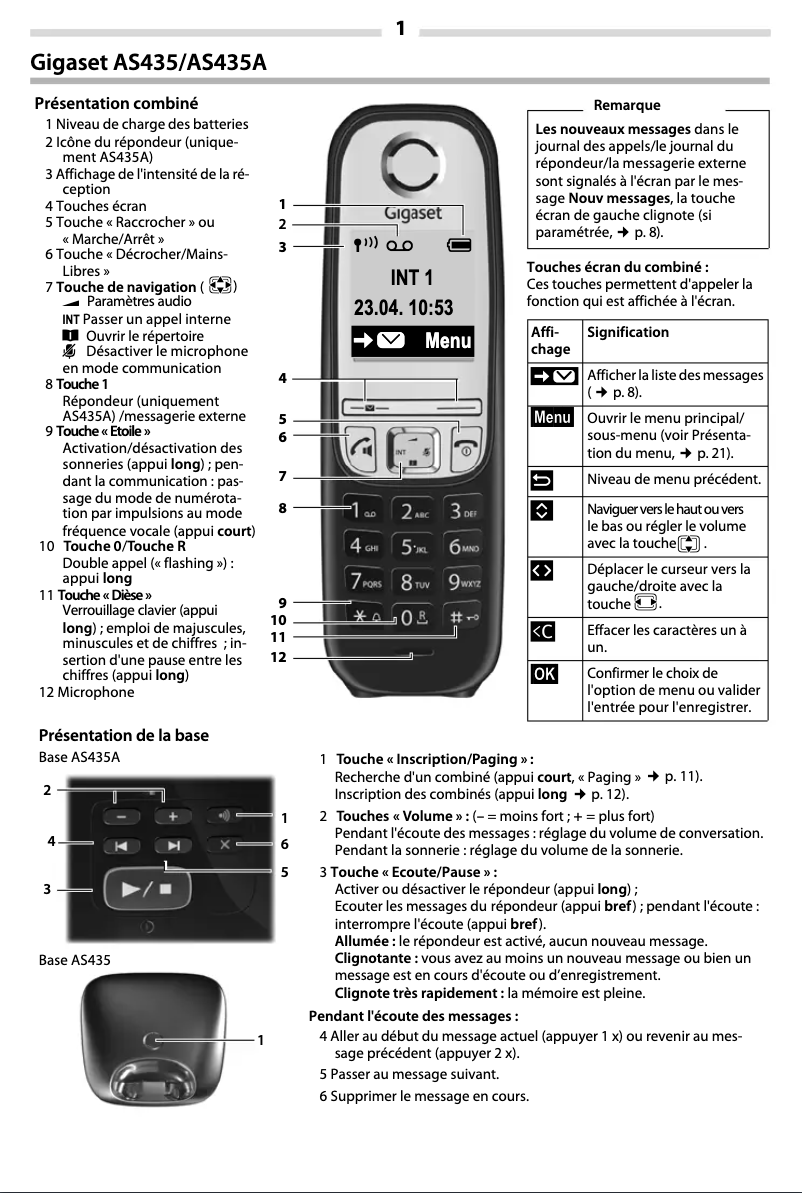
7 10

Editorial note

The Gigaset AS435 stands out for its ergonomic design, offering a comfortable grip that facilitates daily use. Its sound quality is superior, ensuring clear conversations, although some users may note a slight inferiority compared to high-end models. The user-friendly interface allows for intuitive navigation through the options, although some may find it a bit dated. In terms of performance, the Gigaset AS435 adequately meets everyday tasks, even if the sound quality may not satisfy demanding users. Its battery life is a weak point, as it may be insufficient for intensive use, leading to frequent recharges. The design, while functional, lacks aesthetic appeal, which may not suit all users. However, the product offers excellent value for money, supported by the reliability reputation of the Gigaset brand. Additionally, it comes with a comprehensive 24-page user manual, making it easier to understand its features. In summary, the Gigaset AS435 is a solid choice for those looking for a practical and reliable phone, but it may not meet the expectations of users seeking advanced features or a modern design.

Score details

User experience

The user experience is generally positive due to ergonomic design and intuitive features, but the interface may seem dated.

Performance

The Gigaset AS435 provides adequate performance for daily tasks, but the sound quality may lack clarity compared to high-end models.

Battery life

The battery life is insufficient for intensive use, requiring frequent recharges.

Design

The design is functional but may lack aesthetic appeal, which might not suit all users.

Value for money

The Gigaset AS435 offers good value for money, especially considering the reliability reputation of the Gigaset brand.

Support

The product comes with a comprehensive 24-page user manual, making it easier to understand its features.


Advantages

Ergonomic design for a comfortable grip

Exceptional voice clarity without interference

User-friendly interface for easy navigation

Reliability and durability of the Gigaset brand

Comprehensive user manual included

Disadvantages

Sound quality inferior to high-end models

Outdated and unintuitive user interface

No Bluetooth or Wi-Fi connectivity

Insufficient battery life

Unattractive design for some users

Technical Specifications AS435

General Information

Frequently Asked Questions

How can I navigate the menu of the Gigaset AS435?
To explore the menu options on the Gigaset AS435, follow these steps: 1. In standby mode, press the Menu button to open the menu. 2. Use the navigation button to scroll through the different options and find the one you want to use. 3. Once the option is selected, press the OK button to confirm your selection. 4. To return to standby mode, hold down the End Call button. Note that some features mentioned in the manual may not be available in all countries or on all networks. Some may require specific subscriptions. If you have further questions or need help with a specific feature, feel free to ask.
Why is my Gigaset AS435 not charging?
If your Gigaset AS435 is not charging, try these steps to identify the problem: 1. Check that the charger is properly connected to both the phone and the power outlet. Make sure it is securely plugged in. 2. Test the power outlet by plugging in another device. 3. Inspect the charging cable for any signs of damage or wear. If so, try a different cable. 4. Clean the phone's charging port with a soft, dry cloth to remove any dust or debris that may be obstructing the connection. 5. Ensure that the batteries are properly inserted and that the cover is securely closed. 6. Try charging the phone via another outlet or USB port to check the power source. 7. If the problem persists, consider replacing the batteries or contacting Gigaset customer service for further support. Remember to use only the batteries and charger recommended by Gigaset to ensure proper charging and avoid potential damage.
How do I transfer a call to another handset on the Gigaset AS435?
To transfer a call to another handset on the Gigaset AS435, follow these steps: 1. During an active call, press the Menu button to access the options. 2. Use the navigation button to find and select the "Transfer" option. 3. Press OK to start the transfer. 4. A list of available handsets will appear for the call transfer. 5. Select the desired handset using the navigation button. 6. Confirm the transfer by pressing OK, and the call will be directed to the chosen handset. 7. Hang up to end the call on the initial handset. Note that the transfer function may vary depending on the model and configuration of your Gigaset AS435. If you encounter difficulties or have further questions, please refer to the troubleshooting section of the manual or contact Gigaset customer service.
Why can't I hear the other person during a call on the Gigaset AS435?
If you cannot hear the other person during a call on the Gigaset AS435, try these solutions: 1. Adjust the volume level on the phone by pressing the Volume Up button during the call to increase it. Make sure it is not at the minimum. 2. Check that the phone is not in silent mode by pressing the Mute button during the call to toggle this function on or off. 3. Ensure that the microphone is not obstructed. Check that your hand or any other object is not covering the microphone. 4. Assess the call quality based on the signal strength. If you are in a low coverage area, move to a location with better reception. 5. If you are using a headset or Bluetooth device, ensure they are properly connected to the phone and functioning correctly. Try disconnecting and then reconnecting them. 6. Restart the phone by turning it off and then back on to resolve any temporary issues. If the problem persists, it is advisable to contact Gigaset customer service for further assistance.
How do I set up voicemail on the Gigaset AS435?
To set up voicemail on the Gigaset AS435, follow these steps: 1. Press the Menu button to access the options. 2. Navigate through the menu with the navigation button and select "Voicemail." 3. Confirm by pressing OK to enter the voicemail settings. 4. Choose the settings you want to configure, such as recording a personalized greeting or setting a PIN code. 5. Follow the on-screen instructions to customize your settings. 6. Once the setup is complete, press OK to save the changes. 7. To access your voicemail, hold down the 1 key on the keypad. 8. Follow the voice prompts to listen to your messages. Note that the steps and options may vary depending on your provider and network configuration. For any difficulties or questions, contact your provider for assistance.
Is the manual for the Gigaset AS435 available in French?
Yes, the manual for the Gigaset AS435 is available in French.

Similar products


Discover the technical sheet of SL100 colour from Gigaset and its manuals...
Available manuals:
Discover the technical sheet of ME6051 from Motorola and its manuals...
Available manuals:
Discover the technical sheet of D114 from Motorola and its manuals...
Available manuals:
Discover the technical sheet of D112 from Motorola and its manuals...
Available manuals:
Discover the technical sheet of E450 SIM from Gigaset and its manuals...
Available manuals:
Discover the technical sheet of A380 from Gigaset and its manuals...
Available manuals:
Discover the technical sheet of D103 from Motorola and its manuals...
Available manuals:
Discover the technical sheet of AS405 Trio from Gigaset and its manuals...
Available manuals:
Discover the technical sheet of D113 from Motorola and its manuals...
Available manuals:
Discover the technical sheet of A120A Quattro from Gigaset and its manuals...
Available manuals:
Discover the technical sheet of A170 from Gigaset and its manuals...
Available manuals:
Discover the technical sheet of D210 from Motorola and its manuals...
Available manuals:

Presentation of product AS435 specifications from brand Gigaset

General Information

The Gigaset AS435 is a phone from the brand Gigaset, known for its commitment to quality and innovation in the field of telecommunications. This model, the AS435, is designed to provide a pleasant user experience while ensuring reliable performance.

Advantages

This phone stands out for its ergonomic design, which allows for a comfortable grip, making daily use easy and enjoyable. Additionally, it offers superior sound quality, ensuring clear conversations without interference. Its user-friendly interface allows for intuitive navigation through the various available options, thus facilitating access to features. The reliability of the brand Gigaset is also an asset, ensuring durability and long-term performance. To top it all off, an included user manual helps to better understand and utilize all its features.

Disadvantages

However, a few points may be considered limitations. The sound quality may not match that of high-end models, which could affect the user experience. The user interface, while functional, may seem a bit outdated compared to more recent models. Additionally, the lack of advanced features such as Bluetooth or Wi-Fi connectivity limits its use in a modern environment. The battery life may also pose a problem for heavy users, requiring more frequent recharges. Finally, the design may lack aesthetic appeal, which may not suit all tastes.


