

Manual of product AS435A
Editorial note
The Gigaset AS435A presents itself as a quality phone, offering a very positive user experience thanks to its intuitive interface and simple features. Accessible even to users less familiar with technology, it stands out for its ease of use. In terms of performance, the Gigaset AS435A ensures satisfactory daily conversations, although the sound quality may be inferior to that of high-end models. This may affect the calling experience for demanding users. In terms of design, the phone boasts an ergonomic and modern aesthetic, but it may appear somewhat outdated compared to current standards. Regarding value for money, the Gigaset AS435A represents an interesting investment, largely due to the reliability of the brand, known for the durability of its products. However, it is important to note that the lack of advanced features, such as Bluetooth or Wi-Fi connectivity, limits its use in a modern environment, which could disappoint some users. Finally, the product comes with a detailed manual, facilitating its installation and the use of its various features, which demonstrates good support for users. In summary, the Gigaset AS435A is a solid choice for those looking for a reliable and easy-to-use phone, without needing the latest technologies.Score details
User experience
The user experience is very positive thanks to an intuitive interface and simple features, making the phone accessible even to users less familiar with technology.
Performance
The performance is satisfactory for everyday conversations, but the sound quality may be lower than that of high-end models, which can affect the calling experience.
Design
The design is ergonomic and modern, although it may seem a bit outdated compared to current communication device standards.
Value for money
The Gigaset AS435A represents good value for money, especially due to the reliability of the brand and its long-term investment.
Features
The lack of advanced features such as Bluetooth or Wi-Fi connectivity limits its use in a modern environment, which may disappoint some users.
Support
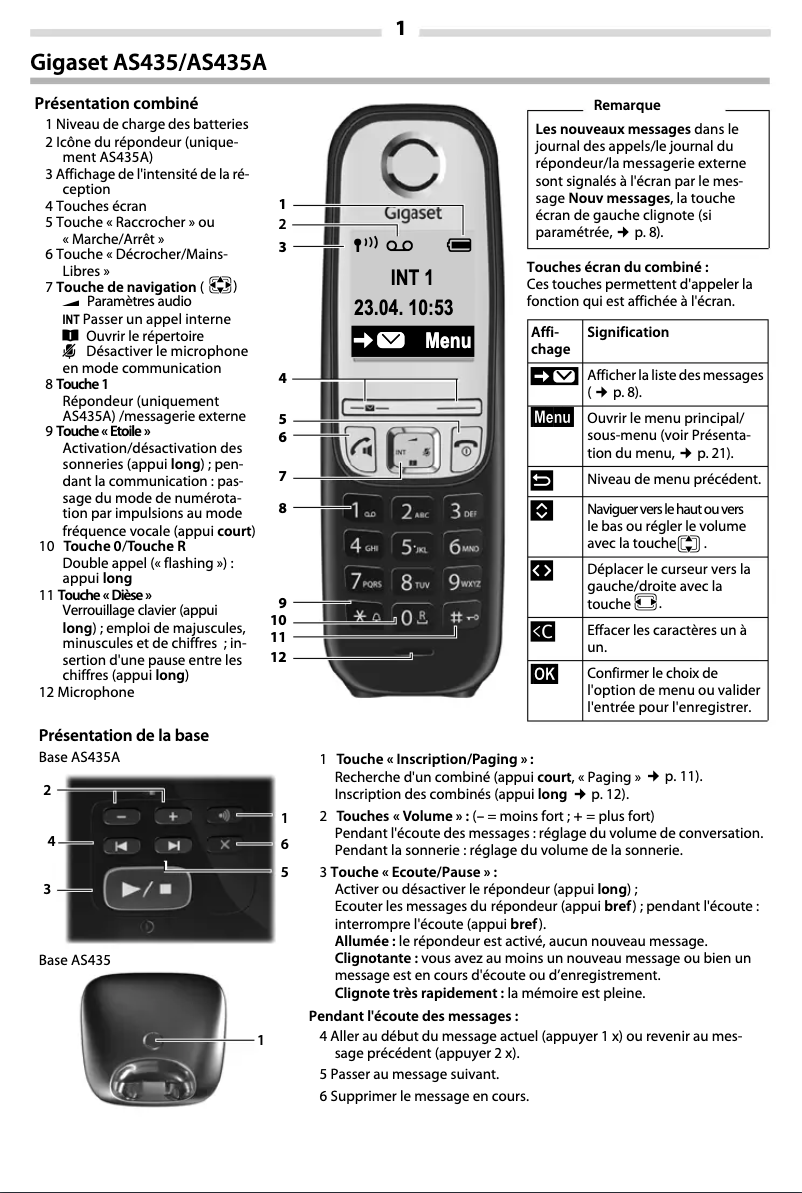
The product comes with a detailed 24-page manual, making it easier to install and use the various features.
Advantages
Clear sound for clear conversations
Intuitive, easy-to-use interface
Modern and ergonomic design
Recognized reliability of the Gigaset brand
Detailed manual included for installation
Disadvantages
Sound quality inferior to premium models
No Bluetooth or Wi-Fi
Outdated design compared to current standards
Limited memory for contacts
Restricted signal range in some homes
Frequently Asked Questions
How do I initialize the Gigaset AS435A phone for first use?
How do I add numbers to the directory of the Gigaset AS435A phone?
How do I make a call using the speakerphone function on the Gigaset AS435A phone?
How do I access voicemail messages on the Gigaset AS435A phone?
Can I transfer calls between different handsets?
Is the Gigaset AS435A manual available in French?
Similar products


More product categories from brand Gigaset
More product types from brand Gigaset











Presentation of product AS435A specifications from brand Gigaset
General Information
The Gigaset AS435A is a phone from the Gigaset brand, which is renowned for its expertise and innovation in the communication device sector. Designed to provide a pleasant user experience, this model stands out for its efficiency and user-friendliness, ensuring satisfactory performance for everyday use.
Advantages
This phone is characterized by a clear sound quality, ensuring crisp conversations without interference. Its intuitive interface and simplified features make it an accessible choice, even for users less familiar with technology. Additionally, the ergonomic design of the Gigaset AS435A allows it to blend harmoniously into various environments while providing optimal comfort of use.
The reliability of the brand Gigaset is a major asset, ensuring that the AS435A model represents a sustainable investment. To facilitate handling, a detailed user manual is provided, allowing for quick installation and a thorough understanding of the different features.
Disadvantages
However, some points deserve to be highlighted. The sound quality can sometimes be inferior to that of higher-end models, which could affect the calling experience. Moreover, the absence of advanced features such as Bluetooth or Wi-Fi connectivity limits its use in modern environments.
The design, while functional, may appear a bit dated compared to contemporary standards of communication devices. Furthermore, the directory memory is limited, which can be problematic for users wishing to keep a large number of contacts. Finally, the signal range may be restricted in certain home configurations, sometimes leading to dropouts during communications.


