

Manual of product AS470
Editorial note
The Gigaset AS470 is a cordless phone that stands out for its great freedom of movement, making its daily use very convenient. Its 1.8-inch backlit screen, while functional, may seem too small for some users, making navigation less comfortable. Additionally, the ability to organize conference calls is a valuable asset for those who wish to communicate with multiple parties at once. The battery life of the Gigaset AS470 is particularly impressive, with 200 hours on standby, significantly reducing the need for frequent recharges. However, the lack of caller ID may pose a problem for those looking to filter their incoming calls. Furthermore, it is worth noting that the model only includes one handset, which may not meet the needs of households requiring multiple devices. In terms of value for money, the Gigaset AS470 is competitively positioned, but the lack of specific features for elderly users and the limited number of handsets included may limit its appeal to some users. Overall, the Gigaset AS470 is a good choice for general use, but it may not suit all needs.Score details
User experience
The user experience is generally positive thanks to a cordless handset that offers great freedom of movement. However, the lack of caller identification can lead to inconveniences for some users.
Performance
The performance is satisfactory for daily calls, with a appreciated conference call feature. However, the lack of specific features for elderly people may limit its accessibility.
Battery life
The standby time is impressive, reaching 200 hours, which reduces the need for frequent recharges and allows for prolonged use.
Design
The design is functional, with a 1.8-inch backlit screen. However, some users may find the screen size too small for comfortable navigation.
Value for money
The price is competitive for a cordless phone, but the number of handsets included is limited to one, which may not be suitable for households needing multiple phones.
Advantages
Cordless handset for more freedom
Backlit display for better visibility
Conference call for multiple participants
Standby time of 200 hours
Directory of up to 100 contacts
Disadvantages
Absence of caller identification
No features for elderly people
Screen too small for some users
Only one handset included
Lightness that may reduce stability
Technical Specifications AS470
Representation / realization
-
Built-in answering machine-
-
TypeAnalog/DECT phone
-
Type of handsetCordless handset
-
On/off switchYes
-
On/off switchYes
-
Number of rings20
Screen
-
Backlight screenYes
-
Screen size1.8 "
-
Display screen size33 x 32 mm
-
Screen resolution96 x 64 pixels
-
Backlight screenYes
Design
-
Mounting type-
-
Elderly people's phone-
-
Product colorWhite
-
Integrated antennaYes
-
Integrated antennaYes
Phone features
-
SpeakerYes
-
Directory capacity100 entries
-
Location of the composerCombined
-
Compatible with multiple handsets4
Call management
-
Caller IDNo
-
Possibility of conference callYes
-
Possibility of conference callYes
Management features
-
Navigation buttonYes
Indication
-
Low battery indicatorYes
-
Low battery indicatorYes
-
Low battery indicatorYes
-
Low battery indicatorYes
Connectivity
-
DC InputYes
-
DC InputYes
-
DC InputYes
Power
-
Communication time6 PM
-
Standby autonomy200 h
Weight and dimensions
-
Dimensions of the combined unit (LxWxH)155 x 49 x 34 mm
-
Weight of the phone110 g
-
Base weight71 g
-
Basic dimensions44 x 88 x 103 mm
Packaging contents
-
Number of included bundles1
-
Headphones includedYes
-
Headphones includedYes
Frequently Asked Questions
What is the screen size of the Gigaset AS470?
What is the screen resolution of the Gigaset AS470?
How do I perform the initial setup of my Gigaset AS470 phone?
How do I change the ringtone volume on my Gigaset AS470 phone?
How do I activate the answering machine on my Gigaset AS470?
How can I save important contacts in the directory of my Gigaset AS470?
How do I access the call log on my Gigaset AS470?
Is the Gigaset AS470 an analog or DECT phone?
Does the Gigaset AS470 have a built-in screen?
Does the phonebook of the Gigaset AS470 have a limit of 100 entries?
Can multiple handsets be used with the Gigaset AS470?
Does the Gigaset AS470 offer caller ID?
Is the manual for the Gigaset AS470 available in French?
Similar products


More product categories from brand Gigaset
More product types from brand Gigaset











Presentation of product AS470 specifications from brand Gigaset
General Information
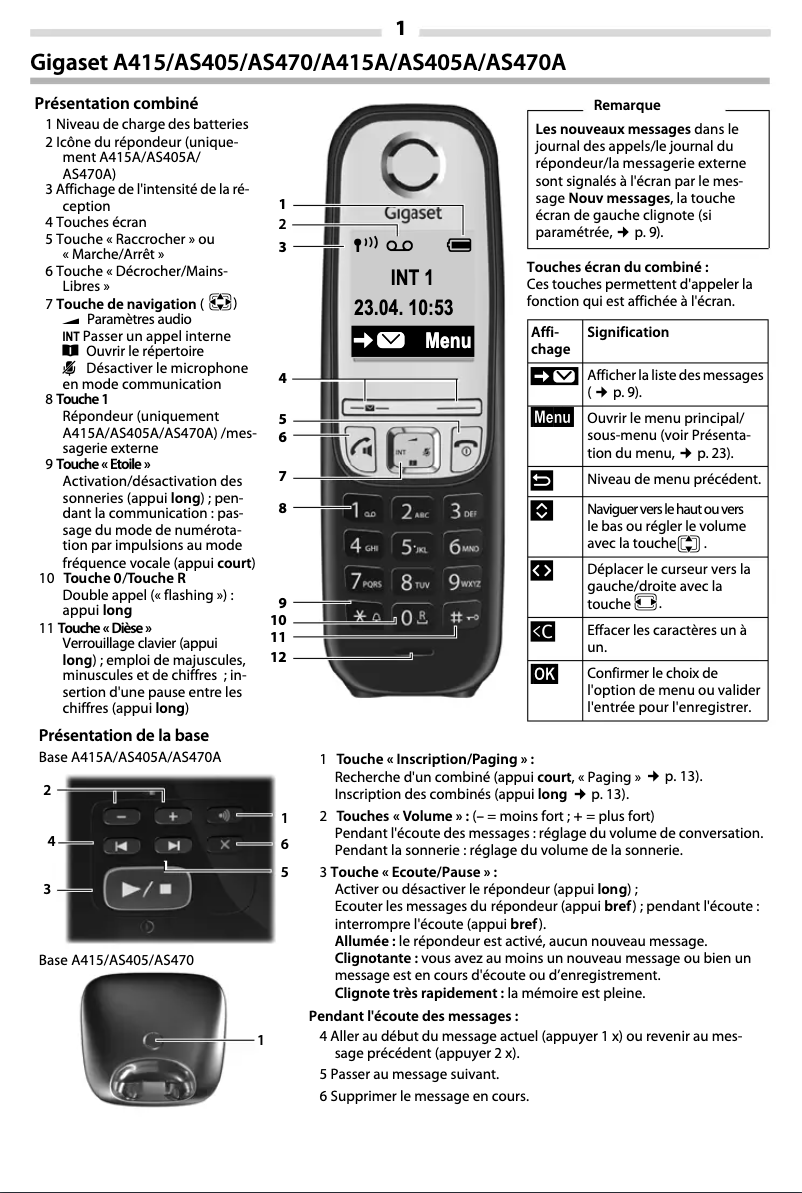
The Gigaset AS470 is a phone from the Gigaset brand, known for its commitment to quality and innovation in the communication device sector. This model is designed to provide reliable performance and an optimized user experience, combining practical and modern features.
Representation / Realization
Designed in the form of an island, the Gigaset AS470 combines aesthetics and functionality, harmoniously integrating into various interiors. Its cordless handset allows for great freedom of movement, making daily use more enjoyable. It is also compatible with GAP standards, ensuring interoperability with other devices. An On/Off button facilitates device management, while the 20 different ringtones allow for personalizing alerts according to user preferences.
Screen
This model is equipped with a backlit screen measuring 1.8 inches, offering a resolution of 96 x 64 pixels. This combination ensures good visibility even in low-light environments, thus facilitating access to displayed information. The screen dimensions, 33 x 32 mm, guarantee a satisfying visual experience.
Design
The Gigaset AS470 stands out with its modern white color, giving it an elegant appearance. Although it is not specifically designed as a phone for elderly people, it features backlit buttons that enhance readability in low-light conditions. Additionally, it is equipped with a built-in antenna to ensure optimal reception.
Phone Features
The phone is equipped with a quality speaker, ensuring a clear and immersive audio experience. With a directory capacity of 100 entries, it allows for storing a large number of contacts for easy access. The handset is designed for intuitive use and is compatible with multiple handsets, providing flexibility in usage.
Call Management
The Gigaset AS470 has a caller ID service (CLIP), allowing the caller's number to be displayed before answering. It also includes a conference call function, facilitating group communications.
Management Features
A navigation button simplifies interaction with the device, contributing to a smooth and pleasant user experience.
Indication
The phone is equipped with clear indicators for battery capacity, charging status, and a low charge warning, allowing for effective management of the device's autonomy.
Connectivity
The Gigaset AS470 offers wireless connections for practical use. It is also equipped with an RJ-11 connector, essential for telephone connections, as well as a DC input for compatibility with DC power supplies.
Power
This model ensures a communication time of 18 hours and an impressive standby time of 200 hours, thus minimizing the need for frequent recharges.
Weight and Dimensions
With dimensions of 155 x 49 x 34 mm for the handset and 44 x 88 x 103 mm for the base, the Gigaset AS470 easily fits into various spaces. Its lightweight of 110 g for the handset and 71 g for the base facilitates handling and installation.
Packaging Contents
The Gigaset AS470 comes with a handset and a base station, ensuring a stable connection. A headset is also included, providing an additional option for users.


