

Manual of product DA410
Editorial note
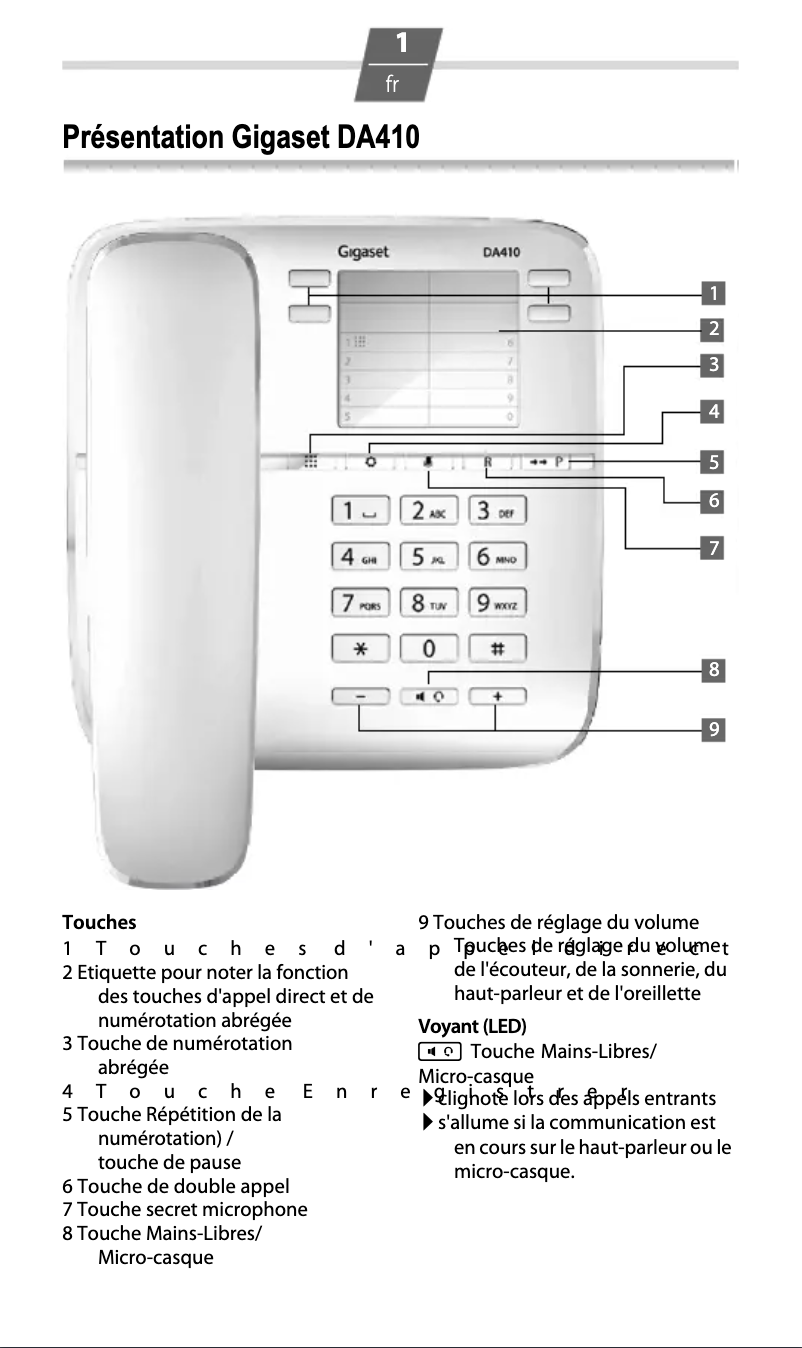
The Gigaset DA410 is a phone with a modern and elegant design, featuring a white finish that easily integrates into various interior styles. Its quick wall installation and Plug and Play functionality make it user-friendly, which is an advantage for those seeking a practical solution. In terms of performance, the quality speaker provides an immersive listening experience. Additionally, the ability to mute the microphone allows for greater control during conversations. However, the product has some limitations. The lack of a built-in answering machine and caller ID function may disappoint users looking to manage their calls more independently. Furthermore, the limited directory and absence of wireless connections may restrict the user experience, especially for those with many contacts to manage or who seek more flexibility. In summary, the Gigaset DA410 offers good value for money for users looking for a functional phone. However, the missing features may not meet the expectations of more demanding users.Score details
User experience
The user experience is satisfactory due to easy installation and a quality speaker, but the lack of a built-in answering machine and caller ID may disappoint some users.
Design
The modern and sleek white design easily fits into various interior styles, which is a strong point for the Gigaset DA410.
Features
Although the phone offers interesting features like Plug and Play and microphone mute, it lacks options such as a built-in answering machine and compatibility with systems like Mac.
Usability
Quick wall installation and digital volume control make it easy to use, but the limited directory and lack of wireless connections may be drawbacks for some users.
Value for money
The Gigaset DA410 offers good value for money for those looking for a functional phone, although some limitations may restrict its appeal to more demanding users.
Advantages
Modern and elegant design in white
Quick and easy wall installation
Immersive quality speaker
Simple Plug and Play installation
Muteable microphone for more control
Disadvantages
No built-in answering machine.
No caller ID.
Not compatible with Mac systems.
No wireless connections.
Limited directory for contacts.
Technical Specifications DA410
Representation / realization
-
TypeAnalog telephone
-
Built-in answering machineNo
-
Number of rings10
Design
-
Mounting typeWall
-
Product colorWhite
Phone features
-
Compatible with multiple handsets-
-
SpeakerNo
-
Microphone deactivationYes
-
Directory capacity- entries
Call management
-
Caller IDNo
Management features
-
Volume orderDigital
Screen
-
Built-in screenNo
Connectivity
-
Plug and PlayYes
-
Wireless connectionsNo
-
Headset ConnectionRJ-9
Other features
-
Mac CompatibilityNo
Weight and dimensions
-
Basic dimensions158 x 196 x 61 mm
Frequently Asked Questions
How can I perform the initial setup of my Gigaset DA410 phone?
How do I adjust the ringer volume on my Gigaset DA410?
How do I add and retrieve contacts in the directory of my Gigaset DA410?
How do I use the redial function on my Gigaset DA410?
How do I activate the hands-free function on my Gigaset DA410?
Does the Gigaset DA410 have an answering machine?
Is it possible to mount the Gigaset DA410 on the wall?
Does the Gigaset DA410 have a speakerphone function?
Can I disable the microphone on the Gigaset DA410?
How many ringtones are available on the Gigaset DA410?
Is the manual for the Gigaset DA410 available in French?
Similar products


More product categories from brand Gigaset
More product types from brand Gigaset











Presentation of product DA410 specifications from brand Gigaset
General Information
The Gigaset DA410 is a phone from the Gigaset brand, known for its innovation and reliability in the communication device sector. This model, referenced under the code DA410 | S30054-S6529-R102, offers optimal performance for daily use. The EAN code, which uniquely identifies this product, is 4250366826813, 4250366826820, 4250366829784.
Representation / Realization
Designed in an island form, the Gigaset DA410 combines functionality and aesthetics, allowing for seamless integration into various environments. Although it does not have a built-in answering machine, it offers a total of 10 different ringtones, thus providing customization in the calling experience.
Design
This model is intended to be wall-mounted, making installation easy while optimizing space. Its white color gives it a modern and elegant look, easily adapting to any type of interior decor.
Phone Features
The Gigaset DA410 is equipped with a quality speaker, ensuring a pleasant sound experience. Its compatibility with multiple handsets allows for versatile use, while the microphone mute function offers increased control during conversations. However, it is worth noting that the directory is not expandable, which may be a disadvantage for those managing many contacts.
Call Management
This model does not have caller ID functionality, thus limiting the ability to know the identity of the caller before answering. This may cause inconvenience for users wishing to filter their calls.
Management Features
The volume management is digital, allowing for easy sound adjustment according to user preferences.
Screen
The Gigaset DA410 features a built-in screen, facilitating navigation and call management through a practical visual interface.
Connectivity
With the Plug and Play feature, the installation of the Gigaset DA410 is quick and uncomplicated. However, it does not offer wireless connections, which may limit mobility. The headset connection is of the RJ-9 type, thus providing a practical option for users seeking an enhanced audio experience.
Other Features
It is important to note that the Gigaset DA410 is not compatible with Mac systems, which could restrict its use for some users.
Weight and Dimensions
The dimensions of the Gigaset DA410 are 158 x 196 x 61 mm, allowing for easy integration into various spaces without clutter.


