

Manual of product DA610
Editorial note
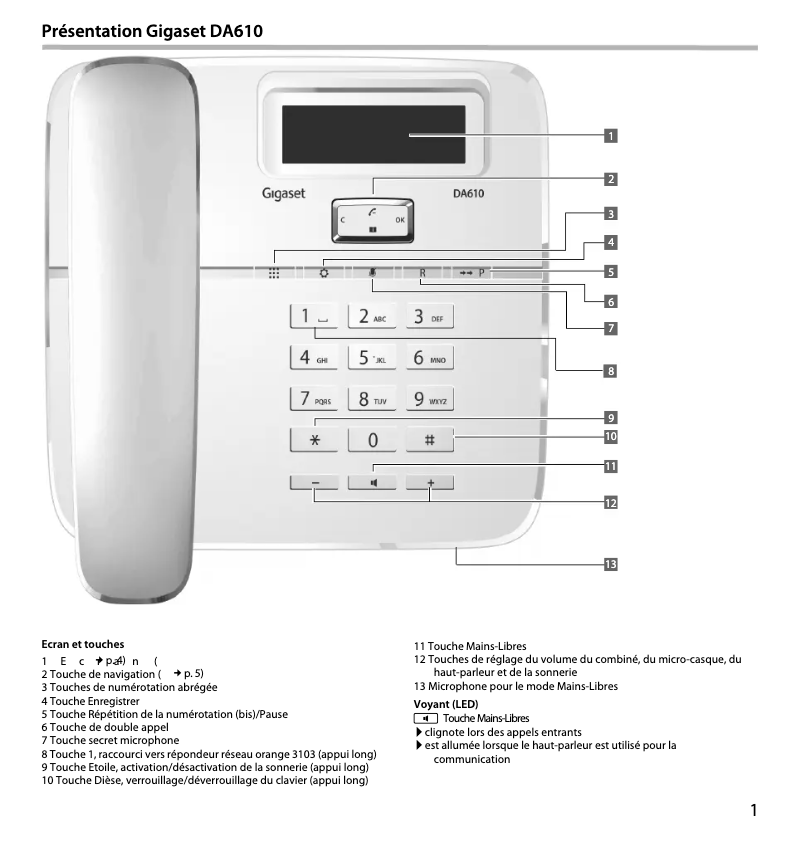
The Gigaset DA610 stands out with its modern and elegant black design, which harmoniously fits into various interiors. Its island mounting type is both functional and aesthetic, although it may not be suitable for all workspaces, particularly in restricted environments. In terms of features, the DA610 offers a quality speaker that ensures clear and pleasant conversations, as well as a directory capacity of 50 entries, facilitating quick storage and access to contacts. The Plug and Play functionality allows for simple and quick installation, making the use of the product very enjoyable. However, the lack of an integrated answering machine and caller ID may limit its effectiveness and practicality for those who wish to manage their calls with peace of mind. Despite its strengths, the Gigaset DA610 has some drawbacks. It is not compatible with Mac systems, which may restrict its use for some users. Additionally, the number of lines displayed, limited to two, may seem insufficient for optimal information viewing. Regarding value for money, although it offers interesting features, its price may seem high for users needing additional functionalities such as an integrated answering machine. In conclusion, the Gigaset DA610 is a phone that combines aesthetics and functionality, but it could benefit from some improvements to meet the expectations of the most demanding users.Score details
User experience
The user experience is generally positive thanks to features like call blocking and quality speaker, but the lack of built-in answering machine and caller ID limits its effectiveness.
Design
The modern and sleek black design of the Gigaset DA610 fits harmoniously into various interiors, although the island mounting type may not suit all spaces.
Features
The features are interesting, particularly the directory capacity of 50 entries and the Plug and Play functionality, but the lack of compatibility with Mac systems and the limited number of displayed lines to 2 can be drawbacks.
Usability
The installation is simple and quick, making the use of the product enjoyable. However, the absence of an answering machine and the inability to recognize callers before answering can detract from its practicality.
Value for money
The Gigaset DA610 offers good sound quality and practical features, but its price may seem high for users needing additional features like a built-in answering machine.
Advantages
Modern and elegant design in black
Quality speaker for clear conversations
Call blocking to filter out unwanted calls
Directory of 50 entries for quick contacts
Simple installation with Plug and Play
Disadvantages
No built-in answering machine
Absence of caller ID
Not compatible with Mac systems
Island design not well suited
Only 2 lines displayed
Technical Specifications DA610
Representation / realization
-
TypeAnalog telephone
-
Built-in answering machineNo
-
Ringtone typePolyphonic
Design
-
Mounting typeOffice
-
Product colorBlack
Phone features
-
Compatible with multiple handsets-
-
VIP Groups (identifying ringtone)Yes
-
VIP Groups (identifying ringtone)Yes
-
Directory capacity50 entries
Call management
-
Caller IDNo
-
Call timerYes
-
Call timerYes
Screen
-
Built-in screenYes
-
Number of lines displayed2 lines
Connectivity
-
Plug and PlayYes
-
Wireless connectionsNo
Weight and dimensions
-
Width178 mm
-
Depth196 mm
-
Height61 mm
Other features
-
Mac CompatibilityNo
Frequently Asked Questions
What is the height of the Gigaset DA610?
What is the width of the Gigaset DA610?
What is the depth of the Gigaset DA610?
How do I add a new contact on my Gigaset DA610?
How do I set up call forwarding on my Gigaset DA610?
Can I adjust the ringer volume on my Gigaset DA610?
How do I activate the hands-free mode on my Gigaset DA610?
Is it possible to adjust the screen contrast on my Gigaset DA610?
Does the Gigaset DA610 come with an answering machine?
What type of mounting is provided for the Gigaset DA610?
What type of ringtone is available on the Gigaset DA610?
Does the Gigaset DA610 have a built-in speaker?
How many contacts can the directory of the Gigaset DA610 hold?
Is the manual for the Gigaset DA610 available in French?
Similar products


More product categories from brand Gigaset
More product types from brand Gigaset











Presentation of product DA610 specifications from brand Gigaset
General Information
The Gigaset DA610 is a desk phone designed by the Gigaset brand, known for its reliability and innovation in the field of communication devices. This model, referenced under the name DA610 | S30350-S212-R101, ensures optimal performance for daily use. The EAN code, which allows for the identification of this product in the distribution circuit, is as follows: 4250366828565, 4250366828640, 4250366828657, 4250366828664.
Representation and Design
The Gigaset DA610 features an island design, combining functionality and aesthetics to harmoniously fit into various interiors. This model does not have a built-in answering machine, which may be a disadvantage for those who wish to manage their calls in their absence. However, it offers a polyphonic ringtone, providing a customizable and pleasant sound experience.
Design
Designed to be placed on a desk, the Gigaset DA610 stands out with its black color, giving it a modern and elegant look. This aesthetic choice allows the device to adapt to different work environments.
Phone Features
The Gigaset DA610 is equipped with a quality speaker, ensuring an immersive sound experience for clear conversations. It is compatible with several handsets, offering flexibility in use. Additionally, it allows for customizing ringtones for specific contacts through the VIP Groups feature. With a directory capacity of 50 entries, this phone facilitates the storage and quick access to important contacts.
Call Management
This model does not offer caller identification, which limits the ability to recognize callers before answering. However, it has a call blocking feature, allowing for filtering unwanted calls for a more serene use. Furthermore, a call timer is integrated for effective management of conversation time.
Screen
The Gigaset DA610 is equipped with a built-in screen that facilitates its use. This screen displays up to 2 lines, allowing for a clear and organized view of important information.
Connectivity
This model offers a Plug and Play feature, ensuring quick and hassle-free installation, making its use particularly enjoyable. However, it does not offer wireless connections, which may limit installation flexibility.
Weight and Dimensions
The dimensions of the Gigaset DA610 are optimized for easy integration into your workspace: a width of 178 mm, a depth of 196 mm, and a height of 61 mm. These dimensions ensure a perfect fit, even in tight spaces.
Other Features
It is important to note that the Gigaset DA610 is not compatible with Mac systems, which may restrict its use for some users.


