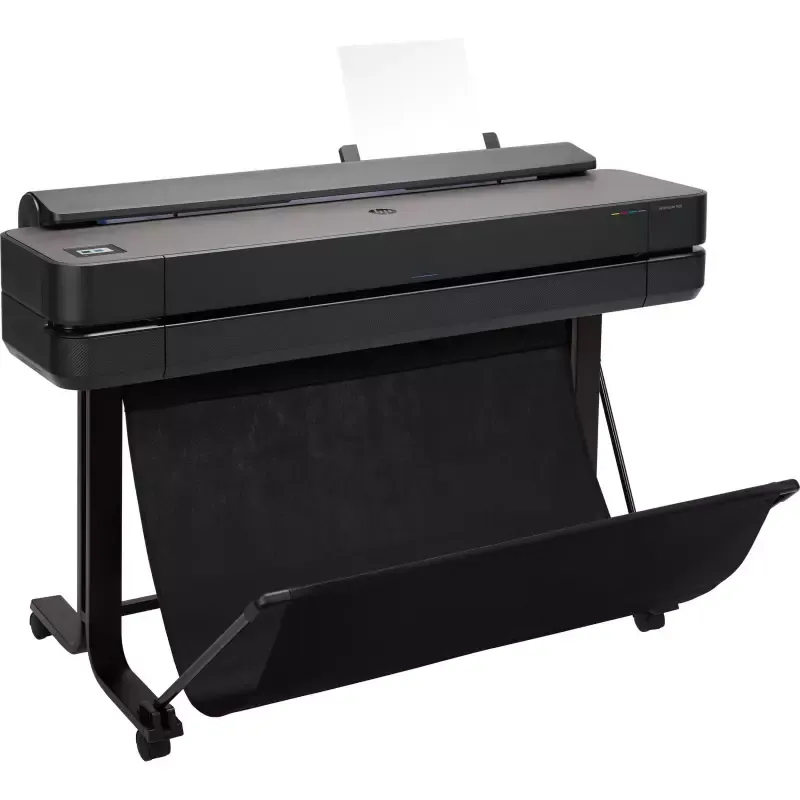

Manuals of product DesignJet T650


Editorial note
The HP DesignJet T650 printer stands out for its exceptional printing performance, offering a maximum resolution of 2400 x 1200 DPI, ideal for professional documents and detailed images. Its versatility in printing media, including photo paper and glossy paper, as well as its color scanning and copying features, enhances its appeal to users looking for faithful and vibrant reproductions. However, despite its many advantages, this model has some drawbacks. Its weight of 35.4 kg can complicate its movement and installation, particularly in tight spaces. Additionally, the costs of ink cartridges can be high in the long run, representing a significant investment. Its large size can also pose integration issues in some offices. In terms of ergonomics, the user experience is generally positive, although the interface may seem complex for some, requiring an adjustment period. Connectivity is enhanced by Ethernet, Wi-Fi, and USB options, but the lack of Bluetooth could limit usage flexibility for some users. Finally, the provided documentation is comprehensive and helpful, facilitating product handling. Sustainability certifications, such as EPEAT Gold and ENERGY STAR, attest to HP's commitment to responsible energy consumption and environmental respect. In summary, the HP DesignJet T650 is a robust and high-performing printer, well-suited to professional printing needs, but it requires consideration of its integration and operating costs.Score details
User experience
The user experience is generally positive, but the interface may be considered complex for some users, requiring an adjustment period.
Performance
The printing performance is excellent with a maximum resolution of 2400 x 1200 DPI, ideal for professional documents and detailed images.
Design
The design is modern, but the size (1317 mm in width) may pose integration issues in limited workspaces.
Value for money
Although the print quality is high, the costs of ink cartridges can be significant, which may represent a substantial long-term investment.
Usability
Connectivity is enhanced with Ethernet, Wi-Fi, and USB, but the lack of Bluetooth could limit connection options for some users.
Features
The color scanning and copying features are a plus, offering faithful and vibrant reproductions.
Robustness
The weight of the printer (35.4 kg) can make moving and installing it difficult, especially in tight spaces.
Support
The available documents, including the user manual and assembly instructions, are helpful for a good understanding of the product.
Documentation
The documentation is comprehensive with a total of 158 pages, providing accurate information on usage and maintenance.
Advantages
High-quality printing up to 2400 x 1200 DPI
Compatible with various types of paper
Ethernet, Wi-Fi, and USB connectivity
True color scanning and copying
EPEAT Gold and ENERGY STAR certified
Disadvantages
Heavy weight, difficult to move.
High cost of ink cartridges.
Bulky size for small spaces.
Complex user interface to master.
Lack of Bluetooth connectivity.
Technical Specifications DesignJet T650
General Information
-
ModelDESIGNJET T650
-
Brand
-
Category
-
Type
-
SKU1301656
-
MPN1301656
Print speed
-
Printing technologyA thermal inkjet
-
ColorYes
-
Maximum resolution2400 x 1200 DPI
-
Number of print cartridges4
-
Printing colorsBlack, Cyan, Magenta, Yellow
-
Languages of the page descriptionCALS G4, HP-GL/2, HP-RTL, JPEG, URF
-
Print head1
Copier
-
CopyNo
Digitization
-
DigitizationNo
Paper management
-
Maximum print format914 x 1897 mm
-
Type of paper tray supportBond paper
-
Leaves (separated)Coated paper
-
Max. diameter of the rollGlossy paper
-
Photo paper
-
Plain paper
-
Satin paper
-
Yes
-
100 mm
Connectivity
-
USB portYes
-
USB portYes
-
USB portYes
-
LAN Ethernet: data transfer rate1000 Mbit/s
Representation / realization
-
Built-in screen-
-
Product colorBlack
-
Internal memory1024 MB
-
Country of originChina
-
HP SegmentProfessional
Sustainability
-
Sustainability certificatesEPEAT Gold
-
ENERGY STAR
Power
-
AC input voltage100 - 240 V
-
Typical electricity consumption35 W
-
Energy consumption (standby mode)0.2 W
Weight and dimensions
-
Width1317 mm
-
Depth605 mm
-
Height932 mm
-
Weight35400 g
Minimum system requirements
-
Support for the Mac operating systemYes
-
Support for the Mac operating systemYes
Packaging information
-
Package weight56000 g
-
Package width1470 mm
-
Package depth575 mm
-
Package height590 mm
-
Cartridge(s) includedYes
Frequently Asked Questions
What is the weight of the HP DesignJet T650?
What is the recommended method for removing jammed paper from the printer?
Why is my printer not recognizing the original cartridges?
What could be the reasons for poor print quality?
What are the differences between a laser printer and an inkjet printer?
Why is my inkjet printer producing black streaks?
What does the term DPI mean?
How many cartridges can the HP DesignJet T650 hold?
What is the height of the HP DesignJet T650?
What is the width of the HP DesignJet T650?
What is the depth of the HP DesignJet T650?
Why won't my printer turn on?
How do I load paper into the HP DesignJet T650 printer?
What should I do if the print quality is unsatisfactory?
How do I connect the printer to my computer?
What should I do if an error message appears on the printer?
Does the HP DesignJet T650 have a maximum resolution of 2400 x 1200 DPI?
Can the HP DesignJet T650 print on different types of media?
Is the HP DesignJet T650 compatible with cut sheets and paper rolls?
Does the HP DesignJet T650 offer connectivity options like Ethernet LAN, Wi-Fi, and USB port?
Does the HP DesignJet T650 have sustainability certifications?
Is the manual for the HP DesignJet T650 available in French?
Similar products


More product categories from brand HP
Computers and accessories HP
Other HP
Phones HP
Audio HP
Interior HP
Software HP
More product types from brand HP


Presentation of product DesignJet T650 specifications from brand HP
General Information
The HP DesignJet T650 is a high-end printer from the HP brand, known for its innovation and quality in the printing device sector. This model, designated under the reference DesignJet T650 | 5HB10A, is designed to deliver exceptional performance and enhance the user experience. The product is identifiable by its EAN code, which includes several references such as 0194850020001 and 0194850020056, ensuring traceability in the distribution system.
Print Speed
Equipped with thermal inkjet printing technology, the HP DesignJet T650 ensures remarkable print quality with precise results. It offers color printing, with a maximum resolution of 2400 x 1200 DPI, guaranteeing documents and images of exceptional clarity. This printer uses four cartridges (Black, Cyan, Magenta, Yellow) for stunning visual output. Additionally, it supports multiple page description languages, such as CALS G4 and HP-GL/2, to accommodate user preferences.
Copier
The HP DesignJet T650 includes a color copying function, allowing for faithful and vibrant reproductions of your original documents.
Scanning
This printer is also equipped with a color scanning feature, providing vibrant reproductions of documents and images.
Paper Management
The maximum print size is 914 x 1897 mm, ideal for large documents. It is compatible with various types of paper, such as plain paper, photo paper, and glossy paper, allowing for versatile use. Furthermore, the HP DesignJet T650 supports separate sheets and has a maximum roll diameter of 100 mm, ensuring optimal paper management.
Connectivity
The HP DesignJet T650 offers several connectivity options, including Ethernet, Wi-Fi, and a USB port, facilitating integration into various work environments. With a data transfer rate of 1000 Mbit/s, it ensures a fast and efficient connection.
Design / Build
This printer features a modern and sleek black finish. It is equipped with a built-in display, facilitating user interaction. Its internal memory of 1024 Mo allows for efficient data and application management. Originating from China, the HP DesignJet T650 is primarily designed for home use.
Durability
The HP DesignJet T650 meets high durability standards, displaying certifications such as EPEAT Gold and ENERGY STAR, ensuring eco-friendly operation and energy efficiency.
Power
This printer operates with an AC input voltage of 100 - 240 V, ensuring compatibility with standard electrical systems. Its typical power consumption is 35 W, with a reduced standby consumption of 0.2 W, contributing to energy savings.
Weight and Dimensions
The HP DesignJet T650 measures 1317 mm in width, 605 mm in depth, and 932 mm in height, dimensions that may require planning for integration into tight spaces. With a weight of 35.4 kg, it can be difficult to move without the assistance of a second person.
Minimum System Requirements
The HP DesignJet T650 is compatible with Windows and Mac operating systems, ensuring smooth use across different platforms.
Packaging Information
The package weight of the HP DesignJet T650 is 56000 g, ensuring adequate protection during transport. The package dimensions are 1470 mm in width, 575 mm in depth, and 590 mm in height, optimizing transport and storage. Additionally, cartridges are included, allowing you to start using the printer right away upon receipt.


