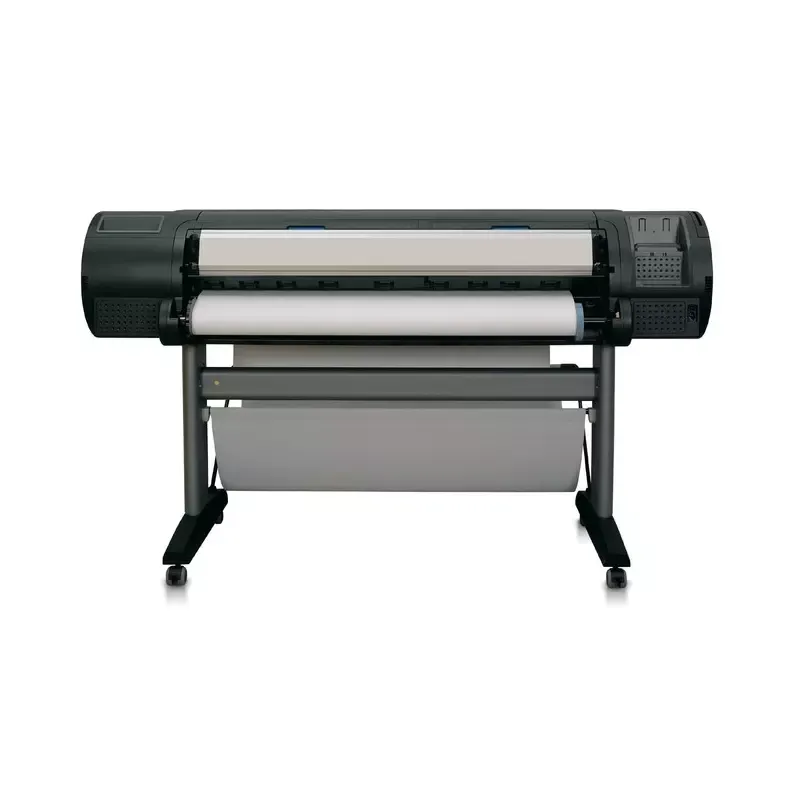

Manual of product DesignJet Z3100

Editorial note
The HP DesignJet Z3100 printer stands out for its exceptional print quality, with a resolution of 2400 x 1200 DPI, ensuring sharp and precise results for various professional projects. Its compatibility with a wide range of print media, from photographic papers to canvases, offers appreciated flexibility in many contexts. Additionally, the effective color management, thanks to calibrated solid color simulations PANTONE, ensures consistency and accuracy of colors in every print. The integration of a web server and Gigabit Ethernet connectivity also facilitates the management and sharing of print resources within a network. However, the printer has some notable drawbacks. Its heavy weight of 271 kg makes transport and installation difficult, potentially requiring several people for handling. Moreover, the minimum system configuration requires relatively old specifications, which may limit its use with recent operating systems and modern computers. The cost of HP Vivera ink cartridges can also represent a significant expense for regular users, and the absence of parallel ports and certain wireless connectivity options could restrict connection choices for some setups. In summary, the HP DesignJet Z3100 is a quality printer, ideal for demanding work, but its imposing dimensions and operating costs may be limiting factors for some users.Score details
User experience
The user experience is enhanced by a control panel with a 5-line LCD screen, making it easier to navigate through the printer's various features.
Performance
The exceptional print quality with a resolution of 2400 x 1200 DPI ensures sharp and precise results, although the printing speed may seem slow for bulk prints.
Features
The printer offers compatibility with a wide range of print media, as well as effective color management through calibrated solid PANTONE color simulations.
Value for money
The cost of HP Vivera ink cartridges can be high, which could represent a significant expense for regular users.
Robustness
The heavy weight of 271 kg makes transporting and installing the printer difficult, potentially requiring multiple people for handling.
Support
The integration of a web server and Gigabit Ethernet connectivity allows for simplified management and easy sharing of print resources within a network.
Usability
The minimum system configuration requires relatively old specifications, which may limit its use with recent operating systems.
Advantages
High-quality printing with 2400 x 1200 DPI.
Compatible with various printing media.
Calibrated PANTONE color management.
Built-in web server and Ethernet connectivity.
ENERGY STAR certified for sustainability.
5-line LCD screen for navigation.
Disadvantages
Very heavy printer, difficult to transport.
Limited system requirements for older systems.
High cost of ink cartridges.
Restricted connectivity, no parallel ports.
Slow printing speed for large volumes.
Technical Specifications DesignJet Z3100
General Information
-
ModelDESIGNJET Z3100
-
Brand
-
Category
-
Type
-
SKU1381355
-
MPN1381355
Packaging information
-
Provided softwarePrinter drivers, HP Printer Utility including HP Color Center
-
Package weight123000 g
-
Package dimensions (LxWxH)1965 x 780 x 780 mm
-
Packaging dimensions (L x W x H)77.3 x 30.7 x 30.7 "
-
Weight of the box/package271 kg
Other features
-
Minimum system requirementsMicrosoft Windows 2000/XP: Pentium IV, 1 GHz, 512 MB RAM, 2 GB available hard disk space
-
Sound power emittedWindows 2000: Pentium III processor, 512 MB RAM, 2 GB available hard disk space, 733 MHz; Windows XP Professional: Pentium IV processor, 512 MB RAM, 2 GB available hard disk space, 1 GHz
-
Compatible ink typesMicrosoft Windows 2000/XP: Pentium IV, 1 GHz, 1 GB RAM, 2 GB available hard disk space
-
JetDirect compatible productsMac OS X v10.2, v10.3, v10.4 and later, PowerPC G4, G5, or Intel Core Processor, 1 GB Ram, 2 GB available hardware disk
-
Minimum line width6.5 B(A)
-
Precision of traitsHP Vivera pigment inks
-
Minimum configuration for MacintoshYes
-
Print quality (black, premium quality)0.0508 mm
-
Print quality (black, normal quality)+/- 0.2 %
-
Print quality (black, normal quality)Mac OS X v 10.2, v 10.3, v 10.4 and later; PowerPC G3 or Intel Core Processor; 256 MB RAM; 1 GB available hardware disk
-
Electromagnetic compatibility2400 x 1200 DPI
-
Printer management1200 DPI
-
Driver update descriptions1200 DPI
-
Ink dropCompliance for Class B products: EU (EMC Directive), USA (FCC rules), Canada (DoC), Australia (ACA), New Zealand (MoC), China (CCC), Japan (VCCI), Korea (MIC) and Taiwan (BSMI)
-
Control panelHP Web Jetadmin
-
SecurityLatest Windows printer drivers information available at http:// and more information on all printer drivers available at http:///country/us/en/support.html?pageDisplay=drivers.
-
Acoustic power (pending)4 pl (lc, lm, lg, pK, E, G), 6 pl (M, Y, mK, R, GN, B)
-
LAN Driver240 x 160 pixels grayscale graphical display with Asian fonts support, 4 direct-access buttons and 7 navigation buttons, 2 bicolor lights (Ready, Processing, Attention, Error)
-
JetDirect compatible productsIEC 60950-1 compliant, EU LVD and EN 60950-1 compliant, certified by CSA for Canada and US, Argentina IRAM, Singapore PSB, Russia GOST, China CCIB, Taiwan BSMI
-
Guaranteed minimum line width44 dB
-
Maximum print length (imperial)Novell NetWare 3.x/4.x clients
-
Maximum output sheet to sheetYes
-
Standard formats of media (sheets, rolls)0.002 in
-
Non-printable area (sheet)300 ft; Operating system and application dependent
-
Water resistance of the print medium66 "
-
Maximum input regarding the roll8.5 to 44-in wide sheets, 11 to 44-in rolls
-
Print quality (color, normal quality)0.2 x 0.67 x 0.2 x 0.2 in
-
Water-resistant on a range of HP creative and specialty papers
-
1
-
1200 x 1200 DPI
Sustainability
-
Sustainability certificatesENERGY STAR
Paper management
-
Accepted types of mediaPhotographic paper (satin, gloss, semi-gloss, matte)
-
Standard average formatsproofing paper (high-gloss, semi-gloss, matte)
-
Maximum length of paper supportsfine art printing material (canvas, smooth, textured, watercolor)
-
Recommended weightsself-adhesive and vinyl (polypropylene, vinyl)
-
Maximum roll lengthsign and banner (display film, banner, scrim, polypropylene, Tyvek, outdoor paper)
-
Maximum width of the supportbond and coated (bond, coated, heavyweight coated, super heavyweight coated)
-
Management of supportsA4
-
Max. diameter of the rollA3
-
Supported media formatsA2
-
Thickness of supports (per print path)A1
-
Non-printable area (roll media)A0
-
Non-printable area (metric sheet)1676.4 mm
-
High copy margin500 g/m²
-
Thickness of the support300 ft
-
Maximum number of paper bins91.4 m m
-
High copy margin1117 mm
-
Low copy marginSheetfeed, roll feed, automatic cutter (cuts all media except canvas)
-
High copy margin136 mm
-
High copy marginA
-
High copy marginB
-
C
-
D
-
E
-
Up to 0.8 mm
-
0.2 x 0.2 x 0.2 x 0.2 in (borderless on glossy roll media)
-
5 x 17 x 5 x 5 mm
-
5 mm
-
> 0.8 mm
-
2
-
5 mm
-
14 mm
-
5 mm
-
5 mm
-
5 mm
-
5 mm
Representation / realization
-
Internal memory128 MB
-
Integrated into the processorMobile Intel Centrino
-
Processor frequency600 MHz
-
CertificationSWOP, ISO, GRACOL, 3DAP
-
Internal storage capacity40 GB
-
Storage mediaHDD
Power
-
Power requirementsInput voltage (autoranging): 100 to 240 VAC (+/- 10%), 50/60 Hz (+/- 3 Hz), 2 amps max
-
Typical electricity consumption200 W
Weight and dimensions
-
Dimensions (LxWxH)1770 x 661 x 1047 mm
-
Maximum dimensions (LxWxH)1770 x 732 x 1047 mm
-
Pallet dimensions (L x W x H)1965 x 780 x 780 mm
-
Weight86000 g
-
Note of dimensions (metric)printer with stand
-
Note of dimensions (metric)printer with stand
-
Pallet dimensions (L x W x H)77.3 x 30.7 x 30.7 "
-
Weight per pallet271 kg
-
Size (imperial)69.7 "
-
Size (imperial)69.7 "
-
Weight (imperial)189 lb kg
Environmental conditions
-
Operating relative humidity (H-H)20 - 80 %
-
Recommended operating temperature
-
Temperature out of operation15 - 35 °C
-
Operating temperature
-
Operating temperature-13 - 131 °C
-
Relative humidity rate (storage)
-
Operating altitude (imperial measurement)5 - 40 °C
-
-
59 - 95 °F
-
-
0 - 95 %
-
-
9842 ft
Print speed
-
Color ManagementHP Color Center
-
Print head nozzlesHP Vivera pigment inks
-
Printing colorsHP embedded spectrophotometer
-
Print head2112
-
Print speed (color image, high quality, glossy paper)Blue
-
Print speed (color image, draft quality, coated paper)Gloss enhancer
-
Print speed (color image, normal quality, coated paper)Green
-
Print speed (color image, normal quality, glossy paper)Light cyan
-
Light grey
-
Light magenta
-
Magenta
-
Matte black
-
Photo black
-
Red
-
Yellow
-
6 (magenta and yellow, light magenta and light cyan, photo black and light gray, matte black and red, gloss enhancer and gray, blue and green)
-
1.6 m2/hr
-
17 ft2/hr
-
13.9 m2/hr
-
150 ft2/hr
-
72 ft2/hr
-
6.9 m2/hr
-
38 ft2/hr
-
3.5 m2/hr
Connectivity
-
USB portYes
-
Type of Ethernet interfaceGigabit Ethernet
-
Number of parallel ports1
-
Number of parallel ports1
-
USB portYes
-
USB connectorUSB Type-A
Minimum system requirements
-
Supported browsersInternet Explorer 5.0 and higher
-
Compatible operating systemsNetscape 6.0.1 and higher
-
Safari for Mac OS 10.3 and higher
-
Mozilla 1.5 and higher
-
Windows 2000
-
Windows XP Home
-
Windows XP Professional
-
Windows XP Professional x64
-
Windows Server 2003
-
Mac OS 10.2 or higher
-
Novell NetWare 5.x, 6.x
-
Citrix MetaFrame
-
Terminal Services
Logistics data
-
Gross weight of the pallet123000 g
-
Products by pallet1 piece(s)
Frequently Asked Questions
What is the weight of the HP DesignJet Z3100 printer?
What is the recommended method for removing jammed paper from the printer?
Why does my printer not recognize the original cartridges?
Why is the quality of my prints poor?
What is the difference between a laser printer and an inkjet printer?
Why is my inkjet printer producing black streaks?
What does the acronym DPI mean?
What certifications does the HP DesignJet Z3100 have?
What is the built-in storage capacity of the HP DesignJet Z3100?
Is the manual for the HP DesignJet Z3100 available in French?
Similar products


More product categories from brand HP
Computers and accessories HP
Other HP
Phones HP
Audio HP
Interior HP
Software HP
More product types from brand HP


Presentation of product DesignJet Z3100 specifications from brand HP
General Information
The HP DesignJet Z3100 is a printer from the HP brand, known for its innovation and quality in the field of printing technologies. This model, identified by the code DesignJet Z3100 | Q6659A, is designed to deliver exceptional performance and a smooth user experience. The associated EAN code for this product is 0882780654402, among others, allowing for unique identification in distribution systems.
Packaging Information
The product comes with software that includes printer drivers and the HP Printer Utility, including the HP Color Center, which optimizes the device's performance. The total weight of the package is 123 kg, ensuring adequate protection during transport. The packaging dimensions are 1965 x 780 x 780 mm, ensuring secure packaging, while the weight of the carton is 271 kg, which is important for assessing handling logistics.
Other Features
For optimal operation, the minimum system requirements are Windows 2000/XP with a Pentium IV processor at 1 GHz, 512 MB of RAM, and 2 GB of disk space. For Mac systems, compatibility starts with Mac OS X v10.2 and also requires 1 GB of RAM. The printer's sound power is measured at 6.5 B(A), allowing for quiet use. Compatible inks include HP Vivera pigment inks, ensuring high-quality and durable prints. Additionally, the HP DesignJet Z3100 is equipped with a built-in web server, facilitating remote management of resources. The print quality reaches 2400 x 1200 DPI for high-quality black prints, ensuring precise and professional results.
Durability
The HP DesignJet Z3100 is ENERGY STAR certified, demonstrating its commitment to energy efficiency and environmental respect.
Paper Management
This printer supports various types of media, including photographic paper, canvases, and artistic printing materials, offering flexibility for different projects. The accepted standard formats range from A4 to A0, with a maximum paper media length of 1676.4 mm. Media management allows for loading in sheets or rolls, with a maximum width of 1117 mm. Additionally, it features an automatic cutter to facilitate the printing process.
Representation / Performance
Equipped with 128 MB of internal memory, the HP DesignJet Z3100 uses a Mobile Intel Centrino processor running at 600 MHz, ensuring fast and efficient performance. It has an internal storage capacity of 40 GB on a hard drive, allowing quick access to the data needed for printing.
Power
The printer's power requirements are 100 to 240 VAC, with a typical power consumption of 200 W, making it a relatively energy-efficient device.
Weight and Dimensions
The printer's dimensions are 1770 x 661 x 1047 mm, with a weight of 86 kg, which can pose logistical challenges during installation. The pallet dimensions are 1965 x 780 x 780 mm and the weight per pallet reaches 271 kg, promoting efficient management during transport.
Environmental Conditions
The HP DesignJet Z3100 operates optimally in a relative humidity of 20 to 80% and at temperatures ranging from 15 to 35 °C. It can also withstand extreme conditions, with an out-of-operation temperature of -13 to 131 °C.
Print Speed
Color management is ensured by calibrated solid color simulations PANTONE, offering great accuracy. The print speed for high-quality color images on glossy paper is 1.6 m²/h, while for draft quality prints, it reaches 13.9 m²/h, which is satisfactory for professional use.
Connectivity
The HP DesignJet Z3100 is equipped with a Gigabit Ethernet interface, allowing for fast and efficient network connections. It also includes a USB Type-A port for easy connection to external devices.
Minimum System Configuration
This model is compatible with several operating systems, including Windows XP, Vista, and 7, as well as various browsers, ensuring smooth and efficient use.
Logistics Data
The gross weight of the pallet is 123 kg, and each pallet contains a single unit, which is crucial for logistics and inventory management.


