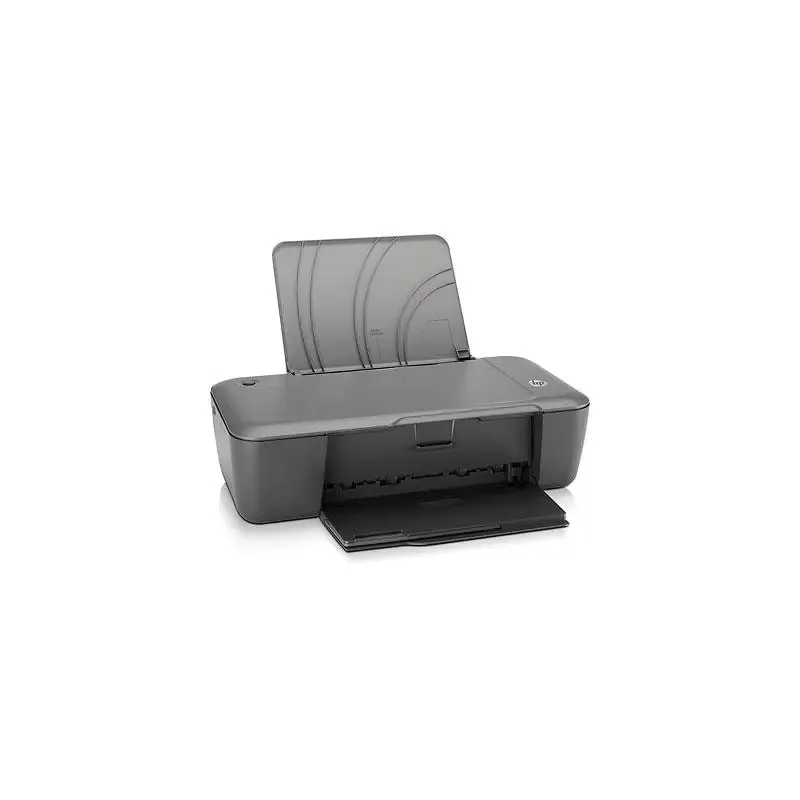

Manual of product Deskjet 1000

Editorial note
The HP Deskjet 1000 printer stands out for its superior print quality, offering a maximum resolution of 4800 x 1200 DPI, ensuring clear documents and vibrant images. Its 60-sheet input capacity allows for continuous printing without frequent interruptions, and it is compatible with a wide range of print media, including photo paper, labels, and envelopes, providing great flexibility for various projects. Additionally, its compact and lightweight design makes it easy to integrate into tight workspaces. However, there are some drawbacks to note. The lack of duplex printing can lead to excessive paper consumption for users looking to optimize their resources. Furthermore, the limited 60-sheet input capacity requires frequent reloading when printing large volumes of documents. The absence of a direct printing function also limits ease of use, especially for those who want to print quickly from their mobile devices. Finally, it is unfortunate that the model is not compatible with Mac operating systems, restricting its use to Windows users only. In terms of performance, the printer displays good characteristics, but the printing speed may be insufficient for users with very high printing needs. Despite this, its reduced energy consumption in sleep mode contributes to a more environmentally friendly operation. Overall, the value for money is reasonable, but the limitations in features may diminish perceived value for some users.Score details
User experience
The user experience is generally satisfactory, although the lack of duplex printing and incompatibility with Mac limits its use.
Performance
The printing performance is good, with a maximum resolution of 4800 x 1200 DPI, but the printing speed may be insufficient for users with large volumes to process.
Battery life
The reduced energy consumption in sleep mode contributes to a more environmentally friendly use, although this does not directly relate to the printer's performance.
Design
The design is compact and lightweight, making it easy to integrate into small workspaces.
Value for money
The price is reasonable for the features offered, but limitations in terms of paper capacity and the absence of direct printing may decrease perceived value.
Features
Although the product offers good print quality and is compatible with various types of media, the lack of certain features like duplex and direct printing limits its capabilities.
Advantages
High-quality printing up to 4800 x 1200 DPI.
60-sheet paper capacity.
Compatible with various printing media.
Compact and lightweight design.
Energy-saving in sleep mode.
Disadvantages
No double-sided printing.
Tray capacity limited to 60 sheets.
No direct printing from mobile.
Not compatible with Mac systems.
Insufficient printing speed for large volumes.
Technical Specifications Deskjet 1000
General Information
-
ModelDESKJET 1000
-
Brand
-
Category
-
Type
-
SKU138910
-
MPN138910
Features
-
ColorYes
-
Service cycle (Maximum)1000 pages per month
-
Languages of the page descriptionPCL 3
-
Number of print cartridges2
-
Printing colorsBlack, Cyan, Magenta, Yellow
-
Double-sided printingNo
Paper management
-
Maximum print format216 x 356 mm
-
Type of paper tray supportCard stock, Envelopes, Labels, Photo paper, Plain paper, Transparencies
-
Maximum ISO A series paper sizeA4
-
Non-ISO print support sizesLegal
-
Envelope sizes10
-
Photo paper sizes4x6, 5x7 "
-
Maximum ISO A series paper sizeA4
Print speed
-
Maximum resolution4800 x 1200 DPI
-
Print speed (black, normal quality, A4/US Letter)16 ppm
-
Print speed (color, normal quality, A4/US Letter)12 ppm
-
Borderless printingNo
Representation / realization
-
Internal memory- Mo
-
Sound power emitted6.4
Input and output capacity
-
Total power capacity60 sheets
-
Total number of power supply units1
-
Total output capacity25 sheets
Connectivity
-
Standard interfacesUSB 2.0
-
Direct printingNo
-
Quantity of USB 2.0 Ports1
-
USB portYes
Minimum system requirements
-
Support for the Mac operating systemMac OS X 10.5 Leopard
-
Mac CompatibilityMac OS X 10.6 Snow Leopard
-
Minimum system requirementsYes
-
Minimum RAMInternet Explorer 6.0
-
Minimal processor128 MB
-
Compatible operating systemsIntel Pentium II/Celeron, 233 MHz
-
Minimal disk spaceWindows OS
-
Minimum configuration for MacintoshMac OS
-
300 MB
-
PowerPC G4, G5/Intel Core
-
300MB HDD
-
256MB RAM
Weight and dimensions
-
Width421 mm
-
Depth380 mm
-
Height266 mm
-
Weight2000 g
Power
-
Average power consumption in Print mode10 W
-
Energy consumption (standby mode)2.3 W
-
AC input voltage110 - 240 V
-
AC input frequency50 - 60 Hz
-
Electricity consumption (stop)0.3 W
-
Energy consumption (eco mode)1.1 W
Environmental conditions
-
Operating temperature5 - 40 °C
-
Temperature out of operation-40 - 60 °C
-
Operating relative humidity (H-H)5 - 80 %
-
Relative humidity rate (storage)5 - 90 %
-
Recommended humidity level for use20 - 80 %
-
Recommended operating temperature15 - 30 °C
-
Operating temperature41 - 104 °F
Sustainability
-
Sustainability certificatesENERGY STAR
Other features
-
Printing technologyA thermal inkjet
-
Print quality, vertical alignment accuracy+/- 0.0051 mm
-
Supported media weight16 kg
-
Dimensions (L x W x H)16.57 x 14.96 x 10.5 "
-
Weight (imperial)4.4 kg
Design
-
Built-in screenNo
-
Market positionDomestic and professional
Frequently Asked Questions
What is the weight of the HP Deskjet 1000?
What is the best method to remove paper jammed in the printer?
Why is my printer not recognizing the original cartridges?
What are the reasons for poor print quality?
How does a laser printer differ from an inkjet printer?
Why is my inkjet printer producing black streaks?
What does the acronym DPI mean?
How many cartridges can be installed in the HP Deskjet 1000?
What is the height of the HP Deskjet 1000?
What is the width of the HP Deskjet 1000?
What is the depth of the HP Deskjet 1000?
Is the manual for the HP Deskjet 1000 available in French?
Similar products


More product categories from brand HP
Computers and accessories HP
Other HP
Phones HP
Audio HP
Interior HP
Software HP
More product types from brand HP


Presentation of product Deskjet 1000 specifications from brand HP
General Information
The HP Deskjet 1000 model, offered by the HP brand, is a device recognized for its quality and innovation in the printer sector. This specific model, referenced under the name Deskjet 1000 | CH340A, ensures reliable performance and a pleasant user experience. The product's EAN code, which is 0885631075869, 0885631076057, 0885631076064, 0885631076071, 0885631076088, 0885631076095, 0885631076101, 0885631076118, guarantees unique identification in the distribution system.
Features
The HP Deskjet 1000 is available in color, offering an aesthetic option for users. It is designed for a maximum monthly duty cycle of 1000 pages, making it suitable for frequent printing needs. This model supports languages for page description in PCL 3, allowing for linguistic flexibility. With two print cartridges and various colors (black, cyan, magenta, yellow), it ensures high print quality. However, it does not offer duplex printing, which may lead to higher paper usage.
Paper Management
The maximum print size is 216 x 356 mm, ideal for large documents. The HP Deskjet 1000 supports various media types, including cardstock, envelopes, labels, photo paper, plain paper, and transparencies. It is compatible with standard paper sizes such as A4 and A5, and can also print on non-ISO formats like Legal. Available envelope sizes include 10 options, and it supports photo paper sizes such as 4x6 and 5x7 inches.
Print Speed
With a maximum resolution of 4800 x 1200 DPI, the HP Deskjet 1000 guarantees sharp and detailed prints. It achieves a print speed of 16 pages per minute (ppm) for black prints and 12 ppm for color prints, suitable for daily use. However, it is not equipped with borderless printing, which may limit certain types of projects.
Technical Specifications
The internal memory of the device is suitable for smooth operation, although its exact capacity is not specified. The noise level during operation is 6.4 dB, ensuring relatively quiet operation.
Input and Output Capacity
The HP Deskjet 1000 has a maximum input capacity of 60 sheets, allowing for uninterrupted printing. It is equipped with a single input tray and can handle an output capacity of 25 sheets.
Connectivity
This model includes standard interfaces that ensure effective connectivity. It is equipped with a USB 2.0 port for quick connection, but does not offer direct printing, which may be a disadvantage for some users.
Minimum System Requirements
The HP Deskjet 1000 is not compatible with Mac operating systems, limiting it to Windows users. It requires a system with Internet Explorer 6.0, a minimum of 128 MB of RAM, and a hard disk space of 300 MB. The minimum required processor is an Intel Pentium II/Celeron at 233 MHz.
Weight and Dimensions
The dimensions of the HP Deskjet 1000 are 421 mm in width, 380 mm in depth, and 266 mm in height, making it easy to integrate into various workspaces. Its weight is approximately 2000 g, providing good maneuverability.
Power
The printer's power consumption is 10 W in print mode, and 2.3 W in standby mode, contributing to energy savings. It operates on an input voltage of 110 to 240 V and a frequency of 50 to 60 Hz, giving it great adaptability.
Environmental Conditions
The product operates optimally within a temperature range of 5 to 40 °C and can withstand temperatures from -40 to 60 °C when not in operation. The operating relative humidity is 5 to 80%, ensuring usability in various environments.
Durability
The HP Deskjet 1000 is ENERGY STAR certified, attesting to its compliance with energy efficiency and environmental impact standards.
Other Features
Using thermal inkjet printing technology, this device offers precise print quality, with a vertical alignment accuracy of +/- 0.0051 mm. It supports heavy media up to 16 kg and has dimensions of 16.57 x 14.96 x 10.5 inches.
Design
The HP Deskjet 1000 is designed for home and professional use, with a built-in screen for intuitive operation. Its compact and lightweight design facilitates integration into small spaces.


