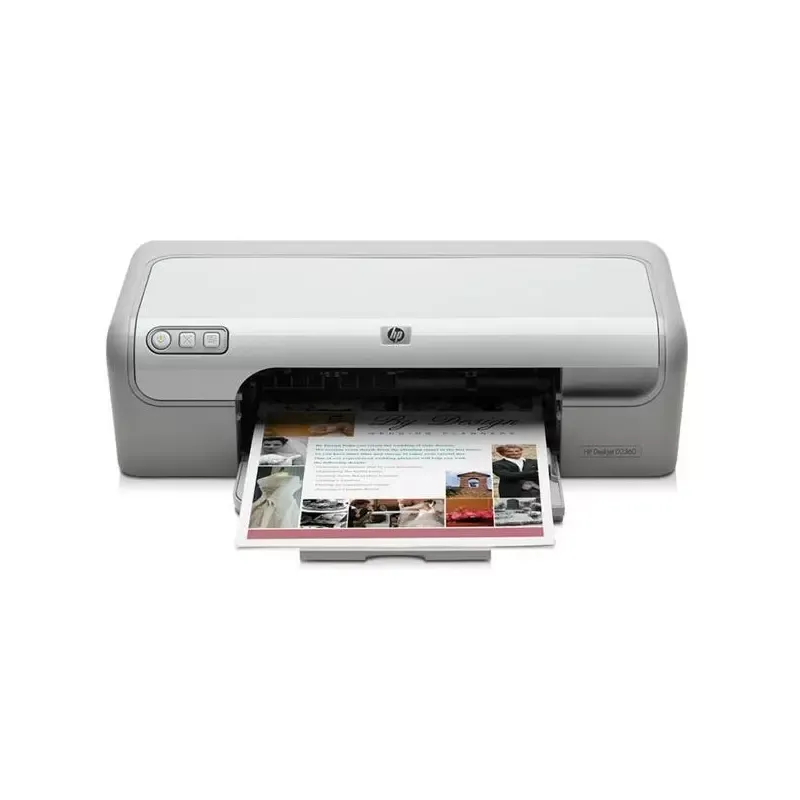

Manual of product Deskjet D2360

Editorial note
The HP Deskjet D2360 printer stands out for its print quality, offering a maximum resolution of 4800 x 1200 DPI that ensures clear and detailed results for all your documents. Its print speed is competitive, reaching up to 20 pages per minute in black and 14 pages per minute in color, optimizing productivity when printing large volumes. Additionally, its compact and lightweight design allows for easy integration into various workspaces while remaining easy to handle. The device supports different types of paper, including labels, envelopes, and photo paper, providing valuable flexibility for various printing needs. Finally, its energy efficiency, with reduced consumption in sleep mode, contributes to energy savings and a lower environmental impact. However, the lack of wireless connectivity may limit usage flexibility, requiring cabling to connect to a computer. Moreover, the color print speed is relatively slow, which could be a drawback for users with frequent and fast needs. The paper capacity is limited to 100 sheets, leading to frequent interruptions to reload the tray during large print jobs. Furthermore, the product lacks advanced features such as scanning or copying, which restricts its use in more demanding office environments. Lastly, its relatively high weight of 2500 g may make moving the printer more difficult. Overall, the HP Deskjet D2360 offers good value for money thanks to its solid performance and practical design, although it is better suited for home use or small printing tasks rather than for more demanding professional environments.Score details
User experience
The user experience is generally positive, with high-quality print results thanks to a maximum resolution of 4800 x 1200 DPI, although the lack of wireless connectivity limits usage flexibility.
Performance
Performance is satisfactory for black prints at 20 ppm, but the color printing speed is relatively slow, which can be a disadvantage for users with frequent needs.
Features
The product offers basic features suitable for home use, but it lacks advanced features such as scanning or copying, which limits its use in more demanding environments.
Design
The compact and lightweight design makes it easy to integrate into various workspaces, although its weight of 2500 g may make moving the printer more difficult.
Value for money
The printer offers good value for money due to its energy efficiency and the ability to use various types of paper, although its limited paper capacity of 100 sheets requires frequent reloading.
Advantages
High-quality printing up to 4800 x 1200 DPI.
Print speed up to 20 pages per minute.
Compact and lightweight design for any space.
Supports various types of paper and formats.
Reduced energy consumption in sleep mode.
Disadvantages
No wireless connectivity.
Slow printing speed, especially in color.
Limited paper capacity of 100 sheets.
Lack of advanced features.
Heavy weight, difficult to move.
Technical Specifications Deskjet D2360
General Information
-
ModelDESKJET D2360
-
Brand
-
Category
-
Type
-
SKU859036
-
MPN859036
Features
-
Languages of the page description-
-
ColorYes
-
Service cycle (Maximum)500 pages per month
-
Number of print cartridges2
Network
-
WifiNo
-
WifiNo
Connectivity
-
Standard interfacesUSB
-
Quantity of USB 2.0 Ports1
-
USB portYes
Input and output capacity
-
Maximum number of feed bins1
-
Maximum number of feed bins1
-
Total power capacity100 sheets
-
Total output capacity50 sheets
Paper management
-
Type of paper tray supportCard stock
-
Maximum ISO A series paper sizeEnvelopes
-
Non-ISO print support sizesIron-On Transfers
-
Envelope sizesLabels
-
ISO, Format Series A (A0...A9)Photo paper
-
Weight of paper tray supportPlain paper
-
Transparencies
-
A4
-
Executive (184 x 267mm)
-
Hagaki card
-
Legal (media size)
-
10
-
C6
-
DL
-
A4
-
A5
-
A6
-
65 - 90 g/m²
Power
-
Average power consumption in Print mode20 W
-
Electricity consumption (stop)4 W
-
AC input voltage100 - 240 V
-
AC input frequency50 - 60 Hz
-
Electricity consumption (stop)4 W
Print speed
-
Maximum resolution4800 x 1200 DPI
-
Print speed (color, draft quality, A4/US Letter)14 ppm
-
Print speed (black, draft quality, A4/US Letter)20 ppm
-
Print speed (black, normal quality, A4/US Letter)6.9 ppm
-
Print speed (color, normal quality, A4/US Letter)2.9 ppm
Packaging information
-
Provided softwareHP Photosmart Essential Software
-
Power cord includedYes
-
Power cord includedYes
-
Power cord includedYes
Minimum system requirements
-
Support for the Windows operating systemWindows 2000
-
Support for the Mac operating systemWindows 2000 Professional
-
Windows XP Home
-
Windows XP Home x64
-
Windows XP Professional
-
Windows XP Professional x64
-
Mac OS X 10.3 Panther
-
Mac OS X 10.4 Tiger
Representation / realization
-
Sound pressure level (impression)47 dB
-
Internal memory- Mo
Environmental conditions
-
Relative humidity rate (storage)5 - 90 %
-
Operating temperature10 - 35 °C
-
Operating relative humidity (H-H)20 - 80 %
-
Temperature out of operation-40 - 60 °C
Design
-
CertificationEN55022: 1998 + A1: 2000 + A2+L179: 2003/ Class B / CISPR 22: 1997 Class B +A1: 2000 + A2: 2002; EN55024: 1998/A1: 2001/A2: 2003/CISPR 24: 1997; EN 61000-3-2: 2000 (2nd Edition); EN 61000-3-3: 1995 + A1: 2001; FCC Title 47 CFR, Part 15 Class B
-
Product color
-
Built-in screenGrey, Silver
-
Market position
-
No
-
-
Domestic and professional
Weight and dimensions
-
Weight2500 g
-
Width467 mm
-
Depth415 mm
-
Height140 mm
Frequently Asked Questions
What is the weight of the HP Deskjet D2360 printer?
How can I effectively remove paper jammed in the printer?
Why is my printer not recognizing the original cartridges?
Why is the quality of my prints poor?
What are the differences between a laser printer and an inkjet printer?
Why is my inkjet printer producing black streaks?
What does the acronym DPI mean?
What are the certifications of the HP Deskjet D2360?
How many cartridges can be installed in the HP Deskjet D2360?
What is the height of the HP Deskjet D2360 printer?
What is the width of the HP Deskjet D2360 printer?
What is the depth of the HP Deskjet D2360 printer?
Is the manual for the HP Deskjet D2360 available in French?
Similar products


More product categories from brand HP
Computers and accessories HP
Other HP
Phones HP
Audio HP
Interior HP
Software HP
More product types from brand HP


Presentation of product Deskjet D2360 specifications from brand HP
General Information
The HP Deskjet D2360, a printer from the renowned brand HP, is synonymous with quality and innovation in the field of printing devices. This model, designated Deskjet D2360 | C9079A, is designed to deliver optimal performance and an intuitive user experience. It is identifiable by a unique EAN code, facilitating its tracking in distribution systems.
Features
The HP Deskjet D2360 is available in color, allowing for seamless integration into various environments. With a maximum service cycle of 500 pages per month, it meets the demands of frequent users. The printer uses two ink cartridges, ensuring superior print quality. Additionally, it is possible to customize the language of the page description, offering personalization for users.
Network
This model does not have Ethernet or Wi-Fi connectivity, thus limiting wireless connection options. This means a wired connection is necessary to use it with a computer.
Connectivity
The HP Deskjet D2360 is equipped with standard interfaces, ensuring smooth connectivity with various devices. It has a USB 2.0 port, facilitating a quick and efficient connection.
Input and Output Capacity
This printer is equipped with a single input tray with a total capacity of 100 sheets, which is adequate for moderate printing volumes. The output capacity reaches 50 sheets, ensuring that your prints are managed efficiently without frequent interruptions.
Paper Management
The HP Deskjet D2360 supports various media types, including labels, envelopes, photo paper, and plain paper. It is compatible with standard paper sizes such as A4, A5, and A6, as well as various envelope sizes, providing flexibility in use.
Power
In terms of energy efficiency, the printer consumes an average of 20 W in print mode and only 4 W in standby mode, contributing to energy savings. Its AC input voltage of 100 - 240 V and operating frequency of 50 - 60 Hz ensure compatibility with standard electrical systems.
Print Speed
With a maximum resolution of 4800 x 1200 DPI, the HP Deskjet D2360 produces prints of remarkable clarity. Its print speed reaches up to 20 pages per minute in black and 14 pages per minute in color, allowing for efficient management of daily printing tasks.
Packaging Information
The product comes with HP Photosmart Essential software, a user manual to guide users, as well as included drivers for easy installation. A power cord is also provided, allowing you to start using it right away after purchase.
Minimum System Requirements
The HP Deskjet D2360 is compatible with several Windows operating systems, ranging from Windows 2000 to Windows XP. It also supports Mac OS X 10.3 Panther and 10.4 Tiger, ensuring usability across various platforms.
Representation / Performance
The noise level during printing is measured at 47 dB, ensuring relatively quiet operation. The internal memory is designed to allow efficient use without slowdowns.
Environmental Conditions
For optimal performance, the relative humidity for storage should be between 5 and 90%, while the ideal operating temperature is between 10 and 35 °C. The printer can also operate in conditions of 20 to 80% ambient humidity.
Design
Complying with safety and performance standards, the HP Deskjet D2360 features a modern finish in gray and silver. It is designed for both home and professional use, making this device versatile for various printing needs.


