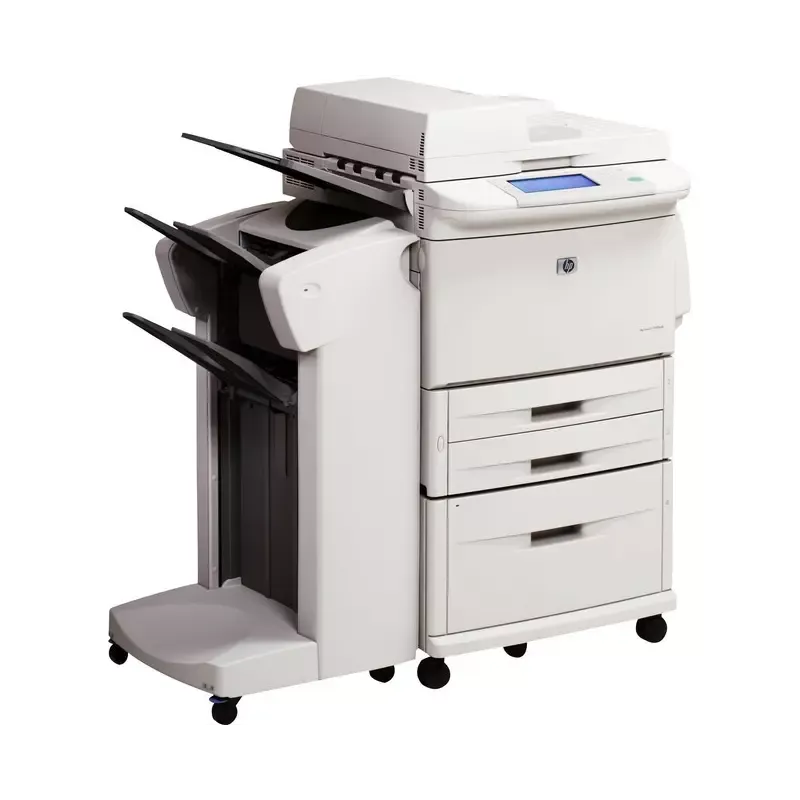

Manual of product LaserJet 9000LMFP

Editorial note
The HP LaserJet 9000LMFP printer stands out for its exceptional print quality, delivering sharp text and clear graphics, making it an ideal choice for professional environments. Its reliable performance is also a major asset, allowing for the management of large print volumes at high speeds, which enhances efficiency within the office. Additionally, ease of use is bolstered by the presence of a user manual, thereby reducing the learning time for new users. However, some drawbacks must be taken into account. The initial cost of the printer may seem high, representing a significant investment for small businesses or occasional users. Its bulky size can also complicate installation in tight office spaces. The toner cartridges, while high quality, can be expensive to replace, thus increasing the long-term operating costs. Furthermore, some advanced features may require a learning curve for users unfamiliar with multifunction printers. Finally, while the operating noise is acceptable, it can be disruptive in quiet work environments. In summary, the HP LaserJet 9000LMFP is a robust and high-performing choice for professionals, but it requires an initial investment and some adjustment time to fully benefit from it.Score details
User experience
The user experience is generally positive due to the ease of use and the presence of a user manual, which reduces the learning time.
Performance
The performance is excellent, with the ability to handle large print volumes while maintaining high speed.
Value for money
The initial cost can be high, which could represent a significant investment for small businesses or occasional users.
Design
The size of the printer can be bulky, making installation difficult in tight office spaces.
Features
The advanced features, while beneficial, may require a learning curve for users unfamiliar with multifunction laser printers.
Robustness
The printer is known for its durability, making it a reliable choice for demanding professional environments.
Support
The operating noise, while acceptable, can be disruptive in quiet work environments.
cost_of_ownership
The toner cartridges can be expensive to replace, which increases the long-term operating cost.
Advantages
High-quality printing
High reliability and durability
Easy and intuitive to use
Integrated advanced technologies
Versatile multifunction printer
Disadvantages
High initial cost for small businesses
Bulky size for limited spaces
Expensive toner cartridges to replace
Complex features requiring learning
Operating noise that can be disruptive
Technical Specifications LaserJet 9000LMFP
General Information
-
ModelLASERJET 9000LMFP
-
Brand
-
Category
-
Type
-
SKU1378241
-
MPN1378241
Frequently Asked Questions
What is the optimal method for removing paper jammed in the printer?
Why is my printer not recognizing the original cartridges?
What are the possible reasons for poor print quality?
What is the difference between a laser printer and an inkjet printer?
Why is my inkjet printer leaving black streaks on prints?
What does the acronym DPI mean?
Is the manual for the HP LaserJet 9000LMFP available in French?
Similar products


More product categories from brand HP
Computers and accessories HP
Other HP
Phones HP
Audio HP
Interior HP
Software HP
More product types from brand HP


Presentation of product LaserJet 9000LMFP specifications from brand HP
General Information
The HP LaserJet 9000LMFP is a flagship model from the HP brand, known for its excellence and innovation in the office equipment sector. This model, designated by the reference LaserJet 9000LMFP | Q2622A#ABF#*BDL1, is designed to deliver outstanding performance, thereby optimizing the user experience.
Advantages
The HP LaserJet 9000LMFP stands out for several strengths:
- Exceptional print quality: It provides sharp prints and precise graphics, making it particularly suitable for professional environments.
- Reliable performance: Its robustness and ability to handle large print volumes without sacrificing speed enhance efficiency within offices.
- Ease of use: With a clear user manual, setting up and using the printer is straightforward, reducing learning time and boosting productivity.
- Technological innovation: Equipped with advanced technologies, this model ensures optimal performance, typical of HP products.
- Versatility: As a multifunction printer, it adapts to various printing needs, whether for administrative documents or presentations.
Disadvantages
However, the HP LaserJet 9000LMFP also has some drawbacks:
- High initial cost: Its purchase price can represent a significant investment for small businesses or occasional users.
- Bulky size: Its format may pose installation challenges in restricted office spaces.
- Toner cartridge cost: Replacing cartridges can be expensive, thus increasing long-term operating costs.
- Complexity of features: Some advanced options may require a learning curve for less experienced users with multifunction laser printers.
- Operating noise: Although the noise level is acceptable for its category, it may be perceived as disruptive in quiet work environments.


