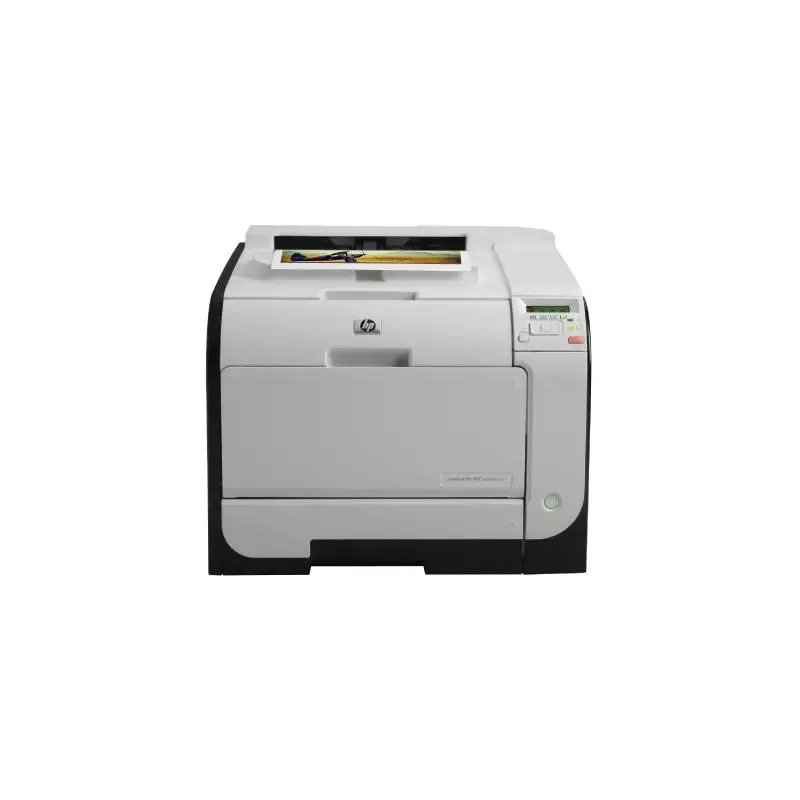

Manual of product LaserJet M451nw
Editorial note
The HP LaserJet M451nw printer stands out for its fast printing performance, reaching 21 pages per minute in color and black. It is ideal for everyday printing needs, offering optimal quality thanks to its laser printing technology and a resolution of 600 x 600 DPI. Additionally, its built-in wireless connectivity and compatibility with various mobile printing technologies allow for appreciated flexibility of use from multiple devices. However, some drawbacks are worth mentioning. The lack of duplex printing functionality limits efficiency in terms of paper reduction, which can lead to additional costs for users requiring double-sided prints. Furthermore, its weight of 22.74 kg may pose challenges for those wishing to move the printer in a dynamic work environment. Although the maximum paper capacity of 550 sheets is sufficient for moderate use, it may not meet the needs of high-demand users, resulting in frequent reloads. In terms of design, the printer has a modern and compact appearance, but its internal memory of 128 MB could slow down the processing of large or complex documents. Finally, it is worth noting that its incompatibility with Mac systems excludes a portion of potential users, which can be a barrier for those using Apple computers. Overall, the HP LaserJet M451nw is a solid choice for those looking for a fast and efficient printer, but it is important to consider its limitations to ensure it will meet all your printing needs.Score details
User experience
The user experience is enhanced by the built-in wireless connectivity and mobile printing technologies, offering flexibility and accessibility.
Performance
The printing performance is excellent with a speed of 21 pages per minute, ideal for daily use. However, the 128 MB internal memory may limit processing speed for complex documents.
Design
The design is modern and compact, but the weight of 22.74 kg may pose a problem for users wanting to move the printer.
Value for money
Although the 550-sheet paper capacity is sufficient for moderate use, it may not be suitable for high-demand users, leading to frequent reloads.
Features
The lack of duplex printing functionality limits paper reduction efficiency, and the absence of compatibility with Mac excludes some users.
Advantages
Fast printing: 21 pages per minute.
Wireless connectivity and mobile printing.
550-sheet capacity for high volumes.
Laser print quality, 600 x 600 DPI.
Compact and modern design.
Disadvantages
No double-sided printing.
Heavy weight, difficult to move.
Input capacity limited to 550 sheets.
Insufficient internal memory of 128 MB.
No compatibility with Mac.
Technical Specifications LaserJet M451nw
General Information
-
ModelLASERJET M451NW
-
Brand
-
Category
-
Type
-
SKU107553
-
MPN107553
Network
-
WifiYes
-
WifiYes
-
WifiYes
-
Wifi standards802.11b, 802.11g, Wi-Fi 4 (802.11n)
-
Mobile printing technologiesApple AirPrint, HP ePrint
Print speed
-
ColorYes
-
Double-sided printingNo
-
Printing technologyLaser
-
Maximum resolution600 x 600 DPI
-
Print speed (color, normal quality, A4/US Letter)21 ppm
-
Print speed (color, normal quality, A4/US Letter)21 ppm
-
Copy time for the first page (color, normal)17 s
-
Copy time for the first page (color, normal)17 s
Features
-
Service cycle (Maximum)40000 pages per month
-
Service cycle (recommended)2000 pages per month
-
Number of print cartridges4
-
Languages of the page descriptionPCL 5c, PCL 6, PostScript 3
-
Printing colorsBlack, Cyan, Magenta, Yellow
Representation / realization
-
Internal memory128 MB
-
Maximum internal memory284 MB
-
Processor frequency600 MHz
Design
-
ScreenLCD
-
Product colorBlack
-
White
Input and output capacity
-
Total power capacity250 sheets
-
Maximum input capacity550 sheets
-
Input capacity of multi-purpose trays50 sheets
-
Total number of power supply units2
-
Maximum number of feed bins3
-
Total output capacity150 sheets
-
Multifunctional trayYes
Paper management
-
Maximum print format216 x 356 mm
-
Type of paper tray supportBond paper
-
ISO, Format Series A (A0...A9)Card stock
-
Non-ISO print support sizesCoated paper
-
JIS series B format (B0...B9)Envelopes
-
Envelope sizesGlossy paper
-
Support width customizationLabels
-
Customization of support lengthPhoto paper
-
Max. length of the supportPlain paper
-
Maximum ISO A series paper sizePre-Printed
-
Recycled paper
-
Transparencies
-
A4
-
A5
-
A6
-
Executive (184 x 267mm)
-
Legal (media size)
-
Letter (media size)
-
B5
-
10
-
76 - 126 mm
-
216 - 356 mm
-
356 mm
-
A4
Connectivity
-
Standard interfacesEthernet
-
Quantity of USB 2.0 PortsUSB 2.0
-
Wireless LAN
-
1
Minimum system requirements
-
Support for the Linux operating systemYes
-
Support for the Linux operating systemYes
-
Support for the Linux operating systemYes
-
Support for the server operating systemWindows Server 2003, Windows Server 2008, Windows Server 2008 x64
-
Minimal disk space400 MB
-
Minimum RAM1024 MB
-
Minimal processor1GHz
Power
-
Average power consumption in Print mode425 W
-
Energy consumption (eco mode)15.2 W
-
Electricity consumption (stop)0.5 W
Weight and dimensions
-
Dimensions (LxWxH)405 x 454 x 322 mm
-
Weight22740 g
Environmental conditions
-
Operating temperature15 - 30 °C
Other features
-
Mac CompatibilityYes
-
CD/DVD PrintingNo
-
Type of power supplyInternal
-
Number of power supplies1
Packaging contents
-
Drivers includedYes
Frequently Asked Questions
What is the weight of the HP LaserJet M451nw printer?
What is the best method to remove jammed paper from the printer?
Why is my printer not recognizing the original cartridges?
What are the possible reasons for poor print quality?
What is the difference between a laser printer and an inkjet printer?
Why is my inkjet printer producing black streaks on prints?
What does the acronym DPI mean?
How many cartridges can be installed in the HP LaserJet M451nw?
Is the manual for the HP LaserJet M451nw available in French?
Similar products


More product categories from brand HP
Computers and accessories HP
Other HP
Phones HP
Audio HP
Interior HP
Software HP
More product types from brand HP


Presentation of product LaserJet M451nw specifications from brand HP
General Information
The model HP LaserJet M451nw is a product of the brand HP, known for its innovation and quality in the home appliance sector. This model, identified by the code CE956A, is designed to deliver optimal performance and enhance the user experience. It also features a unique EAN code that facilitates its identification in distribution systems.
Network
This model is ready to use for hassle-free network connectivity, with options such as Ethernet/LAN and Wi-Fi. The built-in Wi-Fi supports 802.11b, 802.11g, and Wi-Fi 4 (802.11n) standards, ensuring a fast and reliable connection for all your devices. Additionally, it offers various mobile printing technologies, allowing easy printing from multiple devices.
Print Speed
The HP LaserJet M451nw delivers color and black prints at an impressive speed of 21 pages per minute, making this device ideal for everyday use. Although it does not include duplex printing functionality, it uses laser printing technology to ensure accurate results with a maximum resolution of 600 x 600 DPI. The time to the first page, both in black and color, is only 17 seconds, which is particularly suitable for demanding work environments.
Features
The maximum service cycle of the printer reaches 40,000 pages per month, making it suitable for users with intensive printing needs. The recommended service cycle is 2,000 pages per month to optimize performance. With 4 print cartridges available, the model supports multiple page description languages such as PCL 5c, PCL 6, and PostScript 3, while allowing prints in Black, Cyan, Magenta, and Yellow colors.
Representation / Performance
The internal memory of the HP LaserJet M451nw is 128 MB, with a maximum capacity of 284 MB. The processor operates at a frequency of 600 MHz, which directly influences the overall performance of the device.
Design
The printer is equipped with an LCD screen that offers optimal image quality. Its modern design, available in black and white, allows it to easily fit into various work environments.
Input and Output Capacity
The total paper capacity is 250 sheets, with a maximum input capacity of 550 sheets to handle large printing volumes. The multi-purpose tray can hold up to 50 sheets, providing flexibility for different types of documents. The output capacity is 150 sheets, ensuring efficient performance for your printing needs.
Paper Management
The maximum print size is 216 x 356 mm, allowing for optimized quality for larger documents. The paper tray is compatible with a variety of media including plain paper, envelopes, photo paper, and more. It also supports several standard formats such as A4, A5, and B5, thus offering flexibility in use.
Connectivity
This printer is equipped with several standard interfaces, facilitating its integration with various devices. It includes a USB 2.0 port, allowing for quick and efficient connection.
Minimum System Requirements
The HP LaserJet M451nw is compatible with Windows, Mac, and Linux operating systems. It requires a minimum disk space of 400 MB and a RAM of 1024 MB for optimal operation, with a processor of at least 1 GHz.
Power
In print mode, the power consumption is approximately 425 W, while in energy-saving mode, it is reduced to 15.2 W. In standby, the consumption is only 0.5 W, thus contributing to better energy efficiency.
Weight and Dimensions
The dimensions of the printer are 405 x 454 x 322 mm, and its weight is 22.74 kg, which may make moving it a bit difficult, but ensures stable use.
Environmental Conditions
The operating temperature range is between 15 and 30 °C, ensuring optimal operation in various work environments.
Other Features
The HP LaserJet M451nw is not compatible with Mac systems, nor is it designed to print directly on CDs/DVDs. It operates with an internal power supply and requires a single power source for reliable use.
Package Contents
The product includes drivers to ensure quick and easy installation, thus facilitating its use right out of the box.


