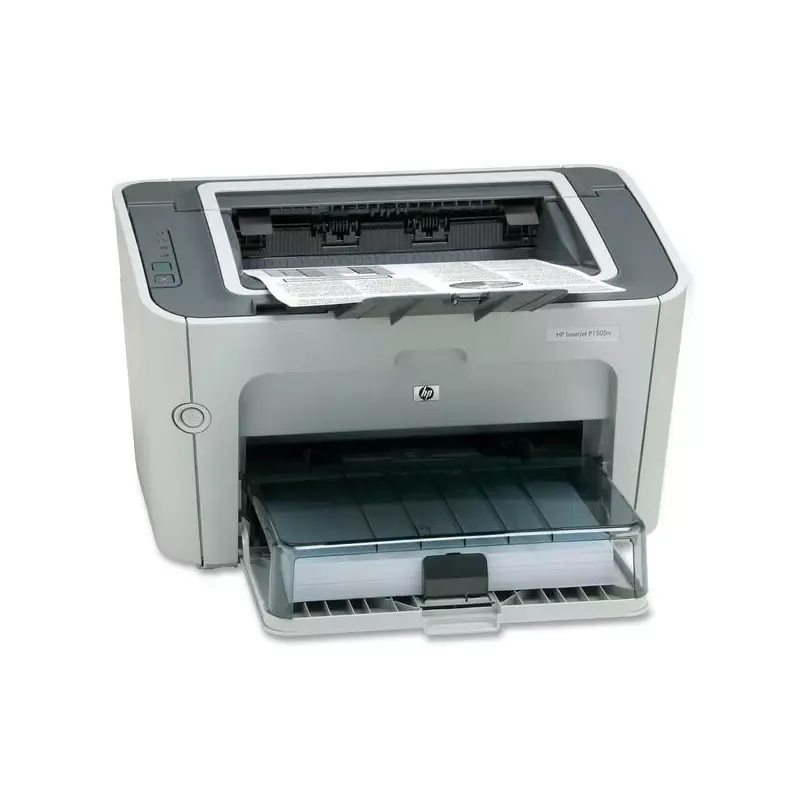

Manual of product LaserJet P1505

Editorial note
The HP LaserJet P1505 printer stands out for its printing speed, reaching 24 pages per minute, making it ideal for work environments requiring high productivity. Its maximum resolution of 600 x 1200 DPI ensures clear and professional prints. Additionally, its input capacity of 260 sheets allows for handling a large volume of documents without the need for frequent reloading. Its compact and lightweight design facilitates integration into various workspaces. However, this device has certain limitations. The lack of duplex printing functionality may lead to higher paper consumption, which may not be suitable for all users. Furthermore, the printer is not compatible with Mac systems, which restricts its use for some users. With only 2 MB of internal memory, it may also encounter difficulties when printing complex or large documents. Finally, the absence of out-of-the-box network connectivity may complicate sharing the printer among multiple users. In terms of performance, the user experience is generally positive, although the printing speed may not meet the demands of some very demanding environments. The value for money is reasonable, considering the features offered, but the limitations regarding memory and compatibility should be taken into account when purchasing. Support is available through a user manual, but the lack of support for Mac remains a notable drawback.Score details
User experience
The user experience is generally positive due to a simple interface, but the lack of ready-to-use network connectivity can complicate printer sharing.
Performance
Performance is satisfactory for most printing tasks, but the speed of 24 ppm may not be sufficient for very demanding environments.
Design
The design is compact and lightweight, allowing for easy integration into various workspaces.
Value for money
The value for money is reasonable considering its features, but the limited internal memory may restrict its use.
Features
Although the printer offers good resolution and decent input capacity, the lack of duplex printing and incompatibility with Mac are notable limitations.
Support
The user manual is available, but the lack of support for Mac systems can be a drawback for some users.
Advantages
Print speed of 24 pages per minute.
Maximum resolution of 600 x 1200 DPI.
Input capacity of 260 sheets.
Compact and lightweight for easy integration.
Laser printing for optimal quality.
Disadvantages
No built-in duplex printing.
Incompatible with Mac systems.
Only 2 MB of internal memory.
No out-of-the-box network connectivity.
Insufficient printing speed for large volumes.
Technical Specifications LaserJet P1505
General Information
-
ModelLASERJET P1505
-
Brand
-
Category
-
Type
-
SKU1392598
-
MPN1392598
Print speed
-
Double-sided printingNo
-
Maximum resolution600 x 1200 DPI
-
Print speed (black, normal quality, A4/US Letter)24 ppm
-
Copy time for the first page (Black, normal)6.5 s
-
Printing technologyLaser
-
Double-sided printingNo
Representation / realization
-
Processor frequency266 MHz
-
Maximum internal memory2 MB
-
Maximum internal memory2 MB
Input and output capacity
-
Total power capacity260 sheets
-
Total power capacity260 sheets
Paper management
-
Envelope sizes10
-
Type of paper tray supportEnvelopes
-
Non-ISO print support sizesLabels
-
Plain paper
-
Transparencies
-
Executive (184 x 267mm)
-
Legal (media size)
-
Letter (media size)
Network
-
Ready-to-use networkNo
Other features
-
Mac CompatibilityYes
-
Compatible operating systemsWindows 2000, XP Home, XP Professional, XP Professional x64, Server 2003 (32/64 bit), Vista
-
Mac OS X v 10.3 +
Weight and dimensions
-
Dimensions (LxWxH)378 x 404 x 226 mm
-
Weight5850 g
Features
-
Service cycle (Maximum)8000 pages per month
Environmental conditions
-
Operating temperature50 - 90.5 °F
Frequently Asked Questions
What is the weight of the HP LaserJet P1505 printer?
What is the recommended method for removing paper jammed in the printer?
Why does my printer not recognize original cartridges?
What are the possible reasons for poor print quality?
What is the difference between a laser printer and an inkjet printer?
Why does my inkjet printer leave black streaks on my prints?
What does the acronym DPI mean?
Is the manual for the HP LaserJet P1505 printer available in French?
Similar products


More product categories from brand HP
Computers and accessories HP
Other HP
Phones HP
Audio HP
Interior HP
Software HP
More product types from brand HP


Presentation of product LaserJet P1505 specifications from brand HP
General Information
The HP LaserJet P1505 printer is a well-known model from the HP brand, famous for its commitment to quality and innovation in the electronics sector. This model, identified by the reference LaserJet P1505 | CB415, is designed to deliver remarkable performance and a smooth user experience. The product is identifiable by its unique EAN code: 0883585165070, 0883585165100, 0883585397068.
Print Speed
This printer is monochrome, not allowing color printing, which makes it particularly suitable for work environments where clarity and precision of documents are essential. With a maximum resolution of 600 x 1200 DPI, the P1505 delivers sharp and detailed prints, ideal for professional documents. Its print speed impresses at 24 pages per minute, allowing for increased productivity. Additionally, the first page print time is only 6.5 seconds, ensuring optimal efficiency. It is worth noting that this model does not offer duplex printing, which may lead to increased paper usage.
Performance / Execution
The HP LaserJet P1505 is equipped with a processor running at 266 MHz, which directly influences the speed of task execution. Its internal memory of 2 MB, while sufficient for standard prints, may present limitations when processing more complex or larger documents.
Input and Output Capacity
The paper loading capacity is 260 sheets, allowing for efficient management of a substantial volume of documents without requiring frequent reloads. This feature is essential for users with sustained printing needs.
Paper Management
The HP LaserJet P1505 supports various media types, including envelopes, labels, plain paper, and transparencies, thus offering flexibility in use. It is capable of printing on various non-ISO formats, such as Executive (184 x 267 mm), Legal, and Letter, meeting different printing needs.
Network
This model does not have out-of-the-box network features, which may complicate sharing among multiple users without additional configuration.
Other Features
It is important to note that the P1505 is not compatible with Mac operating systems. However, it works perfectly with Windows XP, Vista, and 7, ensuring a smooth user interface for these platforms.
Weight and Dimensions
With dimensions of 378 x 404 x 226 mm and a weight of 5850 g, this printer is designed to fit easily into various workspaces while remaining light enough for occasional relocation.
Specifications
The maximum service cycle of the HP LaserJet P1505 is 8000 pages per month, making it suitable for heavy use for users with high printing demands.
Environmental Conditions
For optimal operation, the printer's operating temperature must be between 50 and 90.5 °F, thus ensuring its performance in a variety of environments.


