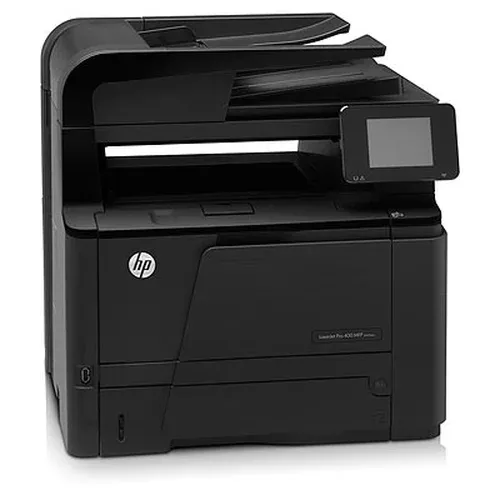

Manual of product LaserJet Pro 400 MFP M425DW

Editorial note
The HP LaserJet Pro 400 MFP M425DW printer is a solid choice for offices looking for an efficient multifunction solution. Thanks to its laser technology, it offers fast, high-quality printing, ensuring professional documents. The all-in-one functionality allows for printing, copying, scanning, and faxing, which is a major asset for optimizing workspace. However, a few drawbacks must be considered. The cost of toner cartridges is relatively high, which can increase long-term operating costs. Additionally, the size of the printer may pose a problem in small workspaces, and the warm-up time can be a hindrance for those seeking immediate printing. The user interface, while feature-rich, may seem complex for less experienced users. In terms of design, the printer stands out with its compact and sleek appearance, suitable for modern environments. However, its size may be a limiting factor for some users. The robustness of the device is also worth noting, especially with its automatic document feeder that optimizes efficiency when printing multiple pages. Regarding wireless connectivity, while it is generally convenient, stability issues may arise, leading to interruptions. In summary, the HP LaserJet Pro 400 MFP M425DW is a high-performing and versatile printer, but users should be aware of the costs and limitations associated with its use.Score details
User experience
The user experience is generally satisfactory, but the interface may seem complex for less tech-savvy users, making it difficult to get started.
Performance
The printing performance is excellent, with fast and high-quality printing thanks to laser technology, ensuring professional documents.
Features
The multifunctionality is a major asset, as it allows printing, copying, scanning, and sending faxes, providing an all-in-one solution suitable for offices.
Design
The design is compact and sleek, well-suited for modern workspaces, although the size may be cumbersome for small spaces.
Value for money
The cost of toner cartridges is high, which increases the long-term operating cost of the printer, which can be a drawback for some users.
Robustness
The printer is robust and capable of handling large documents thanks to its automatic feeder, optimizing efficiency when printing multiple pages.
Support
The wireless connectivity is generally convenient, but it can encounter stability issues, leading to interruptions during use.
Advantages
Fast and high-quality printing.
Multifunction: prints, copies, scans, faxes.
Wireless connectivity for mobile devices.
Automatic feeder for large documents.
Compact and modern design.
Disadvantages
High cost of toner cartridges.
Bulky for small spaces.
Long warm-up time.
Complex user interface.
Connectivity stability issues.
Technical Specifications LaserJet Pro 400 MFP M425DW
General Information
-
ModelLASERJET PRO 400 MFP M425DW
-
Brand
-
Category
-
Type
-
SKU5836
-
MPN5836
Frequently Asked Questions
What is the recommended method for removing a jammed paper from the printer?
Why is my printer refusing to accept original cartridges?
What are the possible reasons for poor print quality?
What are the main distinctions between a laser printer and an inkjet printer?
Why is my inkjet printer producing black streaks on prints?
What does the acronym DPI mean?
Is it possible to obtain the manual for the HP LaserJet Pro 400 MFP M425DW in French?
Similar products


More product categories from brand HP
Computers and accessories HP
Other HP
Phones HP
Audio HP
Interior HP
Software HP
More product types from brand HP


Presentation of product LaserJet Pro 400 MFP M425DW specifications from brand HP
General Information
The HP LaserJet Pro 400 MFP M425DW printer is a multifunction device from the renowned brand HP, known for its innovation and reliability in the office equipment sector. This model, referenced under the code CF288A#BOX, offers a combination of advanced performance and a user-friendly interface, ideal for professional environments. The EAN identifier 886112340100 allows for precise product identification in distribution systems.
Advantages
This printer stands out for:
- Fast and high-quality printing: Thanks to laser technology, it ensures the production of professional documents with impeccable results.
- Multifunctionality: In addition to printing, it allows for copying, scanning, and sending faxes, providing a complete solution for well-equipped offices.
- Wireless connectivity: It is possible to print directly from various mobile devices and computers, enhancing flexibility and ease of use.
- Capacity for handling large documents: Equipped with an automatic document feeder, it optimizes efficiency when printing multiple pages.
- Compact design: Its sleek design fits perfectly into modern workspaces while minimizing clutter.
Disadvantages
Despite its many advantages, the HP LaserJet Pro 400 MFP M425DW has some drawbacks:
- Cost of toner cartridges: The relatively high price of cartridges can increase long-term operating costs.
- Size of the printer: Its size can be cumbersome, making integration difficult in small workspaces.
- Warm-up time: The wait time before printing can be longer than desired for users seeking a quick solution.
- User interface: For users less familiar with technology, the interface may seem complex, which can complicate usability.
- Stability of wireless connectivity: Occasional interruptions may occur when using the wireless function, which can disrupt workflow.


