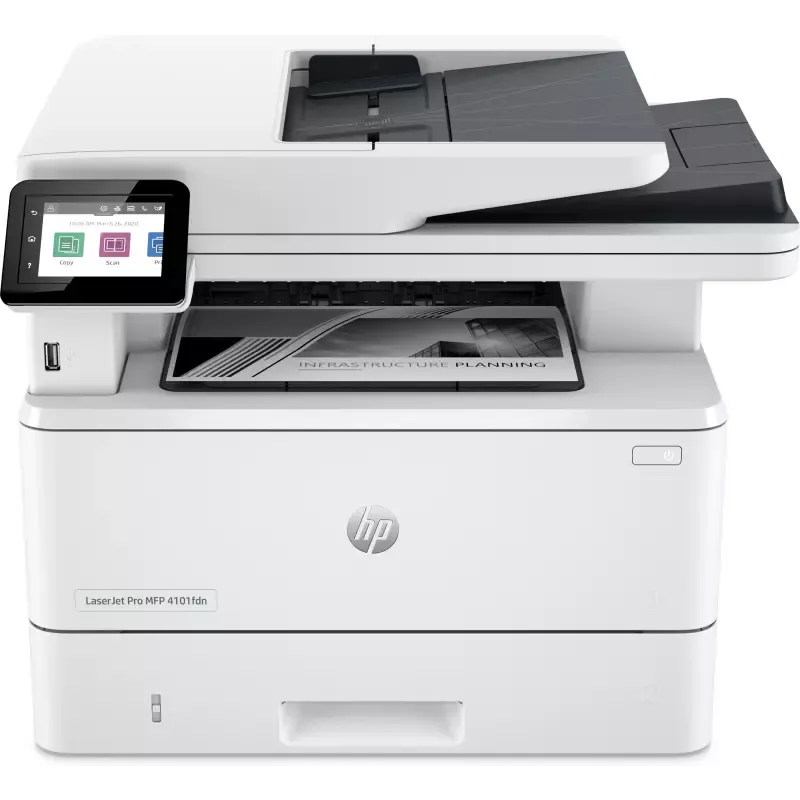

Manual of product LaserJet Pro 4102fdn

Editorial note
The HP LaserJet Pro 4102fdn printer stands out for its impressive performance, offering a printing speed of 40 pages per minute and a maximum resolution of 1200 x 1200 DPI. These features ensure sharp and accurate prints, ideal for demanding work environments. Additionally, its 350-sheet paper capacity and dual input trays make it easy to manage large volumes of documents without interruption. However, the model has some limitations. The duplex printing mode is manual, which may be less convenient for users seeking a fully automated feature. The lack of Wi-Fi connectivity also limits wireless printing options, which could be a drawback for some. Furthermore, the double-sided scanning feature is not available, which may slow down the processing of double-sided documents. In terms of user experience, the intuitive interface and compatibility with various operating systems are appreciated, although the weight of 12.6 kg may complicate moving the device in some offices. The value for money is satisfactory, especially for users with high printing needs, and the sustainability certifications add extra value to this printer. Overall, the HP LaserJet Pro 4102fdn is a solid choice for professionals looking for a fast and efficient printer, despite some restrictions in terms of features.Score details
User experience
The user experience is generally satisfactory, thanks to an intuitive interface and compatibility with various operating systems. However, the lack of Wi-Fi connectivity may be a drawback for some users.
Performance
The printer's performance is excellent with a printing speed of 40 pages per minute and a resolution of 1200 x 1200 DPI, ensuring sharp and accurate prints.
Design
The design is functional and suitable for professional use, but the weight of 12.6 kg may make moving the device less convenient.
Value for money
The value for money is good, especially for users with high printing needs. The sustainability certifications add extra value.
Features
Although the printer offers many features, the manual duplex printing mode and the lack of duplex scanning can be seen as limitations.
Usability
The ease of use is acceptable, but the manual duplex mode and the weight of the device can complicate its use in certain environments.
Advantages
Fast printing: 40 pages per minute
Laser quality: 1200 x 1200 DPI
Manual duplex printing for savings
350-sheet capacity, two trays
Compatible with Windows and Mac
Blue Angel certified for sustainability
Disadvantages
Manual duplex printing is inconvenient.
No Wi-Fi connectivity.
No duplex scanning.
Weight of 12.6 kg makes it difficult to move.
Color resolution limited to 1200 x 1200 DPI.
Technical Specifications LaserJet Pro 4102fdn
General Information
-
ModelLASERJET PRO 4102FDN
-
Brand
-
Category
-
Type
-
SKU1685652
-
MPN1685652
Technical details
-
Main lockers (external) per pallet6 piece(s)
Other features
-
Pallet dimensions (L x W x H)1200 x 1000 x 2111 mm
-
Recommended system requirements2 GB available hard disk space; Internet connection or USB port; Internet browser.
-
Number of users10 user(s)
Logistics data
-
Layers per pallet4 piece(s)
-
Products by pallet24 piece(s)
Weight and dimensions
-
Depth390 mm
-
Height323 mm
-
Width420 mm
-
Weight12600 g
Packaging information
-
Package width497 mm
-
Package height490 mm
-
Package weight15500 g
-
Package depth398 mm
Print speed
-
Printing technologyLaser
-
PrintingMono printing
-
Secure printingYes
-
Duplex printing modeAuto
-
Black print resolution1200 x 1200 DPI
-
Black print resolution1200 x 1200 DPI
-
Print speed (black, normal quality, A4/US Letter)40 ppm
-
Secure printingYes
-
Preheating time45 s
-
Secure printingYes
-
Copy time for the first page (Black, normal)6.3 s
-
Secure printingYes
-
Secure printingYes
-
Secure printingYes
Connectivity
-
Direct printing-
-
USB portYes
-
Quantity of USB 2.0 Ports1
Network
-
WifiNo
-
Ethernet/LANYes
-
Wiring technology10/100/1000Base-T(X)
-
LAN Ethernet: data transfer rate10,100,1000 Mbit/s
-
Mobile printing technologiesApple AirPrint, Mopria Print Service
-
Security-supported algorithm128-bit WEP, 64-bit WEP, 802.1x RADIUS, EAP-PEAP, EAP-TLS, HTTPS, LEAP, SSL/TLS, WEP, WPA
Representation / realization
-
Maximum internal memory512 MB
-
Processor frequency1200 MHz
-
Integrated into the processorYes
-
Maximum internal memory512 MB
-
Sound pressure level (impression)54 dB
-
Sound pressure level (scanning)48 dB
-
Sound power level (impression)6.7 dB
Copier
-
CopyColor copy
-
Max. resolution of copies600 x 600 DPI
-
Automatic adjustment functionYes
-
Release time of the first print (black, normal)7.2 s
-
Maximum number of copies9999 copies
-
Automatic adjustment functionYes
-
Resizing copy25 - 400 %
-
Automatic adjustment functionYes
Design
-
Product colorWhite
-
Color displayYes
-
Screen size2.7 "
-
Order typeTouch
-
Color displayYes
-
Market positionProfessional
-
ScreenCGD
Power
-
Average power consumption in Print mode510 W
-
Energy consumption (loan)7.5 W
-
Energy consumption (in standby mode)0.9 W
-
Energy consumption (eco mode)0.06 W
-
Energy Star, typical electrical consumption (TEC)0.44 kWh/week
-
AC input voltage220 - 240 V
-
AC input frequency50/60 Hz
-
Energy consumption (eco mode)0.06 W
Digitization
-
DigitizationColor scanning
-
Double-sided scanningYes
-
Maximum scanning resolution1200 x 1200 DPI
-
Maximum scan area216 x 297 mm
-
Type of scannerFlatbed and ADF scanner
-
Scanning speed (color)20 ppm
-
Scanner speed (black)29 ppm
-
Supported image formatsJPG, TIFF
-
Support for text formatsPDF
-
Maximum scanning resolution1200 x 1200 DPI
-
Scanning technologyCIS
-
Scan toE-mail, Software, TWAIN, WIA, File
-
Input color display depth24 bit
-
Scan driversTWAIN, WIA
-
Gray levels256
Minimum system requirements
-
Support for the Windows operating systemWindows 10
-
Support for the Mac operating systemWindows 11
-
Supported mobile system
-
Support for other operating systemsMac OS X 11.0 Big Sur
-
Mac OS X 10.15 Catalina
-
Mac OS X 12.0 Monterey
-
Mac OS X 13.0 Ventura
-
-
Android
-
-
ChromeOS
-
Android
-
iOS
Fax
-
FaxSimple fax
-
Fax resolution (black)300 x 300 DPI
-
Automatic discountYes
-
Automatic discountYes
-
Automatic discountYes
-
Fax transmission speed6 sec/page
-
Modem speed33.6 Kbit/s
-
Deferred fax sendingNo
-
Automatic discountYes
-
Fax memory400 pages
Features
-
Service cycle (Maximum)80000 pages per month
-
Service cycle (recommended)750 - 4000 pages per month
-
Number of print cartridges1
-
Printing colorsBlack
-
Double-sided functionsPrint, Copy, Scan
-
Languages of the page descriptionPCL 5e, PCL 6, PostScript 3, URF, PWG, PDF
-
HP SegmentMedium-sized business
-
Printer fontsScalable, TrueType
-
All-in-one multitaskingYes
-
Country of originChina
Input and output capacity
-
Total number of power supply units2
-
Total power capacity350 sheets
-
Maximum output capacity150 sheets
-
Input capacity of the paper tray 1100 sheets
-
Paper tray 2 feed capacity250 sheets
-
Automatic document feeder capacity50 sheets
-
Maximum number of feed bins3
-
Maximum input capacity900 sheets
-
Automatic Document Feeder (ADF)Yes
-
Maximum output capacity150 sheets
Paper management
-
Maximum ISO A series paper sizeA4
-
Type of paper tray supportBond paper
-
ISO, Format Series A (A0...A9)Envelopes
-
Non-ISO print support sizesHeavy paper
-
JIS series B format (B0...B9)Labels
-
Photo paper sizesLetterhead
-
Weight of paper tray supportPlain paper
-
Envelope sizesRecycled paper
-
ISO, Formats Series-B (B0...B9)Rough paper
-
ISO Paper Size, Series C Formats (C0…C9)Thick paper
-
Support width customizationA4
-
Customization of support lengthA5
-
Maximum print formatA6
-
Oficio (media size)
-
16K
-
Statement (140 x 216mm)
-
B5
-
B6
-
4x6
-
5x8 "
-
60 - 200 g/m²
-
10
-
Monarch
-
B5
-
C5
-
B5
-
C5
-
76.2 - 215.9 mm
-
127 - 355.6 mm
-
207.4 x 347.1 mm
Packaging contents
-
Cables includedSector
-
Warranty cardYes
-
Included cartridge capacity (black)2900 pages
-
Warranty cardYes
Sustainability
-
Sustainability certificatesBlue Angel, Post-Consumer Recycled Plastic
-
Compliance with sustainabilityYes
Certificate
-
CertificationCISPR 32:2015 Class B / EN 55032:2015 Class B
-
CISPR 35:2016 / EN 55035:2017 Class B
-
EN IEC 61000-3-2:2019
-
EN 61000-3-3:2013+A1:2019
-
EN 61000-4-12:2016
-
FCC CFR 47 Part 15 Class B
-
ICES-003, Issue 7 Class B
Environmental conditions
-
Recommended humidity level for use30 - 70 %
-
Operating temperature
-
10 - 32.5 °C
Special features
-
UnknownYes
Frequently Asked Questions
What is the weight of the HP LaserJet Pro 4102fdn printer?
What is the recommended method for removing paper jammed in the printer?
Why is my printer not recognizing the original cartridges?
What could be the reasons for poor print quality?
How does a laser printer differ from an inkjet printer?
Why does my inkjet printer leave black streaks on prints?
What does the acronym DPI mean?
What certifications does the HP LaserJet Pro 4102fdn have?
How many cartridges can be installed in the HP LaserJet Pro 4102fdn?
What is the size of the screen on the HP LaserJet Pro 4102fdn?
What is the height of the HP LaserJet Pro 4102fdn printer?
What is the width of the HP LaserJet Pro 4102fdn printer?
What is the depth of the HP LaserJet Pro 4102fdn printer?
Is the manual for the HP LaserJet Pro 4102fdn available in French?
Similar products


More product categories from brand HP
Computers and accessories HP
Other HP
Phones HP
Audio HP
Interior HP
Software HP
More product types from brand HP


Presentation of product LaserJet Pro 4102fdn specifications from brand HP
General Information
The HP LaserJet Pro 4102fdn is a printer from the renowned brand HP, known for its innovation and quality in the field of printing devices. This model, with the code 2Z623F, is designed to deliver high performance and an optimized user experience. The EAN code, which uniquely identifies this product in the distribution system, includes several variations, notably 0195161936180 and 0197961854619.
Technical Details
The external trays of the HP LaserJet Pro 4102fdn printer include 6 pieces, allowing for efficient organization and optimized document storage.
Other Features
This printer has pallet dimensions of 1200 x 1000 x 2111 mm, making transport and storage easier. For optimal use, the recommended system requirements include 2 GB of disk space, an Internet connection or a USB port, as well as an Internet browser. It is suitable for use by up to 10 users, making it an ideal choice for shared office environments.
Logistics Data
The storage layers of the printer include 4 pieces, ensuring easy handling. Each pallet can hold up to 24 units, optimizing stock management.
Weight and Dimensions
With a depth of 390 mm, a height of 323 mm, and a width of 420 mm, this printer easily fits into various workspaces. Its weight of 12.6 kg ensures stability during use.
Packaging Information
The printer's package measures 497 mm wide, 490 mm high, and 398 mm deep, weighing 15,500 g. These dimensions ensure secure transport and optimal product protection.
Print Speed
The HP LaserJet Pro 4102fdn uses laser printing technology, offering superior quality with a maximum resolution of 1200 x 1200 DPI. It can print up to 40 pages per minute in black and white, making it suitable for demanding work environments. It also supports color printing and has a manual duplex printing function to save paper.
Connectivity
The printer is equipped with a USB port for quick connection to various devices. However, it does not support Wi-Fi connectivity, thus limiting wireless printing options.
Network
The HP LaserJet Pro 4102fdn supports Ethernet/LAN connections with 10/100/1000Base-T(X) cabling technology, ensuring a fast and reliable network connection. It also offers mobile printing options for increased flexibility.
Representation / Performance
With an internal memory of 512 MB and a processor running at 1200 MHz, this printer ensures smooth performance. The noise levels during printing and scanning are 54 dB and 48 dB, respectively, allowing for discreet use in work environments.
Copier
The HP LaserJet Pro 4102fdn includes a color copying function with a maximum resolution of 600 x 600 DPI. Although it does not support automatic duplex copying, it allows resizing of copies from 25 to 400%, offering flexibility in document management.
Design
This printer features a modern white finish and has a 2.7-inch touchscreen, making it easy to use with an intuitive interface. It is primarily aimed at professionals, with a color display for an enhanced user experience.
Power
The power consumption in print mode is 510 W, while in standby mode, it is reduced to 0.9 W. This energy efficiency helps reduce the environmental impact of the device.
Scanning
The HP LaserJet Pro 4102fdn allows color scanning with an optical resolution of 1200 x 1200 DPI. Although it does not offer duplex scanning, it provides a scanning speed of 20 pages per minute in color and 29 pages per minute in black.
Minimum System Requirements
Compatible with Windows 10 and 11, as well as several versions of Mac OS, this printer easily integrates into various computing environments. It also supports mobile systems Android, iOS, and Chrome OS.
Fax
The HP LaserJet Pro 4102fdn offers a simple fax function with a resolution of 300 x 300 DPI, ensuring clarity of sent documents. It also includes features such as automatic redial and speed dialing for efficient communication management.
Features
The maximum service cycle is 80,000 pages per month, while the recommended cycle is 750 to 4000 pages, ensuring optimal performance for heavy users. It uses a single cartridge for black printing, with functions that allow for manual duplex printing to save paper.
Input and Output Capacity
The HP LaserJet Pro 4102fdn has 2 input trays totaling 350 sheets, as well as an output capacity of 150 sheets. The automatic document feeder capacity is 50 sheets, facilitating the handling of large volumes of documents.
Paper Management
This printer is compatible with various types of paper, including plain paper, labels, and recycled paper, with a maximum paper size of A4. It also supports several non-ISO formats for flexible use.
Contents of the Package
The HP LaserJet Pro 4102fdn comes with a power cable and included print cartridges, allowing for immediate use. The supplied black cartridge has a print capacity of 2900 pages.
Durability
This printer has sustainability certifications such as Blue Angel, ensuring compliance with high environmental standards. It is designed to minimize its ecological impact while providing reliable performance.
Environmental Conditions
For optimal operation, the recommended humidity level is between 30 and 70%, and the operating temperature range is from 10 to 32.5 °C.


