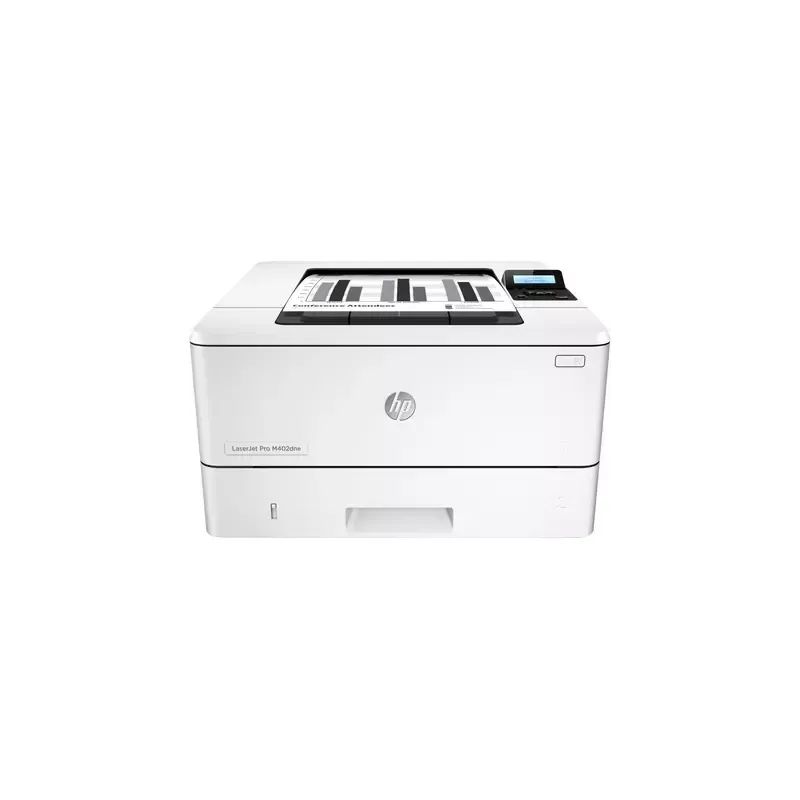

Manual of product LaserJet Pro M402dne

Editorial note
The HP LaserJet Pro M402dne printer stands out with its impressive printing speed of 38 pages per minute, making it an ideal choice for demanding work environments. Its maximum resolution of 1200 x 1200 DPI ensures sharp, high-quality prints that perfectly meet professional needs. Additionally, its manual duplex printing mode helps reduce paper consumption, making this device a more eco-friendly option. The built-in security features ensure the confidentiality of sensitive documents, a significant advantage for users. However, some drawbacks must be considered. The lack of color printing may limit its use for those who need visually varied documents. Furthermore, the manual duplex printing mode can make the process less convenient for those who frequently print double-sided documents. The noise level of 54 dB during printing may also be perceived as disruptive in quiet environments. Additionally, the internal memory of 256 MB may seem insufficient for heavy printing tasks, and the lack of Wi-Fi connectivity limits usage flexibility. In terms of user experience, the product scores 75, highlighting a generally positive experience, although it is hindered by a few limitations. Performance, with a score of 80, is solid, but the limited memory may pose issues for heavy users. The design is deemed functional, but its bulkiness may present integration challenges. The value for money is excellent, with a score of 85, reflecting the printer's attractive technical features. In summary, the HP LaserJet Pro M402dne is a high-performing printer, ideal for professional use, but aspects such as the lack of color and wireless connectivity may not suit all users.Score details
User experience
The user experience is generally good due to the high printing speed and security features. However, the lack of Wi-Fi connectivity and the manual duplex printing mode can make usage less convenient.
Performance
Performance is solid with a printing speed of 38 ppm and a maximum resolution of 1200 x 1200 DPI, well-suited for demanding work environments. However, the 256 MB internal memory may pose limitations for heavier printing tasks.
Design
The design is functional, but the printer is quite bulky. Additionally, the white color gives it a modern look. However, the lack of color printing may be a disadvantage for some users.
Value for money
The value for money is good, considering its technical features and printing speed. The printer is well-suited for professional use with a good printing volume.
Usability
The usage is generally intuitive, but the manual duplex printing mode and the lack of Wi-Fi can make the experience less smooth.
Features
Features include duplex printing and security options, but the absence of color and Wi-Fi connectivity limits its versatility.
Support
The documentation is comprehensive, although access to technical support may vary by region.
Documentation
The user manual is detailed and covers the essential aspects of the printer, making it easier for new users to get started.
Advantages
Fast printing at 38 pages per minute.
Manual duplex printing eco-friendly.
Resolution of 1200 x 1200 DPI.
Security features for sensitive documents.
Paper capacity of 350 sheets.
Disadvantages
No color printing.
Manual double-sided printing.
Noise level of 54 dB.
Internal memory of 256 MB.
No Wi-Fi connectivity.
Technical Specifications LaserJet Pro M402dne
General Information
-
ModelLASERJET PRO M402DNE
-
Brand
-
Category
-
Type
-
SKU1084595
-
MPN1084595
Print speed
-
ColorNo
-
Print speed (black, normal quality, A4/US Letter)38 ppm
-
Copy time for the first page (Black, normal)5.7 s
-
Black print resolution1200 x 1200 DPI
-
Printing technologyLaser
-
Secure printingYes
-
Duplex printing speed (Black, normal quality, A4/US Letter)40 ppm
-
Duplex printing modeAuto
-
Black print resolution1200 x 1200 DPI
-
Secure printingYes
Features
-
Number of print cartridges1
-
Printing colorsBlack
-
Languages of the page descriptionPCL 5, PCL 6, PDF 1.7, PostScript 3, URF, PWG, PCLmS
-
Service cycle (Maximum)80000 pages per month
-
Service cycle (recommended)750 - 4000 pages per month
-
HP SegmentProfessional
-
Printer fontsScalable, TrueType
-
Country of originBrazil, Japan, Philippines
Design
-
Product colorWhite
-
Built-in screenYes
-
ScreenLCD
-
Number of lines displayed2 lines
-
Market positionProfessional
-
Order typeButtons
-
CertificationCISPR 22:2008/EN 55022:2010 - (Class B1), EN 61000-3-2:2006 +A1:2009 +A2:2009, EN 61000-3-3:2008, EN 55024:2010, FCC Title 47 CFR, Part 15 Class B / ICES-003, Issue 5; GB9254-2008, GB17625.1-2012
Network
-
Mobile printing technologiesApple AirPrint
-
Ethernet/LANGoogle Cloud Print
-
Ethernet/LANHP ePrint
-
WifiMopria Print Service
-
LAN Ethernet: data transfer rateYes
-
Security-supported algorithmYes
-
Wiring technologyNo
-
10,100,1000 Mbit/s
-
HTTPS, SNMPv2, SNMPv3, SSL/TLS
-
10/100/1000Base-T(X)
Representation / realization
-
Maximum internal memory256 MB
-
Maximum internal memory256 MB
-
Processor frequency1200 MHz
-
Integrated into the processorYes
-
Built-in memory card readerNo
-
Sound pressure level (impression)54 dB
-
Sound power level (impression)6.8 dB
Input and output capacity
-
Input capacity of the paper tray 1100 sheets
-
Paper tray 2 feed capacity250 sheets
-
Total power capacity350 sheets
-
Maximum input capacity900 sheets
-
Total number of power supply units2
-
Maximum number of feed bins3
-
Maximum output capacity150 sheets
-
Multifunctional trayYes
-
Input capacity of the paper tray 1100 sheets
-
Maximum output capacity150 sheets
Paper management
-
Type of paper tray supportBond paper
-
Maximum ISO A series paper sizeEnvelopes
-
ISO, Format Series A (A0...A9)Heavy paper
-
Non-ISO print support sizesLabels
-
ISO Paper Size, Series C Formats (C0…C9)Letterhead
-
ISO, Formats Series-B (B0...B9)Plain paper
-
Envelope sizesRecycled paper
-
JIS series B format (B0...B9)Rough paper
-
Support width customizationThick paper
-
Weight of paper tray supportTransparencies
-
Customization of support lengthA4
-
A4, A5, A6
-
16K, Oficio (media size)
-
C5
-
B5
-
B5, C5, DL
-
B5, B6
-
76.2 - 215.9 mm
-
60 - 175 g/m²
-
127 - 355.6 mm
Weight and dimensions
-
Width381 mm
-
Height216 mm
-
Depth357 mm
-
Weight8580 g
Minimum system requirements
-
Support for the Mac operating systemMac OS X 10.9 Mavericks
-
Support for the Windows operating systemMac OS X 10.10 Yosemite
-
Support for the Linux operating systemMac OS X 10.8 Mountain Lion
-
Support for other operating systemsWindows 10 x64
-
Windows XP Home
-
Windows XP
-
Windows 8.1
-
Windows 8
-
Windows Vista
-
Windows 8.1 x64
-
Windows 7
-
Windows 10
-
Yes
-
iOS
-
Linux
-
Android
Power
-
Average power consumption in Print mode591 W
-
Energy consumption (loan)6.1 W
-
Electricity consumption (stop)0.1 W
-
Energy Star, typical electrical consumption (TEC)1.54 kWh/week
-
AC input voltage110 - 240 V
-
AC input frequency50/60 Hz
-
Energy consumption (loan)6.1 W
-
Energy consumption (eco mode)0.6 W
Sustainability
-
Sustainability certificatesEPEAT Silver
-
Compliance with sustainabilityYes
-
Does not containMercury
Environmental conditions
-
Operating temperature15 - 32.5 °C
-
Relative humidity rate (storage)10 - 90 %
-
Operating relative humidity (H-H)10 - 80 %
Connectivity
-
Standard interfacesEthernet, USB 2.0
-
Quantity of USB 2.0 Ports1
-
USB portYes
Other features
-
PictBridgeNo
-
Recommended system requirementsWindows 10 (32-bit/64-bit), Windows 8.1 (32-bit/64-bit), Windows 8 (32-bit/64-bit), Windows 7 (32-bit/64-bit): 1 GHz processor, 1 GB RAM (32-bit) or 2 GB RAM (64-bit), 400 MB available hard disk space, CD/DVD-ROM or Internet, USB or Network port; Windows Vista (32-bit): 1 GHz 32-bit (x86) processor, 1 GB RAM (32-bit), 400 MB available hard disk space, CD/DVD-ROM or Internet, USB or Network port; Windows XP (32-bit) SP2: Pentium 233 MHz processor, 512 MB RAM 400 MB available hard disk space, CD/DVD-ROM or Internet, USB or Network port; Windows Server 2003 (32-bit) (SP1 or greater), Windows Server 2003 R2 (32-bit), Windows Server 2008 (32-bit) (SP1 or greater): 1 GHz 32-bit (x86) processor, 1 GB RAM (32-bit), 400 MB available hard disk space, CD/DVD-ROM or Internet, USB or Network port; Windows Server 2008 (64-bit) (SP1 or greater), Windows Server 2008 R2 (64-bit), Windows Server 2008 R2 (64-bit) (SP1): 1 GHz 64-bit (x64) processor, 2 GB RAM (64-bit), 400 MB available hard disk space, CD/DVD-ROM or Internet, USB or Network port
-
Recommended humidity level for use30 - 70 %
Packaging information
-
Package weight11360 g
-
Package depth274 mm
-
Package height464 mm
-
Package width443 mm
Logistics data
-
Layers per pallet5 piece(s)
-
Products by pallet45 piece(s)
-
Harmonized System Code84433210
Technical details
-
Main lockers (external) per pallet9 piece(s)
Packaging contents
-
Cables includedSector
-
Warranty cardYes
Special features
-
UnknownYes
Frequently Asked Questions
What is the weight of the HP LaserJet Pro M402dne?
How can I effectively remove paper jammed in the printer?
Why is my printer not recognizing original cartridges?
What could be the reasons for poor print quality?
What is the difference between a laser printer and an inkjet printer?
Why are black streaks appearing on my prints with an inkjet printer?
What does the term DPI mean?
What certifications does the HP LaserJet Pro M402dne have?
How many cartridges can the HP LaserJet Pro M402dne hold?
What is the height of the HP LaserJet Pro M402dne?
What is the width of the HP LaserJet Pro M402dne?
What is the depth of the HP LaserJet Pro M402dne?
Why is my printer not printing anything?
How can I resolve paper jams in my HP LaserJet Pro M402dne?
What should I do if my prints are of poor quality or have streaks?
How do I troubleshoot the printer not picking up paper from the tray?
What steps should I follow to replace the toner cartridge?
What is the print speed of the HP LaserJet Pro M402dne?
What is the maximum resolution of the HP LaserJet Pro M402dne?
Is the HP LaserJet Pro M402dne compatible with networks?
What is the internal memory capacity of the HP LaserJet Pro M402dne?
What is the maximum service cycle of the HP LaserJet Pro M402dne?
Is the manual for the HP LaserJet Pro M402dne available in French?
Similar products


More product categories from brand HP
Computers and accessories HP
Other HP
Phones HP
Audio HP
Interior HP
Software HP
More product types from brand HP


Presentation of product LaserJet Pro M402dne specifications from brand HP
General Information
The model HP LaserJet Pro M402dne, offered by the brand HP, is known for its reliability and innovation in the office equipment sector. This model, identified by the code C5J91A, is designed to deliver high performance and a smooth user experience. The product is identifiable by its EAN codes, which include references such as 0889899839942 and 4058154121801, ensuring traceability in the distribution system.
Print Speed
The HP LaserJet Pro M402dne is a monochrome printer, with no color printing option, making it suitable for traditional document use. Its print speed reaches 38 pages per minute for A4 format, thus allowing increased productivity, particularly in demanding work environments. The time to print the first page is only 5.7 seconds, facilitating maximum efficiency. With a print resolution of 1200 x 1200 DPI, this device ensures documents of remarkable clarity. Additionally, it incorporates laser printing technology, guaranteeing precise results. It is also equipped with a manual duplex printing function, which helps reduce paper consumption and contributes to more eco-friendly practices.
Features
The HP LaserJet Pro M402dne uses a single black toner cartridge, optimizing print quality. It is compatible with several page description languages such as PCL 5, PCL 6, and PostScript 3, offering flexibility for various types of documents. The printer is designed for monthly duty cycles of up to 80,000 pages, with a recommended cycle of 750 to 4,000 pages, thus meeting the needs of heavy users. Primarily intended for home use, it also includes Scalable and TrueType printer fonts, ensuring a variety of print styles.
Design
With its modern design, the HP LaserJet Pro M402dne features an elegant white finish. It has a built-in LCD screen that facilitates interaction and navigation through the printer settings. The device presents a 2-line display, allowing for clear reading of relevant information. Designed for a professional environment, it uses a button control system, offering intuitive use.
Network
The HP LaserJet Pro M402dne supports several mobile printing technologies, allowing for quick and efficient connection. It is ready for an Ethernet network, although it does not have Wi-Fi connectivity, which may limit usage flexibility in certain environments. With a data transfer rate of 10/100/1000 Mbit/s, it ensures a fast and efficient network connection.
Input and Output Capacity
This printer is equipped with two input trays, offering a total input capacity of 350 sheets, thus facilitating the management of large print volumes. The multifunction tray can hold up to 100 sheets, while the second tray can contain 250 sheets. The maximum output capacity is 150 sheets, ensuring optimal performance for daily printing needs.
Power
In terms of energy efficiency, the HP LaserJet Pro M402dne consumes an average of 591 W during printing, while reducing its consumption to 6.1 W in standby mode. It also has a minimum power consumption of 0.1 W when turned off. The input voltage range of 110 to 240 V and frequency of 50/60 Hz ensure compatibility with most electrical installations.
Durability
The HP LaserJet Pro M402dne is EPEAT Silver certified, demonstrating its commitment to energy efficiency and environmental respect. This model contains no mercury, ensuring safe use for the user.
Environmental Conditions
For optimal operation, the HP LaserJet Pro M402dne should be used in an ambient temperature of 15 to 32.5 °C and a relative humidity of 10 to 90 % for storage, while its operation is ensured in a relative humidity of 10 to 80 %.
Connectivity
The model is equipped with a USB 2.0 port, allowing for quick connection to compatible devices. However, it does not include PictBridge functionality, which limits direct printing from cameras without going through a computer.
Packaging Information
The total weight of the packaging for the HP LaserJet Pro M402dne is 11,360 g, with dimensions of 443 mm width, 464 mm height, and 274 mm depth, ensuring adequate protection during transport.
Logistics Data
The product is organized in layers optimized for efficient storage, with a total of 5 pieces per layer and 45 pieces per pallet, facilitating logistical and inventory management.
Contents of the Packaging
The HP LaserJet Pro M402dne comes with a power cable for efficient electrical connection, as well as a warranty card, providing additional protection for the purchase.


