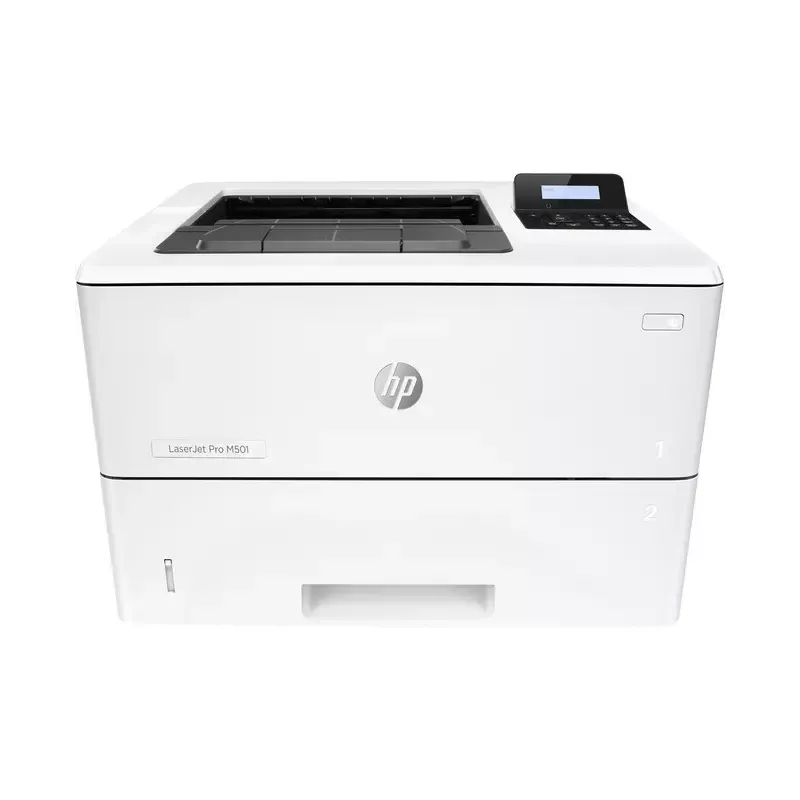

Manuals of product LaserJet Pro M501


Editorial note
The HP LaserJet Pro M501 printer stands out for its printing speed, reaching up to 43 pages per minute, which allows for significant time savings when printing large documents. Its maximum print resolution of 4800 x 600 DPI ensures sharp and professional results, ideal for use in a professional setting. Additionally, with a maximum paper capacity of 1200 sheets, it can handle a large volume of documents without requiring frequent reloads. Sustainability certifications such as ENERGY STAR and EPEAT Silver attest to its energy efficiency and commitment to the environment. However, some drawbacks must be considered. The lack of Wi-Fi connectivity limits usage flexibility, making a connection via an Ethernet network necessary. The manual duplex printing mode can slow down the process for those who frequently print double-sided documents. Furthermore, its weight of 11.6 kg can complicate its movement and installation, especially in tight spaces. Finally, the high cost of toner cartridges can lead to additional expenses in the long run, thus affecting the value for money. Overall, the user experience is positive, with solid performance and notable robustness, but it is essential to take these limitations into account before making a choice.Score details
User experience
The user experience is positive thanks to a fast printing speed of 43 pages per minute, but the manual duplex printing mode can slow down the process for some users.
Performance
The performance is excellent with a print resolution of 4800 x 600 DPI, ensuring sharp and professional prints suitable for business needs.
Features
Although the printer has a maximum paper capacity of 1200 sheets and Ethernet network connectivity, the lack of Wi-Fi limits usage flexibility.
Design
The design is functional, but its weight of 11.6 kg can complicate moving and installation, especially in tight spaces.
Value for money
The cost of ink cartridges can be high, increasing long-term expenses for frequent users, which may diminish the value for money.
Robustness
Sustainability certifications like ENERGY STAR and EPEAT Silver demonstrate the product's environmental commitment and energy efficiency.
Advantages
Fast printing up to 43 pages per minute.
Manual duplex printing to save paper.
Maximum resolution of 4800 x 600 DPI.
Paper capacity of 1200 sheets.
Built-in Ethernet network connectivity.
ENERGY STAR and EPEAT Silver certifications.
Disadvantages
No Wi-Fi connectivity.
Manual duplex printing.
Weighs 11.6 kg, difficult to move.
Limited paper capacity of 1200 sheets.
High cost of ink cartridges.
Technical Specifications LaserJet Pro M501
General Information
-
ModelLASERJET PRO M501
-
Brand
-
Category
-
Type
-
SKU1319870
-
MPN1319870
Print speed
-
ColorNo
-
Black print resolution4800 x 600 DPI
-
Secure printingYes
-
Printing technologyLaser
-
Print speed (black, normal quality, A4/US Letter)43 ppm
-
Copy time for the first page (Black, normal)5.8 s
-
Print margins (top, bottom, right, left)5 mm
-
Duplex printing speed (Black, normal quality, A4/US Letter)34 ppm
-
Duplex printing modeAuto
-
Black print resolution4800 x 600 DPI
-
Secure printingYes
Features
-
Service cycle (Maximum)100,000 pages per month
-
Number of print cartridges2
-
Languages of the page descriptionPCL 5, PCL 6, PDF 1.7, PostScript 3, URF, PWG, PCLmS
-
Printing colorsBlack
-
Service cycle (recommended)1,500 - 6,000 pages per month
-
Number of printer fonts84
-
HP SegmentProfessional
-
Printer fontsScalable, TrueType
-
Country of originBrazil
Power
-
Average power consumption in Print mode660 W
-
AC input voltage200 - 240 V
-
AC input frequency50 Hz
-
Energy consumption (loan)6.1 W
-
Energy consumption (eco mode)0.1 W
-
Energy Star, typical electrical consumption (TEC)0.562 kWh/week
-
Energy consumption (loan)6.1 W
-
Energy consumption (eco mode)0.1 W
Design
-
Product colorWhite
-
Built-in screenYes
-
ScreenLCD
-
Number of lines displayed2 lines
-
Market positionProfessional
-
Order typeButtons
-
CertificationCISPR 22:2008 (International) - Class A; EN 55022:2010 (EU) - Class A; EN 61000-3-2:2006+A1:2009+A2:2009; EN 61000-3-3:2008; EN 55024:2010; EMC Directive 2004/108/EC; Other EMC approvals as required by individual countries
Input and output capacity
-
Paper tray 2 feed capacity550 sheets
-
Maximum input capacity1200 sheets
-
Input capacity of the paper tray 1100 sheets
-
Total number of power supply units2
-
Maximum number of feed bins3
-
Maximum output capacity250 sheets
-
Maximum output capacity250 sheets
-
Multifunctional trayYes
-
Input capacity of the paper tray 1100 sheets
-
Paper tray 2 feed capacity550 sheets
Representation / realization
-
Processor frequency1500 MHz
-
Maximum internal memory256 MB
-
Maximum internal memory256 MB
-
Integrated into the processorYes
-
Sound power level (impression)6.8 dB
-
Sound pressure level (impression)54 dB
Minimum system requirements
-
Support for the Windows operating systemWindows 8.1
-
Support for the Mac operating systemWindows Vista
-
Support for the Linux operating systemWindows 7
-
Support for other operating systemsWindows 8.1 x64
-
Windows 8
-
Windows 10
-
Windows 10 x64
-
Mac OS X 10.8 Mountain Lion
-
Mac OS X 10.9 Mavericks
-
Mac OS X 10.10 Yosemite
-
Mac OS X 10.7 Lion
-
Yes
-
Linux
-
iOS
-
Android
Paper management
-
Maximum ISO A series paper sizeA4
-
Type of paper tray supportBond paper
-
ISO, Format Series A (A0...A9)Card stock
-
JIS series B format (B0...B9)Envelopes
-
Weight of paper tray supportHeavy paper
-
ISO Paper Size, Series C Formats (C0…C9)Labels
-
ISO, Formats Series-B (B0...B9)Letterhead
-
Envelope sizesPlain paper
-
Support width customizationRecycled paper
-
Customization of support lengthRough paper
-
Non-ISO print support sizesThick paper
-
Photo paper formatsTransparencies
-
A4
-
A5
-
A6
-
B5
-
B6
-
60 - 200 g/m²
-
C5
-
B5
-
B5
-
C5
-
DL
-
76.2 - 215.9 mm
-
127 - 355.6 mm
-
Oficio (media size)
-
16K
-
10x15 cm
Environmental conditions
-
Operating temperature15 - 32.5 °C
-
Operating relative humidity (H-H)10 - 80 %
-
Temperature out of operation-20 - 60 °C
-
Relative humidity rate (storage)10 - 90 %
Weight and dimensions
-
Width418 mm
-
Depth376 mm
-
Height289 mm
-
Weight11600 g
-
Pallet dimensions (L x W x H)1200 x 1000 x 2481 mm
Network
-
Ready-to-use networkYes
-
WifiNo
-
Ready-to-use networkYes
-
Mobile printing technologiesApple AirPrint, HP ePrint, Mopria Print Service
-
Wiring technology10/100/1000Base-T(X)
-
Security-supported algorithmHTTPS, SNMPv2, SNMPv3, SSL/TLS
-
LAN Ethernet: data transfer rate10, 100 Mbit/s
Connectivity
-
Standard interfacesEthernet, USB 2.0
-
USB portYes
Sustainability
-
Sustainability certificatesENERGY STAR
-
Compliance with sustainabilityEPEAT Silver
-
Yes
Packaging information
-
Package weight14500 g
-
Package depth398 mm
-
Package height466 mm
-
Package width497 mm
Logistics data
-
Gross weight of the pallet456.7 g
-
Products by pallet30 piece(s)
-
Layers per pallet5 piece(s)
-
Harmonized System Code84433210
Technical details
-
Main lockers (external) per pallet6 piece(s)
Other features
-
Recommended system requirementsCompatible OS (see "Compatible Operating Systems")
-
Recommended humidity level for useCD-ROM drive or Internet connection
-
Acoustic pressure emissions for spectator (ready)30 - 70 %
-
Acoustic power (ready)25 dB
-
40 dB
Packaging contents
-
Cables includedSector
-
Quick Installation GuideYes
-
Quick Installation GuideYes
-
Quick Installation GuideYes
Special features
-
UnknownYes
Frequently Asked Questions
What is the weight of the HP LaserJet Pro M501 printer?
What is the best method to remove paper jammed in the printer?
Why is my printer not accepting original cartridges?
Why is the print quality poor?
What are the differences between a laser printer and an inkjet printer?
Why is my inkjet printer leaving black streaks on prints?
What does the acronym DPI mean?
What certifications does the HP LaserJet Pro M501 have?
How many cartridges can be inserted into the HP LaserJet Pro M501?
What is the height of the HP LaserJet Pro M501 printer?
What are the width dimensions of the HP LaserJet Pro M501?
What is the depth of the HP LaserJet Pro M501 printer?
Is the manual for the HP LaserJet Pro M501 available in French?
Similar products


More product categories from brand HP
Computers and accessories HP
Other HP
Phones HP
Audio HP
Interior HP
Software HP
More product types from brand HP


Presentation of product LaserJet Pro M501 specifications from brand HP
General Information
The model HP LaserJet Pro M501, manufactured by the renowned brand HP, is designed to deliver high-quality printing performance and an optimized user experience. Its EAN code, which allows for product identification within distribution systems, includes several unique numbers, ensuring its traceability.
Print Speed
This printer only supports black and white printing. With a maximum print resolution of 4800 x 600 DPI, it ensures exceptionally clear results suitable for both professional documents and personal use. Its print speed reaches 43 pages per minute, allowing for rapid document production. Additionally, it is equipped with a manual duplex printing function, contributing to efficient resource use and reducing paper waste.
Features
The HP LaserJet Pro M501 is capable of handling a maximum service cycle of 100000 pages per month, making it ideal for demanding work environments. It uses 2 print cartridges and is compatible with several page description languages, such as PCL 5, PCL 6, and PostScript 3. Its maximum input capacity is 1200 sheets, ensuring continuous operation without the need for frequent reloading.
Power
In print mode, this device consumes an average of 660 W, while in standby mode, the consumption is reduced to 6.1 W. This model is designed to operate with an AC input voltage of 200 - 240 V and a frequency of 50 Hz, ensuring compatibility with most electrical systems.
Design
The HP LaserJet Pro M501 stands out with its modern and sleek design, featuring a white finish. It is equipped with a built-in LCD screen for easy navigation through the various functions of the device. With a 2-line display, it offers clear visibility of information. Primarily suited for professional use, it utilizes buttons for user-friendly operation.
Input and Output Capacity
The total input capacity of the device is 550 sheets, with a maximum input capacity of 1200 sheets. It also features a multifunction tray capable of holding 100 sheets for increased flexibility when printing different document formats.
Environmental Conditions
The HP LaserJet Pro M501 operates efficiently within a temperature range of 15 to 32.5 °C and a relative humidity of 10 to 80 %. Its ability to withstand non-operating temperatures ranging from -20 to 60 °C allows it to adapt to various environments without compromising performance.
Weight and Dimensions
With dimensions of 418 mm in width, 376 mm in depth, and 289 mm in height, the total weight of the HP LaserJet Pro M501 is 11.6 kg, which may make it less easy to move in tight spaces.
Network and Connectivity
Although the printer does not have Wi-Fi connectivity, it is equipped with an Ethernet port for wired network connection. It also supports mobile printing technologies, providing convenient access from various devices. Its security algorithm, including HTTPS and SSL/TLS, ensures effective data protection during use.
Durability
The HP LaserJet Pro M501 is certified ENERGY STAR and EPEAT Silver, demonstrating its commitment to energy efficiency and environmental sustainability.
Packaging Contents
The packaging includes a power cable, a warranty card, a user manual, and a quick installation guide, providing everything needed for easy setup.
Special Features
This model also features a punching function, making it adaptable to various usage contexts.


