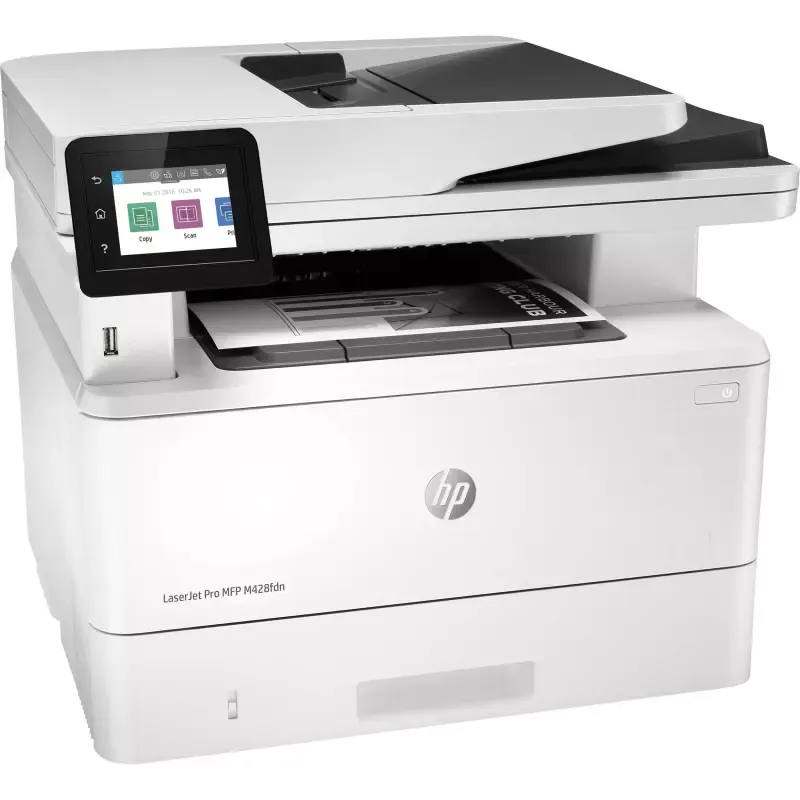

Manual of product LaserJet Pro MFP M428fdn

Editorial note
The HP LaserJet Pro MFP M428fdn is a multifunction laser printer that stands out for its impressive performance. With a printing speed of up to 38 pages per minute and a maximum resolution of 1200 x 1200 DPI, this device ensures high-quality prints, ideal for demanding professional environments. Additionally, its input capacity of 900 sheets allows for handling large volumes of documents without interruption, which is a major asset for offices. However, this model has some drawbacks. The lack of automatic duplex scanning can make certain tasks longer and less convenient. Furthermore, its weight of 12.6 kg limits its portability, which can be an issue for users wanting to move it frequently. Moreover, the lack of Wi-Fi connectivity restricts wireless printing options, making a direct connection via USB or Ethernet necessary, which can be cumbersome in a modern work environment. In terms of design, the printer is functional, but its weight can be a barrier for some users. The initial cost may also be a deterrent for small businesses, although the performance and durability offered by this device justify this investment for professional use. In summary, the HP LaserJet Pro MFP M428fdn is an excellent choice for those looking for a reliable and high-performing laser printer. However, users should consider its limitations in terms of portability and connectivity before making their choice.Score details
User experience
The user experience is generally positive due to an intuitive interface and compatibility with various operating systems, but the lack of automatic duplex scanning can complicate certain tasks.
Performance
Performance is excellent, with printing speeds of up to 38 pages per minute and a print resolution of 1200 x 1200 DPI, ensuring high-quality results.
Design
The design is functional, although its weight of 12.6 kg may make it difficult to move, limiting its use in different environments.
Value for money
The initial cost may be high for small businesses, although the product is designed for professional use and offers good performance.
Robustness
The product is built to last with laser printing technology, ensuring consistent print quality and durability of prints.
Features
Although the printer offers many features, the lack of Wi-Fi connectivity limits wireless printing options, which can be restrictive in a modern office environment.
Advantages
Fast printing up to 38 pages per minute
Print resolution of 1200 x 1200 DPI
Clear scanning at 1200 x 1200 DPI
Compatible with Windows, Mac, iOS, Android
Input capacity of 900 sheets
Consistent and durable laser print quality
Disadvantages
No automatic duplex scanning
Weight of 12.6 kg, difficult to move
No Wi-Fi connectivity, limited connection
Preheating time of 45 seconds
High initial cost for small businesses
Technical Specifications LaserJet Pro MFP M428fdn
General Information
-
ModelLASERJET PRO MFP M428FDN
-
Brand
-
Category
-
Type
-
SKU1298379
-
MPN1298379
Technical details
-
Main lockers (external) per pallet6 piece(s)
Minimum system requirements
-
Support for the Mac operating systemMac OS X 10.14 Mojave
-
Support for the Windows operating systemMac OS X 10.12 Sierra
-
Support for other operating systemsMac OS X 10.13 High Sierra
-
Windows 11
-
Windows 8.1
-
Windows 8
-
Windows 7
-
Windows 10
-
iOS
-
Android
Connectivity
-
Direct printing-
-
Standard interfacesUSB
-
USB portYes
Weight and dimensions
-
Weight12600 g
-
Depth390 mm
-
Height323 mm
-
Width420 mm
Print speed
-
Black print resolution1200 x 1200 DPI
-
Copy time for the first page (Black, normal)6.3 s
-
Print speed (black, normal quality, A4/US Letter)38 ppm
-
Duplex printing modeAuto
-
Secure printingYes
-
Black print resolution1200 x 1200 DPI
-
Printing technologyLaser
-
PrintingMonochrome printing
-
Preheating time45 s
-
Secure printingYes
Digitization
-
Optical scanning resolution1200 x 1200 DPI
-
Scan toE-mail, Software, TWAIN, WIA, File
-
Supported image formatsJPG, TIFF
-
Type of scannerFlatbed and ADF scanner
-
Scanning technologyCIS
-
Maximum scan area216 x 297 mm
-
Scanner speed (black)29 ppm
-
Scanning speed (color)20 ppm
-
Support for text formatsPDF
-
Optical scanning resolution1200 x 1200 DPI
-
Double-sided scanningYes
-
DigitizationColor scanning
-
Input color display depth24 bit
-
Scan driversTWAIN, WIA
-
Gray levels256
Copier
-
Copy speed (normal quality, black, A4)38 cpm
-
Release time of the first print (black, normal)7.2 s
-
Max. resolution of copies600 x 600 DPI
-
Automatic adjustment functionYes
-
CopyColor copy
-
Automatic adjustment functionYes
-
Resizing copy25 - 400 %
-
Maximum number of copies999 copies
-
Automatic adjustment functionYes
Fax
-
Modem speed33.6 Kbit/s
-
Deferred fax sendingYes
-
Fax transmission119 locations
-
Deferred fax sendingYes
-
Fax memory400 pages
-
Maximum number of shortcuts for numbers120
-
FaxSimple fax
-
Fax transmission speed3 sec/page
-
Fax resolution (black)300 x 300 DPI
Network
-
Wiring technology10/100/1000Base-T(X)
-
Mobile printing technologiesApple AirPrint, Google Cloud Print, HP ePrint, Mopria Print Service
-
LAN Ethernet: data transfer rate10,100,1000 Mbit/s
-
WifiNo
-
Ethernet/LANYes
-
Security-supported algorithm128-bit WEP, 64-bit WEP, 802.1x RADIUS, EAP-PEAP, EAP-TLS, HTTPS, LEAP, SSL/TLS, WEP, WPA
Power
-
Average power consumption in Print mode510 W
-
Energy consumption (loan)7.5 W
-
Energy consumption (in standby mode)0.9 W
-
Average power consumption in Print mode510 W
-
Electricity consumption (stop)0.06 W
-
AC input voltage110 - 240 V
-
Electricity consumption (stop)0.06 W
-
Energy Star, typical electrical consumption (TEC)0.4125 kWh/week
-
AC input frequency50/60 Hz
Paper management
-
ISO, Format Series A (A0...A9)A4
-
Type of paper tray supportA5
-
Maximum ISO A series paper sizeA6
-
JIS series B format (B0...B9)Bond paper
-
Photo paper sizesEnvelopes
-
ISO Paper Size, Series C Formats (C0…C9)Heavy paper
-
Support width customizationLabels
-
Non-ISO print support sizesLetterhead
-
Customization of support lengthPlain paper
-
ISO, Formats Series-B (B0...B9)Recycled paper
-
Envelope sizesRough paper
-
Weight of paper tray supportThick paper
-
Maximum print formatA4
-
B5
-
B6
-
4x6
-
5x8 "
-
C5
-
76.2 - 215.9 mm
-
Oficio (media size)
-
16K
-
Statement (140 x 216mm)
-
127 - 355.6 mm
-
B5
-
10
-
Monarch
-
B5
-
C5
-
DL
-
60 - 200 g/m²
-
207.4 x 347.1 mm
Packaging information
-
Package weight15500 g
-
Package height490 mm
-
Package width497 mm
-
Package depth398 mm
Packaging contents
-
Cartridge(s) includedYes
Design
-
Screen size2.7 "
-
Color display
-
Product colorYes
-
Market positionGrey, White
-
Color displayProfessional
-
Order typeYes
-
ScreenTouchscreen
-
CGD
Representation / realization
-
Internal memory512 MB
-
Processor frequency1200 MHz
-
Built-in memory card readerNo
-
Internal memory512 MB
-
Sound pressure level (impression)53 dB
-
Sound power level (impression)6.7 dB
-
Integrated into the processorYes
-
Sound pressure level (scanning)48 dB
Features
-
Number of print cartridges1
-
Country of originChina
-
Digital senderYes
-
HP SegmentProfessional
-
Languages of the page descriptionPCL 6, PostScript 3, URF, PWG, PDF
-
Service cycle (Maximum)80000 pages per month
-
Service cycle (recommended)750 - 4000 pages per month
-
Printer fontsScalable, TrueType
-
Printing colorsBlack
-
Double-sided functionsPrint, Copy, Scan
Logistics data
-
Gross weight of the pallet487700 g
Input and output capacity
-
Maximum input capacity900 sheets
-
Total power capacity350 sheets
-
Maximum output capacity150 sheets
-
Total number of power supply units2
-
Input capacity of the paper tray 1100 sheets
-
Maximum number of feed bins3
-
Paper tray 2 feed capacity250 sheets
-
Automatic Document Feeder (ADF)Yes
-
Automatic document feeder capacity50 sheets
-
Maximum output capacity150 sheets
Sustainability
-
Sustainability certificatesCCC, GS mark
-
Does not containMercury
Other features
-
Recommended system requirements2 GB available hard disk space
-
Number of usersInternet connection
-
USB port
-
Internet browser
-
10 user(s)
Certificate
-
CertificationCISPR 32:2012/EN 55032:2012 - Class B
-
CISPR 32:2015/EN 55032:2015 - Class B
-
EN 61000-3-2:2014
-
EN 61000-3-3:2013
-
EN 55024:2010+A1:2015
-
FCC Title 47 CFR, Part 15 Class B / ICES-003, Issue 6;
Environmental conditions
-
Recommended humidity level for use30 - 70 %
-
Operating temperature
-
10 - 32.5 °C
Special features
-
UnknownYes
Frequently Asked Questions
What is the weight of the HP LaserJet Pro MFP M428fdn?
What is the best method to remove jammed paper from the printer?
Why is my printer rejecting original cartridges?
Why is the quality of my prints poor?
What is the difference between a laser printer and an inkjet printer?
Why does my inkjet printer leave black streaks on my prints?
What does the abbreviation DPI mean?
What certifications does the HP LaserJet Pro MFP M428fdn have?
How many cartridges can be installed in the HP LaserJet Pro MFP M428fdn?
What is the size of the screen on the HP LaserJet Pro MFP M428fdn?
What is the height of the HP LaserJet Pro MFP M428fdn?
What is the width of the HP LaserJet Pro MFP M428fdn?
What is the depth of the HP LaserJet Pro MFP M428fdn?
Is the manual for the HP LaserJet Pro MFP M428fdn available in French?
Similar products


More product categories from brand HP
Computers and accessories HP
Other HP
Phones HP
Audio HP
Interior HP
Software HP
More product types from brand HP


Presentation of product LaserJet Pro MFP M428fdn specifications from brand HP
General Information
The HP LaserJet Pro MFP M428fdn is a multifunction device from the HP brand, known for its expertise in printing and technology. This model, referenced under the code W1A29AR, is designed to provide optimal performance in professional environments. Its EAN code, 0192018914940, allows for easy identification in distribution systems.
Technical Details
The external trays of the HP LaserJet Pro MFP M428fdn can hold up to 6 pieces, providing an efficient solution for organizing and storing documents.
Minimum System Requirements
This model is compatible with various operating systems, including Mac OS X 10.12 Sierra, 10.13 High Sierra, and 10.14 Mojave, ensuring smooth integration for Mac users. For Windows users, it supports Windows 10, 8.1, 8, 7, and 11. Additionally, it is also compatible with iOS and Android systems, offering flexibility of use across different devices.
Connectivity
The HP LaserJet Pro MFP M428fdn allows for direct printing, facilitating the sending of documents from various devices. It is equipped with standard interfaces and a USB port for quick and convenient connection.
Weight and Dimensions
Weighing 12.6 kg, this model is designed for easy handling within an office. Its dimensions are optimized to fit easily into various workspaces: a depth of 390 mm, a height of 323 mm, and a width of 420 mm.
Print Speed
The maximum print resolution of 1200 x 1200 DPI ensures remarkably clear results, suitable for professional needs. The first page output time in black is 6.3 seconds, while the print speed reaches 38 pages per minute, making this device particularly efficient for high-volume workloads. Although it has a manual duplex printing function, it contributes to eco-friendly paper management.
Scanning
Scanning is performed with a maximum resolution of 1200 x 1200 DPI, allowing for high-quality images and documents. The flatbed scanner and ADF ensure quick scanning, although the automatic duplex scanning function is not available. Supported image formats include JPG and TIFF, providing flexible options for document saving.
Copier
The copier of this model achieves a speed of 38 copies per minute in black and white, with a first copy output time of 7.2 seconds. Although it does not have an automatic duplex copying function, it allows for high-quality color copies and can make up to 999 copies with resizing from 25 to 400 %.
Fax
The built-in modem allows for fax transmission at 33.6 Kbit/s, with memory capable of storing up to 400 pages. Users can also schedule delayed fax sends and benefit from automatic callbacks for missed calls.
Network
The HP LaserJet Pro MFP M428fdn features 10/100/1000Base-T(X) wiring technology for reliable network connection. It also supports mobile printing technologies, although it does not have Wi-Fi connectivity.
Power
The power consumption during operation is 510 W, while it is 7.5 W in standby mode and 0.9 W in sleep mode. This model is designed to be energy-efficient while providing optimal performance.
Paper Management
It supports multiple paper formats, including series A (A4, A5, A6) and B (B5, B6), with a maximum input capacity of 900 sheets. Users can also print on various media, including envelopes and thick paper.
Durability
The HP LaserJet Pro MFP M428fdn is certified by several durability standards, ensuring its energy efficiency and environmental compliance.
Special Features
This model is designed for professional use, with 512 MB of internal memory and a processor frequency of 1200 MHz, ensuring optimal performance in handling printing and scanning tasks.


