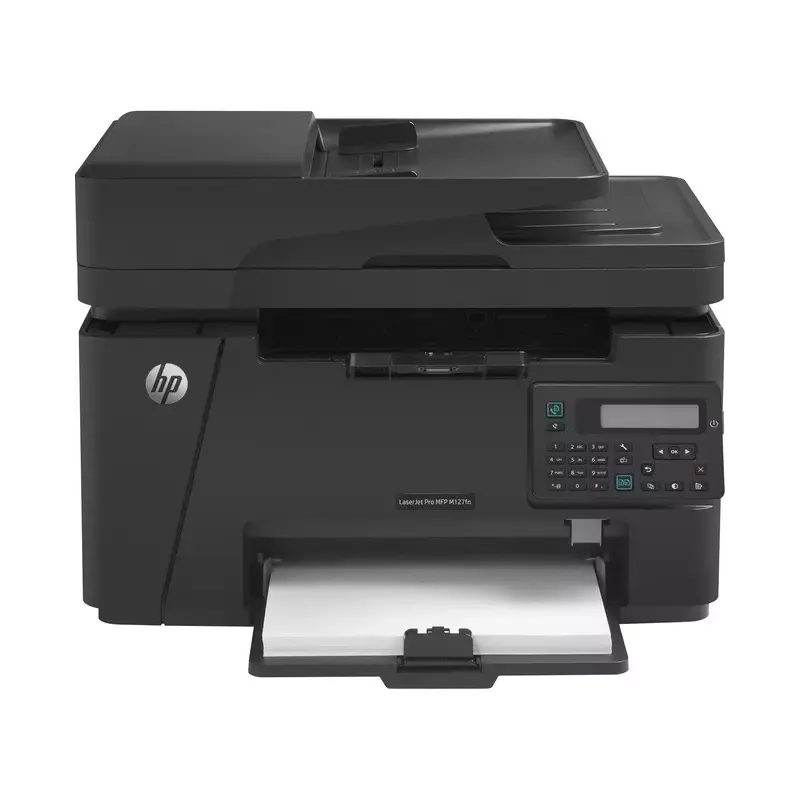

Manual of product M127FN

Editorial note
The HP M127FN printer stands out for its overall satisfactory performance, offering fast printing at a speed of 20 pages per minute and a laser print quality of 600 x 600 DPI. These features make it an ideal choice for daily use in a professional environment. Additionally, its 150-sheet paper capacity and a maximum monthly duty cycle of 8000 pages attest to its robustness and reliability. However, some drawbacks may limit its effectiveness. The duplex printing function is manual, which can be inconvenient for those who need to process double-sided documents quickly. Furthermore, the lack of Wi-Fi connectivity restricts usage flexibility, making printing from mobile devices less convenient. The internal memory of only 128 MB may also pose issues when executing complex tasks. In terms of user experience, although the interface is intuitive, limitations such as non-duplex scanning and copying, as well as a noise level that can reach 52 dB, may detract from the device's user-friendliness. Ultimately, the HP M127FN offers good value for money for professionals looking for an efficient laser printer, but it is important to consider its limitations, particularly regarding paper capacity and connectivity, to ensure it meets the specific needs of your work environment.Score details
User experience
The user experience is generally positive due to fast printing and laser print quality, but the lack of Wi-Fi and manual duplex printing can be drawbacks.
Performance
The printing speed of 20 pages per minute and the resolution of 600 x 600 DPI for copying ensure satisfactory performance, although the 128 MB internal memory may limit performance during complex tasks.
Value for money
The product offers good value for money with features suitable for the office, but the limitations in feed and output capacity may affect efficiency in a high-volume work environment.
Robustness
The solid construction and maximum service capacity of 8000 pages per month demonstrate appreciable robustness for professional use.
Usability
Although the interface is intuitive, limitations such as non-duplex scanning and copying, as well as high noise levels, can detract from user-friendliness.
Advantages
Fast printing: 20 pages per minute.
Laser quality for precise documents.
Color copies with 600 x 600 DPI.
150-sheet capacity for fewer interruptions.
Ethernet connectivity for business networks.
Disadvantages
Manual double-sided printing, impractical.
No Wi-Fi connectivity, limited use.
Insufficient paper capacity for offices.
High noise level, disturbing in silence.
Low internal memory, limits performance.
Technical Specifications M127FN
General Information
-
ModelM127FN
-
Brand
-
Category
-
Type
-
SKU1378279
-
MPN1378279
Print speed
-
Printing technologyLaser
-
PrintingMono printing
-
Print speed (black, normal quality, A4/US Letter)20 ppm
-
Maximum resolution600 x 600 DPI
-
Copy time for the first page (Black, normal)9.5 s
-
Duplex printing modeManual
-
Double-sided printingNo
Copier
-
CopySimple copy
-
Max. resolution of copies600 x 600 DPI
-
Copy speed (normal quality, black, A4)20 cpm
-
Resizing copy25 - 400 %
-
Maximum number of copies99 copies
-
Release time of the first print (black, normal)15 s
-
Duplex copyNo
Digitization
-
DigitizationColor scanning
-
Optical scanning resolution1200 x 1200 DPI
-
Maximum scan area216 x 356 mm
-
Type of scannerFlatbed and ADF scanner
-
Scan toEmail
-
Scanning speed (color)5 ppm
-
Scanner speed (black)7 ppm
-
Supported image formatsJPG, PNG, TIF
-
Support for text formatsPDF
-
Scan driversTWAIN
-
Gray levels256
-
Scanning technologyCIS
-
Double-sided scanningNo
Fax
-
FaxSimple fax
-
Fax resolution (black)300 x 300 DPI
-
Modem speed33.6 Kbit/s
-
Fax transmission100 locations
-
Maximum number of shortcuts for numbers100
-
Duplex faxNo
Features
-
Digital sender-
-
Service cycle (Maximum)8000 pages per month
-
All-in-one multitaskingYes
-
Service cycle (recommended)2000 pages per month
-
HP SegmentHome, Home office
Input and output capacity
-
Total power capacity150 sheets
-
Total output capacity100 sheets
-
Automatic Document Feeder (ADF) production capacity35 sheets
Paper management
-
ISO, Format Series A (A0...A9)A4, A5
-
Maximum print format216 x 297 mm
-
Type of paper tray supportEnvelopes, Labels, Plain paper, Transparencies
-
ISO, Formats Series-B (B0...B9)B5
-
ISO Paper Size, Series C Formats (C0…C9)C5
-
Weight of paper tray support60 - 163 g/m²
-
Envelope sizesDL
-
Maximum ISO A series paper sizeA4
Design
-
ScreenLCD
-
Number of lines displayed2 lines
-
Product colorBlack
-
Built-in screenYes
-
Market positionDomestic and professional
Network
-
Ethernet/LANYes
-
WifiNo
-
LAN Ethernet: data transfer rate10, 100 Mbit/s
-
Mobile printing technologiesApple AirPrint, HP ePrint
-
Wiring technology10/100Base-T(X)
Connectivity
-
Direct printingNo
-
Standard interfacesEthernet, USB 2.0
-
Quantity of USB 2.0 Ports1
-
USB portYes
Representation / realization
-
Maximum internal memory128 MB
-
Built-in memory card readerNo
-
Maximum internal memory128 MB
-
Sound pressure level (copy)52 dB
-
Sound pressure level (impression)49 dB
-
Sound pressure level (scanning)48 dB
-
Processor frequency600 MHz
-
Integrated into the processorYes
Power
-
Electricity consumption (average operation)480 W
-
AC input frequency50 - 60 Hz
-
AC input voltage220 - 240 V
Minimum system requirements
-
Support for the Windows operating systemWindows 7 Home Basic
-
Support for the Mac operating systemWindows 7 Home Basic x64
-
Support for the Linux operating systemWindows 7 Home Premium
-
Support for the server operating systemWindows 7 Home Premium x64
-
Windows 7 Professional
-
Windows 7 Professional x64
-
Windows 7 Starter
-
Windows 7 Starter x64
-
Windows 7 Ultimate
-
Windows 7 Ultimate x64
-
Windows 8
-
Windows 8 Enterprise
-
Windows 8 Enterprise x64
-
Windows 8 Pro
-
Windows 8 Pro x64
-
Windows 8 x64
-
Windows Vista Business
-
Windows Vista Business x64
-
Windows Vista Enterprise
-
Windows Vista Enterprise x64
-
Windows Vista Home Basic
-
Windows Vista Home Basic x64
-
Windows Vista Home Premium
-
Windows Vista Home Premium x64
-
Windows Vista Ultimate
-
Windows Vista Ultimate x64
-
Windows XP Home
-
Windows XP Home x64
-
Windows XP Professional
-
Windows XP Professional x64
-
Mac OS X 10.6 Snow Leopard
-
Mac OS X 10.7 Lion
-
Mac OS X 10.8 Mountain Lion
-
Yes
-
Windows Server 2003
-
Windows Server 2003 R2
-
Windows Server 2003 x64
-
Windows Server 2008
-
Windows Server 2008 R2
-
Windows Server 2008 x64
Sustainability
-
Sustainability certificatesENERGY STAR
Weight and dimensions
-
Width420 mm
-
Depth365 mm
-
Height309 mm
-
Weight9100 g
Packaging information
-
Package width497 mm
-
Package depth398 mm
-
Package height350 mm
-
Package weight11500 g
Environmental conditions
-
Operating relative humidity (H-H)10 - 80 %
-
Temperature out of operation-20 - 60 °C
-
Operating temperature15 - 32.5 °C
-
Relative humidity rate (storage)10 - 90 %
Frequently Asked Questions
What is the weight of the HP M127FN printer?
How do I remove paper jammed in the printer?
Why is my printer not recognizing the original cartridges?
What could be the causes of poor print quality?
What is the difference between a laser printer and an inkjet printer?
Why is my inkjet printer leaving black streaks on prints?
What does the acronym DPI mean?
What is the height of the HP M127FN printer?
What is the width of the HP M127FN printer?
What is the depth of the HP M127FN printer?
Why is the printer not detecting the recently installed toner cartridge?
How can I resolve frequent paper jams in my HP M127FN printer?
What should I do if the printer produces faint or light prints?
How can I troubleshoot Wi-Fi connection issues with my HP M127FN printer?
How can I eliminate vertical lines or streaks on my prints?
Does the HP M127FN printer use laser printing technology?
Is it possible to make color copies with the HP M127FN printer?
What is the maximum number of copies the HP M127FN printer can produce?
What is the optical scanning resolution of the HP M127FN printer?
What is the printing speed of the HP M127FN printer?
Is the manual for the HP M127FN printer available in French?
Similar products


More product categories from brand HP
Computers and accessories HP
Other HP
Phones HP
Audio HP
Interior HP
Software HP
More product types from brand HP


Presentation of product M127FN specifications from brand HP
General Information
The model HP M127FN, from the renowned brand HP, combines quality and innovation in the field of printing. Designed to deliver optimal performance, it is identified by a unique EAN code, which facilitates its integration into distribution systems. This model, also named M127FN | CZ181A, is ideal for meeting the demands of professional users.
Print Speed
Equipped with laser printing technology, the HP M127FN printer ensures impeccable print quality, both in black and color. With a print speed of up to 20 pages per minute (ppm) for A4 documents, it is particularly suited for daily use. Its maximum resolution of 600 x 600 DPI guarantees remarkably clear results. Although duplex printing is manual, it offers an eco-friendly solution for those looking to reduce their paper consumption.
Copier
The integrated copier of the HP M127FN offers a color copy feature, with a similar resolution of 600 x 600 DPI, allowing for vibrant and faithful reproductions. With a speed of 20 copies per minute (cpm) and the ability to resize copies from 25 to 400 %, this device adapts to various printing needs. The maximum number of copies is set at 99, making it efficient for repetitive tasks.
Scanning
The color scanning function of the M127FN printer allows for vibrant reproductions, with an optical resolution of 1200 x 1200 DPI. Its flatbed scanner and ADF (automatic document feeder) facilitate the scanning of multiple documents simultaneously. With a scanning speed of 5 ppm in color and 7 ppm in black, this device is designed to optimize your scanning tasks without compromising on quality.
Fax
The integrated fax machine allows for quick sending and receiving of documents, with a fax resolution of 300 x 300 DPI. Its modem speed of 33.6 Kbit/s ensures an efficient connection. The HP M127FN allows sending faxes to 100 destinations and offers up to 100 speed dial shortcuts, thus facilitating contact management.
Input and Output Capacity
With a paper capacity of 150 sheets and an output capacity of 100 sheets, the HP M127FN is designed to handle a large volume of documents, thus reducing interruptions related to reloading. The automatic document feeder can process up to 35 sheets at a time, increasing efficiency during scanning or copying.
Paper Management
The HP M127FN printer supports various paper sizes, including standard A4 and A5, and allows printing up to 216 x 297 mm. It is compatible with different types of media such as envelopes, labels, and transparencies, thus offering flexibility in use.
Design
The modern design of the HP M127FN, with a built-in LCD screen displaying 2 lines, makes it user-friendly. Its black color gives it an elegant look, suitable for both home and professional environments.
Network
The HP M127FN is equipped with Ethernet/LAN connectivity, ensuring easy integration into corporate networks. However, it does not have Wi-Fi connectivity, which may limit mobile printing options. The data transfer rate is 10/100 Mbit/s, ensuring efficient network communications.
Connectivity
This model offers a USB 2.0 port for quick connection to various devices, but does not support direct printing from mobile devices.
Technical Specifications
The maximum duty cycle of the HP M127FN is 8000 pages per month, ideal for high-volume environments. Its power consumption is 480 W during operation, allowing for efficient use while meeting ENERGY STAR certified energy efficiency standards.
Dimensions and Weight
With a width of 420 mm, a depth of 365 mm, and a height of 309 mm, the HP M127FN is designed to fit easily into various workspaces. Its weight of 9100 g allows for easy handling.
Environmental Conditions
The HP M127FN operates in a relative humidity of 10 to 80 % and withstands temperatures ranging from -20 to 60 °C when not in operation. Operating conditions are between 15 and 32.5 °C, ensuring optimal performance.


