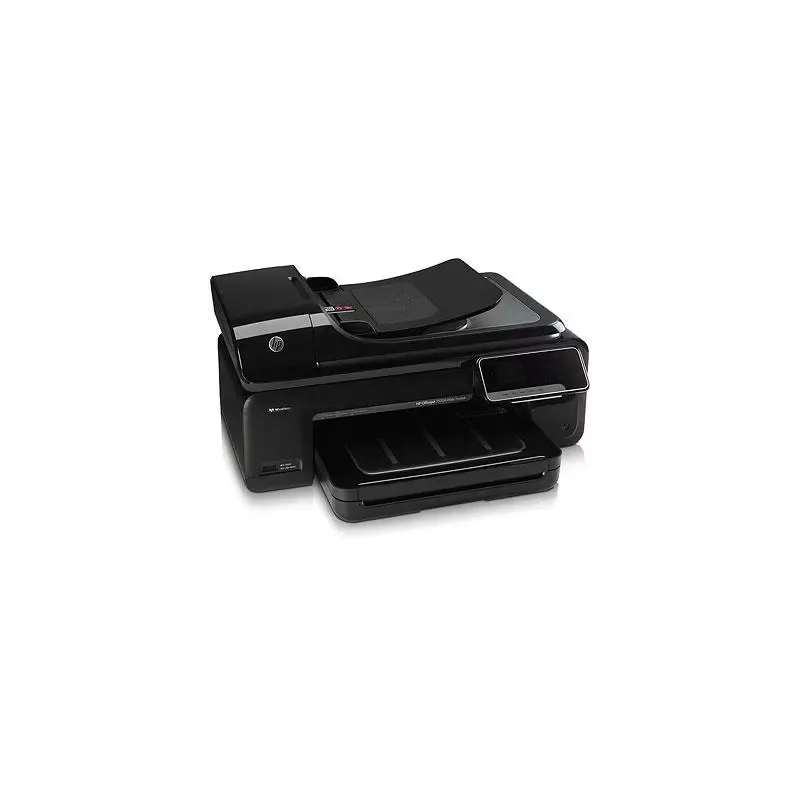

Manuals of product Officejet 7500A


Editorial note
The HP Officejet 7500A printer stands out for its versatility thanks to its all-in-one features, allowing for printing, copying, scanning, and faxing. With a maximum print resolution of 4800 x 1200 DPI, it ensures exceptional quality documents and images, with vibrant colors and precise details. Additionally, its wireless connectivity via Wi-Fi makes printing from various devices easier, enhancing its usability. However, there are some drawbacks to note. The lack of automatic duplex printing can increase paper consumption, limiting its efficiency for double-sided printing. Furthermore, the color printing speed, at 7 pages per minute, is relatively slow compared to other models on the market. The incompatibility with Mac operating systems also restricts its accessibility for some users. In terms of performance, the printer scores 75, indicating adequate performance, although the color speed could be improved. The functional design receives a score of 70, but its weight of 14 kg may pose mobility issues. The value for money is rated good with a score of 78, but the maximum output capacity of 100 sheets may prove insufficient for high-volume work environments. In conclusion, the HP Officejet 7500A is a solid option for light home and professional use, offering many features and high print quality, despite some limitations in terms of efficiency and compatibility.Score details
User experience
The user experience is favorable thanks to the all-in-one feature that allows printing, copying, scanning, and sending faxes, but the lack of automatic duplex printing limits efficiency.
Performance
The printing performance is adequate with a maximum resolution of 4800 x 1200 DPI, although the color printing speed (7 ppm) is relatively slow compared to other models.
Design
The design is functional, but the weight of 14 kg may pose mobility issues for those who need to frequently move the printer.
Value for money
The product offers good print quality for its price, but the maximum output capacity of 100 sheets may be insufficient for high-volume work environments.
Usability
Wireless connectivity via Wi-Fi is a plus, but the lack of compatibility with Mac operating systems limits its appeal to some users.
Features
The advanced scanning features at 4800 x 4800 DPI and the ability to print on various types of media are strong points, but the absence of automatic duplex printing is a drawback.
Support
The user manual and provided guides are helpful, but the lack of support for Mac systems could frustrate some users.
Documentation
The documentation is comprehensive, but it would be beneficial to include specific instructions for Mac users to improve accessibility.
Advantages
High-quality printing up to 4800 x 1200 DPI.
All-in-one function: print, copy, scan, fax.
Fast printing: 10 ppm black, 7 ppm color.
Accurate scanning at 4800 x 4800 DPI.
Wi-Fi connectivity for wireless printing.
Disadvantages
No automatic duplex printing.
Slow color printing speed (7 ppm).
Not compatible with Mac systems.
Long copy time (16-19 seconds).
Heavy weight (14 kg) difficult to move.
Limited output capacity (100 sheets).
Technical Specifications Officejet 7500A
General Information
-
ModelOFFICEJET 7500A
-
Brand
-
Category
-
Type
-
SKU76210
-
MPN76210
Print speed
-
Color resolution4800 x 1200 DPI
-
Borderless printingYes
-
Print speed (ISO/IEC 24734) black10 ppm
-
Print speed (ISO/IEC 24734) color7 ppm
-
Printing technologyThermal inkjet
-
Print speed (black, draft quality, A4/US Letter)33 ppm
-
Print speed (color, draft quality, A4/US Letter)32 ppm
-
PrintingColor printing
-
Double-sided printingNo
-
Black print resolution600 x 600 DPI
-
Color resolution4800 x 1200 DPI
-
Print speed (ISO/IEC 24734) black10 ppm
-
Print speed (ISO/IEC 24734) color7 ppm
-
Copy time for the first page (Black, normal)16 s
-
Copy time for the first page (color, normal)19 s
-
Borderless printingYes
Digitization
-
Type of scannerFlatbed and ADF scanner
-
Scanning technologyCIS
-
Gray levels256
-
Maximum scan area297 x 420 mm
-
Input color display depth24 bit
-
Optical scanning resolution4800 x 4800 DPI
-
DigitizationColor scanning
-
Double-sided scanningNo
-
Scan toE-mail, TWAIN, WIA, Memory Card, Software, PC, File
-
Supported image formatsBMP, JPEG, TIFF
-
Support for text formatsPDF, RTF, TXT
-
Scan driversTWAIN, WIA
-
Scanner speed (black)2.2 ppm
Copier
-
Copy speed (black, draft, A4)33 cpm
-
Copy speed (color, draft, A4)32 cpm
-
Maximum number of copies99 copies
-
Automatic adjustment functionYes
-
Max. resolution of copies4800 x 1200 DPI
-
CopyColor copy
-
Automatic adjustment functionYes
-
Copy speed (color, draft, A4)32 cpm
-
Copy speed (black, draft, A4)33 cpm
-
Resizing copy25 - 400 %
-
Automatic adjustment functionYes
Fax
-
Modem speed33.6 Kbit/s
-
Deferred fax sendingYes
-
Fax transmission48 locations
-
Fax memory100 pages
-
Maximum number of shortcuts for numbers110
-
Deferred fax sendingYes
-
Deferred fax sendingYes
-
Fax resolution (black)300 x 300 DPI
-
FaxColor fax
-
Deferred fax sendingYes
-
Deferred fax sendingYes
-
Fax transmission speed3 sec/page
-
Deferred fax sendingYes
Input and output capacity
-
Total output capacity100 sheets
-
Total output capacity100 sheets
-
Total power capacity150 sheets
-
Total power capacity150 sheets
-
Maximum number of feed bins1
-
Maximum number of feed bins1
-
Automatic document feeder capacity35 sheets
-
Automatic Document Feeder (ADF)Yes
Representation / realization
-
Processor frequency192 MHz
-
Maximum internal memory128 MB
-
Integrated into the processorYes
-
Integrated into the processorYes
-
Sound pressure level (impression)56 dB
-
Maximum internal memory128 MB
-
Integrated into the processorYes
-
Sound power level (impression)6.5 dB
-
Compatible memory cardsSD
Design
-
ScreenLCD
-
Screen size2.36 "
-
Screen resolution480 x 234 pixels
-
Product colorBlack
-
Built-in screenYes
-
Market positionDomestic and professional
Paper management
-
Type of paper tray supportEnvelopes
-
Maximum print formatLabels
-
ISO, Format Series A (A0...A9)Photo paper
-
Non-ISO print support sizesPlain paper
-
JIS series B format (B0...B9)Transparencies
-
Photo paper formats297 x 420 mm
-
Maximum ISO A series paper sizeA3
-
Support width customizationA3+
-
Weight of the multifunctional tray supportA4
-
ISO, Formats Series-B (B0...B9)A5
-
Customization of support lengthA6
-
Borderless print size2L
-
B4
-
B5
-
13x18
-
10x15 cm
-
A3
-
76 - 330 mm
-
60 - 280 g/m²
-
B4
-
B7
-
127 - 1118 mm
-
A3+
Other features
-
Compatible operating systemsWindows 7
-
Standard input paper traysWindows Vista
-
Formats of scanned filesWindows XP (SP2)
-
All-in-one functionsMac OS X v10.5
-
All-in-one color functionsv10.6
-
Pallet dimensions (L x W x H)Linux
-
Recommended system requirements1
-
Number of usersBMP
-
Number of print headsPDF
-
RTF
-
TIFF
-
TXT
-
Copy
-
Fax
-
Print
-
Scan
-
copy
-
fax
-
print
-
scan
-
1219 x 1016 x 2545 mm
-
Microsoft® Windows® 7: 1 GHz 32-bit (x86) or 64-bit (x64) processor, 1 GB (32-bit) or 2 GB (64-bit) RAM, 1.5 GB hard disk space, CD-ROM/DVD drive or Internet connection, USB port; Windows Vista®: 800 MHz 32-bit (x86) or 64-bit (x64) processor, 512 MB RAM, 2.0 GB hard disk space, CD-ROM/DVD drive or Internet connection, USB port; Windows® XP (32-bit) (SP2): Intel Pentium II, Celeron or compatible processor, 233 MHz or higher, 128 MB RAM, 750 MB hard disk space, CD-ROM/DVD drive or Internet connection, USB port
-
3 utilisateur(s)
-
2
Minimum system requirements
-
Minimal processorPentium 233 MHz
-
Minimum RAM128 MB
-
Minimal disk space300 MB
-
Support for the Windows operating systemWindows Vista, Windows XP, Windows 7
-
Support for the Mac operating systemMac OS X 10.5 Leopard, Mac OS X 10.6 Snow Leopard
-
Support for the Linux operating systemYes
-
Support for other operating systemslinux
Network
-
WifiYes
-
WifiYes
-
Wifi standards802.11b, 802.11g, Wi-Fi 4 (802.11n)
-
Mobile printing technologiesApple AirPrint
Connectivity
-
Standard interfacesEthernet
-
USB portRJ-11
-
Quantity of RJ-11 portsUSB 2.0
-
Quantity of RJ-11 portsWireless LAN
-
USB portYes
-
1
-
1
-
Yes
Weight and dimensions
-
Weight14000 g
-
Width606 mm
-
Depth426 mm
-
Height293 mm
Environmental conditions
-
Temperature out of operation-40 - 60 °C
-
Operating relative humidity (H-H)10 - 80 %
-
Operating temperature5 - 40 °C
-
Recommended humidity level for use20 - 80 %
Features
-
Number of print cartridges4
-
Digital senderYes
-
Service cycle (Maximum)7000 pages per month
-
Digital senderYes
-
Service cycle (recommended)200 - 800 pages per month
-
Languages of the page descriptionPCL 3 GUI
-
HP SegmentMedium-sized business
-
Printing colorsBlack, Cyan, Magenta, Yellow
-
Double-sided functionsFax
-
Country of originMalaysia
Packaging contents
-
Provided softwareArcSoft® Scan-n-Stitch™ Deluxe v 1.1.1.36
-
Cables includedAC, Phone
-
User manualYes
Sustainability
-
Sustainability certificatesENERGY STAR
-
Compliance with sustainabilityYes
Packaging information
-
Package weight19200 g
-
Package width697 mm
-
Package depth500 mm
-
Package height404 mm
Power
-
Electricity consumption (average operation)16 W
-
Energy consumption (in standby mode)4.1 W
-
Electricity consumption (stop)0.7 W
-
Energy consumption (standby mode)6 W
-
AC input frequency50/60 Hz
-
AC input voltage100 - 240 V
-
Consumption (max)50 W
-
Energy consumption (in standby mode)4.1 W
Logistics data
-
Gross weight of the pallet346 g
Certificate
-
CertificationCISPR 22: 2005/EN 55022: 2006 Class B
-
EN 55024: 1998+A1: 2001+A2: 2003
-
EN 61000-3-2: 2006
-
EN 61000-3-3: 1995+A1: 2001
-
FCC CFR 47, Part 15 Class B/ICES-003
-
Issue 4 Class B
Frequently Asked Questions
What is the weight of the HP Officejet 7500A printer?
What is the recommended method for removing jammed paper from the printer?
Why is my printer not recognizing the original cartridges?
Why is the quality of my prints poor?
What are the differences between a laser printer and an inkjet printer?
Why does my inkjet printer have black streaks on the prints?
What does the acronym DPI mean?
What certifications does the HP Officejet 7500A have?
How many cartridges can the HP Officejet 7500A hold?
What is the size of the screen on the HP Officejet 7500A printer?
What is the height of the HP Officejet 7500A printer?
What is the resolution of the screen on the HP Officejet 7500A?
What is the width of the HP Officejet 7500A printer?
What is the depth of the HP Officejet 7500A?
Why won't my HP Officejet 7500A turn on?
How can I troubleshoot paper jam issues in my HP Officejet 7500A?
How do I align the print head of my HP Officejet 7500A?
How can I improve the print quality of my HP Officejet 7500A?
My HP Officejet 7500A is not connecting to my computer via Wi-Fi. What should I do?
Does the HP Officejet 7500A have a high maximum resolution?
Is the HP Officejet 7500A an economical printer?
What is the print speed for normal quality black documents on A4 paper with the HP Officejet 7500A?
Can the HP Officejet 7500A make copies without being connected to a PC?
Is the manual for the HP Officejet 7500A available in French?
Similar products


More product categories from brand HP
Computers and accessories HP
Other HP
Phones HP
Audio HP
Interior HP
Software HP
More product types from brand HP


Presentation of product Officejet 7500A specifications from brand HP
General Information
The HP Officejet 7500A is a printer from the renowned brand HP, known for its innovation and quality in the electronics sector. This model, identified by the reference Officejet 7500A | C9309A, is designed to deliver optimal performance, whether for professional or personal use. Its unique EAN code allows for precise identification in distribution systems.
Print Speed
With a maximum print resolution of 4800 x 1200 DPI, the HP Officejet 7500A ensures prints of exceptional clarity, ideal for all types of documents. It offers a print speed of 10 pages per minute in black and 7 pages per minute in color, ensuring efficiency during daily tasks. The thermal inkjet printing technology provides precise results, while the economical printing function helps reduce costs while maintaining quality. Although it does not offer automatic duplex printing, it allows borderless printing, ensuring a professional finish without white edges.
Scanning
The integrated scanner, a flatbed scanner with ADF, makes it easy to scan multiple documents at once. Thanks to CIS technology, it offers an optical scanning resolution of 4800 x 4800 DPI, ensuring high-quality images. The product supports various image and text formats, providing flexibility in scanning protocols, although it does not offer duplex scanning.
Copying
The HP Officejet 7500A stands out for its fast copying speed, reaching up to 33 copies per minute in black and 32 copies per minute in color. With a maximum capacity of 99 copies, it meets common printing needs. The resolution of copies can reach 4800 x 1200 DPI, ensuring print quality faithful to the original documents.
Fax
This printer is also equipped with fax features, with a modem speed of 33.6 Kbit/s. It allows sending documents to 48 different locations and has a fax memory of 100 pages, thus facilitating communication management. Additionally, the automatic redial function ensures that users do not miss any important communications.
Input and Output Capacity
The HP Officejet 7500A has an input capacity of 150 sheets and an output capacity of 100 sheets, thus meeting the requirements of a moderate work environment. Its automatic document feeder can hold up to 35 sheets, simplifying scanning and copying.
Connectivity
This printer offers varied connectivity, including Wi-Fi and a USB 2.0 port. It also allows direct printing from mobile devices, making it more flexible and accessible to use.
Design
The HP Officejet 7500A features a modern design with a 2.36-inch LCD screen, facilitating navigation and use. Its black color gives it an elegant look, suitable for a professional environment.
Energy Consumption
In terms of energy efficiency, the printer consumes 16 W in normal operation and 4.1 W in economy mode, helping to reduce its ecological footprint. Its compliance with ENERGY STAR standards highlights its commitment to the environment.
Environmental Conditions
The HP Officejet 7500A operates within a temperature range of 5 to 40 °C and can withstand a relative humidity of 10 to 80 %, making it a reliable device in various work environments.
Additional Features
Compatible with various operating systems, including Windows and Linux, the HP Officejet 7500A is a versatile choice for users. It does not support Mac systems, which may limit its use for some users.


